CRM Data Cleanup: Find Duplicates Before Import
CRM Data Cleanup: Essential Steps for a Safe Import
CRM data cleanup is the process of reviewing, correcting, standardizing, and validating customer data before or after it enters a CRM system. Before importing data, profile the source, normalize appropriate fields, define reliable matching rules, review ambiguous duplicates, and test the import. A matching email or company name alone does not always prove that two records are identical.
This guide is a cautious preparation workflow, not a claim that any CRM automatically prevents every duplicate. HubSpot and Salesforce document product-specific matching and import behavior; verify the current rules for the target objects and configuration before you merge or overwrite records.
Key Takeaways
- Preserve the source: Keep an unchanged, read-only copy before cleaning or importing data.
- Normalize carefully: Standardize values only when doing so does not erase meaningful distinctions.
- Use reliable match keys: Prefer stable record or external IDs over names or email addresses alone.
- Review ambiguous duplicates: Route uncertain matches to a human reviewer instead of automatically merging them.
- Test before full import: Import a representative sample, reconcile the results, and then continue in controlled batches.
What Should Be Profiled Before CRM Data Cleanup?
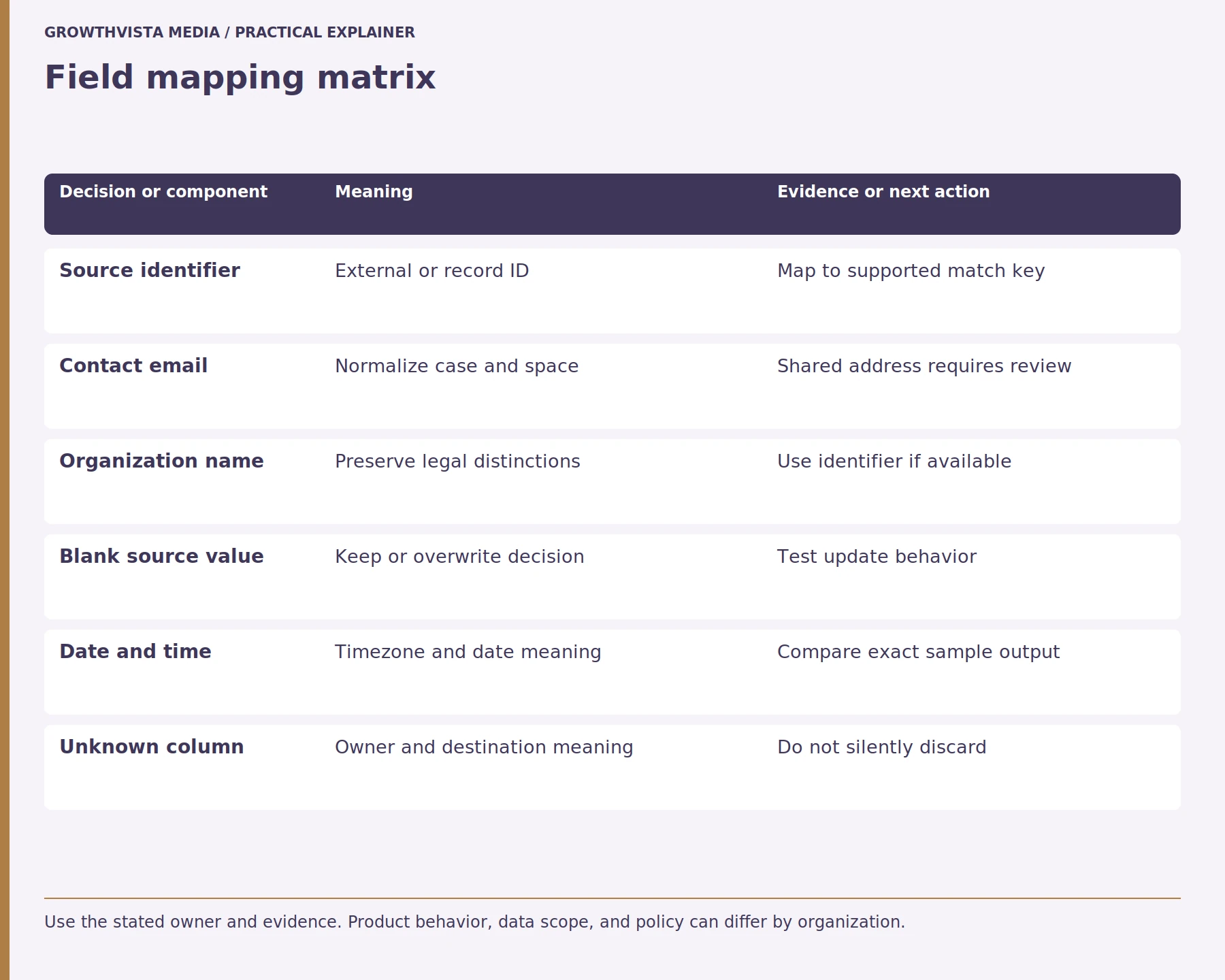
Before CRM data cleanup, profile the source for row counts, missing values, duplicate identifiers, invalid dates, inconsistent formats, and unexpected values. Separate contacts, companies, opportunities, and other record types before applying cleanup rules. Also document the source system, export date, field definitions, and any transformations planned for the data.
Look for values that are syntactically similar but represent different facts, such as phone extensions, country codes, company suffixes, or shared team inboxes. Do not discard them merely because a simple normalization rule collapses them. HubSpot’s duplicate-management guidance describes product-specific potential duplicate review, which should be treated as a review aid rather than a guarantee. HubSpot: Review and manage duplicate records

What Are the Main CRM Data Cleanup Terms?
| Term | Definition | Example |
|---|---|---|
| Data profiling | Examining data before changing it | Counting blanks and duplicates |
| Normalization | Converting values to a consistent format | Standardizing a country code |
| Match key | Field used to identify corresponding records | External ID |
| Duplicate candidate | Records that may represent the same entity | Two similar contacts |
| Merge | Combining confirmed duplicate records | Keeping one contact record |
| Field mapping | Connecting source fields to destination fields | Company_Name → Company Name |
| Reconciliation | Comparing expected and actual import results | Created vs. rejected records |
How should records be matched without creating false merges?
CRM records should be matched using the most stable identifier available, such as a verified source ID or supported external ID. Email addresses, names, phone numbers, and company names can provide supporting evidence but should not automatically prove identity. Ambiguous matches should be reviewed before records are merged or overwritten. A shared inbox may appear on several legitimate contacts; a common company name may refer to distinct legal entities. A match rule should explain which fields are required and which differences trigger human review.
Create three test groups: clear match, clear non-match, and ambiguous candidate. Confirm the import result for each. Salesforce documents matching and external-ID behavior for particular import paths, while HubSpot documents its own duplicate rules. Salesforce: Data Import Wizard Those product rules do not remove the need to inspect the exact object and settings.
| Stage | Check | Stop condition |
|---|---|---|
| Source profile | Rows, blanks, identifiers, formats | Unknown field meaning |
| Match design | Clear match and conflict behavior | Ambiguous ID mapping |
| Test file | Create, update, skip, reject totals | Unexpected changed record |
| Relationships | Company, owner, and activity links | Orphan or wrong association |
| Batch close | Reconcile and retain results | Count mismatch |
What does normalization change, and what should stay intact?
CRM data normalization means converting appropriate values into consistent formats without removing meaningful information. Safe examples may include trimming accidental spaces or standardizing a known country code. Original values should be preserved when they may be needed for auditing, interpretation, or recovery, and every transformation should follow a documented rule.
Do not strip punctuation from names or addresses indiscriminately. Punctuation may distinguish a meaningful legal name, unit, or identifier. Store dates with an explicit time zone or date-only meaning where the system supports it. A transformation log lets an administrator explain why a record changed and repeat the import consistently.
How should ambiguous duplicate candidates be reviewed?
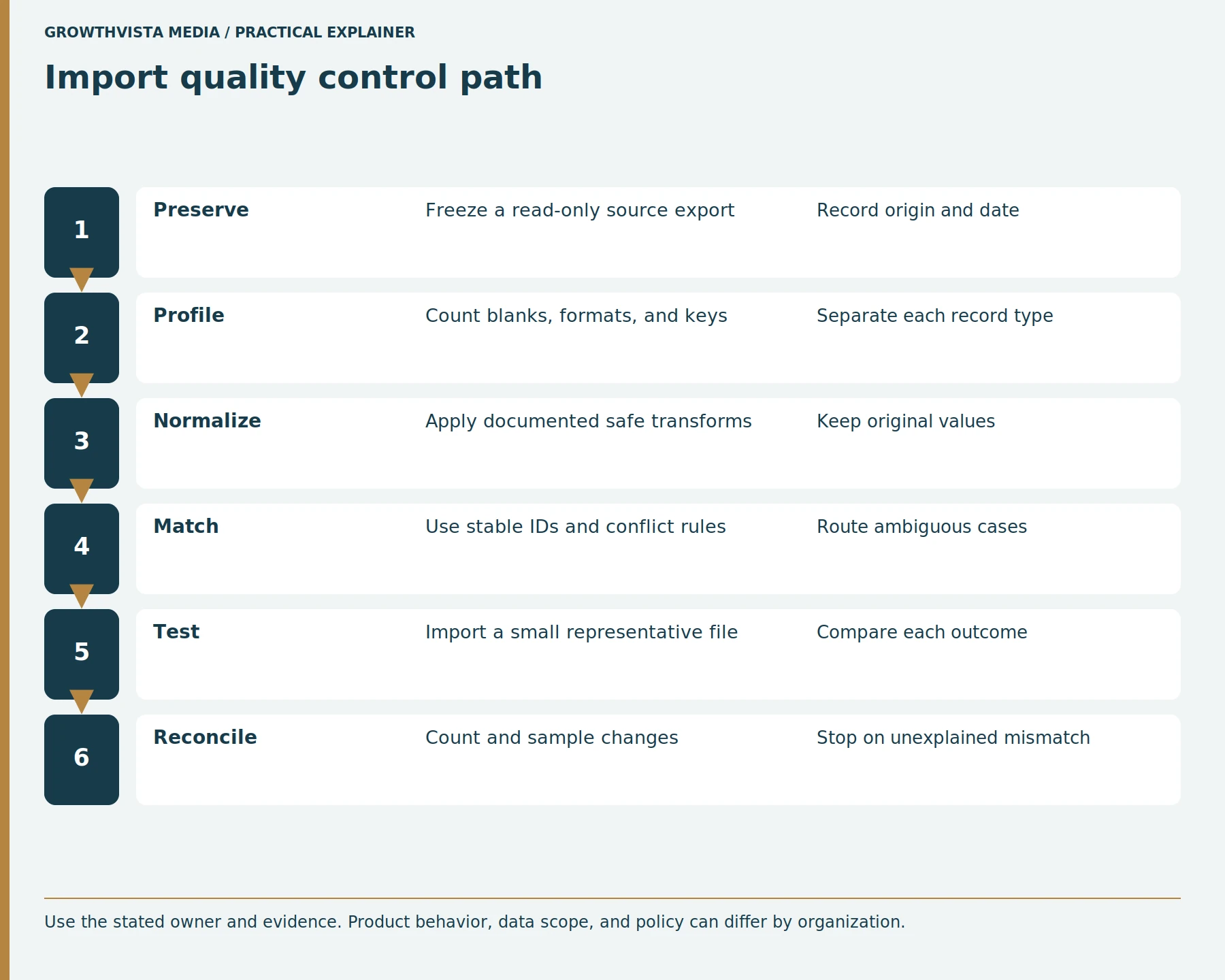
Ambiguous CRM duplicate candidates should be reviewed by comparing identity, organization, source, ownership, and relevant activity history. Define which evidence permits a merge and which conflicts require escalation. When the available evidence cannot establish that two records represent the same entity, keep them separate until an authorized reviewer can resolve the match.
Record the chosen survivor and any field-level decisions. Review the destination’s merge behavior for associations, activity history, and integrations. Do not assume a merge is fully reversible. A review queue with “merge,” “keep separate,” and “needs more evidence” outcomes is safer than an automatic rule that treats one matching field as decisive.
How should imports handle create versus update?
Each CRM import row should have an intended outcome: create, update, or skip. New records should be created only when no verified match exists, while updates should use the destination’s supported identifier or matching mechanism. Test conflict and duplicate behavior before using an upsert-style process across the full dataset.
Use a small test file first. Salesforce specifically recommends testing a small CSV file to verify source preparation. Salesforce: Use external IDs when importing Compare the expected record count, changed fields, relationships, and rejected rows with the actual results. Save the import settings and mapping so a subsequent batch repeats the same logic.
How can field mapping prevent silent data loss?
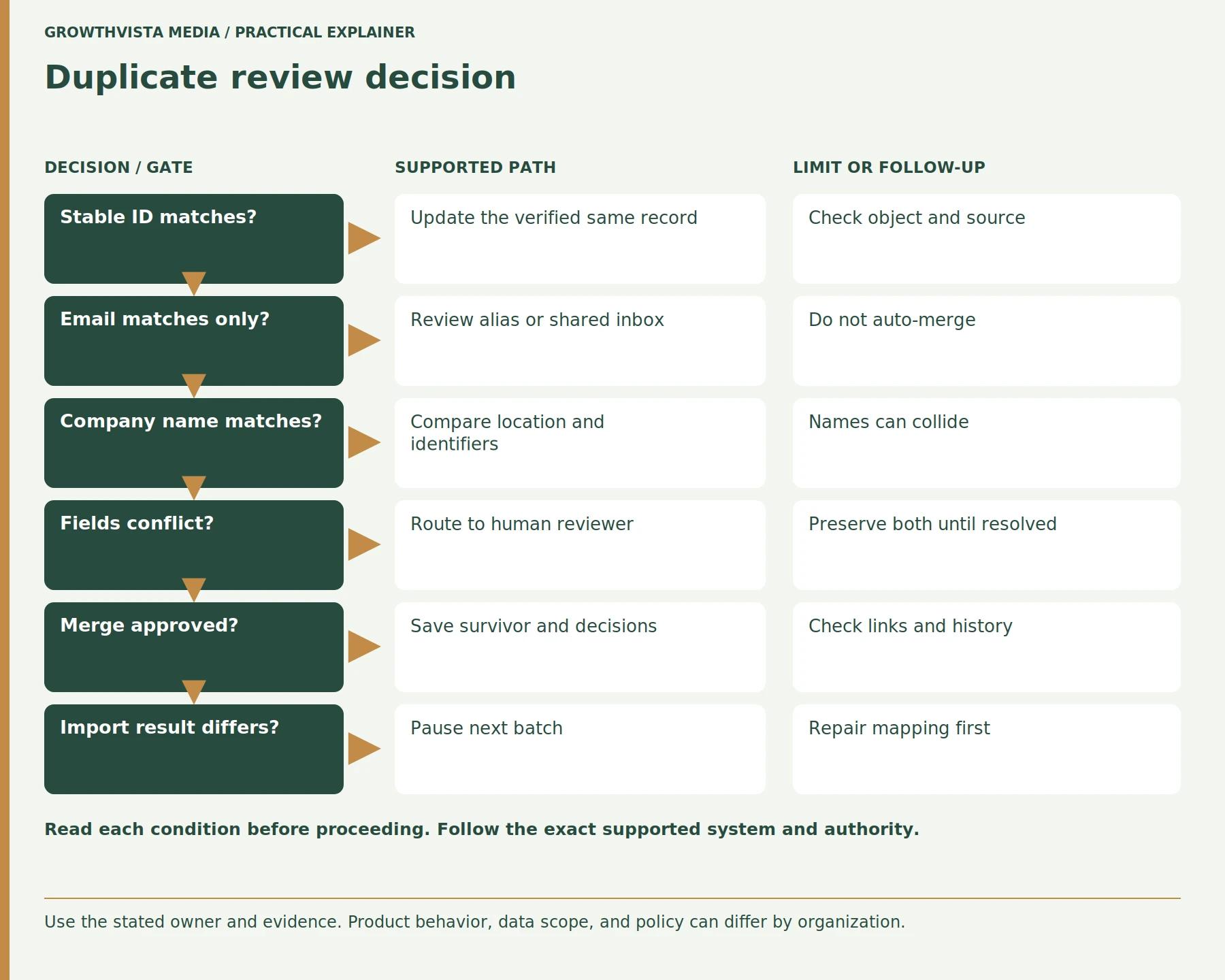
CRM field mapping connects each source field to its intended destination field and defines how its values should be transformed. A documented mapping can prevent silent data loss by identifying field types, blank-value behavior, unsupported values, and source columns without a destination. Every important field should have an explicit handling decision before import.
| Source issue | Decision to define |
|---|---|
| Blank value | Keep existing value or overwrite |
| Date | Format and time-zone handling |
| Multi-select | Allowed destination values |
| Currency | Currency and decimal format |
| Unknown column | Map, preserve, or intentionally exclude |
| Identifier | Match/update behavior |
Inspect a sample record after import and compare it with the source. Check relationships, notes, activities, and consent or communication preferences where relevant. A successful import message confirms that a tool processed a file; it does not prove every business meaning survived.
Which reconciliation checks belong after each batch?
After each CRM import batch, reconcile source rows against records that were created, updated, skipped, or rejected. Compare totals by object type and inspect representative examples from each outcome. Verify identifiers, associations, important fields, and rejected rows before processing the next batch. Pause when results differ from the documented expectations.
If the reconciliation fails, pause the next batch. Correct the mapping or source transformation, then rerun only the scope that the system supports safely. Avoid repeating a create import blindly, because it can multiply records. Keep the import timestamp and version of the source file in the migration log.
How should CRM cleanup continue after migration?
CRM data cleanup should continue after migration through defined ownership, duplicate review, field validation, and monitoring. Assign responsibility for data-quality rules and track the specific problems identified during migration, such as missing company relationships or shared contact addresses. Correct recurring issues at their source instead of relying only on periodic cleanup projects.
Keep merge authority limited to trained users and preserve the organization’s audit requirements. Revisit matching rules when new regions, product lines, or data sources are added. Measure data quality with definitions the team can reproduce, such as rows missing a required relationship, rather than a single unexplained “cleanliness” score.
What Should You Check Before Importing CRM Data?
- Preserve an untouched source export.
- Record the source system and export date.
- Separate contacts, companies, deals, and other objects.
- Profile missing, malformed, and duplicate values.
- Document normalization rules.
- Define stable match identifiers.
- Create an ambiguous-match review process.
- Map every required source field.
- Define blank-value behavior.
- Test create, update, skip, and reject outcomes.
- Verify relationships and associations.
- Reconcile the test import before continuing.
Frequently asked questions
Should Matching Email Addresses Always Be Merged?
No. Matching email addresses can indicate duplicate CRM records, but they do not always prove that two records represent the same person. Shared inboxes, aliases, recycled addresses, and source-data errors can create legitimate exceptions. Use additional identifiers and defined conflict rules before approving an uncertain merge.
Is automatic duplicate detection complete?
No CRM duplicate-detection system should be assumed to identify every duplicate automatically. Detection depends on the objects, fields, matching rules, configuration, and available data. Review the CRM provider’s current documentation and create a manual review process for ambiguous records that cannot be resolved confidently by the configured rules.
Why keep an untouched source file?
An untouched source file preserves the original data before normalization, mapping, merging, or importing changes it. It provides a reference for auditing transformations, investigating unexpected import results, and repeating preparation steps when necessary. Keep the original read-only and perform cleanup work on a controlled copy.
Should a blank source value overwrite a CRM field?
A blank source value should overwrite an existing CRM field only when the documented mapping intentionally requires that behavior. Otherwise, an import may erase useful information unintentionally. Define blank-value handling for each important field and verify the destination CRM’s update behavior with representative records before processing the full dataset.
What is a safe first import?
A safe first CRM import is a small, representative test file containing known new records, verified matches, ambiguous duplicate candidates, and intentionally invalid or incomplete rows. Define the expected outcome for each record, run the import, and compare created, updated, skipped, and rejected results before proceeding with larger batches.
Can a merge always be undone?
Do not assume that a CRM record merge can always be fully reversed. Merge behavior for fields, activities, associations, ownership, and integrations varies by CRM platform and configuration. Review the provider’s current merge documentation and preserve an appropriate source export or backup before performing consequential merge operations.
Conclusion: Clean CRM Data Before You Import
Effective CRM data cleanup combines source preservation, profiling, normalization, careful record matching, field mapping, testing, and reconciliation. The goal is not simply to remove duplicates; it is to move reliable information without accidentally merging, overwriting, or discarding meaningful data.
Next step: Create a small test file containing clear matches, new records, ambiguous duplicates, and expected outcomes, then reconcile the results before beginning the full CRM import.
Sources and further reading
Official documentation supports the technical guidance. Examples and worksheets are editorial methods, not hands-on product benchmarks. Reviewed October 2026.
- HubSpot: Review and manage duplicate records
- Salesforce: Data Import Wizard
- Salesforce: Use external IDs when importing