CRM Data Model: Essential Guide to Connecting Records

A CRM data model defines how customer records, fields, activities, and relationships are organized within a Customer Relationship Management system. An effective model separates contacts, companies, opportunities, and interactions while connecting them through clearly defined relationships. This structure helps businesses maintain consistent data, track ownership, support automation, and generate reliable reports.
This guide presents a vendor-neutral modeling worksheet. Product-specific object names, association limits, and automation behavior vary. Test the model with representative records and actual reporting questions before importing the full database.
Your decision checklist
Key Takeaways
- Define CRM objects first: Identify contacts, companies, opportunities, and activities before creating custom fields.
- Model relationships explicitly: Use associations to connect records without unnecessarily duplicating information.
- Separate ownership from lifecycle stages: Accountability and process status represent different business facts.
- Preserve interaction history: Keep repeated calls, meetings, emails, and tasks as activities when chronology matters.
- Test before implementation: Validate relationships, reports, ownership, and automation with representative sample records.
What Are the Main Parts of a CRM Data Model?
| Term | Definition | Example |
|---|---|---|
| Object | Category of CRM records | Contact, company, deal |
| Record | Individual instance of an object | One customer |
| Field/property | Attribute stored on a record | Email, deal value |
| Association | Connection between records | Contact → company |
| Activity | Recorded interaction or event | Call, email, meeting |
| Owner | Person/team accountable for a record | Sales representative |
| Lifecycle stage | Position within a business process | Lead, customer |
What Business Questions Should a CRM Data Model Answer?
A CRM data model should answer the questions sales, service, and operations teams ask repeatedly. These include who belongs to an organization, which opportunities remain active, who owns the next action, and what interactions occurred. Defining these questions before configuring fields helps prevent unnecessary complexity and inconsistent reporting.
Interview the people who enter and use the data. Capture the language they use and any required distinction, such as a billing contact versus a decision maker. HubSpot’s CRM model documentation illustrates records and associations between object types; treat its terminology as an example rather than a universal schema. HubSpot: Manage CRM records, properties, and associations

How Should Contacts, Companies, and Opportunities Be Organized?
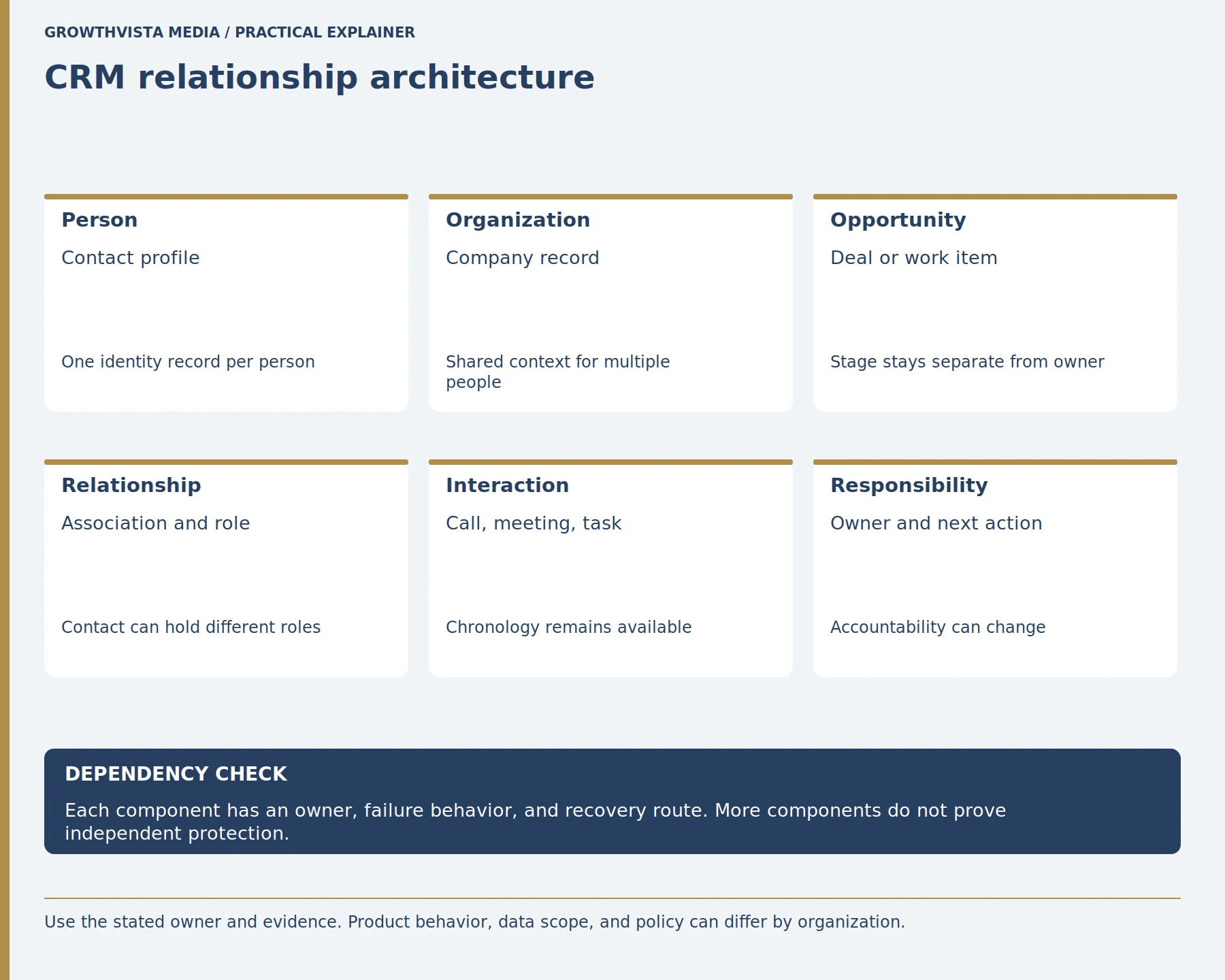
Contacts, companies, and opportunities should generally be separate CRM objects because they represent different business entities. A contact represents a person, a company represents an organization, and an opportunity represents potential business. Associations connect these records while preserving their individual identities, ownership, and lifecycle information.
Define lifecycle and ownership separately. A person can remain a valid contact after an opportunity closes, while a company may have several opportunities over time. Map who creates each record and which system is authoritative. Use required fields sparingly and only when staff can reliably know the value at that stage.
| Question | Record or relationship | Validation example |
|---|---|---|
| Who is this person? | Contact record | One stable contact profile |
| Which organization? | Company association | Two contacts share one company |
| What work may close? | Opportunity record | Two opportunities remain separate |
| What happened last week? | Activity record | History retains date and outcome |
| Who acts next? | Owner plus task | Owner change does not rewrite stage |
CRM Data Model Example
| CRM element | Example |
|---|---|
| Company | BrightWave Solutions |
| Contact | Sarah, Marketing Manager |
| Opportunity | Proposed SEO services contract |
| Activity | Discovery call |
| Owner | Assigned sales representative |
| Relationship | Sarah is the decision maker |
In this illustrative example, the company, contact, and opportunity remain separate records. The discovery call is an activity, while ownership remains separate from the opportunity stage. This structure allows additional contacts and opportunities to be added without duplicating the underlying customer records.
What Are CRM Relationships and Association Labels?
CRM relationships are connections between records that describe how business entities are related. Association labels add meaning to those connections by identifying roles such as decision maker, billing contact, or implementation lead. Explicit relationships preserve context when one person is connected to multiple companies, opportunities, or other CRM records.
Common relationship structures include one-to-one, one-to-many, and many-to-many relationships, where supported by the CRM platform.
For a small example, a consultant may be both a buyer at Company A and a former employee of Company B. A single company field cannot express both facts. Model the relevant links explicitly and test how the CRM displays and exports them. HubSpot explains associations between CRM object records and named associations in its developer guidance. HubSpot: Manage CRM records, properties, and associations
When should an activity be a separate record?
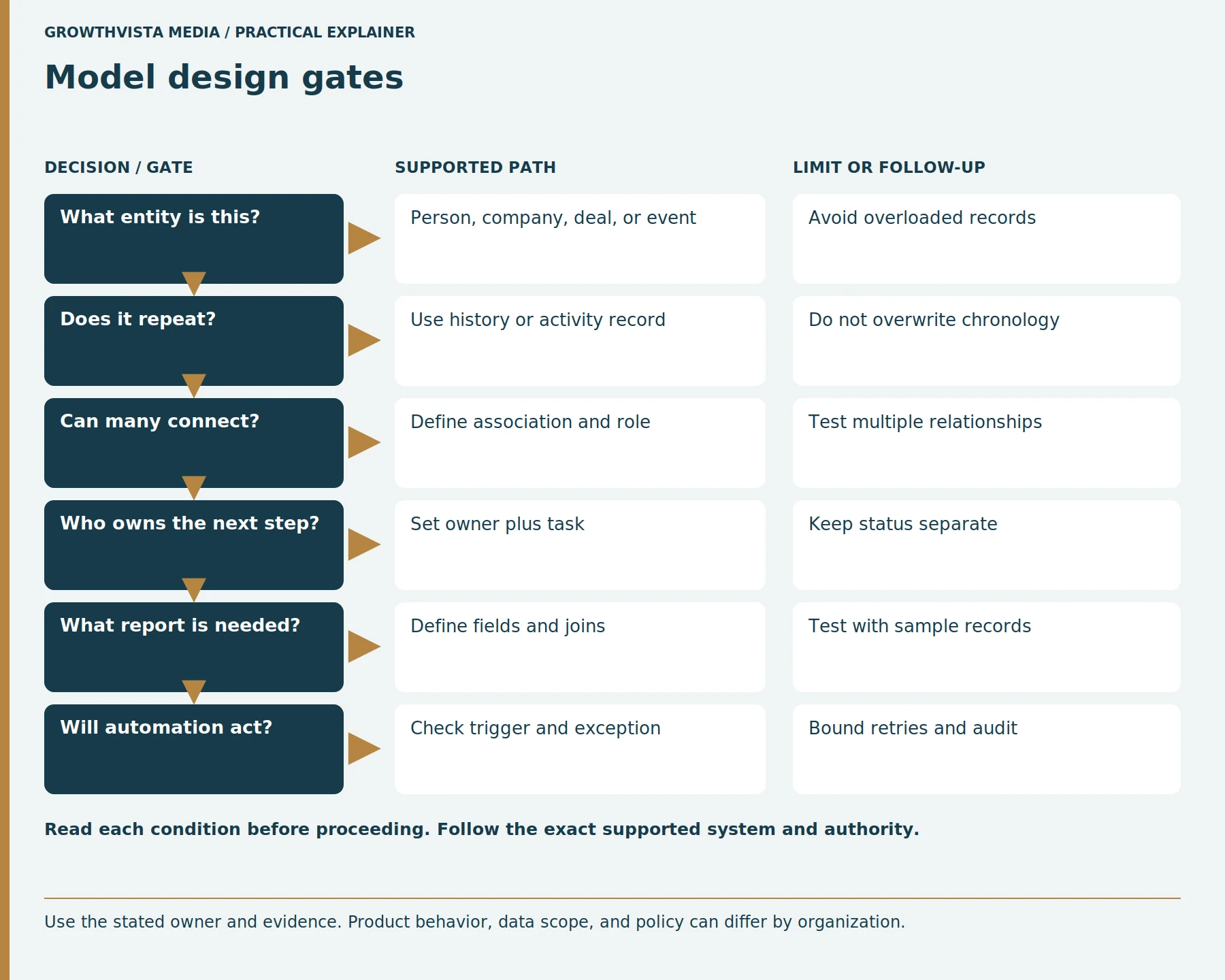
A CRM activity should be stored separately when the business needs to preserve the history, timing, ownership, or outcome of repeated interactions. Calls, meetings, emails, tasks, and status changes can occur multiple times for the same customer. Separate activity records preserve this chronology instead of overwriting earlier information.
Define which interactions are captured automatically and which staff enter manually. Avoid collecting more personal data than the business purpose requires. Set retention and access rules with the responsible policy owner. If an integration creates an activity, test duplicate handling and attribution before it writes into the live CRM.
How should ownership and lifecycle stages be modeled?
CRM ownership identifies who is accountable for a record or next action, while a lifecycle stage describes where that record stands within a defined business process. These concepts should remain separate because responsibility can change without changing the customer’s status, and a stage can change without transferring ownership.
| Concept | Meaning | Example |
|---|---|---|
| Ownership | Who is responsible | Sales representative |
| Lifecycle stage | Where the record is in the process | Qualified opportunity |
| Task | What should happen next | Schedule follow-up |
Do not make a single field carry both urgency and lifecycle. “Waiting on customer” might be a status, a task state, or a reason code depending on the process. Use a short data dictionary with definition, allowed values, owner, and reporting use. Then test whether two people classify the same sample consistently.
How Can a CRM Data Model Support Accurate Reporting?
A CRM data model supports accurate reporting by defining consistent relationships, ownership rules, lifecycle stages, and field meanings. Reports become more dependable when users enter information consistently and related records are connected correctly. Testing reports with representative data can reveal missing relationships, ambiguous definitions, and inconsistent field usage before full implementation.
Build a small report with sample records covering ordinary and edge cases. Compare its output with the team’s expected answer. A field that exists but is filled differently by each department creates false precision. Define whether the report uses current values or historical snapshots, because a current owner field cannot necessarily explain who owned a record last quarter.
What should be checked before configuring CRM automation?
CRM automation should rely on clearly defined fields, relationships, and lifecycle transitions. Each automation needs a specific trigger, intended action, exception path, and accountable owner. Before deployment, test whether the correct record is updated and whether retries or repeated triggers could create duplicate activities, notifications, or other unintended changes.
Start in a test environment or with a bounded sample if the product supports it. Review the audit history and compare before-and-after records. Avoid chains of rules whose order changes the outcome without a visible explanation. Keep a manual correction path for authorized staff. Vendor-specific association APIs and automation behavior must be checked against current documentation.
How do you keep a CRM data model understandable?
A CRM data model stays understandable when its objects, fields, relationships, sources, and business rules are documented consistently. A data dictionary is a reference that defines these elements and explains how they should be used. Maintaining one helps teams identify duplicate concepts, outdated fields, and reporting dependencies.
| Data dictionary item | What to document |
|---|---|
| Field name | System and display name |
| Definition | Exact business meaning |
| Object | Contact, company, deal, etc. |
| Allowed values | Valid entries |
| Source | User, import, or integration |
| Owner | Responsible team/person |
| Reporting use | Reports that depend on it |
| Status | Active or deprecated |
How Should You Test a CRM Data Model Before Implementation?
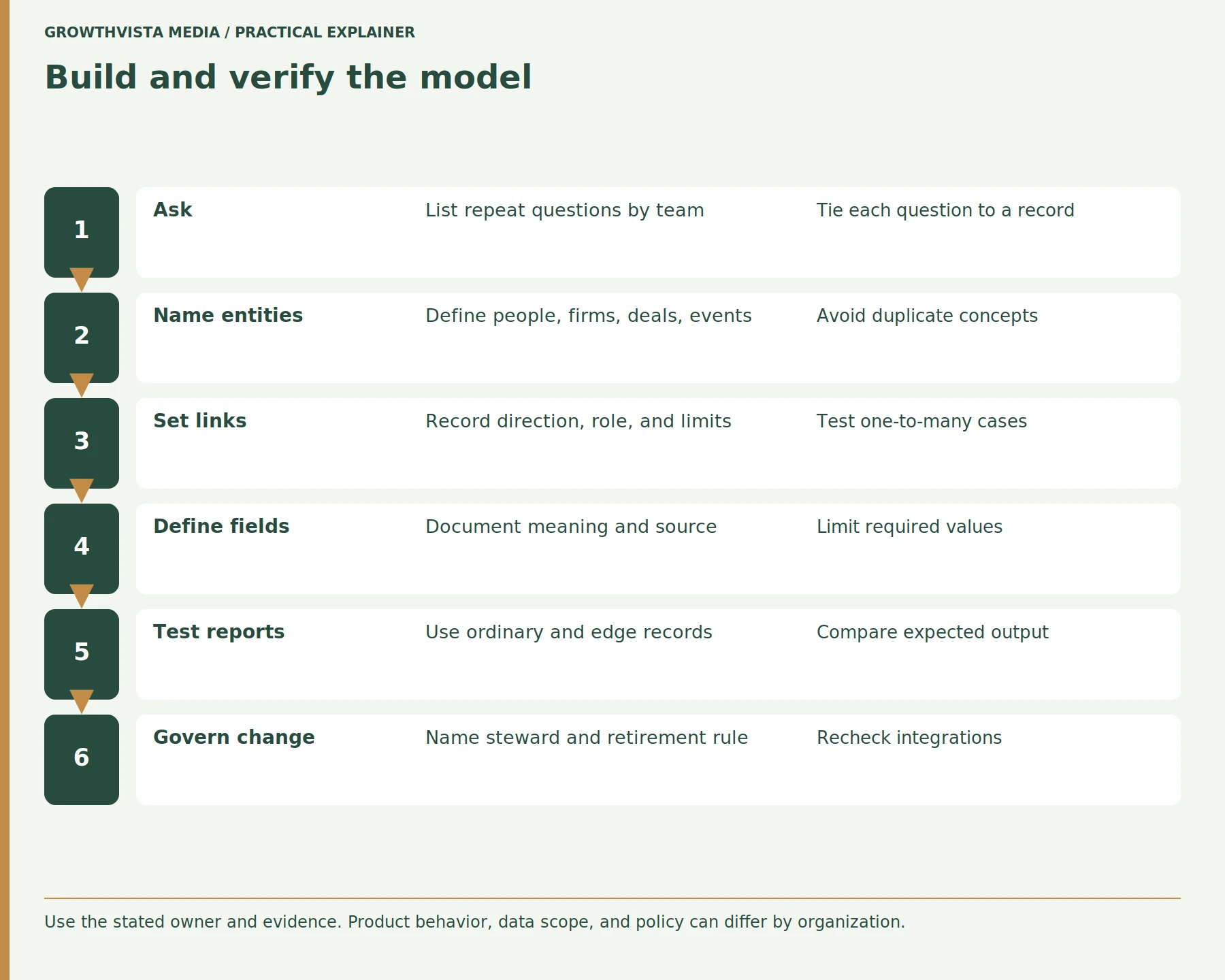
A CRM data model should be tested with representative records covering both normal workflows and edge cases. Verify that associations behave correctly, ownership changes do not alter lifecycle meaning, reports return expected results, and automation does not create duplicates. Resolve unexpected behavior before importing the complete database.
- Test multiple contacts under one company.
- Test one contact associated with multiple relevant records.
- Change ownership without changing lifecycle stage.
- Record several activities for one contact.
- Generate your most important reports.
- Test missing or incomplete values.
- Trigger automation more than once.
- Compare actual results with expected results.
Frequently asked questions
What is an object in CRM software?
A CRM object is a category of records representing a business entity or activity. Common examples include contacts, companies, opportunities, and support tickets. Each object contains individual records with defined fields or properties. Object names and capabilities vary between CRM platforms, and some systems also support custom objects.
Should every CRM fact become a custom field?
No. Custom fields work best for defined attributes that belong to a record. Repeated events, historical changes, and relationships may be better represented as activities, associations, or separate records. The appropriate structure depends on how the information changes over time and how employees need to report on it.
Can one contact be associated with multiple companies?
Many CRM systems support relationships between one contact and multiple companies, although capabilities and limits vary by platform. These relationships may represent employment, consulting, purchasing, or other roles. When multiple relationships matter, model them explicitly and use appropriate association labels instead of duplicating the contact record.
Why use association labels?
Association labels describe the role or meaning of a relationship between CRM records. For example, contacts associated with the same opportunity might be identified as a decision maker, billing contact, or implementation lead. Labels preserve context without requiring separate duplicate records, although exact functionality varies by CRM platform.
Should ownership and stage share one field?
Ownership and lifecycle stage should generally remain separate because they represent different facts. Ownership identifies the person or team responsible for a record, while stage describes its position within a business process. Keeping them separate makes reassignment, workflow management, and reporting easier to interpret.
How can a CRM model be tested?
Test a CRM data model with representative records covering normal workflows and edge cases. Verify associations, ownership changes, lifecycle stages, activities, reporting, and automation behavior. Compare actual outputs with documented expectations before importing the full database or enabling organization-wide automation.
What is the difference between a CRM object and a field?
A CRM object represents a category of information, such as a contact, company, or opportunity. A field stores an individual attribute of that object, such as an email address, industry, or opportunity value. Understanding this distinction helps prevent businesses from using custom fields to represent separate entities or relationships.
Conclusion: Build the CRM Data Model Around Business Questions
A useful CRM data model separates people, organizations, opportunities, activities, relationships, ownership, and lifecycle stages while keeping their meanings consistent. The objective is not to create more fields; it is to structure information so teams can understand, report on, and maintain it reliably.
Next step: List your five most important CRM reporting questions and test whether your proposed records and relationships can answer each one with representative sample data.
Sources and further reading
Official documentation supports the technical guidance. Examples and worksheets are editorial methods, not hands-on product benchmarks. Reviewed October 2026.
- HubSpot: Manage CRM records, properties, and associations
- Salesforce: Object relationships overview
- Salesforce: Data model overview