Customer Support Knowledge Base: Keep Answers Findable

A customer support knowledge base is a collection of help articles, troubleshooting guides, and instructions that customers can use to solve problems independently. An effective knowledge base answers real customer questions, provides clear steps, stays accurate as products change, and offers a way to contact support when self-service cannot resolve the issue.
This guide uses Zendesk’s knowledge documentation as an implementation example. Tool features and customer results vary. Do not reuse vendor-reported percentages as a forecast for your organization. Measure whether readers resolve their task and can reach support when the article is incomplete.
Key Takeaways
- Start with real customer questions: Use support tickets, search queries, and recurring problems to choose article topics.
- Focus on one task per article: Give each guide a clear audience, outcome, and step-by-step solution.
- Verify instructions: Have a qualified product or policy owner review technical accuracy.
- Maintain content regularly: Assign owners and update articles after product changes or customer feedback.
- Measure actual usefulness: Evaluate task completion, support contacts, and feedback rather than article views alone.
What belongs in a customer support knowledge base?
A customer support knowledge base should contain answers to recurring customer questions, troubleshooting instructions, product setup guides, account-management steps, and relevant policy explanations. Topics should reflect tasks customers actually need to complete. Each article should have a defined audience, verified instructions, an expected outcome, and a clear support option when the solution does not apply.
Use support data as a source of candidate topics, then verify the answer with a qualified product or policy owner. Zendesk’s guidance recommends clear, concise, consistent knowledge content. Zendesk: Develop knowledge base content Customer questions show demand, but they do not establish the technically correct procedure.

How should an article title and structure be chosen?
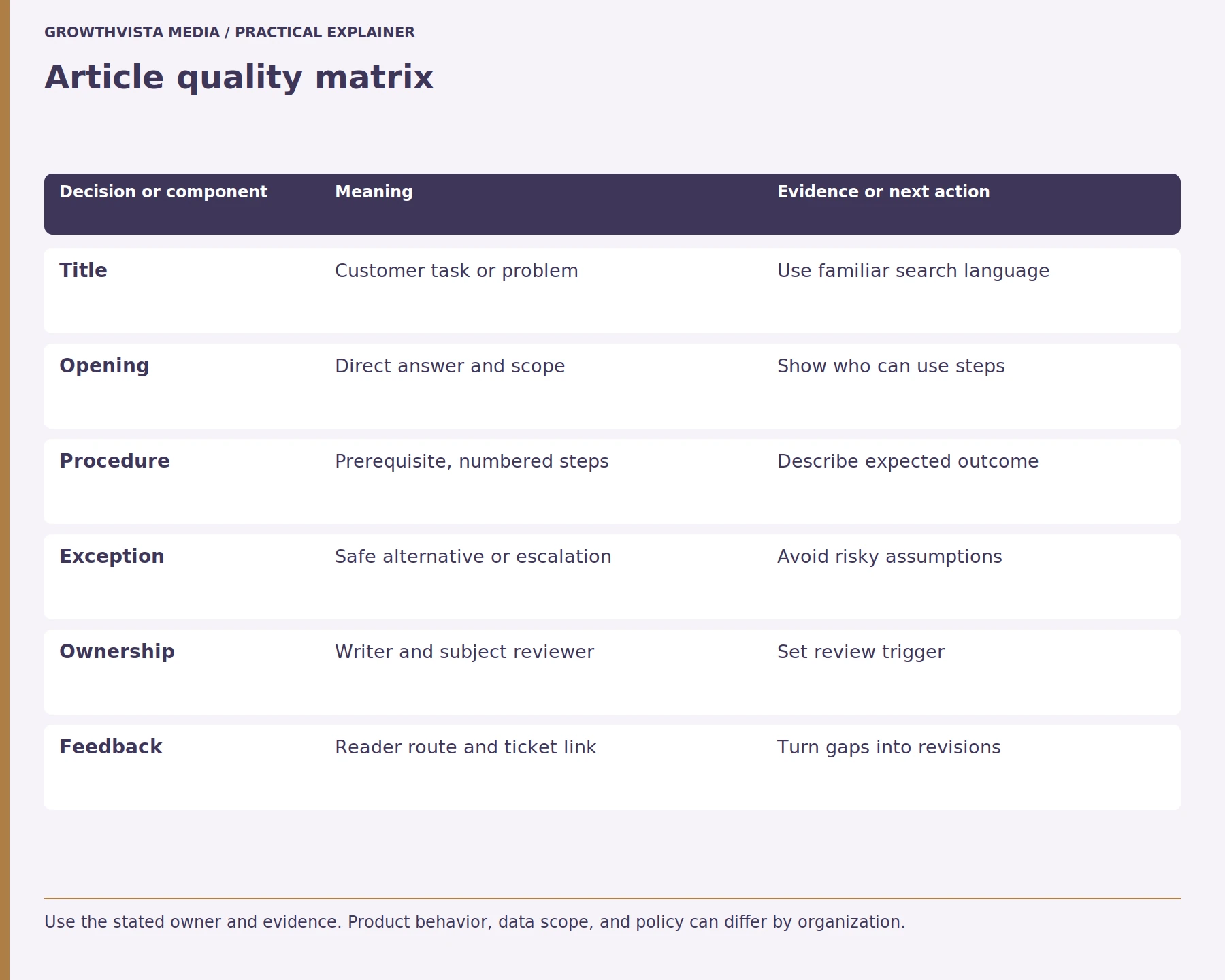
A knowledge base article should use a title that clearly describes the customer’s question or task. Its structure should begin with a direct answer, followed by prerequisites, numbered instructions, expected results, and troubleshooting or escalation steps. Use familiar language, short sections, and descriptive headings so readers can quickly find the information they need.
Keep each article focused enough that a reader can scan it quickly. Link related tasks instead of stacking unrelated procedures together. Include the product version, eligibility, or region where it changes the answer. Zendesk documents article creation and formatting options in its knowledge base. Zendesk: Create knowledge base articles Confirm the published rendering on mobile and with assistive technology.
| Field | Example | Owner |
|---|---|---|
| Question | Change billing contact | Support content steward |
| Audience | Account administrator | Product owner |
| Steps | Prerequisites and numbered path | Technical reviewer |
| Exception | User lacks required permission | Escalation team |
| Review trigger | Permission interface changes | Content owner |
What makes a support instruction safe and complete?
A safe customer support instruction explains what the user needs before starting, the exact action to perform, and the expected result. It should warn about potentially harmful changes, such as deleting information or modifying account permissions. When instructions cannot resolve the issue, the article should provide an appropriate recovery or support route.
Have the responsible product or operations owner verify steps against the current interface and policy. Do not invent menu labels based on an old screenshot. If a task differs by platform or account type, separate the paths and label them plainly.
Who should own knowledge base content?
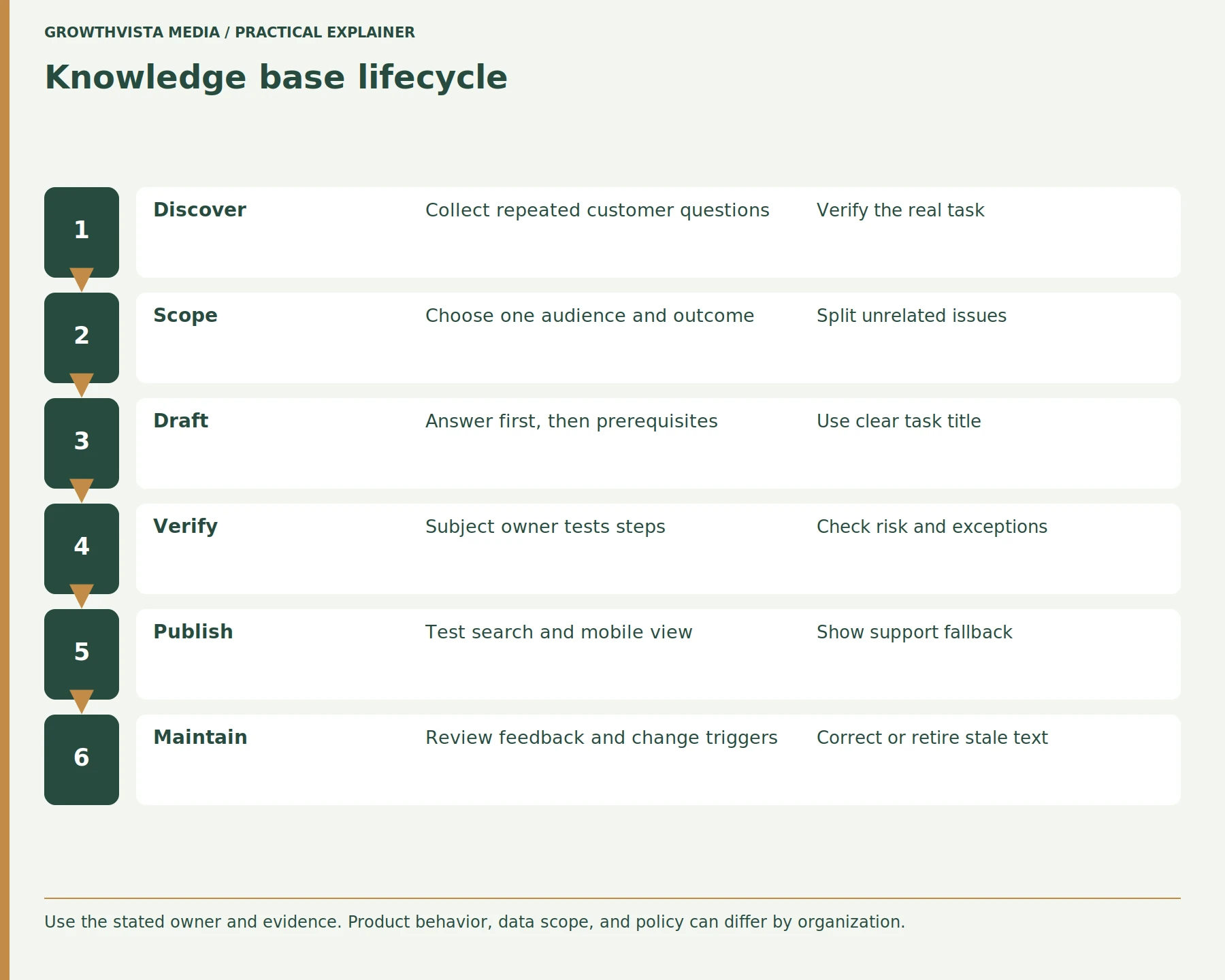
Knowledge base content should have a designated content owner responsible for maintenance and a qualified subject-matter expert responsible for verifying accuracy. Sensitive or policy-related instructions may also require specialist approval. Clear ownership ensures articles can be reviewed, corrected, and retired when products, procedures, or customer requirements change.
Create a workflow for draft, review, publish, and retire. Zendesk describes content review workflows where articles can be submitted for review. Zendesk: Create content for review Keep approval history and the date of the last factual check. A generic “team” owner does not provide a clear update route when a procedure changes.
How should outdated articles be found?
Outdated knowledge base articles can be identified through product releases, policy changes, customer feedback, support tickets, broken links, and scheduled content reviews. Teams should prioritize pages containing obsolete screenshots, incorrect instructions, or deprecated features. A documented review process helps determine whether each article should be updated, redirected, consolidated, or retired.
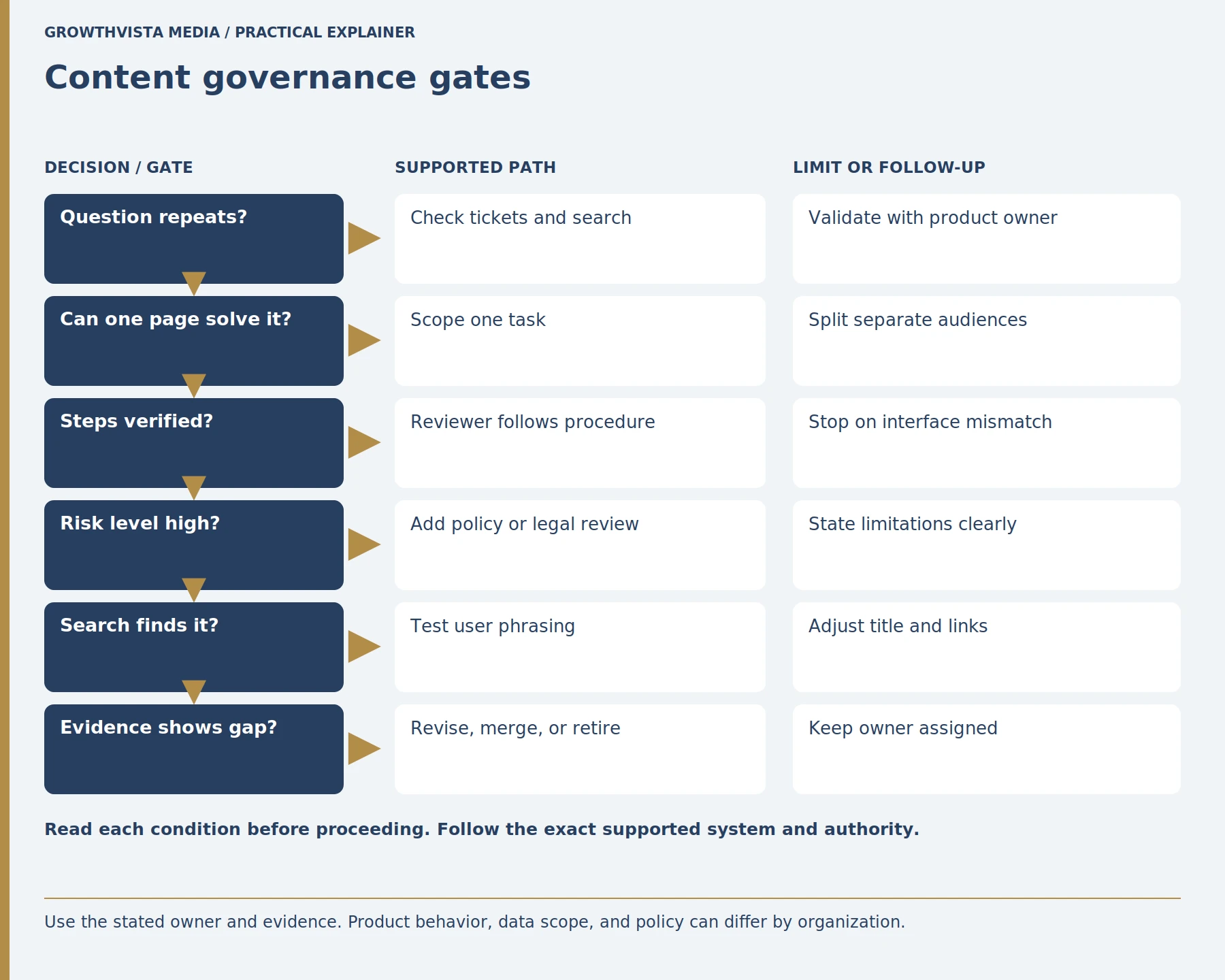
Use analytics as a signal rather than a verdict. A low-traffic page may be important for a rare high-impact task; a high-traffic article may still fail users. Keep a clear process for correcting, redirecting, or retiring an obsolete article so search results do not send readers to conflicting instructions.
How can reader feedback improve the knowledge base?
Reader feedback helps improve a knowledge base by identifying missing instructions, unclear explanations, unsuccessful troubleshooting steps, and unanswered customer questions. Teams should review article ratings alongside support tickets and product changes to understand the underlying problem. Feedback becomes valuable when it leads to specific corrections, new articles, or clearer support pathways.
Zendesk describes using feedback and support interactions to develop knowledge content. Zendesk: Write knowledge base articles Do not assume a thumbs-up measures successful resolution. Use a follow-up sample or task completion signal where appropriate, and avoid collecting more personal information than necessary.
How should search and article navigation be planned?
Knowledge base search and navigation should reflect the language customers use to describe their tasks and problems. Organize articles into understandable categories, include relevant synonyms, and link related instructions where useful. Test common search phrases, spelling variations, mobile navigation, and access to human support to identify gaps in findability.
Test with a small set of real query phrases and observe whether the right answer appears. Check spelling variants, mobile layout, and the route to human support. If a search returns several near-duplicate pages, consolidate or distinguish their scope. Do not keyword-stuff titles at the expense of clarity.
What should knowledge base measurement include?
Knowledge base performance should be measured using a combination of search success, article feedback, repeat support contacts, and task-completion indicators where available. Page views alone cannot prove that customers resolved their issues. Teams should define each metric clearly, examine real support examples, and use findings to improve content rather than simply increasing traffic.
Review qualitative examples with agents and customers. Zendesk publishes documentation for reporting and analyzing support activity, but dashboards and field definitions depend on the product configuration. Zendesk: Analyze support metrics State the exact metric and limits. Use the findings to edit, merge, or create articles rather than treating traffic as the goal.
Customer Support Knowledge Base Article Structure
| Article element | Example |
|---|---|
| Title | How to Change Your Billing Contact |
| Audience | Account administrators |
| Prerequisite | Appropriate account permissions |
| Direct answer | Explain where billing contacts are managed |
| Steps | Numbered instructions verified against the product |
| Expected result | New billing contact appears in account settings |
| Exception | User lacks permission |
| Next action | Contact the account administrator or support |
This is an illustrative template, not a verified procedure for a specific product.
What Should You Check Before Publishing a Knowledge Base Article?
Before publishing a customer support knowledge base article, verify that it addresses a real customer question, contains accurate instructions, identifies the intended audience, and provides a clear expected result. A qualified reviewer should check technical steps, accessibility, and the support escalation route before approving publication.
Knowledge Base Publishing Checklist
- Confirm the article addresses a real customer question.
- Use a clear, task-focused title.
- Define the intended audience.
- Provide a direct answer near the beginning.
- List prerequisites and required permissions.
- Write numbered steps where appropriate.
- Explain the expected result.
- Include warnings for risky actions.
- Provide troubleshooting or support options.
- Verify instructions with a qualified reviewer.
- Test links, search visibility, and mobile readability.
- Assign a content owner and review trigger.
Frequently Asked Questions
How Long Should a Knowledge Base Article Be?
A knowledge base article should be long enough to help the reader complete one specific task without unnecessary information. Include prerequisites, instructions, expected results, and relevant exceptions. Short procedures may need only a few steps, while complex troubleshooting can require more detail. Separate unrelated tasks into different articles.
Who Should Approve Technical Knowledge Base Instructions?
Technical instructions should be reviewed by a qualified subject-matter expert who understands the current product, interface, and workflow. Policy or eligibility claims may require additional approval from the responsible team. The reviewer should verify that instructions are accurate, safe, and suitable for the intended audience before publication.
How Often Should Knowledge Base Articles Be Reviewed?
Knowledge base articles should be reviewed according to their risk level, importance, and frequency of change. High-impact or frequently updated procedures may need more frequent checks. Product releases, policy changes, broken links, and repeated customer complaints should trigger additional reviews, even when the next scheduled review date has not arrived.
Does a Knowledge Base Article View Mean Self-Service Succeeded?
No. An article view shows that someone accessed the content, but it does not confirm that their problem was resolved. Readers may leave because the instructions are incomplete or irrelevant. Evaluate article views alongside feedback, repeat support contacts, search behavior, and task-completion evidence when available.
Should Outdated Knowledge Base Articles Be Deleted Immediately?
Not necessarily. Outdated articles should be assessed before removal to determine whether they need correction, consolidation, redirection, or retirement. Deleting a page without considering related links and search results can make information harder to find. Preserve appropriate historical records and direct customers toward current instructions.
What Should Happen When a Knowledge Base Article Does Not Solve an Issue?
When an article does not resolve the customer’s problem, it should offer a clear next step, such as contacting support or following an appropriate troubleshooting route. Explain what information the customer may need to provide. The support process should help the agent continue without forcing the customer to repeat unnecessary steps.
What Is the Difference Between a Knowledge Base and an FAQ Page?
A knowledge base is a structured collection of help resources that may include troubleshooting guides, tutorials, product instructions, and policy explanations. An FAQ page usually provides shorter answers to common questions. FAQs can be part of a knowledge base, while detailed articles are better suited to multi-step tasks and complex issues.
Conclusion: Build a Knowledge Base That Solves Real Problems
An effective customer support knowledge base prioritizes accurate answers, clear instructions, reliable ownership, and regular maintenance. Its success depends on whether customers can complete their tasks, not simply on how many articles are published or viewed.
Next step: Review your five most frequently asked support questions and check whether each has an accurate, easy-to-find article with a clear outcome and support escalation option.
Sources and further reading
Official documentation supports the technical guidance. Examples and worksheets are editorial methods, not hands-on product benchmarks. Reviewed October 2026.
- Zendesk: Develop knowledge base content
- Zendesk: Create knowledge base articles
- Zendesk: Create content for review
- Zendesk: Write knowledge base articles
- Zendesk: Analyze support metrics