Best CRM Software for Small Businesses in 2026
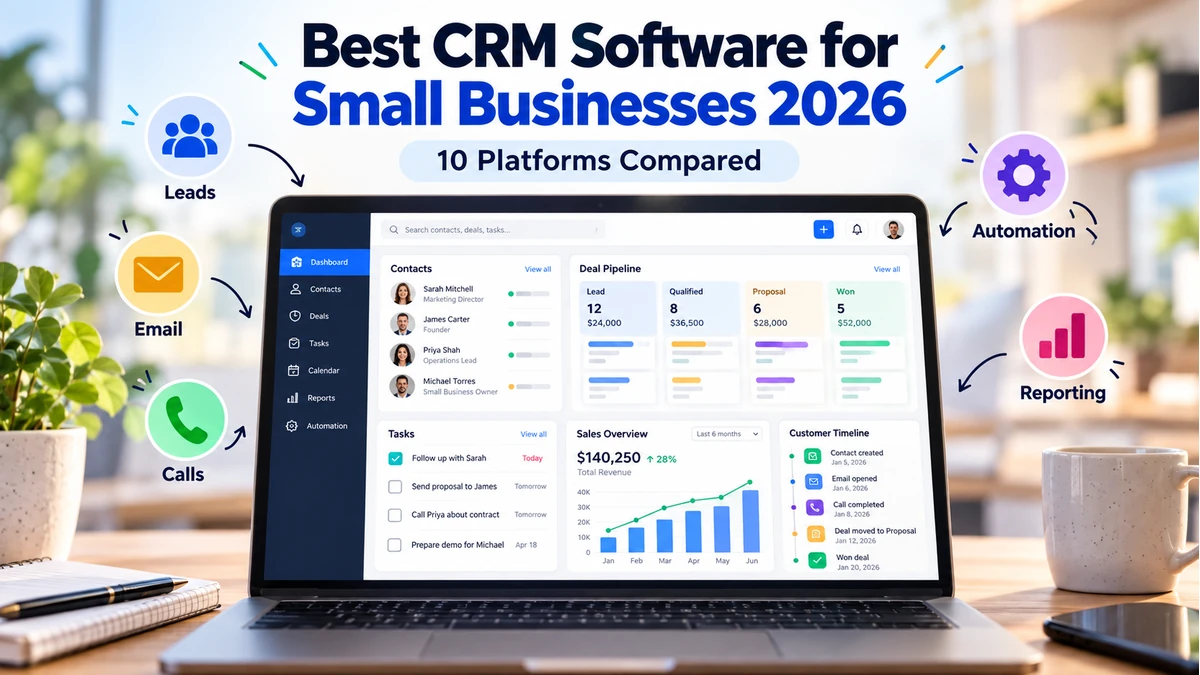
A customer relationship management system becomes useful when a business can no longer reliably track leads, follow-ups, deals and customer history in spreadsheets, inboxes and individual employees’ notes.
The best CRM software for small businesses in 2026 should make the next action clearer rather than simply creating another database to maintain. For some teams that means a visual sales pipeline; for others it means marketing automation, shared customer records, service history or integration with accounting and operational systems.
Current CRM products increasingly include AI-assisted summaries, reporting, drafting and workflow tools. Those features can reduce administrative work, but the fundamentals still matter more: clean contact data, a sales process the team actually follows, useful automation and reporting that reflects how the business sells.
This guide compares 10 CRM platforms for different small-business workflows and explains what to evaluate before migrating customer and pipeline data.
What is the best CRM software for small businesses?
The best CRM software for a small business depends on its sales process, team size, workflow and need for automation. HubSpot CRM is a strong all-round starting point, Pipedrive is well suited to sales teams that need a visual pipeline, Zoho CRM offers extensive customization, Freshsales combines CRM with sales communication tools, and Bigin by Zoho CRM is designed for very small teams moving beyond spreadsheets. Businesses should compare ease of use, contact management, pipeline features, automation, integrations, reporting and total cost before choosing a CRM.
Quick Comparison: Best CRM Software for Small Businesses
| CRM | Best For | Free Option | Automation | Key Strength | CTA |
|---|---|---|---|---|---|
| HubSpot CRM | All-round starting point | Yes; limits apply | Good–Strong by tier | CRM + marketing/sales/service ecosystem | Try HubSpot → |
| Pipedrive | Sales pipeline visibility | Trial | Strong by tier | Visual deal pipeline | Try Pipedrive → |
| Zoho CRM | Customization + value | Yes; terms vary | Strong | Broad SMB feature set | Try Zoho CRM → |
| Freshsales | Sales + communication workflows | Yes/terms vary | Strong by tier | Freshworks ecosystem + sales tools | Try Freshsales → |
| monday CRM | Visual/custom workflows | Trial/terms vary | Strong | Flexible boards and processes | Try monday CRM → |
| Bigin by Zoho CRM | Very small teams | Yes/terms vary | Moderate | Simplified pipeline CRM | Try Bigin → |
| Close | Calling-heavy sales teams | Trial | Strong | Calling/email/SMS-oriented selling | Try Close → |
| Copper | Google Workspace teams | Trial | Moderate–Strong | Google-centric workflow | Try Copper → |
| Insightly | CRM + projects | Trial/terms vary | Strong by tier | Relationship + project workflow | View Plans → |
| Salesforce Starter | Growth toward Salesforce ecosystem | Trial/terms vary | Strong | Scalable Salesforce platform | View Plans → |
1. HubSpot CRM — Strong All-Round Starting Point
HubSpot combines contact and company records with sales, marketing, service, content and data tools in one customer platform. Its free CRM is a practical way for a small team to move beyond spreadsheets without immediately committing to a large software project.
HubSpot’s current pricing page says its free foundational tools are available for up to two users and include free Smart CRM functionality, with limits applying to contacts and other tools. Paid tiers expand automation and the broader platform.
The main consideration is long-term packaging: as a company adopts more advanced marketing, sales or service capabilities, it should model the paid configuration it will eventually need.
Best for: Small businesses wanting a broad CRM ecosystem that can connect marketing, sales and customer service.
2. Pipedrive — Strong Choice for Visual Sales Pipeline Management
Pipedrive is centered on deals, stages, activities and the actions required to move opportunities forward. Its pipeline view provides a clear visual representation of the sales process.
Pipedrive allows teams to customize stages, create custom fields and use multiple pipelines for different sales processes. Current documentation also emphasizes workflow automation, reporting and a large integration marketplace.
This sales-first approach is particularly useful when the biggest problem is missed follow-up or poor visibility into active opportunities rather than broad marketing automation.
Best for: Sales-led small businesses that want an intuitive, customizable deal pipeline.
3. Zoho CRM — Strong for Customization and Value
Zoho CRM is relevant to small businesses that want a broad feature set and are willing to spend more time configuring the system around their process.
It sits inside the larger Zoho ecosystem, which can be attractive to companies also evaluating finance, support, campaigns and other business applications.
The trade-off is that a feature-rich CRM can require more deliberate setup than a simplified pipeline product. Define fields, stages, ownership and automation before importing years of inconsistent data.
Best for: Cost-conscious teams that value customization and a broad connected business-software ecosystem.
4. Freshsales — Strong for Sales Engagement Inside Freshworks
Freshsales is the CRM product within Freshworks and combines lead/contact management with sales workflows, communication features and automation capabilities.
It can be a natural fit for businesses already using or considering other Freshworks products, especially when sales and customer-service workflows need to connect.
Plan capabilities differ, so teams should verify which automation, AI, email and communication features are included at the tier they expect to use.
Best for: Small and midsize sales teams wanting CRM plus communication and Freshworks ecosystem integration.
5. monday CRM — Strong for Flexible Visual Workflows
monday CRM applies the flexible board-and-workflow model associated with monday.com to sales and customer processes.
This can work well for teams that want to adapt CRM views and workflows to their own process, particularly if they already use monday.com for project or work management.
Highly flexible systems can also become inconsistent if every team creates its own fields and statuses, so governance matters even for a small deployment.
Best for: Visual teams that want configurable CRM workflows and may already use monday.com.
6. Bigin by Zoho CRM — Strong for Very Small Teams Moving Beyond Spreadsheets
Bigin is positioned as a simpler pipeline-focused CRM within the Zoho family.
It can be a useful step for very small businesses that need contacts, deals, activities and pipeline visibility but do not yet need the breadth of a full CRM deployment.
The important question is whether the business can stay within the simpler model or expects near-term requirements that would justify starting directly with Zoho CRM or another broader platform.
Best for: Very small sales teams taking their first structured step beyond spreadsheets.
7. Close — Strong for Calling-Heavy Outbound Sales
Close is designed around sales communication and is particularly relevant to teams that spend much of the day calling, emailing and following up with prospects.
Keeping communication activity close to the lead and pipeline record can reduce the friction created by separate dialer, inbox and CRM workflows.
It is less compelling for businesses whose primary CRM need is field service, complex customer support or broad enterprise process customization.
Best for: Inside-sales and outbound teams where calling and rapid follow-up are central.
8. Copper — Strong for Google Workspace-Centered Teams
Copper focuses on CRM workflows that feel closely connected to Google Workspace, making it relevant to businesses that already operate primarily through Gmail, Calendar and related Google tools.
This can reduce context switching for teams that want customer records and relationship activity close to their existing productivity environment.
Businesses with complex automation or multi-department requirements should compare its deeper capabilities and integration needs with broader CRM suites.
Best for: Small teams deeply invested in Google Workspace and relationship-driven sales.
9. Insightly — Strong for Connecting Sales and Projects
Insightly combines CRM capabilities with workflow and project-oriented features, which can suit service businesses where a won opportunity becomes an implementation or delivery project.
That continuity can reduce handoff gaps between selling the work and delivering it.
Teams should map their exact sales-to-project process before choosing a CRM on this basis, because dedicated project-management platforms may still be needed for complex delivery operations.
Best for: Service businesses that want customer relationships and post-sale project work connected.
10. Salesforce Starter — Strong for Businesses Planning Around the Salesforce Ecosystem
Salesforce offers smaller-business packages that provide a more approachable entry point into its broader platform. Salesforce currently positions Starter Suite as a small-business option spanning sales, service, marketing and commerce capabilities.
The strategic attraction is the ability to grow into the wider Salesforce ecosystem if the company eventually needs more complex processes, integrations and administration.
That future scalability should be weighed against current simplicity. A small team should not adopt enterprise-style complexity merely because it might need it years later.
Best for: Growing businesses that have a clear reason to build toward the Salesforce ecosystem.
What is the best free CRM for a small business?
The best free CRM depends on the team’s size and workflow. HubSpot CRM is a strong starting point for businesses that want contact, sales and customer-management tools without an immediate paid commitment. Other CRM providers offer free plans or trials with different limits on users, contacts, automation and features. Before choosing a free CRM, compare the current limits on contacts, pipelines, integrations, reporting, automation and data storage rather than choosing based only on whether a free plan exists.
If you want a broad all-in-one CRM, start with HubSpot. If sales pipeline visibility is the priority, consider Pipedrive. For extensive customization, consider Zoho CRM. For very small teams, Bigin can be a simpler starting point. For Google Workspace-focused teams, Copper is worth evaluating.
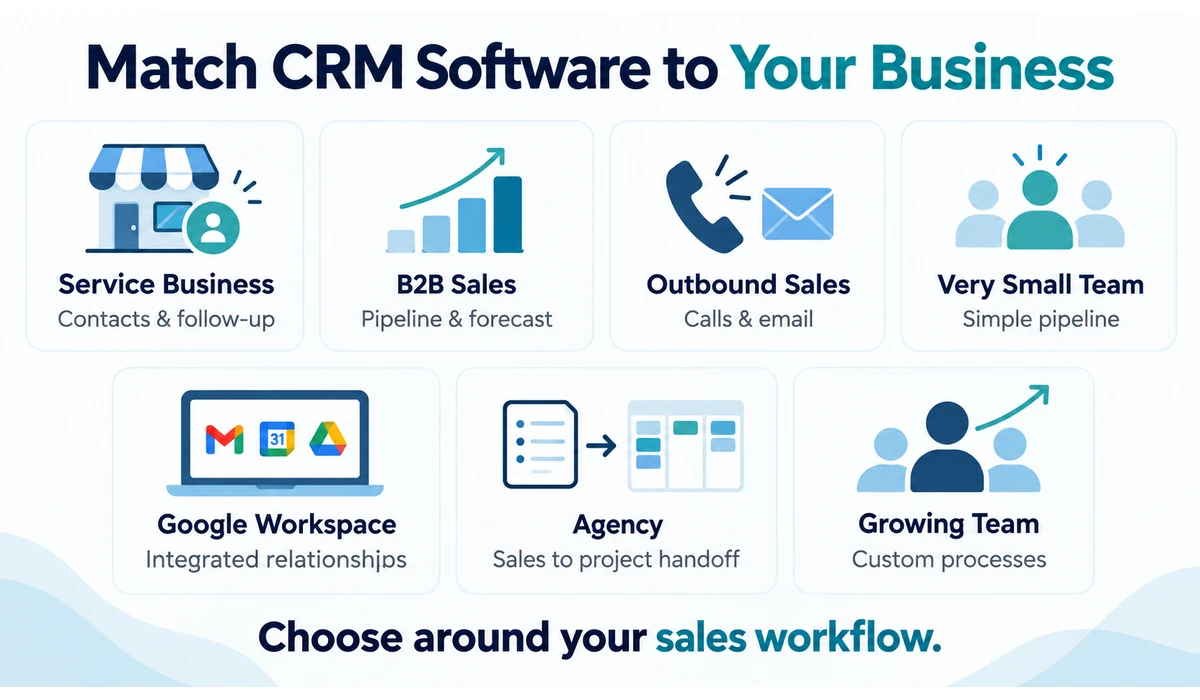
Which CRM Fits Your Business Type?
| Business Type | Primary CRM Need | Platforms to Evaluate |
|---|---|---|
| Small service business | Contacts, deals, follow-up, forms | HubSpot, Pipedrive, Zoho CRM |
| Sales-led B2B team | Pipeline, activities, forecasting | Pipedrive, HubSpot, Freshsales |
| Outbound / inside sales | Calls, email, fast follow-up | Close, Freshsales, Pipedrive |
| Very small team | Simple pipeline beyond spreadsheets | Bigin, HubSpot |
| Google Workspace team | Gmail/Calendar-centered relationships | Copper, HubSpot |
| Service + project delivery | Sales-to-project handoff | Insightly, monday CRM |
| Multi-function growth team | Sales + marketing + service ecosystem | HubSpot, Zoho CRM, Salesforce |
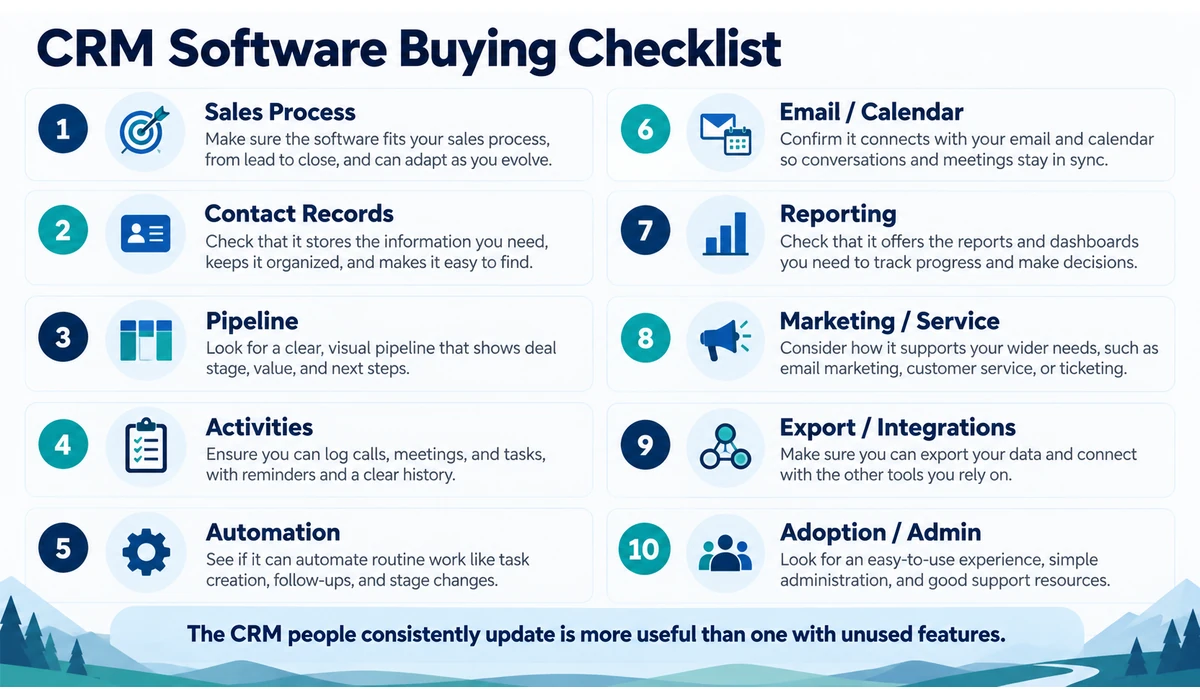
What Should a Small Business Look for in CRM Software?
1. A Clear Sales Process
Define what counts as a lead, qualified opportunity, proposal, won deal and lost deal before configuring software. A CRM cannot fix an undefined process.
2. Contact and Company Records
The system should make it easy to see who the customer is, recent communication, open opportunities, tasks and relevant history.
3. Pipeline Management
Sales teams need stages that reflect how they actually sell. Avoid creating so many stages that users stop updating deals.
4. Activities and Follow-Up
Calls, meetings, tasks and next steps should be easy to create and visible enough that opportunities do not quietly go cold.
5. Workflow Automation
Useful automation includes assigning leads, creating follow-up tasks, updating fields and triggering communications. Automate stable processes rather than automating confusion.
6. Email and Calendar Integration
Check Gmail/Outlook and calendar requirements, shared inbox needs and whether email logging works the way the team expects.
7. Reporting and Forecasting
Start with practical metrics: pipeline value, stage conversion, win rate, sales cycle, activity completion and source performance.
8. Marketing and Service Integration
If marketing or support teams need the same customer record, evaluate whether native modules or integrations provide the required context.
9. Data Export and Integrations
Confirm you can export core data and connect accounting, marketing, calling, forms and other systems that matter to the business.
10. Adoption and Administration
The most sophisticated CRM has little value if employees avoid it. Consider setup time, training, permissions, data quality and who will own ongoing administration.
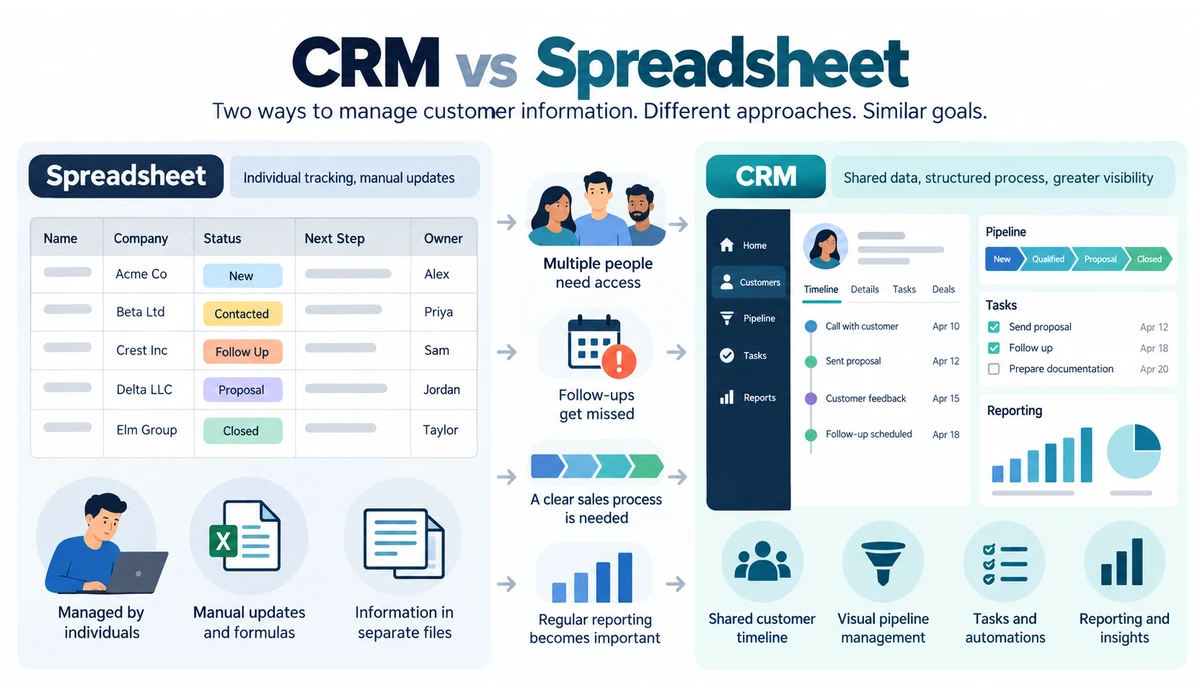
CRM vs Spreadsheet: When Is It Time to Switch?
| Spreadsheet May Still Work When | CRM Becomes Useful When |
|---|---|
| One person manages a small lead list | Multiple people need shared customer history |
| Few active opportunities | Follow-ups are being missed |
| Simple status tracking | Deals move through defined stages |
| No workflow automation needed | Tasks and communications need automation |
| Reporting is occasional/manual | Pipeline metrics are needed regularly |
| Customer history lives with one owner | Business needs continuity across staff |
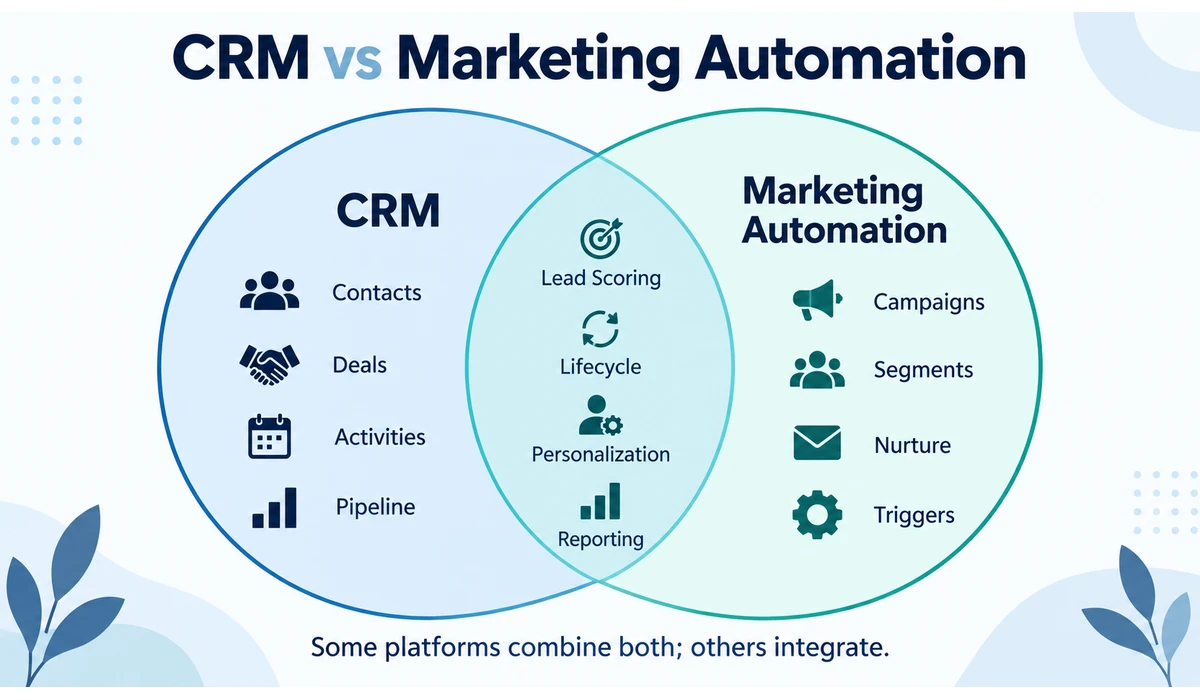
CRM vs Marketing Automation
A CRM primarily organizes customer and prospect relationships, sales activity, deals and history. Marketing automation focuses on campaigns, segmentation, lead nurturing and triggered communications.
The categories increasingly overlap. HubSpot, Zoho and other suites combine CRM with marketing capabilities, while specialist email platforms integrate with CRMs. The right architecture depends on whether sales or marketing owns the customer journey and how much data must move between systems.
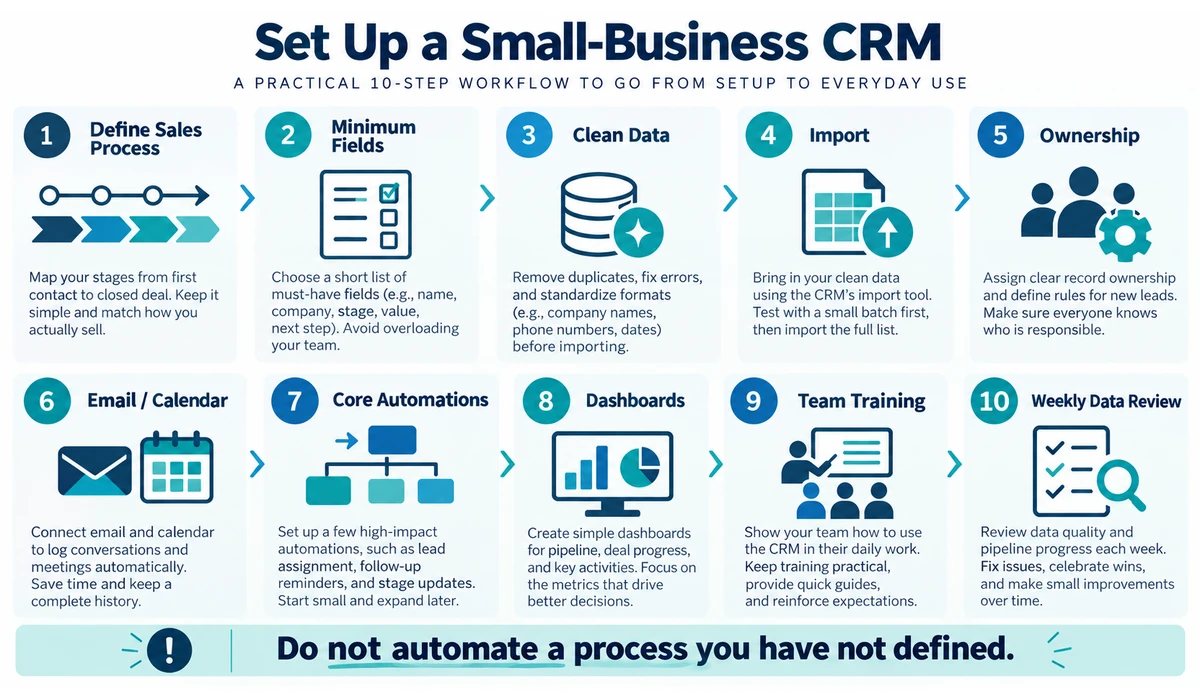
How to Set Up a Small-Business CRM Without Creating a Mess
-
- Define the sales stages and what must be true before a deal moves forward.
- Choose the minimum contact, company and deal fields required for decisions.
- Assign record ownership and rules for new leads.
- Clean duplicate and outdated data before importing it.
- Connect email and calendars only after deciding what should be logged.
- Create a small number of high-value automations first.
- Build dashboards around decisions the team actually makes.
- Train users on the same process and naming conventions.
- Review stale deals, missing next steps and data quality every week.
- Add new fields, automations and integrations only when there is a clear business need.
CRM Metrics Small Businesses Should Actually Track
Metrics should use consistent definitions. A dashboard cannot compensate for salespeople using different meanings for ‘qualified’, ‘proposal’ or ‘won’.
| Metric | What It Helps Answer |
|---|---|
| New qualified opportunities | Is the pipeline being replenished? |
| Pipeline value | How much potential revenue is active? |
| Stage conversion | Where are deals dropping out? |
| Win rate | What share of qualified deals are won? |
| Average sales cycle | How long does a deal take to close? |
| Average deal value | How valuable is a typical won deal? |
| Overdue activities | Are follow-ups being missed? |
| Lead source performance | Which channels produce useful opportunities? |
AI in CRM: Useful Assistant, Not a Substitute for Clean Data
CRM vendors increasingly add AI for summaries, email drafting, lead prioritization, reporting and workflow assistance. These tools can save administrative time when the underlying records are accurate.
AI outputs should still be reviewed, especially customer-facing messages and recommendations. Duplicate contacts, missing activity and inconsistent stages will reduce the usefulness of any AI layer.
For a small business, improving data quality and follow-up discipline usually creates more value than enabling every available AI feature.
Frequently Asked Questions
What is CRM software?
CRM software stores and organizes customer and prospect information, interactions, deals, tasks and related relationship history so teams can manage follow-up and sales processes consistently.
Does a very small business need a CRM?
Not always. A spreadsheet may be sufficient for one person with a small number of leads. A CRM becomes more valuable as the team, pipeline and need for shared history grow.
Is there free CRM software for small businesses?
Yes. HubSpot currently offers free CRM tools with user and feature limits, and other vendors offer free tiers or trials. Verify current limits before committing your workflow.
Which CRM is easiest for sales pipeline management?
Pipedrive is specifically designed around visual deal pipelines, while HubSpot, Zoho, Freshsales and other CRMs also provide pipeline views. Test your own sales process rather than choosing from screenshots alone.
Can a CRM replace email marketing software?
Some CRM suites include substantial marketing tools, but specialist email platforms may offer different automation, sending and creator/ecommerce capabilities. Many businesses integrate the two.
How long does CRM implementation take?
A basic small-team setup can be relatively quick, but data cleanup, integrations, automation, permissions and user training can make a production rollout significantly longer.
What is the biggest CRM implementation mistake?
Importing messy data and recreating every old spreadsheet field before defining the new sales process often produces a complicated system that employees do not trust or use.
What is the easiest CRM for a small business?
The easiest CRM depends on the team’s workflow and technical experience. Pipedrive can be straightforward for sales teams focused on deal pipelines, while HubSpot can be a practical starting point for businesses that want CRM, marketing and service capabilities in one ecosystem. The best way to judge ease of use is to test a real sales process with actual fields, stages and follow-up tasks.
How much does CRM software cost for a small business?
CRM costs vary by provider, users, features and subscription tier. Some providers offer free plans, while paid plans typically add automation, reporting, integrations, AI features and larger usage limits. Small businesses should compare the total cost of the features they actually need rather than choosing solely by the advertised starting price.
What should a small business look for in a CRM?
A small business should prioritize easy contact management, a clear sales pipeline, follow-up tasks, useful automation, email and calendar integration, reporting, data export and integrations with other essential tools. Ease of adoption is also important because a CRM only creates value when the team consistently keeps customer and deal information updated.
Final Thoughts
The best CRM software for small businesses is the system that makes customer ownership, next actions and pipeline status easier to understand.
HubSpot provides a broad starting ecosystem; Pipedrive focuses tightly on sales pipeline management; Zoho CRM offers extensive customization; Freshsales and Close suit communication-heavy sales teams; monday CRM emphasizes flexible workflows; and Salesforce can make sense when a business has a clear path toward its wider platform.
Before choosing, build the same sample pipeline in two or three shortlisted systems using real fields, stages and follow-up tasks. That reveals usability differences more clearly than a feature checklist.
Keep the first implementation small. Clean data, consistent stages and reliable follow-up are more important than deploying every CRM feature on day one.