Best Project Management Software for Small Teams in 2026
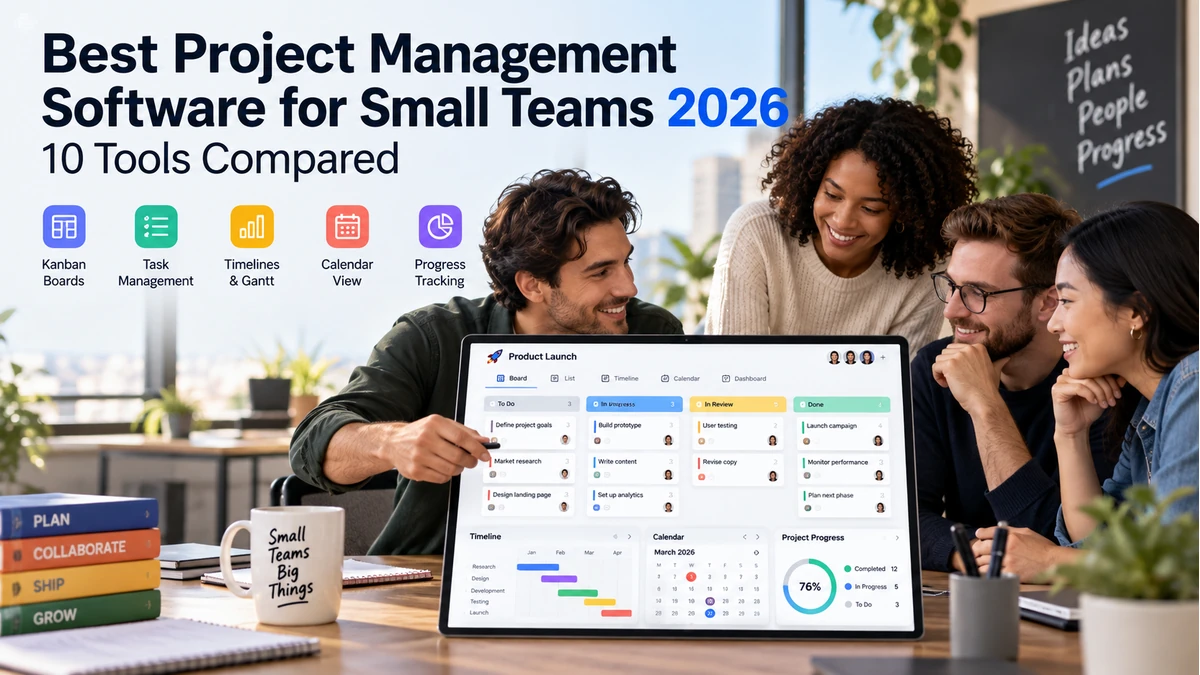
What is the best project management software for small teams?
The best project management software for a small team depends on how the team works. Asana is a strong choice for structured cross-functional work, ClickUp suits teams that want extensive customization, Trello works well for simple Kanban workflows, Notion combines documentation with lightweight project management, and Teamwork.com is useful for client-service teams. Small teams should prioritize clear task ownership, deadlines, collaboration, automation and ease of adoption rather than choosing a platform based only on its number of features.
Small teams rarely need the most complicated project-management system. They need a shared place where everyone can see what needs to happen, who owns it, when it is due and what is blocking progress.
The best project management software for small teams in 2026 ranges from lightweight Kanban boards to highly configurable work-management platforms. Asana emphasizes structured tasks, multiple project views, rules, forms and reporting. ClickUp combines tasks, goals, sprints, custom statuses and broad customization. Trello remains intentionally approachable with boards, cards, automation, templates and integrations.
AI is increasingly built into work-management software, but it should support—not replace—clear ownership and sensible workflows. Current Asana features include AI-powered workflows and AI teammates, while other platforms increasingly add summaries, drafting and project insights.
This guide compares 10 tools for different small-team working styles and explains how to choose based on complexity, client collaboration, planning, documentation, automation and reporting.
Quick Comparison: Best Project Management Software
| Platform | Best For | Views / Style | Automation | Key Strength | CTA |
|---|---|---|---|---|---|
| Asana | Structured cross-functional work | List, board, calendar, timeline/Gantt | Strong | Clear ownership + workflows | Try Asana → |
| ClickUp | Feature-rich all-in-one teams | Many customizable views | Strong | Tasks + docs + goals + customization | Try ClickUp → |
| monday work management | Visual custom workflows | Boards, dashboards, timelines | Strong | Flexible workflow building | Try monday → |
| Trello | Simple Kanban workflows | Boards/cards | Good | Fast learning curve | Try Trello → |
| Notion | Docs + lightweight projects | Pages, databases, multiple views | Moderate | Knowledge + project workspace | Try Notion → |
| Basecamp | Simple team/client coordination | Projects, to-dos, schedules | Light | Low-complexity communication | View Plans → |
| Teamwork.com | Client-service teams | Tasks, projects, workload | Strong | Client work + time/budget focus | Try Teamwork → |
| Wrike | Growing operational teams | List, board, Gantt, dashboards | Strong | Structured work + reporting | View Plans → |
| Zoho Projects | Value-focused business teams | Task, Kanban, Gantt | Strong | Zoho ecosystem + project controls | Try Zoho Projects → |
| Microsoft Planner | Microsoft 365 teams | Plans, boards, schedules | Moderate | Microsoft ecosystem integration | View Planner → |
1. Asana — Strong All-Round Choice for Structured Small Teams
Asana is designed around projects, tasks, owners and due dates, with list, board, calendar, timeline and Gantt-style project views. Its current feature set also includes custom fields, forms, rules, status updates, time tracking and reporting capabilities depending on plan.
For a small team, the main advantage is clarity: work can have one accountable assignee while collaborators, subtasks and dependencies provide context without duplicating the task.
Asana has also expanded AI-powered workflow features in 2026, but small teams can get substantial value from the core project structure before adding advanced automation.
Best for: Marketing, operations and cross-functional teams that want structured work without building a system from scratch.
2. ClickUp — Strong for Teams Wanting Maximum Features in One Workspace
ClickUp combines traditional project management with goals, sprints, milestones, task relationships, custom statuses and extensive customization.
Its breadth is attractive to teams trying to reduce the number of separate tools used for tasks, planning and documentation.
The same breadth can create setup overhead. Small teams should resist enabling every feature and instead define a few standard views, statuses and templates.
Best for: Teams that want a highly configurable all-in-one workspace and are willing to spend time setting it up.
3. monday work management — Strong for Visual Custom Workflows
monday work management is built around flexible boards, columns, automations and dashboards that can be adapted to many operational workflows.
It can work well for small teams that think visually and need to track campaigns, requests, projects or recurring operations in a shared system.
Flexibility should be governed with templates and naming standards so each project does not become a completely different board.
Best for: Visual teams that want to customize workflows without traditional software development.
4. Trello — Strong for Simple Kanban Project Tracking
Trello remains one of the easiest ways to introduce a small team to shared project tracking. Its core board-and-card model is simple to understand and quick to deploy.
Current Trello features include Inbox, Planner, automation, templates, Power-Ups and integrations, allowing a simple board to become more capable without immediately becoming a full project-management suite.
Trello can become less comfortable when a team needs complex dependencies, portfolio reporting or detailed resource planning across many projects.
Best for: Small teams wanting a lightweight visual board with minimal training.
5. Notion — Strong for Teams Combining Documentation and Projects
Notion is especially useful when project work and team knowledge need to live together. Pages and databases can hold meeting notes, project briefs, tasks, roadmaps and internal documentation.
Database views allow teams to represent the same structured information in tables, boards, calendars and other layouts.
The trade-off is that Notion is a toolkit rather than a rigid project methodology. Teams need to design sensible templates and avoid turning every workflow into a custom database.
Best for: Small teams that want documentation, knowledge and lightweight project tracking in one workspace.
6. Basecamp — Strong for Simple Team and Client Coordination
Basecamp takes a deliberately simpler approach to projects, emphasizing communication, to-dos, schedules, files and shared project spaces.
That can appeal to teams that do not want to maintain complex statuses, custom fields and dashboards just to coordinate work.
Teams needing advanced dependencies, portfolio analytics or detailed resource management may find a more structured work-management platform a better fit.
Best for: Small service teams that value straightforward project communication over deep configuration.
7. Teamwork.com — Strong for Client-Service Businesses
Teamwork.com is particularly relevant to agencies, consultancies and professional-service teams that manage projects on behalf of clients.
Project tasks can be combined with time, workload and commercial context, which is useful when the team must understand both delivery progress and the effort being spent.
A product team that does not bill or report around client work may not need that service-business emphasis.
Best for: Agencies and client-service teams that need project delivery connected to time and commercial visibility.
8. Wrike — Strong for Growing Teams Needing More Structure
Wrike provides structured project and work-management features for teams that are moving beyond simple task lists.
It can support multiple project views, request workflows, dashboards and reporting, making it relevant when a small team is becoming a more formal operations function.
That capability can be excessive for a three-person team with one simple board, so evaluate the workflow rather than choosing for future complexity alone.
Best for: Growing operational and marketing teams that need more structured workflows and reporting.
9. Zoho Projects — Strong Value for Zoho-Centered Businesses
Zoho Projects combines tasks, milestones, Gantt-style planning, time tracking and automation within the wider Zoho business-software ecosystem.
It can be particularly attractive to small companies already using Zoho CRM, finance or collaboration products because project information can sit closer to other business processes.
As with any ecosystem decision, compare the integrations and plan limits required by the exact workflow rather than assuming every Zoho product is automatically included.
Best for: Value-conscious teams already using or considering the broader Zoho ecosystem.
10. Microsoft Planner — Strong for Microsoft 365 Teams
Microsoft Planner is a natural option for organizations already working in Microsoft 365 and Teams.
Its biggest advantage is ecosystem fit: task planning can remain close to the collaboration and identity environment employees already use rather than introducing another standalone vendor.
Teams with highly specialized project-management requirements should compare Planner’s current capabilities with dedicated platforms before standardizing on it.
Best for: Small teams centered on Microsoft 365 that want project/task management close to their existing tools.
What is the best free project management software for small teams?
The best free option depends on the team’s workflow and the limits of each platform’s current free plan. Trello can be a good starting point for simple Kanban-based work, while Asana, ClickUp, Notion and Microsoft Planner may suit teams that need different combinations of tasks, documentation and collaboration. Compare the current free-plan limits for users, projects, storage, automation and integrations before choosing.
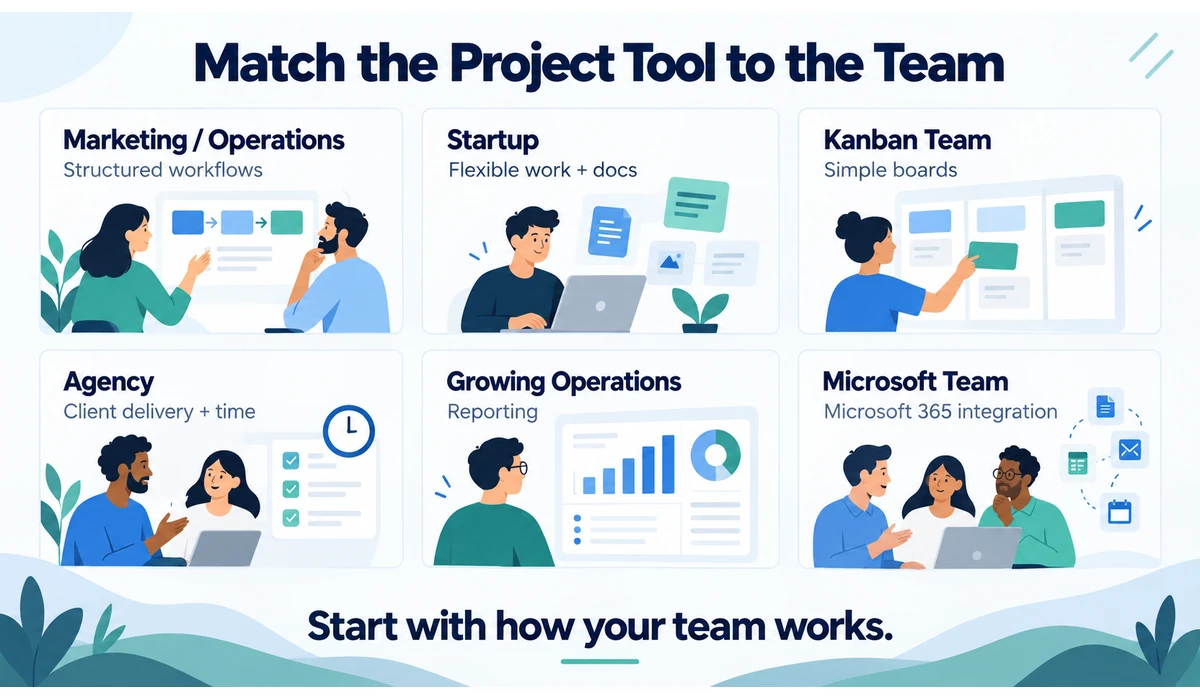
Which Project Management Tool Fits Your Team?
| Team Type | Primary Need | Platforms to Evaluate |
|---|---|---|
| Marketing / operations | Owners, deadlines, requests, reporting | Asana, monday, ClickUp |
| Small startup | Flexible planning + docs | ClickUp, Notion, Asana |
| Simple Kanban team | Fast visual task tracking | Trello, monday |
| Agency / consultancy | Client work, time, delivery | Teamwork.com, Basecamp, Asana |
| Growing operations team | Reporting, workflows, structure | Wrike, Asana, monday |
| Zoho-centered business | Projects connected to business apps | Zoho Projects |
| Microsoft 365 team | Integrated tasks and collaboration | Microsoft Planner |
What to Look for in Project Management Software
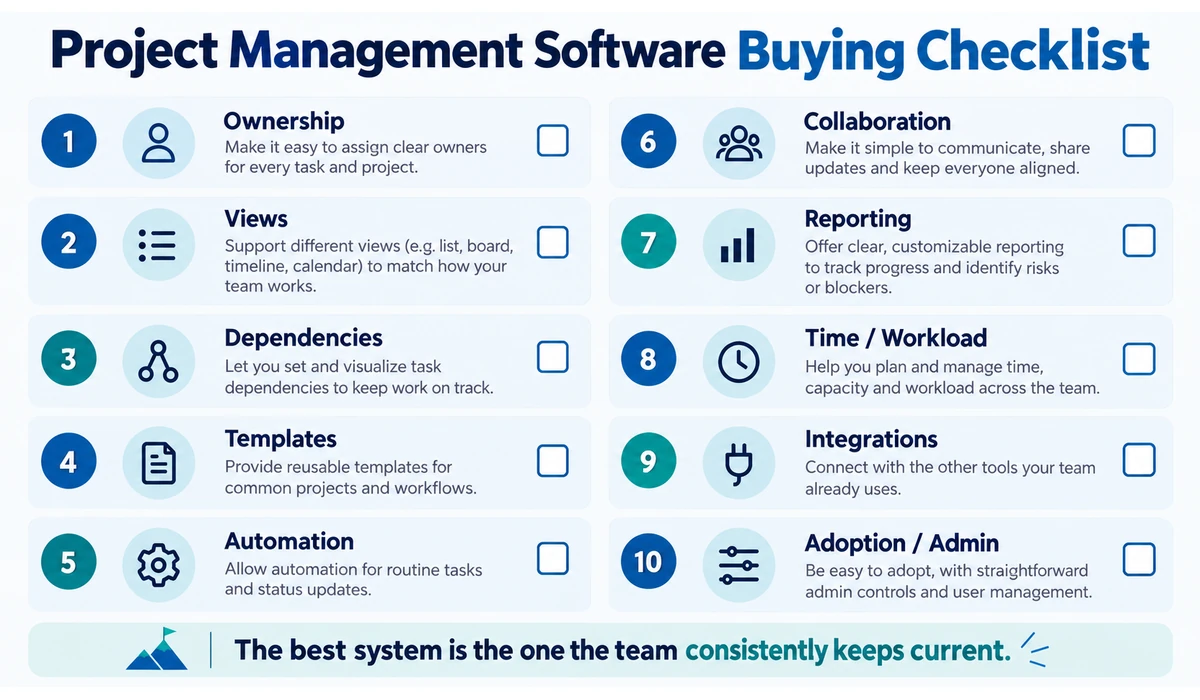
1. Clear Task Ownership
Every important task should have an accountable owner and a realistic due date. Shared responsibility without ownership often means no responsibility.
2. Views Your Team Will Use
List, Kanban, calendar, timeline and Gantt views serve different purposes. Do not pay for advanced views if the team only uses a board.
3. Dependencies and Milestones
Projects with handoffs benefit from dependencies and milestone tracking so delays become visible before the final deadline.
4. Recurring Work and Templates
Templates reduce setup time and make repeated processes—onboarding, campaigns, month-end or content production—more consistent.
5. Automation
Useful automations assign work, update fields, create recurring tasks or notify stakeholders. Start with repetitive rules that have a clear business purpose.
6. Collaboration
Comments, attachments, mentions, approvals and guest access can keep project context attached to the work instead of scattered across chat and email.
7. Reporting
Small teams usually need a few useful views: overdue work, project status, workload and milestone progress. Complex executive dashboards are not always necessary.
8. Time and Workload
Agencies and service teams may need time tracking and capacity planning; product or internal teams may care less about billable time.
9. Integrations
Check the tools the team already relies on—Google Workspace, Microsoft 365, Slack, CRM, cloud storage and development tools.
10. Administration and Adoption
A system that requires constant maintenance may be wrong for a small team. Evaluate how quickly a new employee can understand where work lives and what to update.
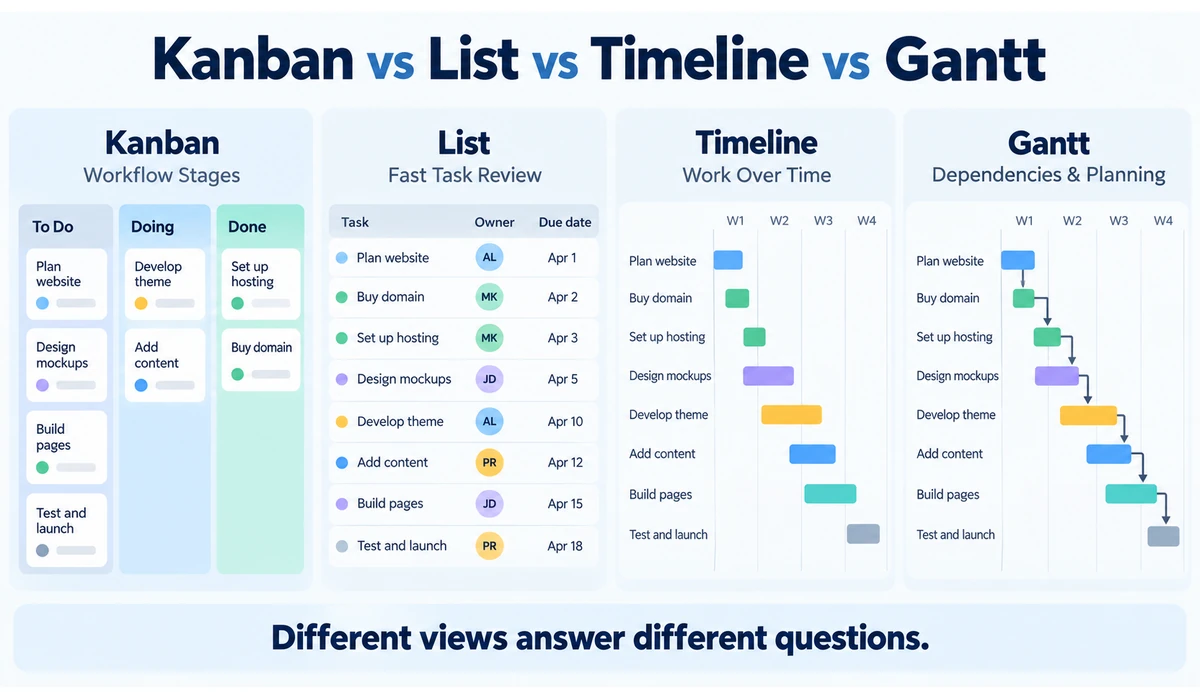
Kanban vs List vs Timeline vs Gantt
| View | Best For | Watch Out For |
|---|---|---|
| Kanban board | Workflow stages and visual status | Can hide dates/dependencies |
| List | Fast task review and filtering | Less visual flow |
| Calendar | Deadlines and scheduled content | Not ideal for complex dependencies |
| Timeline | Sequencing work over time | Needs accurate dates |
| Gantt | Dependencies and project planning | Can be excessive for simple work |
Project Management Software vs Team Chat
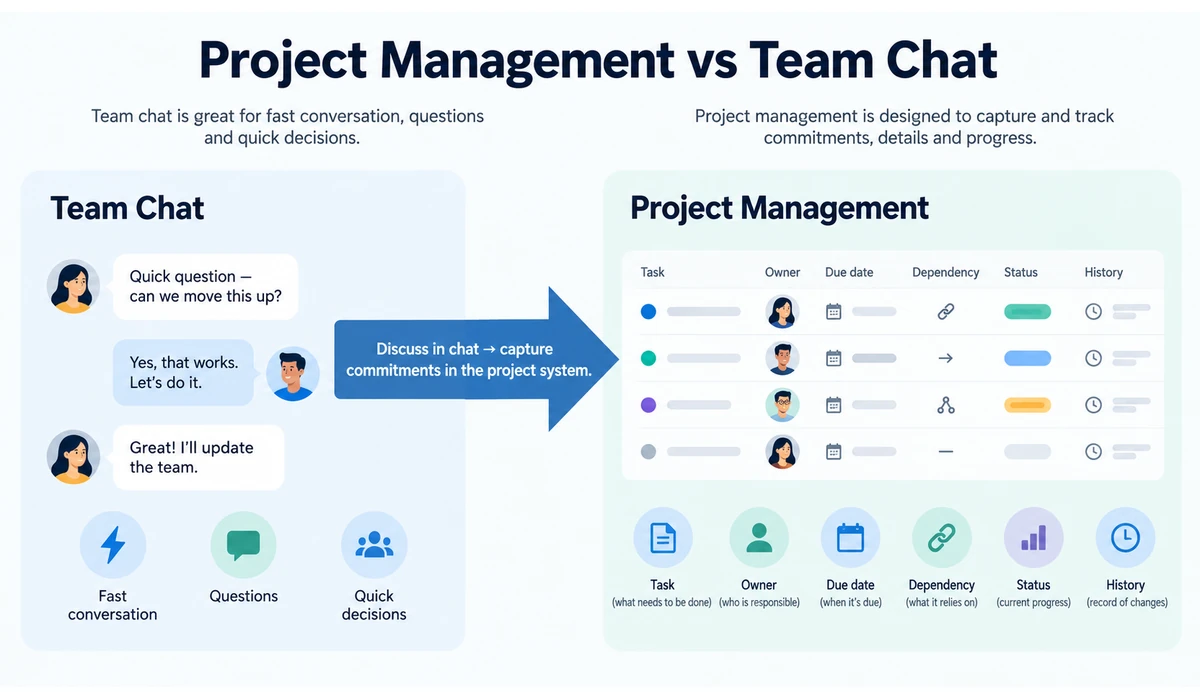
Chat tools are useful for fast conversation, but they are poor long-term systems of record for project commitments. Important decisions and tasks can disappear in a busy channel.
A practical pattern is to discuss quickly in chat, then capture the actual task, owner, due date and decision in the project-management system. The project tool should answer what is happening without requiring someone to search through messages.
Project Management Software vs Notion-Style Workspace
Dedicated project-management tools usually provide stronger built-in task ownership, dependencies, workflow automation and reporting. Flexible workspace tools such as Notion combine documentation and databases, allowing teams to design their own project system.
The right approach depends on whether the team values predefined project controls or prefers to build a workspace around its own documentation and data model.
How to Set Up Project Management Software for a Small Team
-
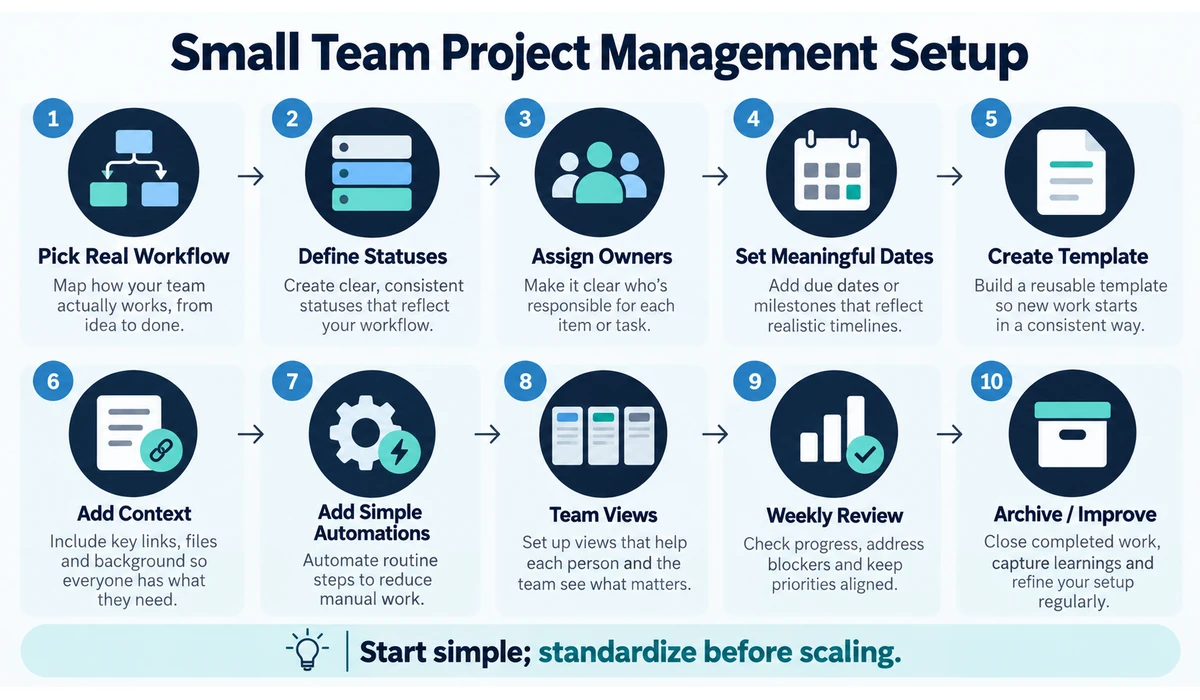
- Choose one or two real workflows to implement first instead of migrating everything.
- Define a small set of statuses that everyone understands.
- Give each task one accountable owner.
- Use due dates only when they carry real meaning.
- Create templates for repeatable projects and requests.
- Keep project briefs, decisions and relevant files attached to the work.
- Add only the automations that remove obvious repetitive steps.
- Create one simple view for managers and one practical daily view for contributors.
- Review overdue and blocked work at a consistent team cadence.
- Archive obsolete projects and remove unused fields so the workspace stays understandable.
AI in Project Management: Where It Helps
AI features can summarize project activity, draft status updates, answer questions about work, classify requests and automate routine steps. Asana’s current 2026 platform, for example, includes AI-powered workflows and AI teammates alongside its core project-management features. ClickUp also exposes AI-driven summaries and progress-oriented cards in its feature set.
These tools are most useful when project data is already structured. If tasks have no owners, deadlines are unreliable and status fields are ignored, an AI summary will simply summarize poor data.
Small teams should first establish a reliable operating rhythm, then use AI to reduce administrative work.
Common Project Management Mistakes Small Teams Make
-
- Creating too many statuses and custom fields.
- Using the tool as a dumping ground instead of assigning clear owners.
- Tracking the same task independently in multiple systems.
- Putting every conversation into tasks and making the system noisy.
- Adding automations before the workflow is stable.
- Building dashboards no one uses.
- Leaving completed or abandoned projects active forever.
- Choosing software based on feature count rather than the team’s actual work.
Frequently Asked Questions
What is the easiest project management software for a small team?
Trello is often a straightforward starting point because its board-and-card structure is easy to understand. Asana and other platforms can be better when a team needs more structured task ownership, dependencies, reporting or workflow controls. The easiest tool is ultimately the one the team can adopt and maintain consistently.
What is the best project management software for a small business?
There is no single best option for every small business. Asana and ClickUp can suit teams that need structured or customizable workflows, Trello can work well for simple visual task management, Notion can combine projects with documentation, and Teamwork.com can suit agencies and client-service businesses.
Should a small team use project management software or spreadsheets?
Project management software is generally more useful when a team needs shared task ownership, deadlines, dependencies, recurring work, notifications or project history. A spreadsheet may be sufficient for a small and simple workflow, but it can become harder to maintain as projects and collaborators increase.
What is the best project management software for a small team?
The answer depends on workflow. Asana suits structured cross-functional work; ClickUp suits teams wanting extensive customization; Trello is strong for simple Kanban; Notion works well when documentation and projects overlap; Teamwork.com is oriented toward client-service work.
Is Trello enough for a small team?
Yes, when the workflow is primarily board-based and does not require complex dependencies, portfolio reporting or detailed resource planning.
Is Asana good for small teams?
Yes. Asana supports core tasks and projects across its plans and offers list, board, calendar, timeline/Gantt and other features depending on plan. Small teams should verify current plan limits before choosing.
Should a small team use ClickUp or Asana?
ClickUp generally offers a highly configurable workspace, while Asana emphasizes structured work coordination and clear project/task relationships. Build one real workflow in both before deciding.
Can Notion replace project management software?
For many small teams, yes—especially when work is lightweight and documentation is central. Teams needing advanced dependencies, workload planning or standardized reporting may prefer a dedicated project-management platform.
Do we need project management software if we use Slack or Teams?
Chat helps communication but does not reliably replace structured tasks, owners, due dates and project history. The two categories work best when chat conversations feed clear actions into the project system.
How many project-management tools should a small team use?
Usually one primary system of record is easier to maintain. Specialized engineering or client tools may coexist, but duplicate task tracking should be minimized.
Final Thoughts
The best project management software for small teams is the tool that makes ownership, deadlines and blockers easier to see without adding more administration than the work itself.
Asana is a strong structured all-rounder; ClickUp offers broad customization; monday work management is highly visual and flexible; Trello keeps Kanban simple; Notion blends projects with knowledge; Teamwork.com targets client-service delivery; and Microsoft Planner fits naturally inside Microsoft 365.
Before subscribing, recreate one real project in two or three shortlisted platforms. Add the actual tasks, owners, dependencies, recurring work and reporting your team needs.
Choose the simplest system that supports the team’s real complexity. You can add automation and AI later; clear ownership and consistent usage should come first.