Customer Support Metrics: Speed, Quality, and Workload

Customer support metrics are measurable indicators used to evaluate how effectively a support team responds to requests, resolves issues, maintains service quality, and manages workload. Important metrics include first reply time, resolution time, customer satisfaction, ticket reopen rate, and backlog age. Tracking these together helps teams identify service problems without relying on misleading individual numbers.
This guide uses Zendesk’s metric definitions as an example and does not supply industry benchmarks. Check your helpdesk’s exact field definitions, business-hours settings, and reporting filters before comparing periods or teams.
Key Takeaways
- Measure response speed: Track first reply time and resolution time using clearly defined reporting clocks.
- Evaluate service quality: Review customer satisfaction, repeat contacts, reopened tickets, and quality assessments.
- Monitor workload: Track ticket volume, backlog age, reassignment, and team capacity.
- Compare fairly: Account for issue complexity, working hours, support channels, and ticket priority.
- Turn metrics into improvements: Identify process problems, test changes, and monitor their effects on speed and quality.
Which customer support metrics describe speed?
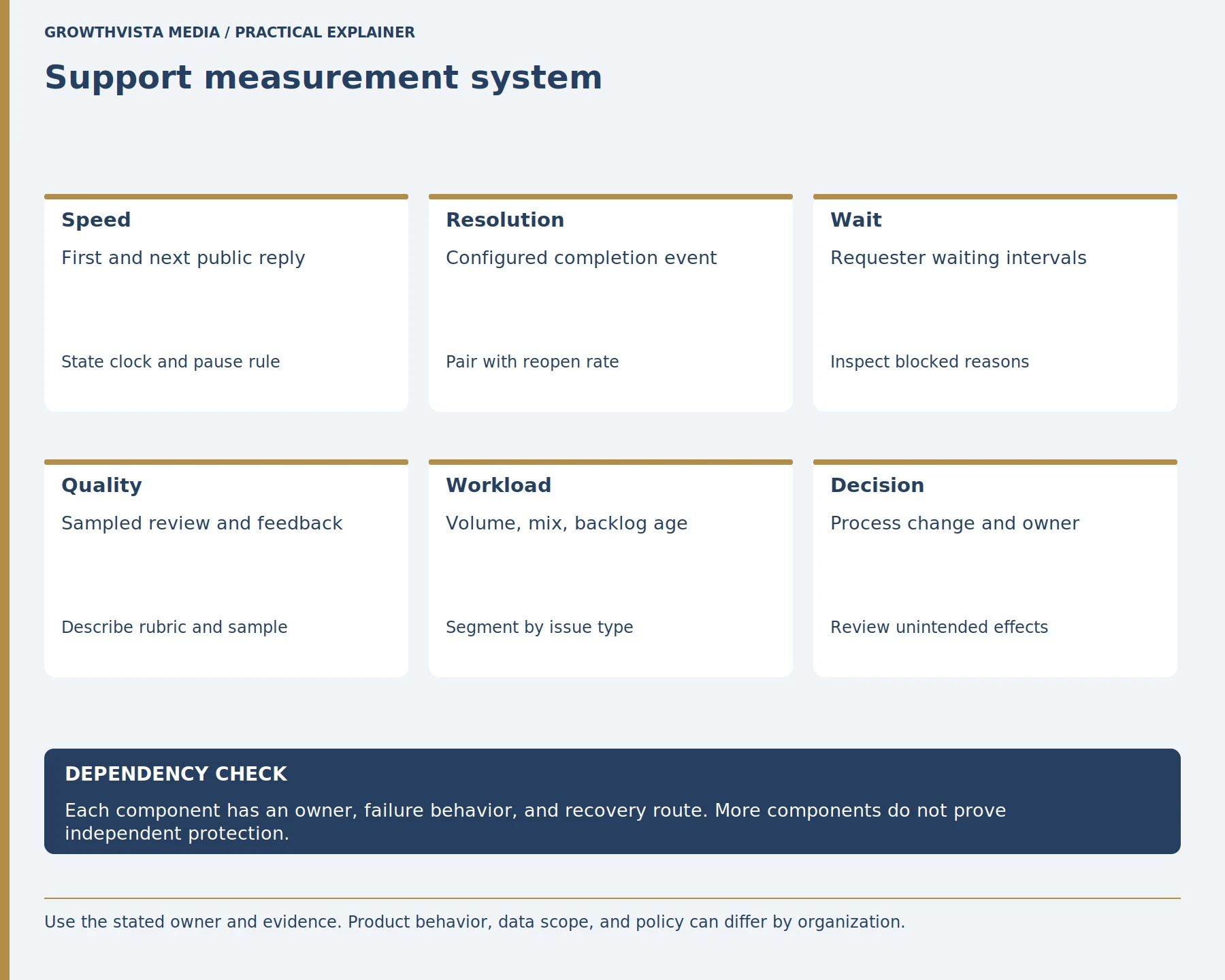
Customer support speed metrics measure how quickly a team responds to requests and progresses toward resolution. Common examples include first reply time, next reply time, requester wait time, and total resolution time. Each metric uses specific start and end events, so teams must document whether the calculation follows calendar hours, business hours, or configured pause rules.
Common time measures include first reply, next reply, requester wait, and total resolution time, but vendors define their clocks differently. Zendesk lists several distinct support metrics and attributes, including first reply and total resolution time. Zendesk: Metrics and attributes for Support State whether the measure uses calendar hours or business hours and whether pending time pauses.
Report the distribution or meaningful percentiles when averages hide long waits, and show the time period and ticket population. Do not compare numbers across tools or teams until definitions match. A faster first reply can be a useful signal, but it does not prove the response answered the question.

What Are the Most Important Customer Support Metrics?
Customer support teams commonly track response speed, resolution efficiency, customer satisfaction, repeat work, and workload. The most useful metrics depend on the organization’s service goals and support model. Each metric should have a documented definition and be interpreted alongside related indicators rather than used as an isolated performance score.
| Metric | What it measures | Important limitation |
|---|---|---|
| First reply time | Time until the first qualifying response | Doesn’t prove resolution |
| Resolution time | Time until a defined resolved event | Depends on workflow and clock |
| Customer satisfaction (CSAT) | Feedback from responding customers | Survey response may be selective |
| Ticket reopen rate | Share of eligible tickets reopened | A reopen may concern a new issue |
| Repeat contact rate | Customers contacting again under a defined rule | Requires consistent issue matching |
| Backlog age | Age of unresolved tickets | Must consider priority and status |
| Ticket volume | Number of incoming requests | Doesn’t reflect complexity alone |
| Quality review score | Performance against a review rubric | Depends on sampling and consistency |
Why should first reply and resolution be read separately?
Customer support speed metrics measure how quickly a team responds to requests and progresses toward resolution. Common examples include first reply time, next reply time, requester wait time, and total resolution time. Each metric uses specific start and end events, so teams must document whether the calculation follows calendar hours, business hours, or configured pause rules.
Zendesk documents SLA policies that can set response and resolution targets and provides specific metric definitions. Zendesk: Define SLA policies Make the policy and report clocks explicit. Review tickets that were closed quickly but reopened, as well as tickets with a fast acknowledgement and a long unresolved wait.
| Signal | What it describes | Pair it with |
|---|---|---|
| First public reply | Initial response under a defined clock | Resolution and customer feedback |
| Total resolution | Time to a configured end event | Reopen and issue complexity |
| Requester wait | Customer waiting intervals | Pending reason and ownership |
| Backlog age | Open work waiting over time | Priority and blocked status |
| Quality review | Sampled adherence to a rubric | Repeat contacts and case mix |
How can quality and repeat work be represented?
Customer support quality can be evaluated through customer satisfaction feedback, ticket reopen rates, repeat contacts, resolution outcomes, and structured quality reviews. Each measure captures a different aspect of service and has limitations. Teams should combine these indicators with representative ticket samples rather than assuming one score fully reflects customer experience or resolution accuracy.
Pair the metric with sample records and a stable definition. Zendesk’s reporting guidance discusses support metrics and analysis; exact datasets depend on the product configuration. Zendesk: About SLA policies Do not collapse quality into a single score without explaining its components and review method.
What does backlog age reveal?
Ticket backlog age measures how long unresolved support requests have remained open or waiting under a defined reporting rule. It helps identify delayed work, potential service risks, and tickets requiring attention. Backlog age should be interpreted alongside priority, issue complexity, ticket status, and dependencies because older tickets are not automatically the most urgent.
Identify the owner for cases approaching the organization’s approved targets. Review blocked tickets separately from work awaiting an agent action. Do not set a universal threshold from a benchmark that may use a different workload or clock.
How should workload and staffing be considered?
Customer support workload should be evaluated using incoming ticket volume, resolved requests, active cases, backlog, reassignment patterns, and available staffing capacity. Teams should also consider issue complexity, communication channels, and seasonal demand. Comparing workload alongside service speed and quality helps identify capacity constraints without reducing employee performance to a single number.
Use capacity planning as a conversation with the team, not a mechanical ranking of individuals. Check whether automation, self-service, or a policy change shifts effort to another queue. Protect customer and employee privacy when reporting at small group sizes.
How can teams compare performance fairly?
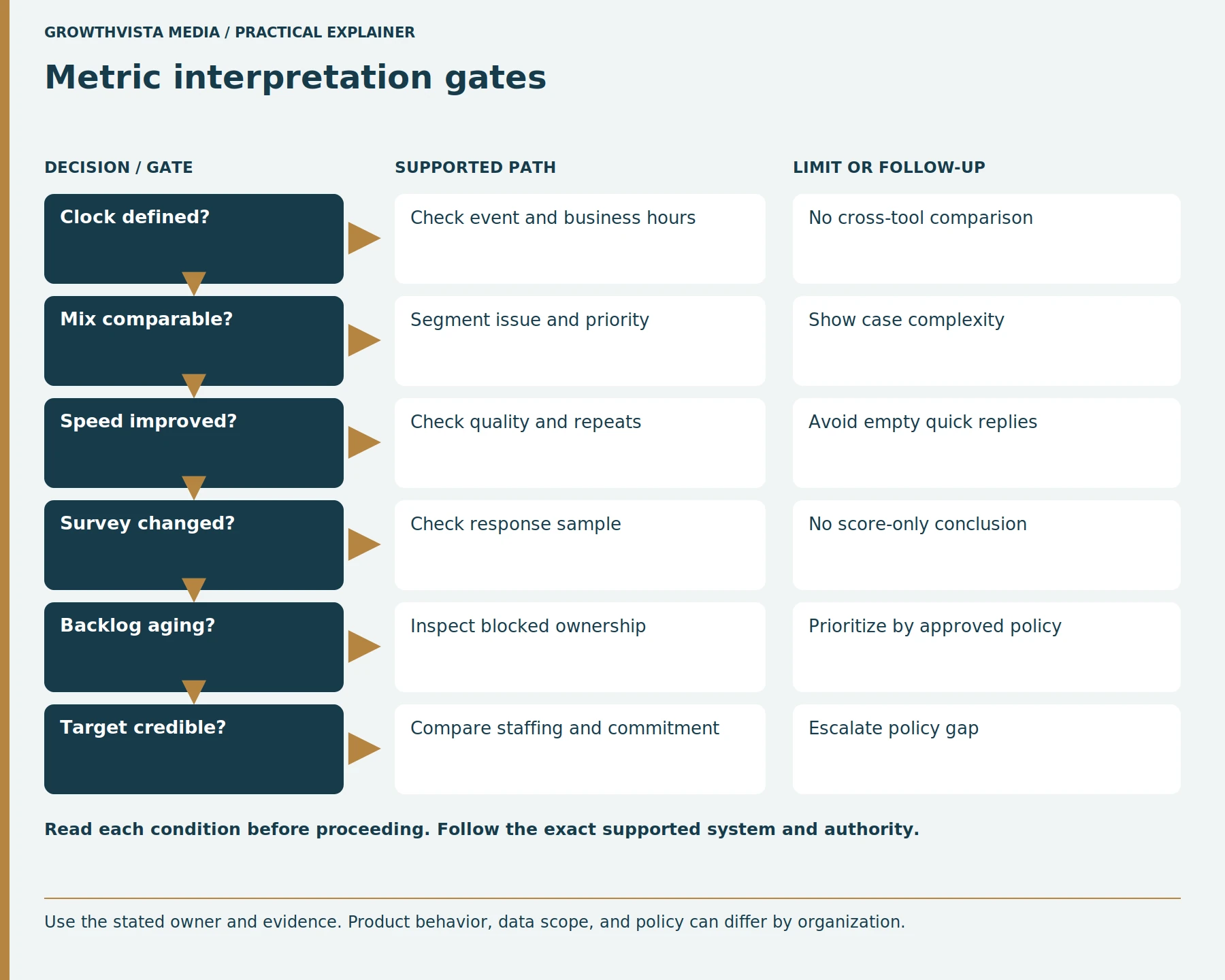
Customer support performance comparisons should use consistent metric definitions, reporting periods, business-hour settings, ticket categories, and exclusion rules. Teams handling different issue types or complexity levels should not be judged solely by raw averages. Segmenting results and reviewing representative cases provides a more meaningful comparison of service outcomes and operational challenges.
If one group handles escalations and another handles routine requests, a raw average is not a fair comparison. Stratify by case type or examine representative examples. Zendesk describes SLA measures and reporting features that can support configured analysis, but the organization must define what counts as a meaningful result. Zendesk: Analyze metrics that matter
Example: Why Faster Replies Don’t Always Mean Better Support
Consider two support teams reviewing their monthly performance.
| Measure | Team A | Team B |
|---|---|---|
| Average first reply time | 10 minutes | 25 minutes |
| Average resolution time | 18 hours | 12 hours |
| Ticket reopen rate | 15% | 5% |
| Tickets handled | 500 | 500 |
These numbers are illustrative, not industry benchmarks or measured results.
Team A replies faster, but Team B resolves tickets sooner and has fewer reopened cases. This doesn’t automatically make Team B better: the teams may handle different issue types, and the measurements may have different limitations.
The example demonstrates why customer support metrics should be evaluated together rather than ranked by first reply time alone.
How should a service target be designed?
Customer support service targets should reflect customer commitments, issue priority, staffing coverage, and realistic operational capacity. Each target should define the qualifying event, measurement clock, business hours, pause conditions, and escalation process. Clear service-level agreement (SLA) rules help teams monitor performance while avoiding unrealistic or misleading response and resolution promises.
Set targets around customer commitments, staffing coverage, issue risk, and the service the organization can actually provide. Specify the clock, pause rules, priority, and event that starts or satisfies the target. Zendesk describes SLA policies as defined response and resolution targets. Zendesk: Define SLA policies A target is an operational commitment, not an industry promise.
Monitor breaches with enough lead time to act. Review whether the target encourages short acknowledgements without useful answers or unnecessary ticket closure. If the target changes, explain it to staff and customers where required.
How can a metric drive a useful improvement?
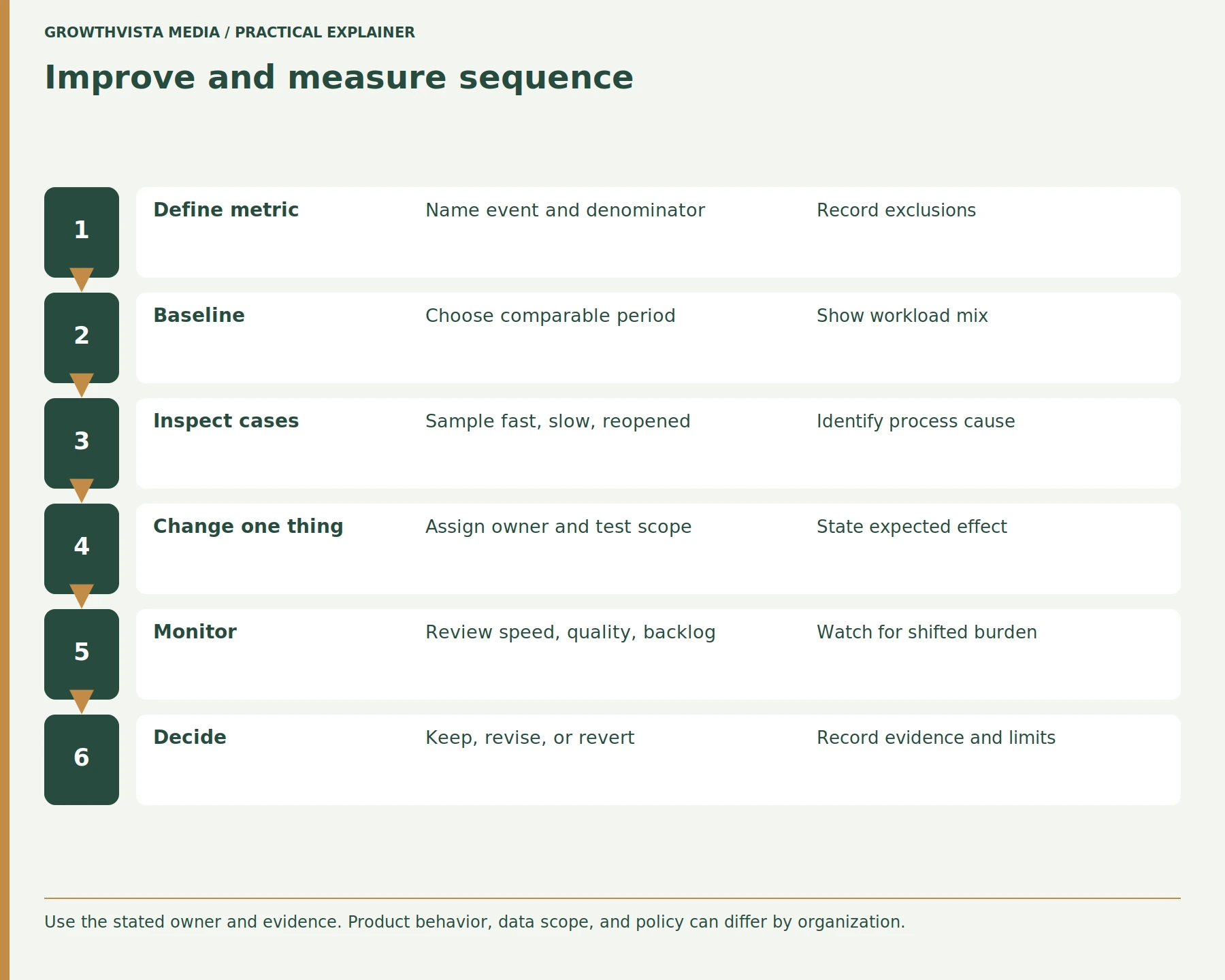
Customer support metrics drive improvement when teams use them to identify a specific problem, investigate its cause, and test a measurable process change. For example, slow resolution may result from incomplete ticket information or unclear ownership. After making an adjustment, teams should monitor response speed, resolution quality, repeat contacts, and workload together.
Review speed, quality, repeat work, and workload together after the change. Keep the interpretation and caveats beside the chart. Zendesk’s guidance on analyzing support metrics emphasizes looking at trends and taking action; adapt its product-specific advice to your own system. Zendesk: Report on first reply time
What Should a Customer Support Metrics Review Checklist Include?
A customer support metrics review should verify that reporting definitions are consistent, service targets are clear, and comparisons account for ticket complexity and workload. Teams should examine response speed, resolution quality, repeat contacts, and backlog together. Any proposed improvement should have a responsible owner and measurable follow-up criteria.
Customer Support Metrics Checklist
- Define each metric and its purpose.
- Confirm start and end events.
- Check business-hour and calendar-hour settings.
- Document exclusions and reporting filters.
- Review first reply and resolution times.
- Examine customer satisfaction and quality reviews.
- Check reopened tickets and repeat contacts.
- Monitor backlog age and priority.
- Compare workload and available staffing.
- Segment by issue type and complexity.
- Investigate unusual trends using sample tickets.
- Assign an owner to each improvement.
- Review results after implementing changes.
Frequently Asked Questions
Does a Fast First Reply Mean the Customer’s Issue Is Solved?
No. First reply time measures how quickly a customer receives an initial qualifying response under the helpdesk’s configured rules. It does not show whether the answer was correct or the issue was resolved. Teams should review resolution time, repeat contacts, reopened tickets, and customer feedback alongside first reply performance.
Should Average Resolution Time Be Used Alone?
Average resolution time should not be used as the only measure of support performance. It can hide unusually long cases and differences in issue complexity. Teams should examine resolution-time distributions, backlog age, reopened tickets, customer feedback, and relevant workload information to understand whether faster resolution reflects meaningful service improvements.
Why Can Two Helpdesks Report Different First Reply Times?
Two helpdesks may calculate first reply time differently because of business-hour calendars, qualifying response events, ticket exclusions, automation settings, or reporting filters. Their customer populations and ticket types may also differ. Before comparing results, confirm that both systems use equivalent definitions and measurement periods.
Are Customer Satisfaction Survey Results Representative of Every Customer?
Not necessarily. Customer satisfaction surveys reflect the people who respond, and their experiences may differ from those who do not. Results can also depend on survey timing, question wording, and response rates. Teams should interpret satisfaction scores alongside ticket samples, complaints, repeat contacts, and other available service indicators.
How Should Teams Use SLA Targets?
Teams should use service-level agreement targets to monitor response and resolution commitments under clearly defined conditions. Each SLA should specify applicable tickets, measurement clocks, operating hours, and escalation procedures. Targets should reflect approved customer commitments and available capacity rather than arbitrary benchmarks that may not suit the organization.
Can Customer Support Metrics Fairly Rank Individual Agents?
A single customer support metric rarely provides a fair basis for ranking individual agents. Employees may handle different case types, workloads, escalation responsibilities, or customer situations. Performance reviews should consider service quality, issue complexity, collaboration, and consistently defined measures while avoiding conclusions based on raw speed or ticket volume alone.
What Is the Difference Between First Reply Time and Resolution Time?
First reply time measures the interval between a ticket’s starting event and its first qualifying response. Resolution time measures the interval until a configured resolution event. These metrics represent different stages of customer support and should be reviewed together to identify delays in acknowledgement, investigation, and completion.
Conclusion: Measure Customer Support Performance Beyond Speed
Effective customer support measurement combines response time, resolution quality, repeat contacts, backlog, and workload. Clear metric definitions and fair comparisons help teams identify service problems without drawing misleading conclusions from individual numbers.
Next step: Review your current support dashboard and select one metric that needs investigation. Examine the related tickets, identify a process improvement, and track its effect on both service speed and quality.
Sources and further reading
Official documentation supports the technical guidance. Examples and worksheets are editorial methods, not hands-on product benchmarks. Reviewed October 2026.
- Zendesk: Metrics and attributes for Support
- Zendesk: Define SLA policies
- Zendesk: About SLA policies
- Zendesk: Analyze metrics that matter
- Zendesk: Report on first reply time