Customer Support Ticket Routing: Avoid Costly Assignment Mistakes

Customer support ticket routing is the process of directing incoming support requests to the appropriate agent, team, or queue based on issue type, priority, required skills, and available resources. Effective routing uses clear classification rules, accountable ownership, and escalation paths to reduce misassigned tickets and help customers reach someone qualified to resolve their issue.
This guide treats routing as an operating design, not a product-specific setup recipe. Zendesk documentation describes views, triggers, and routing options as configurable parts of its workflow. Check your platform’s current behavior, permissions, and plan before applying any example.
Key Takeaways
- Classify tickets accurately: Use clear issue categories, customer context, and relevant intake fields.
- Separate priority from topic: Determine urgency using impact and approved service policies.
- Match tickets to qualified agents: Route requests according to skills, permissions, and availability.
- Provide a human fallback: Keep uncertain or unassigned tickets visible in an owned triage queue.
- Test and monitor routing rules: Check automation order, exceptions, reassignment patterns, and escalation behavior.
What should customer support ticket routing use?
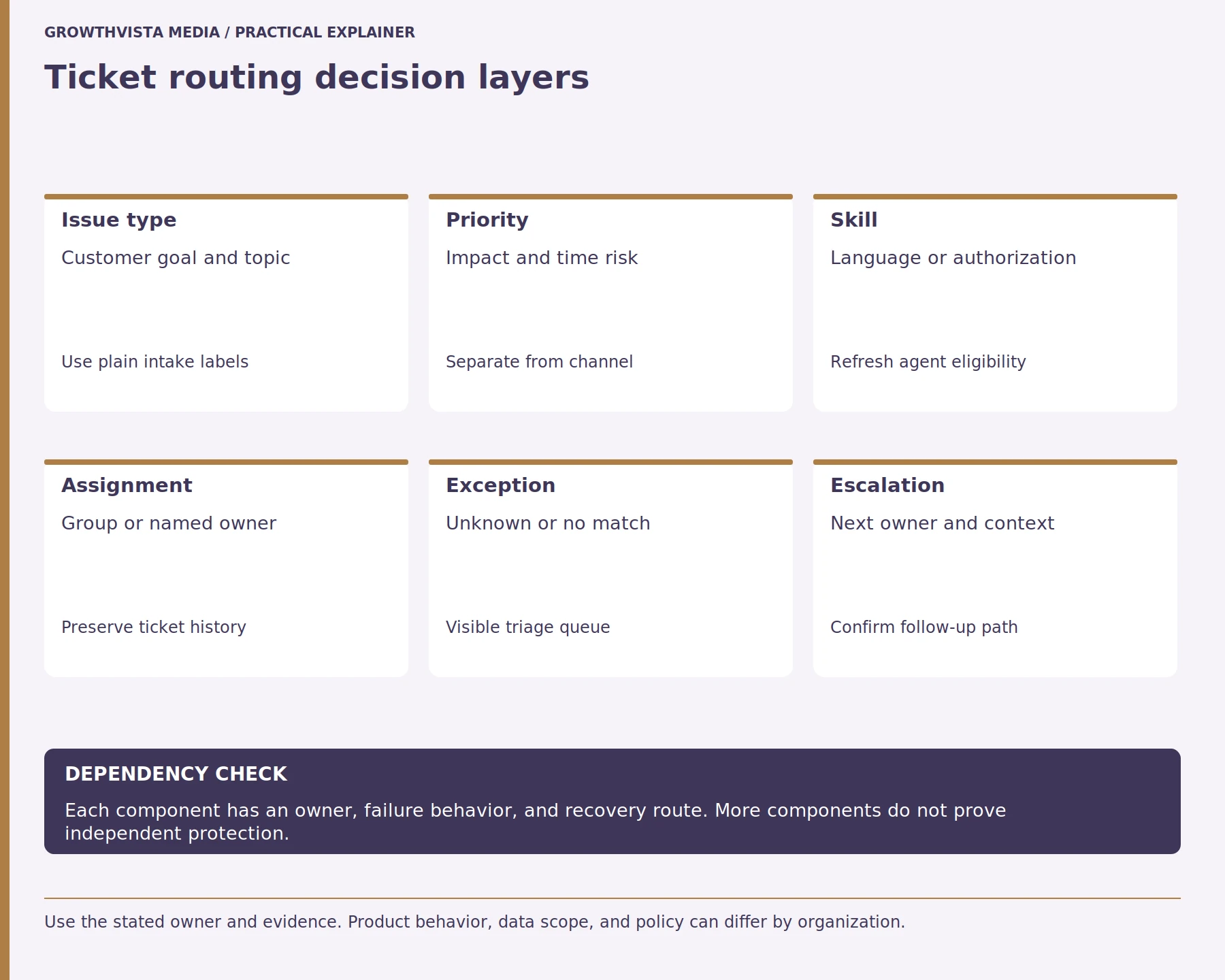
Customer support ticket routing should use reliable information such as issue type, product, language, verified urgency, required skills, and agent availability. Routing rules should distinguish customer-provided details from confirmed account or incident information. When the system cannot confidently identify an appropriate destination, the request should move to a monitored human triage queue.
Zendesk describes routing options for incoming tickets and the role standard views and triggers can play in a basic framework. Zendesk: Routing options for incoming tickets Your own categories should reflect actual staffing and authority. If a required field is unknown, route to a safe review queue rather than guessing.

What Are the Main Types of Customer Support Ticket Routing?
ustomer support ticket routing methods determine how incoming requests are assigned to agents or teams. Common approaches include rule-based, skill-based, priority-based, and availability-based routing. Each method uses different criteria, and support teams may combine them to match requests with qualified staff while maintaining clear ownership and escalation paths.
| Routing method | How it works | Example |
|---|---|---|
| Rule-based | Uses predefined conditions | Billing issue → Billing team |
| Skill-based | Matches required expertise | Technical API issue → API specialist |
| Priority-based | Uses impact and urgency | Critical outage → Escalation queue |
| Availability-based | Considers eligible staff capacity | Available qualified agent |
| Manual triage | Human reviews uncertain cases | Unclear issue → Triage team |
Availability and configuration depend on the support platform.
How should priority be separated from topic?
In customer support ticket routing, topic identifies the type of problem, while priority determines how urgently the request should be handled. Priority should reflect factors such as customer impact, service commitments, and time sensitivity rather than the communication channel alone. Separating these concepts helps teams assign tickets appropriately without treating every request within a category as equally urgent.
Give agents a way to correct a misclassified ticket and record why. Review whether priority changes affect escalation or customer communication. Do not promise a response time unless the organization has approved and can monitor that commitment.
| Condition | Route | Fallback evidence |
|---|---|---|
| Known issue and skill | Qualified product group | Queue owner sees no match |
| Urgent impact per policy | Priority escalation path | Approved notification sent |
| Language requirement | Eligible language queue | Triage if no agent available |
| Sensitive account change | Authorized specialist | Identity review requested |
| Unknown classification | Human triage queue | Unassigned work monitored |
How can skill-based routing be designed?
Skill-based ticket routing assigns support requests to agents or groups with the knowledge, language ability, permissions, or technical expertise needed to address them. Teams should define required skills, maintain current agent eligibility, and provide a fallback when no qualified person is available. Routing rules should also account for coverage and availability.
Zendesk’s messaging routing documentation describes how tickets may remain unassigned when no eligible agent is available and how views can expose them. Zendesk: Route messaging tickets That is a useful design question for any system: who notices the no-match state and when? Test availability and after-hours cases.
What should happen when automatic classification is uncertain?
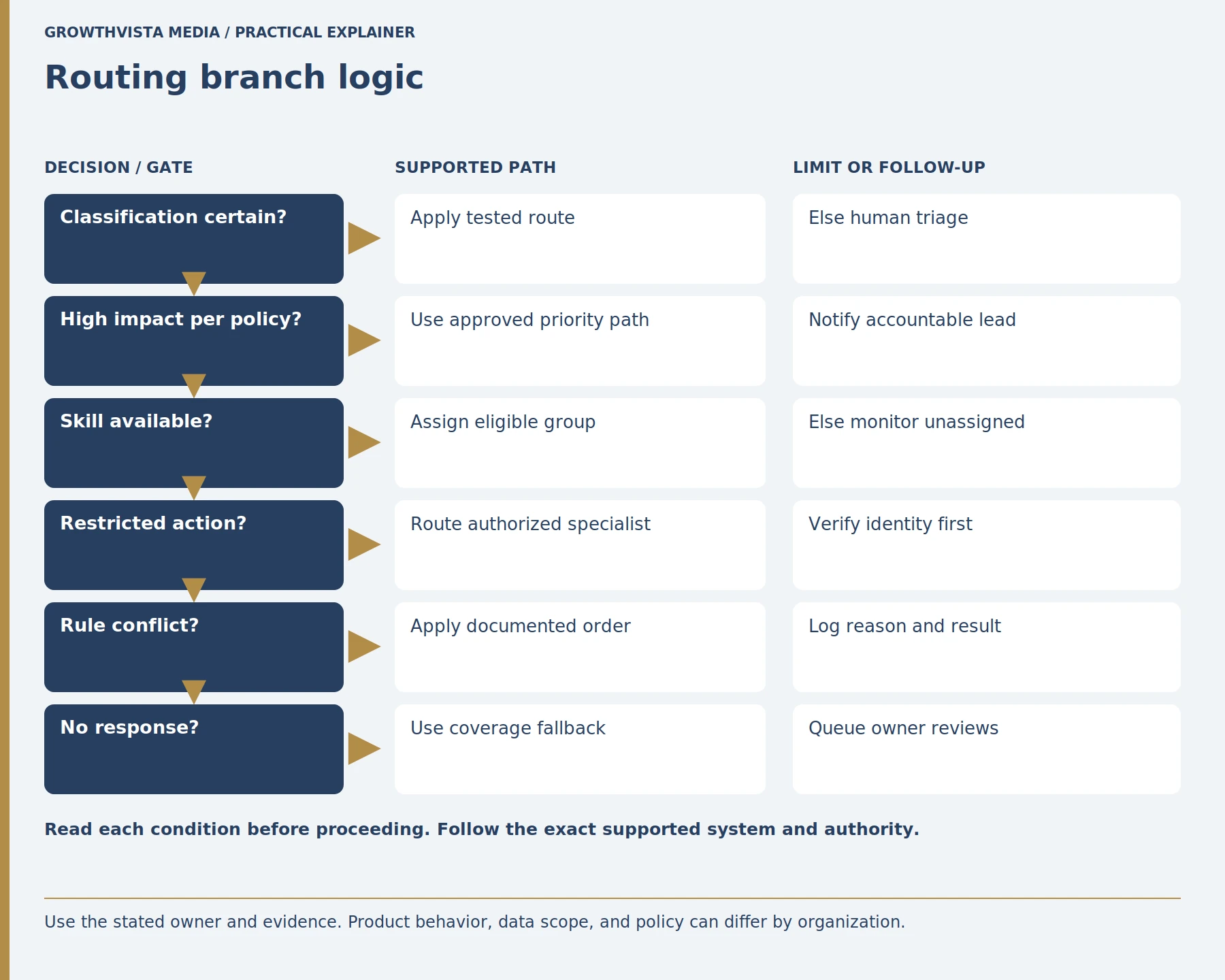
When automatic ticket classification is uncertain, the request should move to a monitored human triage queue rather than being assigned through an unreliable guess. The receiving agent should see the original request, available classification evidence, and routing history. Human review helps prevent repeated misrouting, unnecessary transfers, and delays caused by incorrect automated decisions.
If automation uses keywords or machine classification, test common variations, typos, multilingual messages, and quoted email history. Keep an audit record and review misroutes. A model confidence value is not proof that a customer’s issue was understood.
How should routing rules and trigger order be managed?
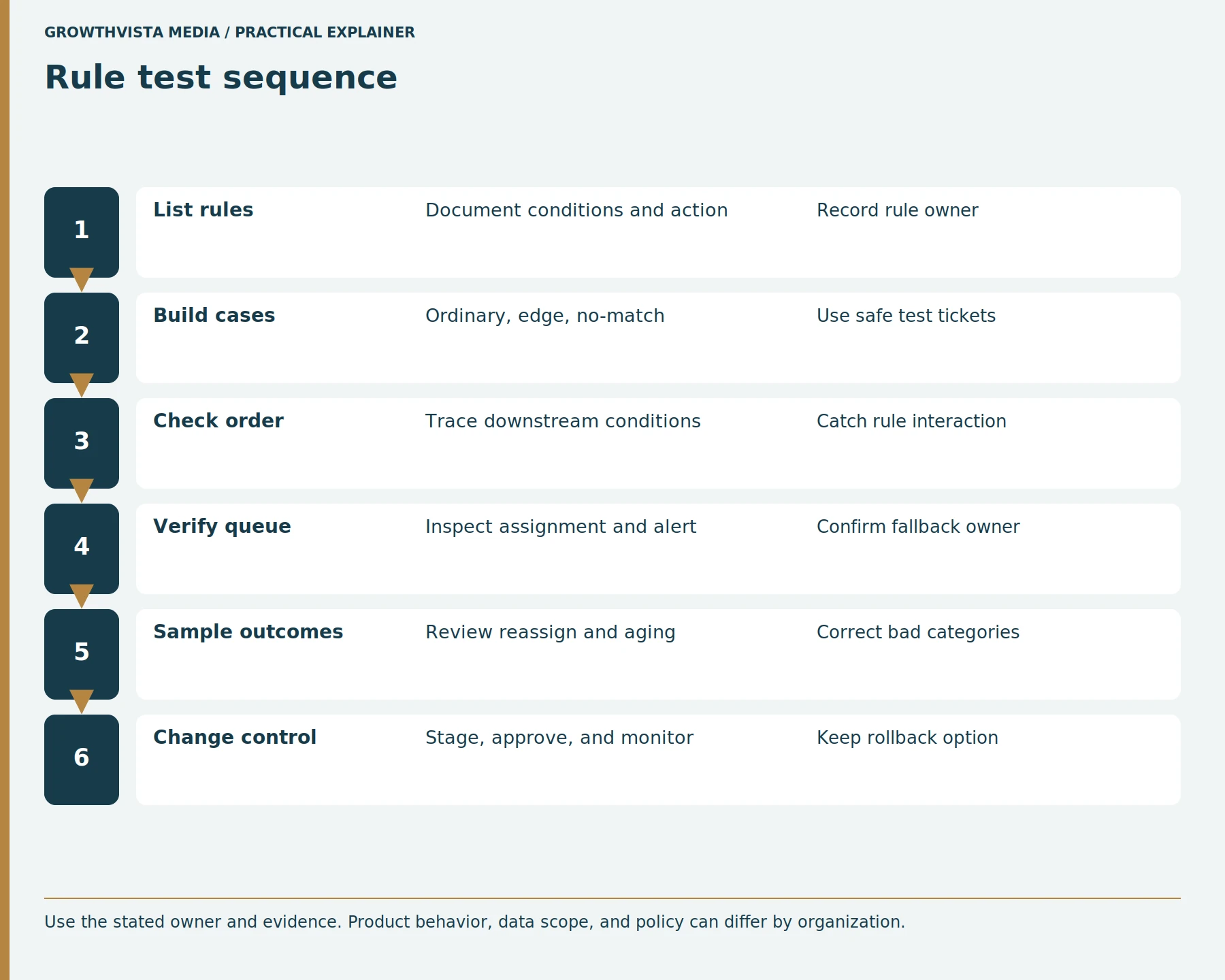
Ticket routing rules should have documented conditions, actions, owners, and execution priorities. Administrators must test how one rule’s changes affect subsequent rules, especially when triggers update ticket fields or assignments. Using representative test cases helps identify conflicting automation, unexpected notifications, and incorrect routing before rules are activated across the support operation.
Test with synthetic or internal tickets that cover each branch and an exception. Verify assignment, notification, status, priority, and customer-facing message. Stage changes where supported and keep a rollback path. Do not activate overlapping rules until their precedence is understood.
How can unassigned and aging tickets be surfaced?
Unassigned and aging support tickets should appear in monitored queues or views with clearly assigned owners and review schedules. Teams should identify tickets awaiting assignment, approaching service deadlines, or repeatedly transferred between groups. Fallback coverage is particularly important outside normal working hours, when automation may assign work to unavailable agents.
Set aging rules using actual service commitments and operating hours. Avoid a universal minute threshold without an approved service policy. Review whether the displayed sort order helps the team find risk rather than only the oldest ticket.
How should escalations preserve context?
Support ticket escalations should preserve the customer’s original issue, business impact, attempted solutions, relevant evidence, approvals, and required next action. The receiving team must be able to access the necessary ticket history without asking the customer to repeat information unnecessarily. Clear ownership rules should explain when responsibility transfers and who communicates updates.
Define when the original owner remains responsible and when ownership fully changes. Notify the customer about the next step when appropriate, without promising an unapproved deadline. Track repeated transfers as a workflow signal and investigate category definitions, training, or missing permissions.
How can a routing system be audited?
A customer support ticket routing system should be audited by comparing actual assignments with the intended team, skill, and service outcome. Review misrouted, unassigned, reassigned, reopened, and overdue tickets to identify recurring problems. Document routing-rule changes, verify exceptions, and test whether the workflow still reflects current staffing and support requirements.
Zendesk notes that standard views and triggers can work together in its routing framework. Zendesk: Plan ticket routing and workflows Evaluate the complete workflow rather than a single rule. Keep a change log with test cases and an owner. Remove obsolete rules only after confirming no active process depends on them.
Worked routing example: a customer reports that an account administrator cannot complete a billing change. The intake asks which account, what task failed, and whether the change is time-sensitive under the organization’s policy. A verified permission issue routes to the authorized account team; a suspected identity problem follows the security review path; an unclear case enters staffed triage. Each route retains the customer’s description and attempted steps. If no eligible specialist is available, an owned unassigned queue and a coverage schedule prevent the ticket from disappearing between automation rules.
What Should You Check Before Automating Ticket Routing?
Before automating customer support ticket routing, verify that intake fields, assignment rules, priority criteria, and escalation paths are clearly defined. Test routine requests, high-impact issues, uncertain classifications, and unavailable-agent scenarios. A monitored fallback queue and documented ownership rules help prevent tickets from becoming unassigned or repeatedly transferred.
Ticket Routing Checklist
- Define clear support issue categories.
- Identify required intake fields.
- Separate topic and priority rules.
- Document agent skills and permissions.
- Confirm team availability and coverage.
- Define routing conditions and rule order.
- Create a monitored human triage queue.
- Test uncertain and incomplete requests.
- Verify escalation and notification behavior.
- Check after-hours and unavailable-agent cases.
- Monitor reassignment and aging patterns.
- Record changes and review routing performance.
Frequently Asked Questions
Should the Support Channel Determine Ticket Priority?
The support channel should not automatically determine ticket priority. A request submitted through live chat, email, or a web form may be urgent or routine depending on its impact and service requirements. Teams should use documented urgency criteria, verified context, and approved service commitments to prioritize requests consistently.
What Happens When No Eligible Agent Matches a Ticket?
When no eligible agent matches a support ticket, the system should place it in a visible fallback or human triage queue. A designated owner must monitor that queue and decide whether to reassign, escalate, or wait for qualified coverage. This prevents requests from remaining unnoticed when automated assignment cannot find a suitable recipient.
Can Keyword-Based Routing Replace Human Triage?
Keyword-based routing can automate straightforward, well-defined support requests, but it should not replace human triage for ambiguous or high-risk cases. Customers may use different wording, spelling, or languages to describe the same problem. Teams should test routing accuracy, monitor incorrect assignments, and maintain a human override for uncertain classifications.
Why Should Ticket Routing Trigger Order Be Tested?
Ticket routing trigger order matters because actions performed by one automation rule may change the conditions evaluated by another. This can result in unexpected assignments, repeated notifications, or conflicting ticket updates. Administrators should test the actual platform’s rule behavior using representative scenarios before enabling overlapping automations.
What Should a Support Ticket Escalation Note Contain?
A support ticket escalation note should explain the customer’s issue, its impact, actions already attempted, relevant evidence, and the reason for escalation. It should identify the receiving team, expected next action, and any required approvals. Clear notes help preserve context and reduce unnecessary repetition during transfers.
How Can Customer Support Ticket Misrouting Be Measured?
Ticket misrouting can be measured by reviewing assignments that required correction, repeated transfers, no-match cases, aging tickets, and recurring contact patterns. Teams should define each metric consistently and inspect sample tickets to understand why routing failed. Findings can guide improvements to intake fields, assignment rules, training, and agent coverage.
What Is the Difference Between Ticket Routing and Ticket Escalation?
Ticket routing determines where a support request should initially go based on its topic, priority, required skills, and available agents. Ticket escalation moves a request to a higher authority or more specialized team when additional expertise, approval, or urgency is involved. Both processes require clear ownership and preserved customer context.
Conclusion: Route Support Tickets With Clear Ownership
Effective customer support ticket routing combines accurate classification, appropriate skill matching, transparent priority rules, and reliable escalation processes. Automation can support these decisions, but teams still need monitored queues, human review, and regular audits to prevent requests from being lost or repeatedly reassigned.
Next step: Review your current ticket-routing workflow and test three scenarios: a correctly classified request, an uncertain request, and a ticket with no available qualified agent.
Sources and further reading
Official documentation supports the technical guidance. Examples and worksheets are editorial methods, not hands-on product benchmarks. Reviewed October 2026.
- Zendesk: Routing options for incoming tickets
- Zendesk: Route messaging tickets
- Zendesk: Ticket triggers and notifications
- Zendesk: Plan ticket routing and workflows