Email Segmentation: Smart Strategies to Reach the Right Audience

Email segmentation is the process of dividing an email audience into smaller groups based on relevant attributes, preferences, or behaviors. Effective segmentation uses accurate subscriber data, clear inclusion and exclusion rules, and appropriate permission to send messages. It helps marketers deliver more relevant communications while reducing unnecessary or unwanted emails.
This guide describes a governance and campaign workflow, not legal advice or a promise of deliverability. Email laws and provider requirements vary by location and message type. Check the rules that apply to your audience and the current sending-platform guidance before a campaign.
Key Takeaways
- Define your audience: Identify the communication purpose and subscriber characteristics relevant to the message.
- Use accurate data: Choose appropriate attributes, verify their sources, and review freshness.
- Apply clear segmentation rules: Document inclusion, exclusion, and overlapping-audience conditions.
- Respect subscription preferences: Keep unsubscribe and suppression records authoritative across connected systems.
- Test before sending: Verify audience counts, email content, personalization, links, and unsubscribe behavior.
What makes email segmentation useful?
Email segmentation helps marketers organize subscribers into groups that share relevant preferences, needs, or behaviors. By defining clear audience rules, businesses can send messages that better match recipient expectations. Effective segmentation also supports consistent campaign planning, although its results depend on data accuracy, subscriber permissions, message quality, and measurement methods.
Separate marketing preferences from operational account status. A customer relationship does not automatically establish permission for every promotional message. Google’s sender guidance encourages clear subscription practices and provides requirements for certain bulk messages to Gmail recipients. Google: Learn about bulk email best practices Apply the legal and platform rules relevant to your jurisdictions and message types.

Which attributes should be used to define an audience?
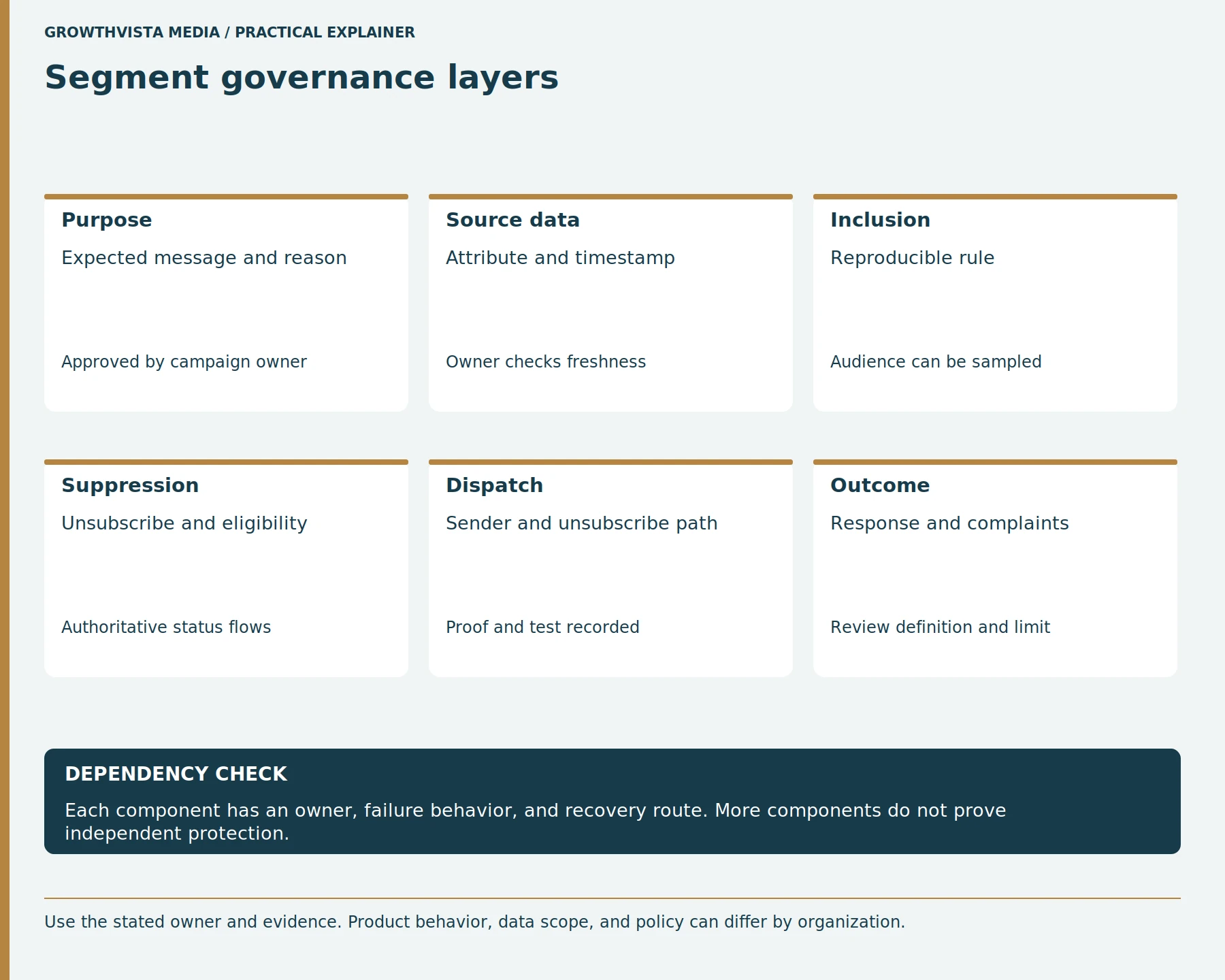
Email segmentation attributes should be accurate, relevant to the communication purpose, and collected or used appropriately. Common examples include explicitly selected interests, geographic regions, product categories, and defined engagement events. Each attribute should have a documented source, update process, and freshness requirement so outdated or inappropriate information does not determine campaign eligibility.
Avoid inferring sensitive traits or using stale fields without review. A segment can be technically precise and still be inappropriate. Explain each field’s source, owner, allowed values, and update path in a data dictionary. Minimize the data used to create and send the campaign.
| Rule element | Example definition | Review question |
|---|---|---|
| Purpose | Monthly guide for selected topic | Is this message expected? |
| Include | Confirmed subscribers selecting topic A | Where and when was it recorded? |
| Exclude | Unsubscribed or suppressed addresses | Which system is authoritative? |
| Freshness | Preference checked in last defined period | Does the source update reliably? |
| Send check | Count, sample, links, opt-out | Did the live send honor exclusions? |
How should inclusion and exclusion rules be written?
Email segmentation rules should clearly identify which subscribers qualify for a campaign and which must be excluded. Inclusion conditions may use confirmed preferences or relevant activity, while exclusions should account for unsubscribed, suppressed, or otherwise ineligible recipients. Document rule precedence, data sources, and how conflicting records are resolved before sending.
Make rules inspectable and save a version or snapshot of the audience when the system supports it. Review the audience estimate and sample records before sending. A saved segment can change as data updates, so record the actual send audience or count needed for an audit.
Email Segmentation Example for an Online Store
Consider an online store sending an email about new flower bouquets.
| Segment element | Example |
|---|---|
| Campaign purpose | Announce new flower bouquets |
| Include | Subscribers who selected flower-product updates |
| Exclude | Unsubscribed or suppressed contacts |
| Data source | Recorded email preferences |
| Send condition | Eligible at the time of sending |
| Success measures | Clicks, conversions, complaints, unsubscribes |
This example illustrates how a campaign can target an audience using documented preferences rather than assumptions.
The example is illustrative, not a tested campaign result.
How do segments differ from static lists?
A dynamic email segment automatically updates its membership according to defined criteria, while a static email list generally contains a fixed or manually managed group of contacts. Dynamic segments suit campaigns that depend on current subscriber information. Static lists can support fixed cohorts, but subscription eligibility and suppression still need to be checked before sending.
Use a dynamic rule when current attributes should control eligibility. Use a snapshot when the campaign or analysis requires a fixed cohort, while maintaining current suppression controls at send time. Do not treat list membership as proof of consent unless the organization has documented that process.
How can a team avoid sending irrelevant or duplicate campaigns?
Teams can reduce irrelevant or duplicate email campaigns by defining each campaign’s purpose, managing audience overlap, setting contact-frequency rules, and coordinating a shared sending calendar. When subscribers qualify for multiple segments, establish message priority and preference rules. Review complaints, unsubscribes, and customer feedback to identify communications that may need adjustment.
Monitor replies, unsubscribes, complaints, and customer-service feedback as signals to review the plan. Do not optimize only for opens, which can be affected by mailbox privacy features. Keep a human review for sensitive or high-impact communications.
What should a pre-send test include?
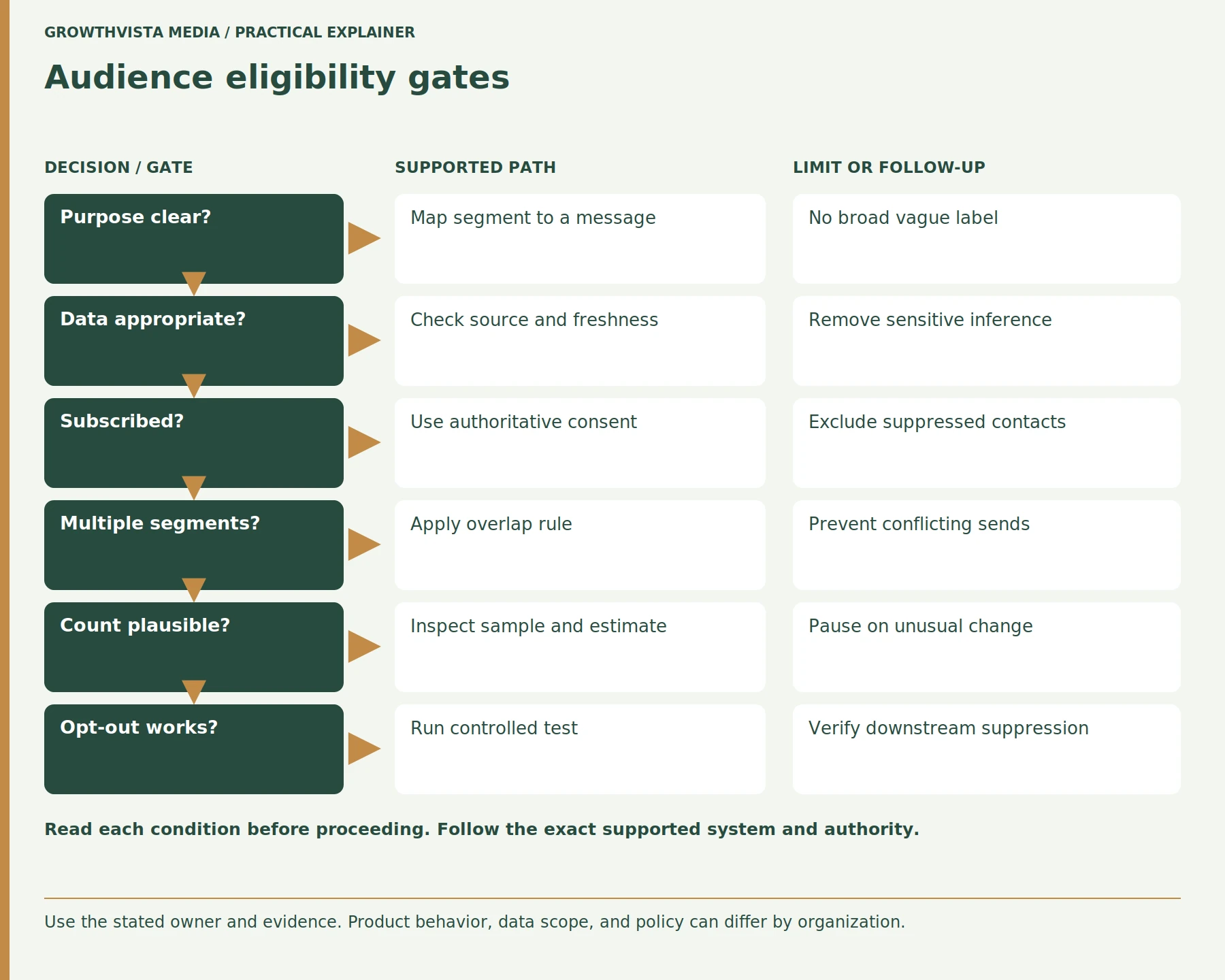
An email segmentation pre-send test should verify recipient eligibility, audience counts, suppression rules, sender identity, personalization, links, mobile rendering, accessibility, and unsubscribe functionality. Teams should inspect sample contacts and send internal proofs before launch. Testing helps identify audience-selection errors and message problems before they affect the full campaign.
Gmail’s sender guidelines distinguish one-click unsubscribe and visible unsubscribe expectations for relevant subscribed or marketing messages. Google: Email sender guidelines Verify the required implementation for the specific message and provider. Do not treat a footer link that has not been tested as a functioning opt-out.
How should consent and preference changes flow through systems?
Email consent and preference changes should flow consistently between the authoritative subscription record, CRM, email marketing platform, and connected tools. Teams need documented rules for opt-ins, unsubscribes, duplicate contacts, and synchronization failures. Testing these updates helps prevent a subscriber from being mistakenly re-added to a promotional audience after opting out.
Test both opt-in and opt-out paths with an internal address. A successful web form submission is not enough if a downstream sync later re-adds the person to a campaign. Investigate integration retries and imports that can overwrite a suppression state. Follow applicable law and company policy.
How can segment performance be reviewed responsibly?
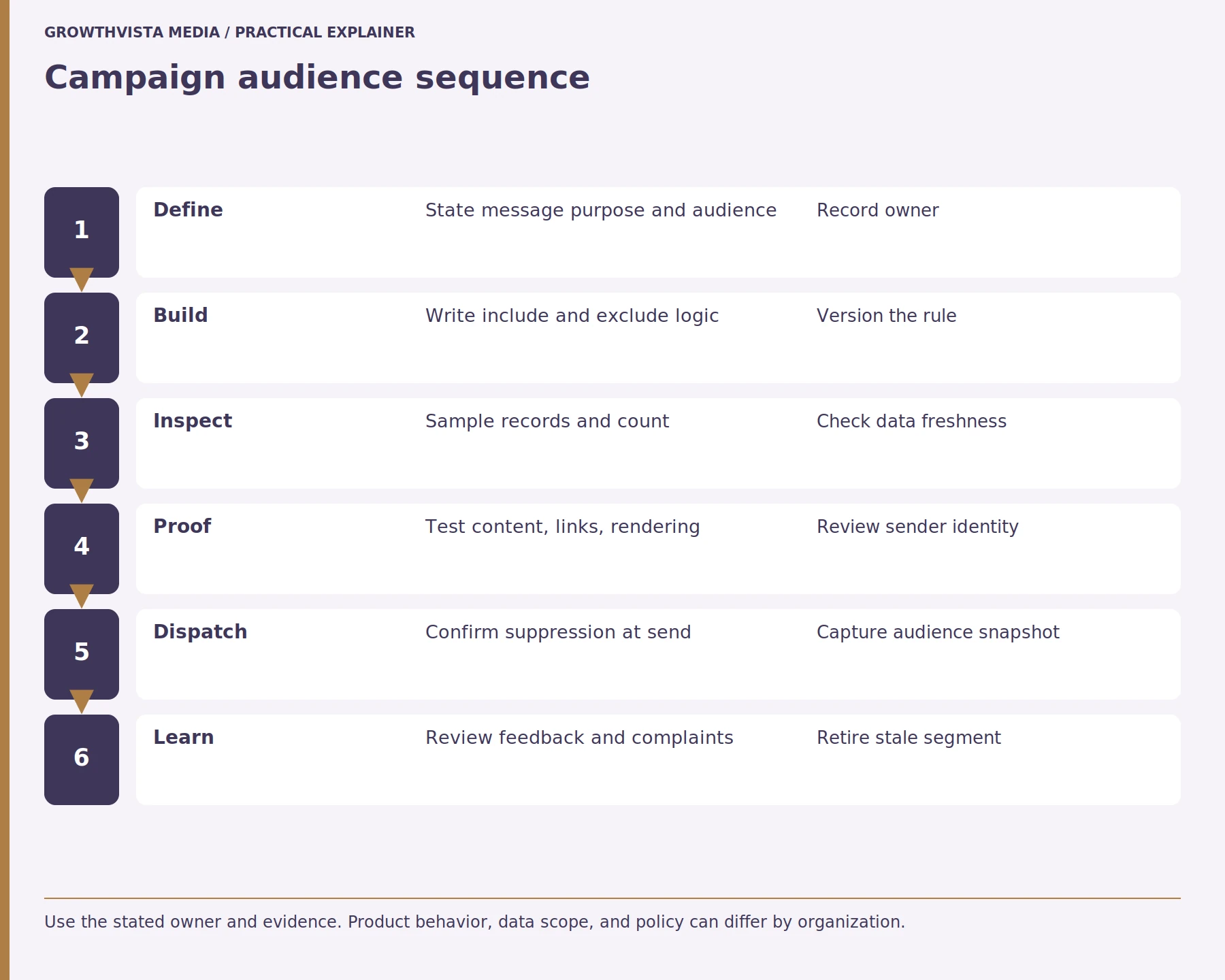
Email segment performance should be evaluated using relevant delivery, complaint, unsubscribe, click, conversion, and customer-outcome measures. Compare audiences using consistent definitions and account for differences in subscriber intent, campaign timing, and measurement limitations. Strong results do not automatically prove segmentation caused the improvement, so controlled testing may be useful for important decisions.
Use a controlled test when it can answer a specific decision, define a minimum practical effect, and preserve eligibility and suppression rules. Keep the audience definition with the results so future readers know who was included. Update or retire a segment when its source fields become unreliable.
What Is an Effective Email Segmentation Checklist?
An email segmentation checklist helps marketers verify that audience selection is relevant, reproducible, and consistent with subscription preferences. Before sending, confirm the campaign purpose, data sources, inclusion and exclusion conditions, audience overlap, and current suppression status. Test the selected audience and email content before approving the campaign.
Email Segmentation Checklist
- Define the campaign purpose.
- Identify the intended subscribers.
- Verify relevant data sources.
- Check attribute accuracy and freshness.
- Document inclusion rules.
- Apply unsubscribe and suppression exclusions.
- Review overlapping audience segments.
- Verify the recipient count.
- Test personalization and fallback values.
- Check email links and mobile rendering.
- Test unsubscribe functionality.
- Record the final audience and approval.
Frequently asked questions
Frequently Asked Questions
Does Buying an Email List Create Subscription Permission?
Buying an email list does not automatically establish permission to send marketing messages. Requirements depend on applicable laws, recipient location, message type, and email service provider policies. Businesses should verify the source of the addresses, applicable consent requirements, and platform restrictions before using purchased contact information for campaigns.
Can a Dynamic Email Segment Change After It Is Saved?
Yes. A dynamic email segment can change when subscriber attributes, preferences, or activities are updated. For example, a subscriber may enter a segment after selecting a topic or leave after changing a preference. Exact behavior depends on the email platform, including when membership is recalculated and how send-time suppression is applied.
Should Unsubscribed Contacts Be Excluded From Every Message?
Unsubscribed contacts should be excluded from promotional messages covered by their opt-out and applicable requirements. Some transactional or operational communications may be governed by different rules. Businesses should distinguish message categories carefully, honor relevant preferences, and follow the applicable legal and email-platform requirements rather than treating every message as identical.
What Is a Good Definition of an Engaged Email Subscriber?
An engaged email subscriber should be defined using a specific, measurable activity and time period. For example, a business might define engagement through a relevant click or other verified interaction within a documented window. The definition should identify its data source, exclusions, and measurement limitations rather than relying on a subjective label.
Are Email Opens a Reliable Measure of Subscriber Attention?
Email opens can provide limited campaign information, but they are not always reliable evidence of human attention. Mailbox privacy protections, image loading, and automated activity can affect open measurements. Marketers should interpret opens alongside more meaningful indicators such as clicks, conversions, replies, complaints, and unsubscribe behavior.
What Should an Email Segmentation Pre-Send Review Verify?
A pre-send review should confirm the campaign purpose, inclusion and exclusion rules, recipient count, current suppression status, sender identity, personalization, links, and email rendering. It should also verify the unsubscribe process and relevant approvals. Testing sample contacts helps identify incorrect audience membership before the campaign reaches the full list.
What Is the Difference Between Email Segmentation and Personalization?
Email segmentation divides subscribers into groups using defined criteria, such as preferences or relevant behaviors. Email personalization adjusts message content for a recipient or audience, such as using a preferred topic or appropriate product recommendation. Segmentation can support personalization, but the two practices serve different purposes and require reliable data.
Sources and further reading
Official documentation supports the technical guidance. Examples and worksheets are editorial methods, not hands-on product benchmarks. Reviewed October 2026.
- Google: Learn about bulk email best practices
- Google: Email sender guidelines
- Google: Email sender guidelines FAQ