Best AI Presentation Makers in 2026: 8 Tools Compared
Editorial Disclosure: GrowthVista Media may receive compensation from qualifying SaaS referrals where an affiliate relationship is available. This does not change the comparison criteria used in this guide.
The best AI presentation makers in 2026 can turn prompts, documents and outlines into structured decks while helping with layouts, visuals, branding and revisions.
Explore more in our AI Tools guides. For primary product information, see the official Gamma and Microsoft PowerPoint websites.
How We Compared the Best AI Presentation Makers
AI presentation tools can now do much more than place bullet points into a template. The stronger platforms can build a deck from a prompt or document, propose structure, generate visuals, apply brand styling and help revise individual slides after the first draft.
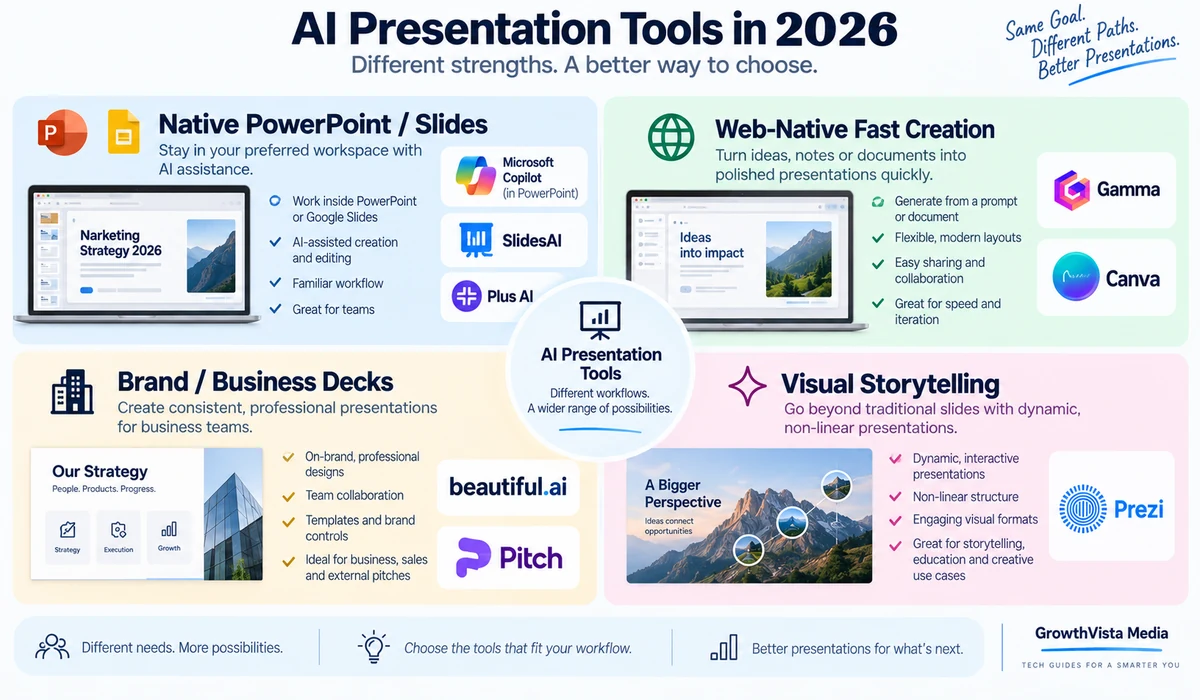
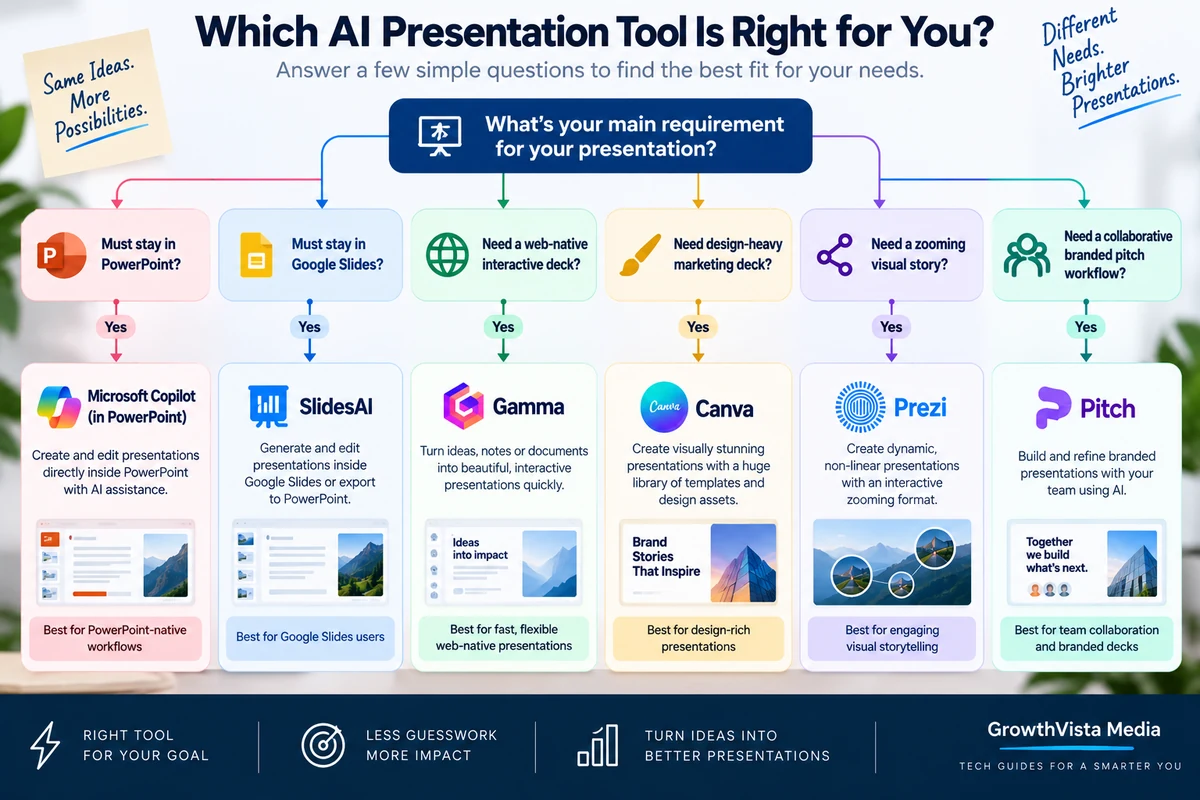
The right tool depends on where the finished presentation needs to live. Some teams want a fast web-native deck. Others need a fully editable PowerPoint file, native Google Slides workflow, strict corporate branding or a more visual storytelling format.
This guide compares eight presentation platforms by workflow rather than declaring one universal winner.
Editorial Disclosure: GrowthVista Media may receive compensation from qualifying SaaS referrals where an affiliate relationship is available. This does not change the comparison criteria used in this guide.
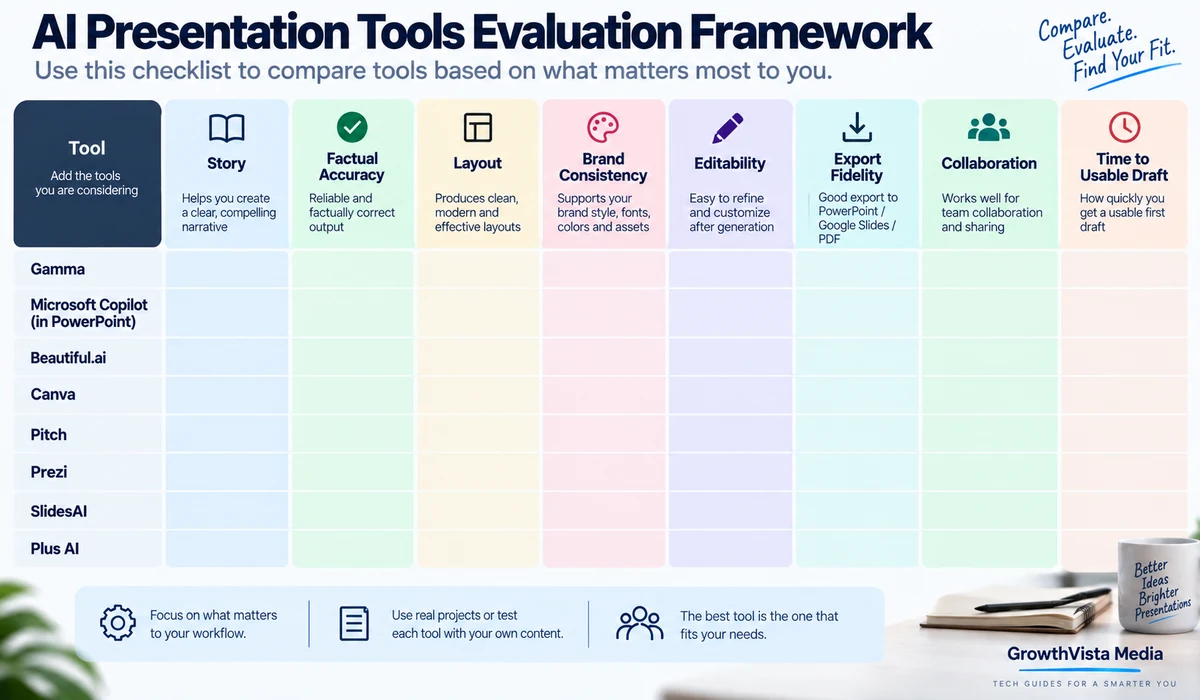
How We Evaluated AI Presentation Tools
- Prompt or document-to-deck workflow
- Ability to review structure before generation
- Slide design and layout quality
- Editing after AI generation
- PowerPoint/Google Slides compatibility
- Brand controls
- Charts, diagrams and visual storytelling
- Collaboration and presenting features
- Ability to work from existing files
- Suitability for repeatable professional use
Quick Comparison
| Tool | Strong Fit | Notable Workflow | View Tool |
|---|---|---|---|
| Gamma | Fast web-native presentations and visual documents | Generate, paste or import content; AI-assisted flexible slides | View Tool → |
| Microsoft Copilot in PowerPoint | Native PowerPoint business workflow | Create and edit decks directly inside PowerPoint | View Tool → |
| Beautiful.ai | Structured professional business decks | AI generation plus Smart Slide-style design automation | View Tool → |
| Canva | Design-rich presentations and marketing teams | AI creation inside a large template and visual-content ecosystem | View Tool → |
| Pitch | Collaborative branded business decks | Pitch Agent creates and refines branded decks through chat | View Tool → |
| Prezi AI | Dynamic visual storytelling | Prompt/file-to-presentation with zooming visual format | View Tool → |
| SlidesAI | Google Slides and PowerPoint users | Generate inside Slides/PowerPoint or web and export native files | View Tool → |
| Plus AI | Native slide workflows and existing deck transformation | AI-assisted generation and editing around presentation files | View Tool → |
1. Gamma — For Fast, Flexible Web-Native Presentations
Gamma is useful when speed and flexible visual structure matter more than starting inside traditional PowerPoint.
Its current creation workflow supports three approaches: Generate for an AI-built first draft, Paste for formatting existing text, and Import for converting files, decks or webpages. Gamma's current slide system uses flexible canvases that adjust to content rather than behaving exactly like fixed traditional slides.
Gamma also provides AI-assisted slide editing, presenter view, speaker notes and web sharing. That makes it relevant for proposals, internal updates, educational material and decks that may also be shared as interactive web content.
If the final deliverable must be a highly customized corporate PowerPoint file, test the export and editing workflow on a real deck before standardizing on Gamma.
2. Microsoft Copilot in PowerPoint — For Native PowerPoint Workflows
Copilot is the most natural option when PowerPoint itself is non-negotiable. Microsoft's current workflow can create a presentation from a prompt or referenced file, then let the user add, rewrite, reorganize and refine slides directly in PowerPoint.
In 2026, Microsoft expanded Copilot's agentic editing capabilities so it can perform multi-step actions inside presentations rather than only suggesting text. PowerPoint can also use a well-structured corporate template and Brand Kit information to create more brand-consistent output.
Microsoft's current editing experience can offer different AI models, including ChatGPT and Claude, depending on availability and licensing.
The advantage is native editability: teams that already exchange .pptx files do not need to introduce a separate presentation format.
Explore Microsoft Copilot for PowerPoint →
3. Beautiful.ai — For Structured Professional Business Decks
Beautiful.ai is built around presentation design rather than general-purpose content generation. Its current AI creation workflow begins with a prompt and can also accept supporting documents, PDFs or links.
Instead of jumping blindly from a short prompt to a finished deck, the platform's 2026 workflow is designed to let users shape the story and preserve intent during generation.
This makes it relevant for sales decks, business reviews, strategy presentations and teams that want design automation without manually arranging every element.
As with any automated design system, test the tool with dense charts, unusual layouts and your real brand requirements before committing to a company-wide template strategy.
4. Canva — For Design-Rich Presentations and Marketing Teams
Canva is attractive when presentations are part of a broader content workflow. A team can combine presentation layouts with brand assets, illustrations, photos, video and other marketing material in the same environment.
AI-assisted creation can accelerate outlines, copy and visual concepts, while Canva's template and Brand Kit ecosystem helps non-designers keep a deck visually coherent.
The platform is especially practical for marketers, educators and small businesses that already use Canva for social content, documents and campaign assets.
For finance-heavy or highly technical corporate decks, confirm that the charting, export and precision-editing workflow fits the team's needs.
5. Pitch — For Collaborative Branded Business Presentations
Pitch is designed around collaborative business decks. Its current Pitch Agent can generate a complete presentation from a prompt, refine slides through chat and work with attached files as context.
Pitch also documents a brand workflow where a company domain can be used to pull logo, colors and fonts into a generated branded template.
This is useful for startups, agencies and sales teams that repeatedly create pitch decks, proposals and client presentations with shared brand expectations.
The strongest reason to choose Pitch is usually the combination of AI creation, collaboration and presentation workflow rather than AI generation alone.
6. Prezi AI — For Dynamic Visual Storytelling
Prezi remains structurally different from conventional slide tools. Its AI workflow can create presentations from a prompt or uploaded PPTX, PDF or DOCX content, then turn the material into Prezi's zooming visual storytelling format.
Prezi's 2026 updates include faster generation for detailed prompts, expanded language support and the ability to download a Prezi presentation as a PPTX file.
This makes it relevant when the relationship between ideas matters and a linear sequence of static slides feels limiting.
The motion-based format should serve the story rather than become a distraction. For conservative corporate audiences, a conventional deck may still be easier to consume.
7. SlidesAI — For Google Slides and PowerPoint Users
SlidesAI is designed to meet users inside familiar presentation software. Its current platform works through a web app, Google Slides add-on and PowerPoint add-in.
Users can generate from a prompt, notes or uploaded document, review the outline before slides are created, refine text with AI and export to PowerPoint, Google Slides or PDF.
SlidesAI also documents support for more than 100 languages, which can be useful for international teams and educators.
This is a practical option for users who want AI generation without abandoning the slide editor their organization already uses.
8. Plus AI — For AI Assistance Around Existing Slide Workflows
Plus AI is relevant to users who want AI to help create and transform presentation content while keeping the finished deck close to conventional slide workflows.
Typical use cases include generating a first deck, rewriting or restructuring slides and turning existing source material into presentation form.
For teams comparing Plus AI with SlidesAI or native Copilot, the important test is not the demo deck. Use a real existing presentation and compare how much manual cleanup remains after export or editing.
Which Tool Fits Which Presentation Job?
| Presentation Job | Tools to Investigate | Why |
|---|---|---|
| Corporate PowerPoint | Microsoft Copilot, Plus AI, SlidesAI | Native or PowerPoint-oriented editing workflow |
| Fast web presentation | Gamma | Rapid AI creation and web-native sharing |
| Sales/pitch deck | Pitch, Beautiful.ai, PowerPoint Copilot | Brand consistency and business presentation workflow |
| Marketing presentation | Canva, Pitch | Strong design and reusable brand assets |
| Educational deck | Gamma, Canva, SlidesAI | Fast structure, visuals and accessible editing |
| Visual storytelling | Prezi AI | Nonlinear/zooming presentation format |
| Google Slides workflow | SlidesAI, compatible native AI tools | Keeps work close to Google Slides |
| Existing document to deck | Copilot, Gamma, Beautiful.ai, Prezi, SlidesAI | All support source-driven generation in different forms |
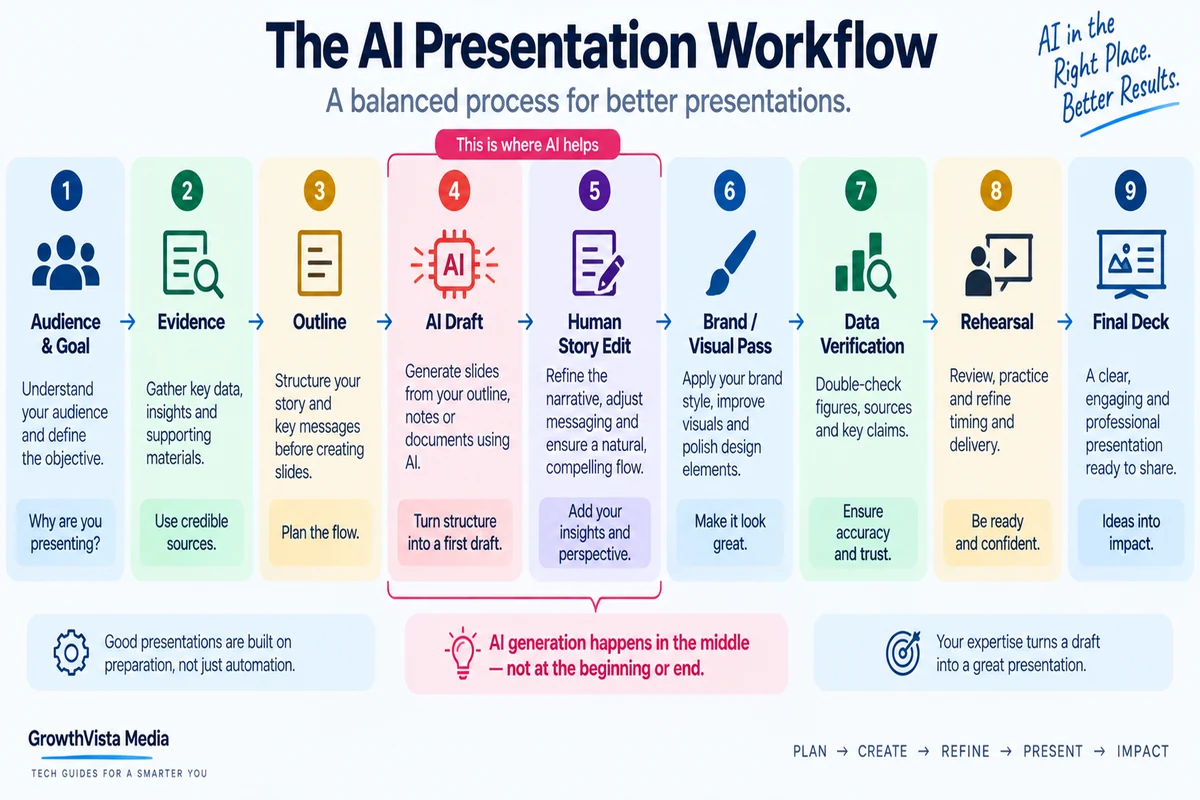
Prompt-to-Deck Is Only the First 20 Percent
A generated presentation can look complete while still having a weak argument.
The important work after generation is editorial: remove repeated slides, verify numbers, simplify dense text, strengthen the opening, make the recommendation explicit and ensure every visual supports the message.
Treat the first AI deck as a structured draft, not a finished executive presentation.
Start With an Outline When the Stakes Are High
For an internal brainstorm, one-prompt generation can be sufficient. For a sales proposal, board deck or investor presentation, define the story first.
A useful structure might include context, problem, evidence, options, recommendation, implementation and next step. Give the AI this structure or review its proposed outline before allowing it to design dozens of slides.
Beautiful.ai and SlidesAI explicitly support workflows that let users shape or review presentation structure before the final slides are produced.
Brand Consistency: Templates Still Matter
AI does not eliminate the need for a good presentation system.
Corporate templates should define layouts, typography, colors, chart styles and common slide patterns. Microsoft's current PowerPoint guidance explicitly notes that a well-structured template helps Copilot generate more brand-consistent presentations.
Pitch, Canva and other platforms also provide brand-oriented workflows. The quality of the source brand system affects the consistency of the AI output.
PowerPoint Export Needs a Real-World Test
Many AI presentation tools advertise PowerPoint export, but an exported file is not automatically equivalent to a deck created natively in PowerPoint.
Before standardizing on a tool, test charts, fonts, animations, editable objects, image crops and complex layouts after export. Also open the file on another machine if clients or colleagues will edit it.
If native .pptx fidelity is critical, tools that operate directly inside PowerPoint deserve extra consideration.
AI Images Can Improve a Deck – or Make It Look Generic
Presentation makers increasingly generate visuals automatically. This can eliminate hours spent searching stock libraries, but generic AI imagery can also weaken credibility.
Use generated images where they clarify a concept or create a distinctive visual. For data, product screenshots, organizational structures and factual diagrams, use verified source material instead.
Do not use AI-generated charts to represent real numbers unless the chart is rebuilt from the actual data.
A Practical Presentation Stack
| Stage | AI Can Help With | Human Responsibility |
|---|---|---|
| Research | Summarize source material | Verify facts and choose evidence |
| Story | Suggest outline and sequence | Decide argument and audience |
| Draft | Generate slides and copy | Remove filler and repetition |
| Design | Layouts, images and formatting | Brand, hierarchy and accessibility |
| Data | Suggest chart format | Use correct source data and labels |
| Revision | Rewrite, shorten and reorganize | Approve meaning and nuance |
| Delivery | Speaker notes and rehearsal support | Present with judgment and context |
| Export/share | Format and distribution | Check fidelity and permissions |
How to Test an AI Presentation Maker
- Use one real 10-15 slide presentation rather than a generic demo topic.
- Provide the same outline and source material to each shortlisted tool.
- Measure time to a usable draft, not time to first generation.
- Count how many slides require major rewriting.
- Check charts, citations, image relevance and factual accuracy.
- Test your real logo, fonts and brand template.
- Export to the format your clients or team actually use.
- Open the exported file in its destination application and check editability.
- Rehearse the presentation; a visually polished deck can still tell a poor story.
Frequently Asked Questions
What is the best AI presentation maker in 2026?
There is no universal choice. Gamma fits fast web-native decks, Microsoft Copilot fits native PowerPoint workflows, and tools such as Beautiful.ai, Canva, Pitch, Prezi and SlidesAI target different design and collaboration needs.
Which AI tool can create PowerPoint presentations?
Microsoft Copilot creates and edits presentations directly in PowerPoint. SlidesAI also works through a PowerPoint add-in, while several web tools support PPTX export.
Can AI turn a document into a presentation?
Yes. Current tools including Microsoft Copilot, Gamma, Beautiful.ai, Prezi and SlidesAI support document- or file-driven presentation creation in different forms.
Which AI presentation tool is useful for Google Slides?
SlidesAI works directly in Google Slides and also provides a web platform and PowerPoint add-in.
Which tool is useful for pitch decks?
Pitch and Beautiful.ai are oriented toward professional business presentations, while PowerPoint Copilot can be useful when the organization already uses Microsoft 365.
Can AI keep a presentation on brand?
Yes, to varying degrees. PowerPoint Copilot can use templates and Brand Kit information, while Pitch, Canva and other tools provide brand-oriented workflows.
Can Prezi AI export to PowerPoint?
Yes. Prezi added PPTX download capability in 2026.
Should I trust AI-generated charts and statistics?
No. Verify every statistic and build factual charts from the actual source data. AI can suggest a chart format but should not invent the numbers.
Is Gamma the same as PowerPoint?
No. Gamma uses flexible web-native slides/canvases and interactive sharing, while PowerPoint is a traditional slide-file environment. The workflows overlap but are not identical.
Do I still need to edit an AI-generated presentation?
Yes. Review story, facts, slide density, visuals, brand consistency, accessibility and export quality before presenting.
Final Thoughts
When comparing the best AI presentation makers, prioritize the workflow and specifications that match your actual use case rather than choosing on headline features alone.
AI presentation software is most useful when it removes layout and first-draft friction without taking control of the story away from the presenter.
Gamma is built for fast web-native creation. Microsoft Copilot is compelling when PowerPoint is the required final environment. Beautiful.ai and Pitch focus on professional business decks, Canva connects presentations to a broader design workflow, Prezi offers a more dynamic storytelling format, and SlidesAI and Plus AI serve users who want AI closer to familiar slide software.
Before choosing a subscription, create the same real presentation in two or three shortlisted tools. Export it, edit it and present it.
The right platform is the one that gets your team from evidence and outline to a clear, editable and on-brand presentation with the least corrective work.
Image Production Summary
Use original GrowthVista graphics and permitted vendor assets only. Do not copy software interfaces, fabricate presentation-quality scores or imply hands-on benchmark testing that was not performed.
Source Verification Notes – Reviewed September 2026
- Gamma official Help Center: current slide system, Generate/Paste/Import workflow and presentation features – help.gamma.app.
- Microsoft official PowerPoint/Copilot documentation: presentation creation, direct editing, Brand Kit/template behavior and 2026 agentic capabilities – microsoft.com / support.microsoft.com.
- Beautiful.ai official support documentation: August 2026 AI presentation creation workflow – beautiful.ai.
- Pitch official AI Presentation Maker documentation: Pitch Agent, file context and branded template workflow – pitch.com.
- Prezi official 2026 product updates and AI support documentation: prompt/file creation, language expansion and PPTX export – prezi.com / support.prezi.com.
- SlidesAI official 2026 documentation: web app, Google Slides, PowerPoint add-in, outline review, exports and 100+ languages – slidesai.io.
- Canva and Plus AI: recheck current official product, export, pricing and brand-feature documentation immediately before publication.
- Recheck plan pricing, export limits, AI credits, collaboration limits and feature availability immediately before publishing because SaaS presentation products change frequently.