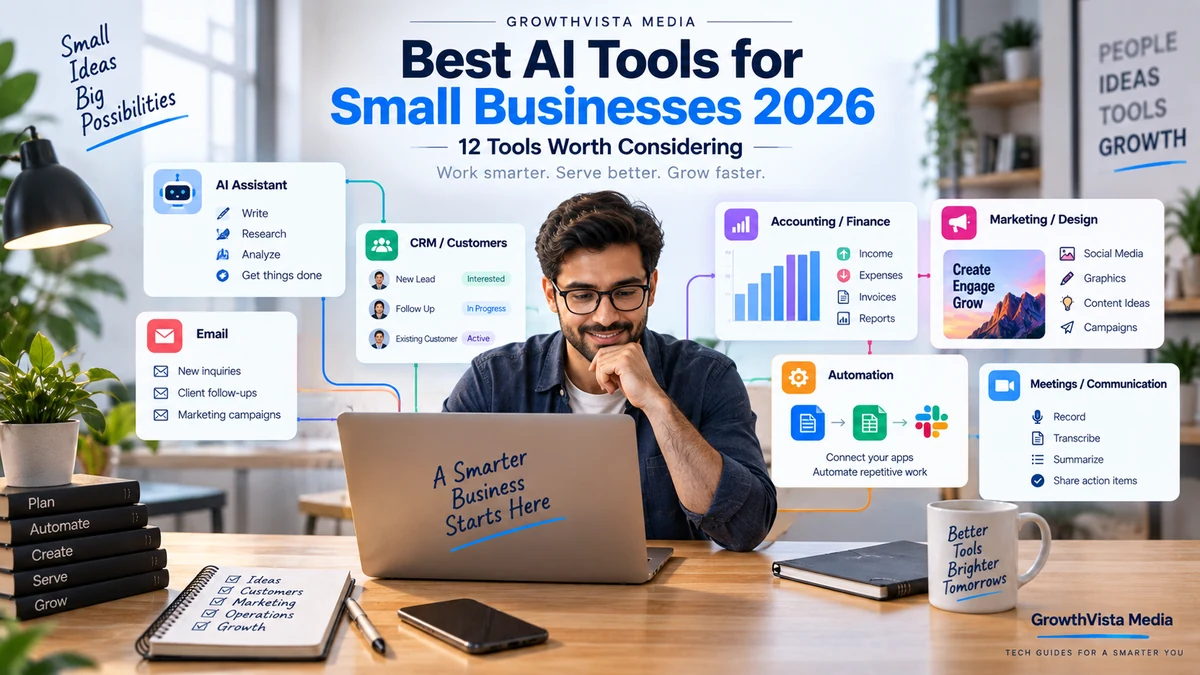
Best AI Tools for Small Businesses in 2026: 12 Tools Worth Considering
Editorial Disclosure: GrowthVista Media may receive compensation from qualifying SaaS referrals where an affiliate relationship is available. This does not change the selection criteria used in this guide.
The best AI tools for small businesses in 2026 can help lean teams reduce repetitive work, improve customer follow-up and produce more without adding unnecessary software complexity.
Explore more in our AI Tools guides. For primary product information, see the official OpenAI Business and Microsoft Copilot websites.
How We Selected the Best AI Tools for Small Businesses
Small businesses rarely need more software. They need fewer repetitive tasks, faster customer follow-up, clearer financial information and more output from a lean team.
That is where AI can be useful. The strongest small-business applications are not novelty chatbots; they sit inside work the business already performs—writing proposals, answering customers, preparing campaigns, updating CRM records, categorizing transactions, summarizing meetings and moving information between apps.
This guide compares 12 tools across those practical jobs. It does not assume every business needs all 12. A better goal is to identify one or two expensive bottlenecks and test AI there first.
Editorial Disclosure: GrowthVista Media may receive compensation from qualifying SaaS referrals where an affiliate relationship is available. This does not change the selection criteria used in this guide.
How We Selected the Tools
- Clear use case for a small or growing team
- Ability to reduce repetitive administrative work
- Integration with common business workflows
- Team controls where business data is involved
- Practical marketing, sales, finance or operations value
- Current AI functionality in 2026
- Ability to start small rather than requiring an enterprise transformation
- Human review and control for consequential actions
Quick Comparison
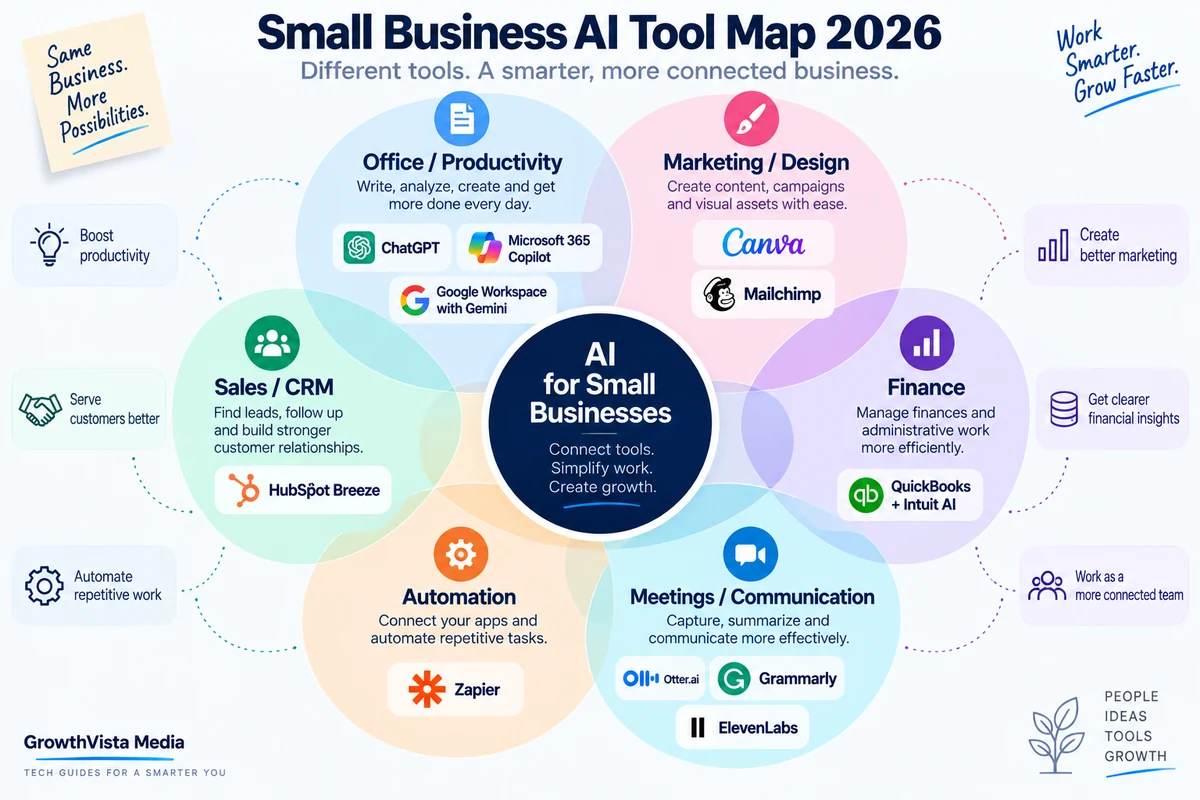
| Tool | Business Job | Useful When | View Tool |
|---|---|---|---|
| ChatGPT Business | General productivity and multi-step work | A team needs one flexible AI workspace across writing, analysis, research and operations | View Tool → |
| Microsoft 365 Copilot | Office productivity | The business already runs on Word, Excel, Outlook, PowerPoint and Teams | View Tool → |
| Google Workspace with Gemini | Google productivity | The team works primarily in Gmail, Docs, Drive and Meet | View Tool → |
| HubSpot Breeze | CRM, marketing, sales and service | Customer data and go-to-market workflows already live in HubSpot | View Tool → |
| QuickBooks + Intuit AI | Accounting and finance operations | The business needs help with bookkeeping workflows and financial administration | View Tool → |
| Zapier | Automation across apps | Staff repeatedly copy information or trigger the same actions between systems | View Tool → |
| Canva Business | Design and marketing production | A small team needs branded content, ads and visual assets without a large design department | View Tool → |
| Notion AI | Knowledge, projects and internal workflows | Company information and project work already live in Notion | View Tool → |
| Grammarly | Business communication | Many employees write emails, proposals, documents and customer messages | View Tool → |
| Mailchimp | Email and marketing automation | The business relies on email campaigns and customer journeys | View Tool → |
| Otter.ai | Meeting capture and follow-up | Sales, client and internal meetings create too much manual note-taking | View Tool → |
| ElevenLabs | Voice and multilingual audio | The business creates narration, localized audio or voice-based content | View Tool → |
1. ChatGPT Business — For General Productivity and Cross-Functional Work
ChatGPT Business is a broad option for small teams that want one AI workspace to handle many different jobs rather than buying a specialist tool for every task.
OpenAI currently positions ChatGPT Business for small businesses across customer management, financial reporting, marketing and operations. The Business workspace includes centralized administration, SSO/MFA controls and no training on business data by default.
Current Business plans also include ChatGPT Work, which can carry out longer multi-step tasks and work with supported tools and plugins. That can make the platform useful beyond drafting: a team can research, analyze files, prepare deliverables and automate parts of recurring workflows.
The best starting point is usually one repeated process—such as preparing weekly reports, writing proposals or analyzing customer feedback—rather than asking every employee to 'use AI more.'
2. Microsoft 365 Copilot — For Businesses Already Running on Microsoft 365
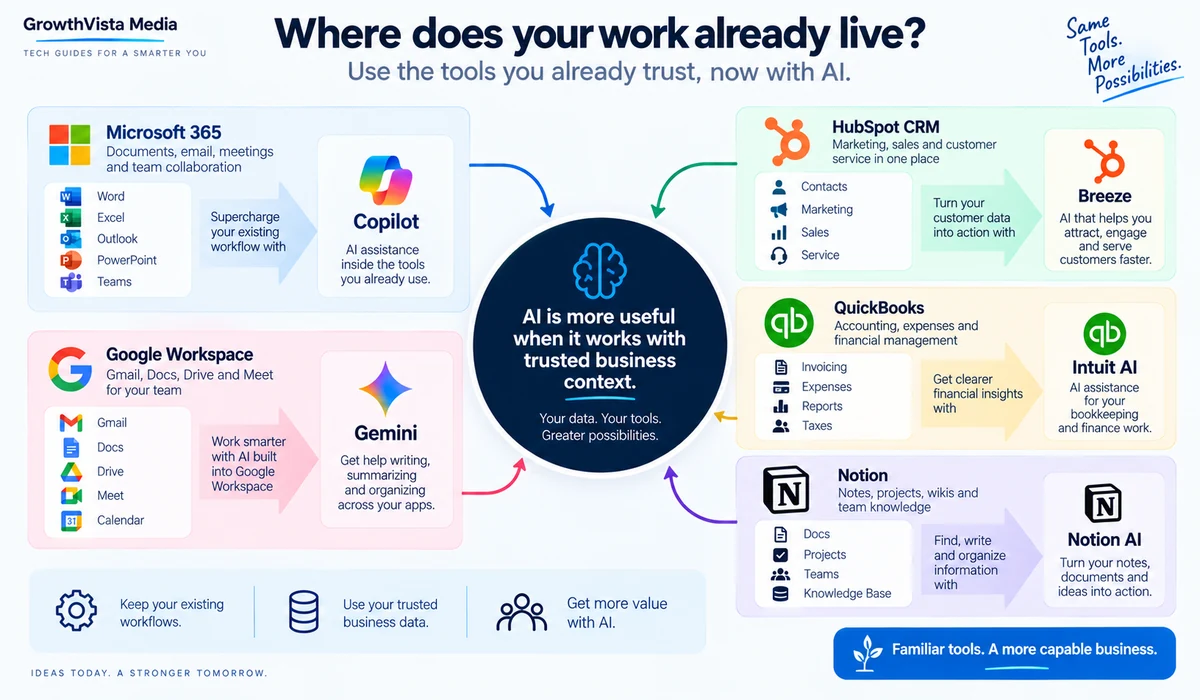
Microsoft 365 Copilot is most compelling when Word, Excel, PowerPoint, Outlook and Teams are already the operating environment.
Microsoft's current small-business plans integrate Copilot into those applications and add work-grounded AI, research/data-analysis capabilities and prebuilt agents. Business plans are designed for organizations up to 300 users.
That can reduce tool switching: an owner can work on email in Outlook, analysis in Excel, a proposal in Word and a presentation in PowerPoint without moving the underlying work into a separate AI application.
Before adding Copilot seats to everyone, identify which roles spend enough time in Microsoft 365 to justify the additional license.
3. Google Workspace with Gemini — For Gmail, Docs and Drive-Centered Teams
Google Workspace is the natural alternative for teams whose daily work already happens in Gmail, Docs, Drive, Meet and related Google applications.
Google's current business plans include Gemini capabilities at different levels. The Standard tier, for example, includes Gemini assistance across Gmail, Docs, Meet and more, plus AI research functionality and the Gemini app.
For a small business, the main benefit is context and convenience. Drafting an email, summarizing a document or preparing meeting material is more useful when AI is close to the information employees already use.
Choose the Workspace tier for the storage, security and collaboration features you need first; treat AI as part of the workflow rather than the only purchasing criterion.
4. HubSpot Breeze — For CRM, Marketing, Sales and Customer Service
HubSpot Breeze is relevant when customer and marketing information already lives in HubSpot. Its current Breeze Assistant can generate content, summarize CRM records, prepare for meetings and complete tasks across the account.
HubSpot also supports AI-assisted content creation for pages, blog posts, knowledge-base articles and CTAs. For a small sales team, the bigger advantage may be that the assistant can work with CRM context rather than generic prompts.
This makes HubSpot more attractive when the business needs CRM plus AI, not when it simply needs a writing assistant.
5. QuickBooks + Intuit AI — For Accounting Administration
QuickBooks is integrating Intuit AI directly into accounting workflows. Current QuickBooks documentation describes AI that can proactively surface insights and act with user permission, with specialized capabilities around accounting and related business tasks.
The Accounting AI can assist with transaction categorization, matching, anomalies and bookkeeping workflows. This is a more practical small-business use of AI than asking a general chatbot to interpret raw financial records without accounting context.
Financial automation still needs oversight. Owners and accountants should review material classifications, reconciliations, tax treatment and financial decisions.
6. Zapier — For Automating Repetitive Work Between Apps
Zapier is useful when the problem is not creating content but moving information between systems.
Its 2026 platform connects thousands of applications and supports AI inside automated workflows. Zapier's documentation now describes AI steps that can summarize, classify, draft, reason and use tools, while traditional Zaps still handle trigger-and-action automation.
A small business might route a website lead into a CRM, create a task, classify the inquiry, draft an internal summary and notify the appropriate employee without manually copying data.
Automation should begin with stable, well-understood processes. Automating a broken process usually makes the mistakes happen faster.
7. Canva Business — For Brand, Design and Marketing Content
Canva Business is designed specifically for individuals, marketers and small teams. Canva's current plan combines advanced AI, brand management, collaboration and marketing capabilities.
Small businesses can use it to create social posts, presentations, sales collateral, video, ads and print materials while keeping brand assets in a shared system. Canva also positions its AI around adapting campaigns across channels and formats.
For businesses without an in-house design department, the value is the full workflow: template, brand controls, AI assistance, editing and output in one place.
8. Notion AI — For Company Knowledge and Repeatable Internal Work
Notion AI is useful when a small business already manages projects, documentation, SOPs or internal knowledge in Notion.
Current Business and Enterprise plans include core AI capabilities such as Notion Agent, AI Meeting Notes and Enterprise Search. Custom Agents can perform multi-step work on schedules or triggers, with usage managed through Notion credits.
In September 2026, Notion also introduced reusable AI skills so teams can turn repeatable instructions—such as a monthly business review format—into shared workflows.
That can help prevent useful AI prompts and processes from remaining trapped in one employee's private chat history.
9. Grammarly — For Consistent Business Communication
Grammarly is useful when communication quality is the bottleneck rather than content generation itself.
Its business features include generative drafting, style guides, brand tones and contextual company knowledge. That can help customer-facing teams maintain clearer and more consistent emails, proposals and documents.
For a small company, a writing layer that works across everyday applications can be easier to adopt than asking every employee to move communication into a separate AI chat.
10. Mailchimp — For Email Marketing and Customer Journeys
Mailchimp is relevant to small businesses that already depend on email marketing. AI-assisted features can help with content, campaign creation, audience work and marketing automation while the platform continues to handle lists, journeys and reporting.
The advantage of using AI inside an email platform is that content generation stays close to the campaign workflow. The team can move from idea to email, segmentation, send and measurement without assembling a separate stack.
Do not let AI-generated copy bypass consent, unsubscribe and email-marketing compliance requirements.
11. Otter.ai — For Meeting Notes and Follow-Up
Otter.ai is useful for businesses where meetings generate significant administrative work. Transcription and AI summaries can reduce manual note-taking and make follow-up easier.
Sales calls, client meetings, interviews and internal discussions can become searchable records rather than scattered handwritten notes.
Businesses should establish clear rules for consent, recording, retention and sensitive conversations before automatically capturing meetings.
12. ElevenLabs — For Voice, Narration and Localization
ElevenLabs is a specialist rather than a general small-business platform. It becomes useful when voice is a repeated production requirement.
Businesses can use AI speech for product videos, training, explainers, localized audio and other narration workflows. Voice cloning and multilingual capabilities can reduce re-recording when content changes.
Use cloned voices only with appropriate permission and review current commercial terms for the selected plan and voice.
Which Tools Fit Common Small-Business Problems?
| Problem | Tools to Investigate | Starting Point |
|---|---|---|
| Too much admin/writing | ChatGPT Business, Copilot, Gemini | Choose the assistant closest to your existing work environment |
| Leads fall through the cracks | HubSpot Breeze + Zapier | Improve CRM process before adding automation |
| Bookkeeping consumes owner time | QuickBooks + Intuit AI | Automate routine categorization/review with accountant oversight |
| Marketing looks inconsistent | Canva Business | Create Brand Kit and reusable campaign templates |
| Knowledge is scattered | Notion AI | Centralize SOPs and recurring processes |
| Emails/proposals need polish | Grammarly + general assistant | Standardize voice and reusable examples |
| Too much manual app-to-app work | Zapier | Automate one stable repetitive workflow first |
| Meetings create no follow-up | Otter.ai + task/CRM integration | Capture decisions and owners |
| Need multilingual audio/video | ElevenLabs; specialist video tools | Test one real localization workflow |
Don't Start With 12 Subscriptions
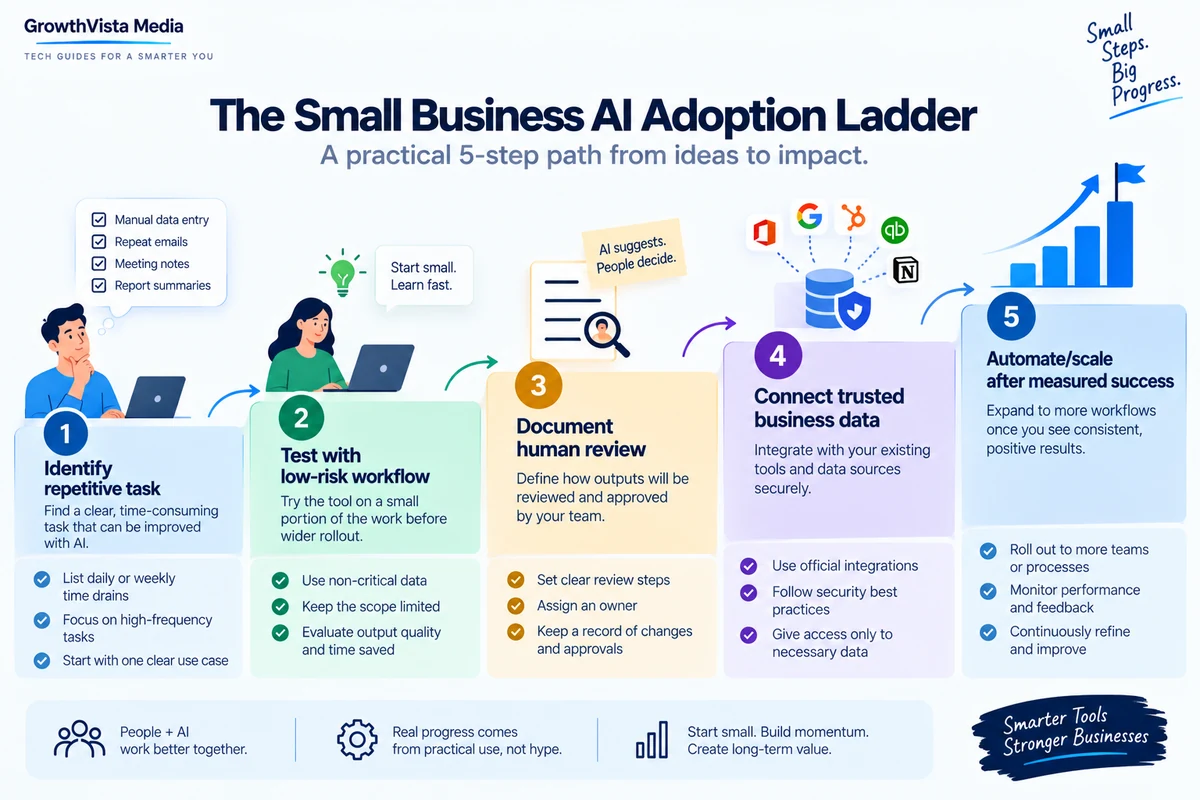
A common AI adoption mistake is buying several overlapping tools before the team has defined a workflow.
A five-person company does not necessarily need ChatGPT Business, Copilot and Gemini at the same time. The best general assistant is often the one that fits the company's existing productivity environment and data.
Add specialist software only when it solves a different recurring problem.
A Simple ROI Test for AI Software
| Question | What to Measure |
|---|---|
| How often does the task occur? | Per day/week/month frequency |
| How long does it take now? | Current staff minutes/hours |
| How much time remains with AI? | Prompting, review and corrections included |
| What is the subscription/usage cost? | Seats, credits and integration costs |
| What is the error cost? | Customer, financial, legal or operational impact |
| Does quality improve? | Fewer missed steps, clearer output, faster response |
| Can the workflow be standardized? | Documented input, output and reviewer |
Do not evaluate AI by how impressive a demo looks. Measure the economics of the actual workflow.
A tool that saves ten minutes once a month is different from one that removes an hour of repetitive work every day. Track the real before-and-after process for several weeks before expanding licenses.
Security and Privacy Matter More When AI Touches Business Data
Before connecting customer records, financial data, contracts or internal documents, review the vendor's current business-data policy, retention settings, access controls and administrative features.
Use business/team plans where appropriate rather than having employees independently upload company data into unmanaged personal accounts.
Apply least-privilege access and avoid sending sensitive information to a tool simply because an integration exists.
Keep Humans in the Loop for High-Impact Work
AI can draft a customer response, suggest an accounting category or summarize a contract. That does not mean it should independently approve refunds, submit tax filings, make hiring decisions or send legally significant messages without an appropriate review process.
The more consequential the action, the clearer the approval checkpoint should be.
A Lean AI Stack for a 5–20 Person Business
| Layer | Choose One or Add Only If Needed | Example |
|---|---|---|
| General assistant | One primary workspace | ChatGPT Business OR Microsoft Copilot OR Gemini |
| Customer/CRM | If customer workflow needs it | HubSpot Breeze |
| Finance | If accounting runs in QuickBooks | QuickBooks + Intuit AI |
| Automation | When systems need to talk | Zapier |
| Creative | For regular marketing/design | Canva Business |
| Knowledge | If SOP/project knowledge is centralized | Notion AI |
| Communication | If writing quality is a repeated issue | Grammarly |
| Specialists | Only for repeated specialist work | Otter.ai / ElevenLabs / email platform |
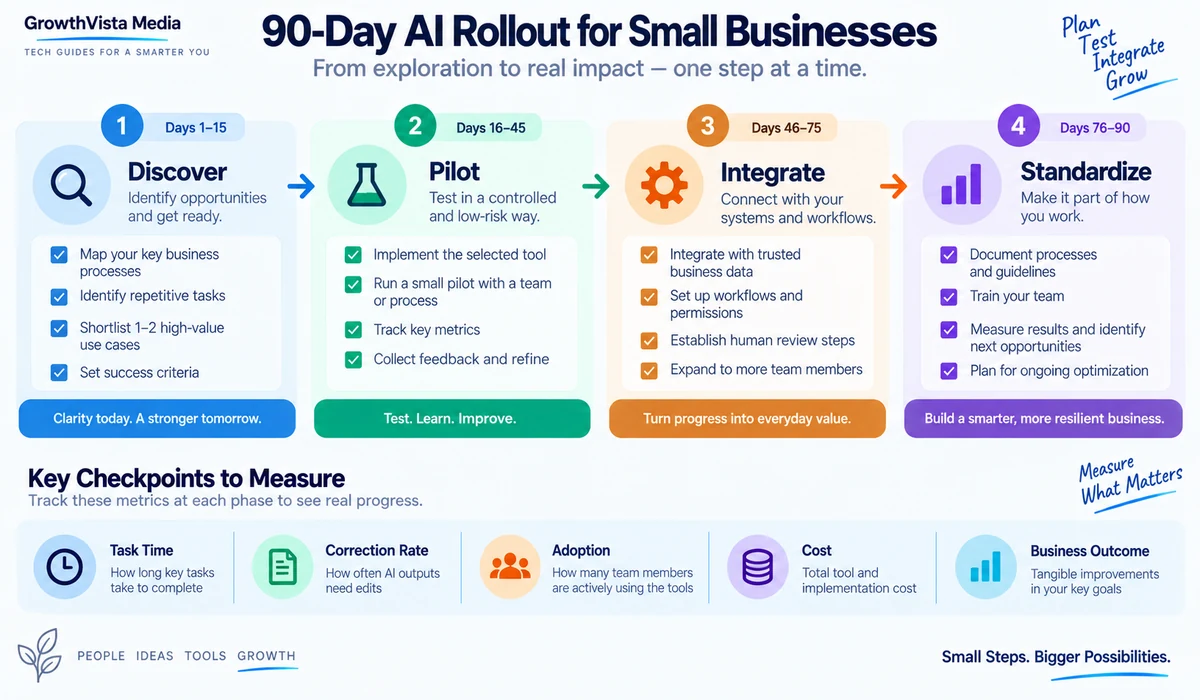
90-Day Small-Business AI Rollout
- Days 1–15: list repetitive tasks and choose one low-risk, high-frequency workflow.
- Days 16–30: test one primary AI tool with a small group and document prompts, inputs and review steps.
- Days 31–45: measure time saved, correction rate and employee adoption.
- Days 46–60: connect trusted data or one business application only if the basic workflow is working.
- Days 61–75: automate handoffs with a tool such as Zapier where appropriate.
- Days 76–90: standardize the successful workflow, define access/security rules and decide whether additional seats or specialist tools are justified.
Frequently Asked Questions
What is the best AI tool for a small business?
It depends on the existing workflow. ChatGPT Business is a broad cross-functional option, while Microsoft Copilot or Google Gemini may fit better when the business is already centered on those productivity suites.
What AI tools can help with small-business marketing?
Canva Business can help with branded creative, HubSpot Breeze with CRM-driven marketing, and Mailchimp with email campaigns and customer journeys.
Can AI help with small-business accounting?
QuickBooks is integrating Intuit AI into accounting workflows such as categorization, matching and anomaly handling. Material financial decisions should still be reviewed.
What can a small business automate with Zapier?
Examples include lead routing, notifications, CRM updates, document steps and AI-assisted classification or summarization across connected applications.
Do small businesses need ChatGPT, Copilot and Gemini?
Usually not. Start with the platform that best fits the systems your team already uses, then add specialists only for clear gaps.
Is business data safe in AI tools?
Security and data-use policies differ. Review current business-plan terms, admin controls, retention and training policies before connecting sensitive data.
Should every employee get an AI license?
Not automatically. Start with roles that have high-frequency use cases, measure adoption and value, then expand if justified.
Can AI replace a small-business employee?
AI is more reliably used to automate tasks and increase capacity than to assume an entire job. Human judgment remains important for customer, financial, legal and operational decisions.
How should a small business calculate AI ROI?
Compare subscription and implementation cost with measurable time saved, errors reduced, throughput improved or revenue-related outcomes in the actual workflow.
What is the easiest AI workflow to start with?
Choose a frequent, low-risk task such as summarizing meetings, drafting routine emails, creating first-draft marketing copy or preparing an internal report.
Can AI run customer service automatically?
It can assist with triage, drafting and self-service, but businesses should define escalation rules and human review for sensitive or unusual cases.
How many AI tools should a small business use?
As few as necessary. A general assistant plus two or three specialists tied to real systems is often more manageable than a large overlapping stack.
Final Thoughts
When comparing the best AI tools for small businesses, prioritize the workflow and specifications that match your actual use case rather than choosing on headline features alone.
The best small-business AI strategy is not to buy the most tools. It is to remove the most expensive friction.
If your company already lives in Microsoft 365 or Google Workspace, start there. If you need a broader independent AI workspace, ChatGPT Business is designed for cross-functional business work. HubSpot, QuickBooks, Canva, Notion and Zapier become valuable when AI can operate close to the CRM, books, brand, knowledge base or automation layer that already runs the company.
Keep the rollout narrow enough to measure. One documented workflow that saves time every week is more valuable than twelve subscriptions nobody consistently uses.
Revisit the stack every quarter. AI products, pricing and integrations are changing quickly in 2026, and capabilities that once required a separate tool may become included in software you already pay for.
Image Production Summary
Use original GrowthVista graphics and permitted vendor assets only. Do not copy software interfaces, fabricate customer results, invent ROI figures or imply hands-on benchmarking that was not performed.
Source Verification Notes — Reviewed September 2026
- OpenAI official Small Business, ChatGPT Business and Business pricing documentation — openai.com / help.openai.com.
- Microsoft official Microsoft 365 Copilot Business plans and small-business documentation — microsoft.com.
- Google official Workspace Business plan documentation — workspace.google.com.
- HubSpot official Breeze Assistant and knowledge-base documentation — hubspot.com / knowledge.hubspot.com.
- Intuit/QuickBooks official Intuit AI and QuickBooks Online documentation — quickbooks.intuit.com.
- Zapier official 2026 AI and automation documentation — help.zapier.com.
- Canva official Canva Business and small-business documentation — canva.com.
- Notion official AI product and September 2026 release documentation — notion.com.
- Grammarly official business product documentation — grammarly.com.
- Mailchimp, Otter.ai and ElevenLabs: verify current official product, pricing, privacy and usage terms immediately before publication.
- Recheck all plan names, prices, usage limits, AI availability, integrations and data policies immediately before publishing; these products change frequently.