Best AI Video Generators for Marketing & Social Media Ads in 2026
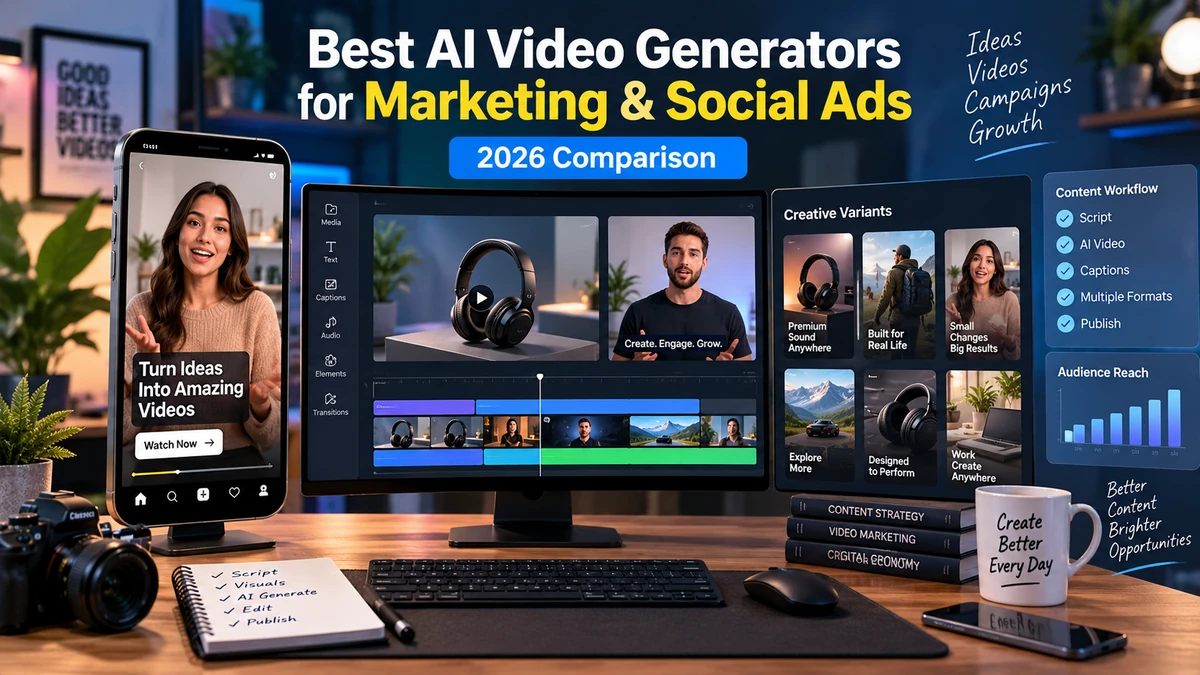
The best AI video generators for marketing in 2026 are most useful where teams need more creative volume for paid social, product launches, localized campaigns, UGC-style creative and frequent ad refreshes.
Explore more in our AI Tools guides. Product capabilities, licensing and plans change frequently, so verify current details on each provider’s official website before production.
How We Evaluated the Best Ai Video Generators For Marketing
The best AI video generators for marketing are changing production fastest where teams need volume: paid social, product launches, localized campaigns, UGC-style creative and constant ad refreshes.
The useful question is not simply which model makes the prettiest clip. Marketing teams need a workflow that can turn a brief or product into multiple usable creative variations, resize them for placements, maintain brand consistency, localize quickly and make revision inexpensive.
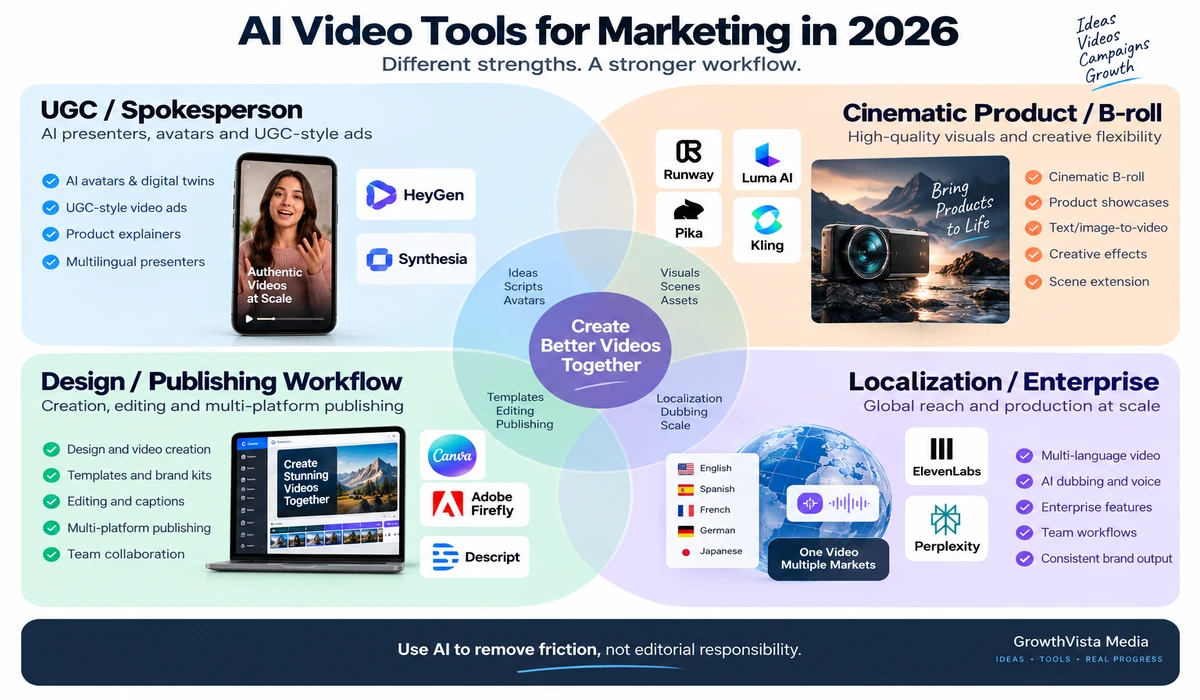
This guide compares 10 of the best AI video generators for marketing from that perspective. Some specialize in AI presenters and UGC-style ads, some in cinematic product footage, and others combine creation, editing and campaign workflows in one environment.
Editorial Disclosure: GrowthVista Media may receive compensation from qualifying SaaS referrals where an affiliate relationship is available. This does not change the comparison criteria used in this guide.
How We Evaluated the Best Ai Video Generators For Marketing
Speed from brief to first usable creative
Product-image and URL-to-ad workflows
UGC-style or spokesperson capability
Cinematic product/B-roll generation
Vertical, square and widescreen formats
Captions, voice and localization
Creative variation and A/B testing workflow
Brand controls and team collaboration
Commercial-use restrictions
Ability to update creative without a reshoot
Quick Comparison
| Platform | Marketing Fit | Notable Workflow |
|---|---|---|
| HeyGen | UGC-style, spokesperson, product and localized ads | Brief/product link → presenter, visuals, voice, captions and variants |
| Canva Grow | Teams wanting creation + publishing + insights | Generate, edit and publish to Meta, TikTok and LinkedIn |
| Adobe Firefly | Product visuals, B-roll and creative teams | Multi-model video generation + editing in Adobe workspace |
| Runway | Cinematic product shots and creative iteration | Gen-4.5 plus Create Ad app and broader creative tools |
| Synthesia | Product explainers and global marketing content | Avatars, brand controls, document-to-video and localization |
| Luma AI | Cinematic B-roll and transforming existing footage | Generation plus video modification |
| Pika | Social hooks and transformation effects | Fast effects, swaps, additions and short-form experimentation |
| Kling | Cinematic ad concepts and motion-heavy shots | Generative video available through major multi-model platforms |
| Google video tools | Native-audio cinematic creative | Veo/Google workflows for video with dialogue, ambience and SFX |
| Dreamina / Seedance | Reference-driven creative sequences | Text, image, video and audio references for directed generation |
1. HeyGen — For UGC-Style, Spokesperson and Localized Video Ads
HeyGen has moved directly into performance-marketing workflows. Its current AI Ad Generator can start from a product, offer, script or product link and build video with scenes, voice, captions and pacing.
The platform is especially relevant when a campaign needs a human-style presenter without organizing repeated shoots. HeyGen documents creator-style and UGC-style ad workflows, product promotions, service ads and campaign variations.
It also supports multiple formats and broad localization. Current HeyGen marketing materials describe 175+ languages and dialects, while its social-ad tools are designed to adapt creative for feed, Reels, Stories and Shorts.
For marketers, the main advantage is iteration: change the hook, offer, presenter, voice or CTA and regenerate instead of reshooting.
2. Canva Grow — For an End-to-End Ad Creation and Publishing Loop
Canva Grow is no longer just a design template workflow. Canva's current 2026 product positions Grow as an ad-management environment that can generate creative with AI, publish directly to Meta, TikTok and LinkedIn, and bring campaign insights back into the creative process.
Canva says Grow can use a website and brand context to generate static and video ads, after which teams can refine the creative in Canva's editor. This can be attractive to smaller marketing teams that want fewer handoffs between designer, ad builder and reporting workflow.
Canva's broader video tools also provide templates, captions, stock media and AI-generated video clips. The strength is workflow consolidation rather than one single frontier video model.
3. Adobe Firefly — For Product Video and Multi-Model Creative Production
Adobe Firefly is a strong fit when marketers need to generate product shots, social clips, B-roll and campaign concepts while retaining a professional editing workflow.
Firefly currently combines Adobe's own Video Model with partner models such as Veo, Runway, Kling and Luma in supported workflows. Marketers can switch models, refine clips, extend segments and add voiceovers, music and sound effects inside one workspace.
Adobe explicitly states that video generated with its own Firefly Video Model is safe for commercial use. Partner-model terms should still be checked separately.
For brands already using Adobe tools, this reduces the friction between AI generation and final campaign production.
4. Runway — For Cinematic Product Shots and Creative Iteration
Runway is useful when an ad concept needs custom cinematic visuals rather than a template-led presenter.
Its Gen-4.5 model supports text-to-video and image-to-video, while Runway's broader Apps system now includes Create Ad. Runway describes Create Ad as combining a reference advertisement, product or scene image and prompt to produce new creative variations.
That workflow can help marketing teams adapt an existing structure to new products, explore visual directions or produce multiple concepts without starting from a blank canvas.
Runway's value is strongest when the creative team still wants art direction and shot-level control rather than full automatic ad assembly.
5. Synthesia — For Product Explainers and Global Marketing Content
Synthesia is designed for repeatable business video, which can translate well to product explainers, feature announcements, launch updates and localized marketing.
Its current marketing workflow can turn product pages, campaign briefs, documents or slides into editable video. Teams can use AI avatars, Brand Kits, templates, analytics and one-click localization across 160+ languages.
There is an important advertising restriction: Synthesia's current licensing documentation says stock and synthetic avatars cannot be used in paid promotions such as paid Facebook, Instagram, YouTube, TikTok or programmatic ads. Those restrictions do not apply in the same way to custom avatars; usage then depends on the agreement with the person whose likeness is used.
That makes Synthesia highly relevant for organic marketing, product education and custom-avatar campaigns, but marketers planning paid media must check avatar licensing before production.
6. Luma AI — For Cinematic B-Roll and Existing-Footage Transformation
Luma's video tools are useful when the creative idea needs cinematic generation or transformation of existing footage.
A marketer can use generated B-roll for product atmosphere, concept scenes or campaign storytelling, while Modify-style workflows can alter visual environments or styling around footage that already exists.
This is different from a one-click ad builder. Luma is more relevant when a creative team wants unique visual material to assemble into an ad.
7. Pika — For Social Hooks, Transformations and Rapid Experiments
Pika's strength is short-form visual experimentation. Its effects and transformation workflows can modify objects, add elements, animate frames or create visually surprising moments that work well as social hooks.
For marketers, this can be useful when the first one or two seconds need an unusual visual rather than a conventional spokesperson.
The trade-off is that a strong effect does not automatically create a strong advertisement. The hook still needs to connect to the product, offer and CTA.
8. Kling — For Motion-Heavy Cinematic Ad Concepts
Kling remains a relevant model for cinematic and motion-heavy generative video. It is now available through major multi-model environments such as Adobe Firefly, which makes it easier for creative teams to compare it with other models inside one production workflow.
Kling is worth testing for stylized product scenes, narrative concepts and shots where movement is more important than a talking presenter.
Model versions and access change quickly, so marketers should verify the exact current model and commercial terms before budgeting a campaign.
9. Google's Video Tools — For Native-Audio Creative
Google's video ecosystem is useful when audio is part of the generated scene. Veo 3.1 and Google's evolving Gemini video workflows support generation that can include dialogue, sound effects and ambience.
For ads, this can reduce the separation between visual concept and audio concept. A short product scene, character interaction or atmospheric brand moment can be prompted with sound in mind.
The Google product surface is changing quickly in 2026, so verify whether your workflow uses Veo, Gemini Omni or another supported model before publishing fixed specifications.
Explore Google's AI Video Tools →
10. Dreamina / Seedance — For Reference-Driven Campaign Visuals
Dreamina's Seedance workflows are relevant when a marketer wants to guide generation with more than text. Current workflows can use combinations of text, image, video and audio references.
That can help with visual continuity when a campaign already has a defined look, product imagery or storyboard.
As with other fast-moving platforms, exact model versions, regional access and commercial terms should be verified before launch.
Which Tool Fits Which Marketing Job?
| Marketing Job | Tools to Investigate | Why |
|---|---|---|
| UGC-style paid social | HeyGen; custom-avatar Synthesia workflows | Presenter/creator-style creative and fast variations |
| Product cinematic B-roll | Runway, Firefly, Luma, Kling, Google video | Custom generated scenes and motion |
| Ad creation + publishing | Canva Grow | Creation, editing, publishing and insights in one workflow |
| Global product explainers | HeyGen, Synthesia | Localization and repeatable presenter workflows |
| Short-form visual hooks | Pika, Runway, Firefly | Effects and custom generated visuals |
| Brand creative team | Adobe Firefly, Runway | Generation integrated with deeper creative control |
| Existing footage transformation | Luma, Firefly, Pika | Modify or extend source footage |
| Reference-driven campaign | Seedance, Google video, Runway | Use visual references to guide generation |
AI UGC Ads: Useful, but Be Precise About What They Are
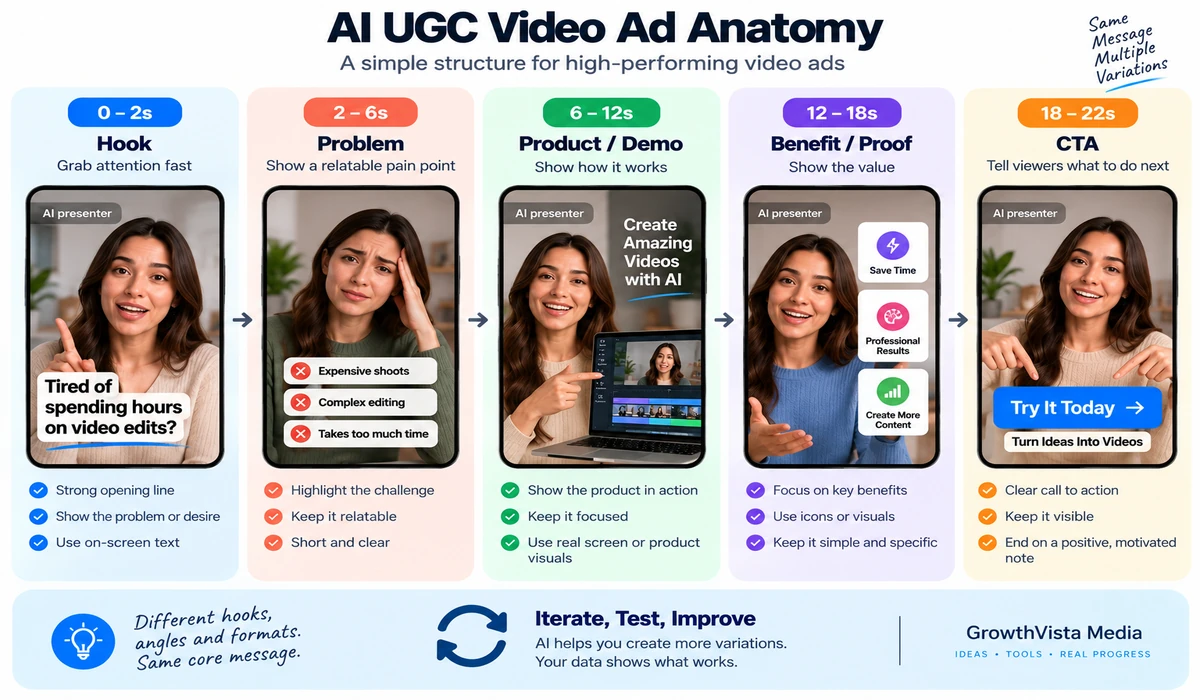
AI UGC-style ads imitate the direct-to-camera, informal visual language commonly associated with creator content. They can be useful for testing scripts, presenters and hooks quickly.
They should not be presented as genuine customer testimonials when the person or experience is synthetic. Marketing teams should review platform advertising policies and consumer-protection rules for endorsements, testimonials and disclosure in the markets where ads run.
The safer creative approach is to use AI presenters as presenters—not fabricate a customer experience that did not happen.
Creative Variation Is Where AI Can Change Performance Marketing
Traditional video production makes each new hook, opening shot or spokesperson variation expensive. AI makes those changes cheaper, which can increase the number of creative hypotheses a team is able to test.
That does not mean AI-generated ads automatically perform better. Performance still depends on the offer, audience, hook, landing page, targeting and media buying.
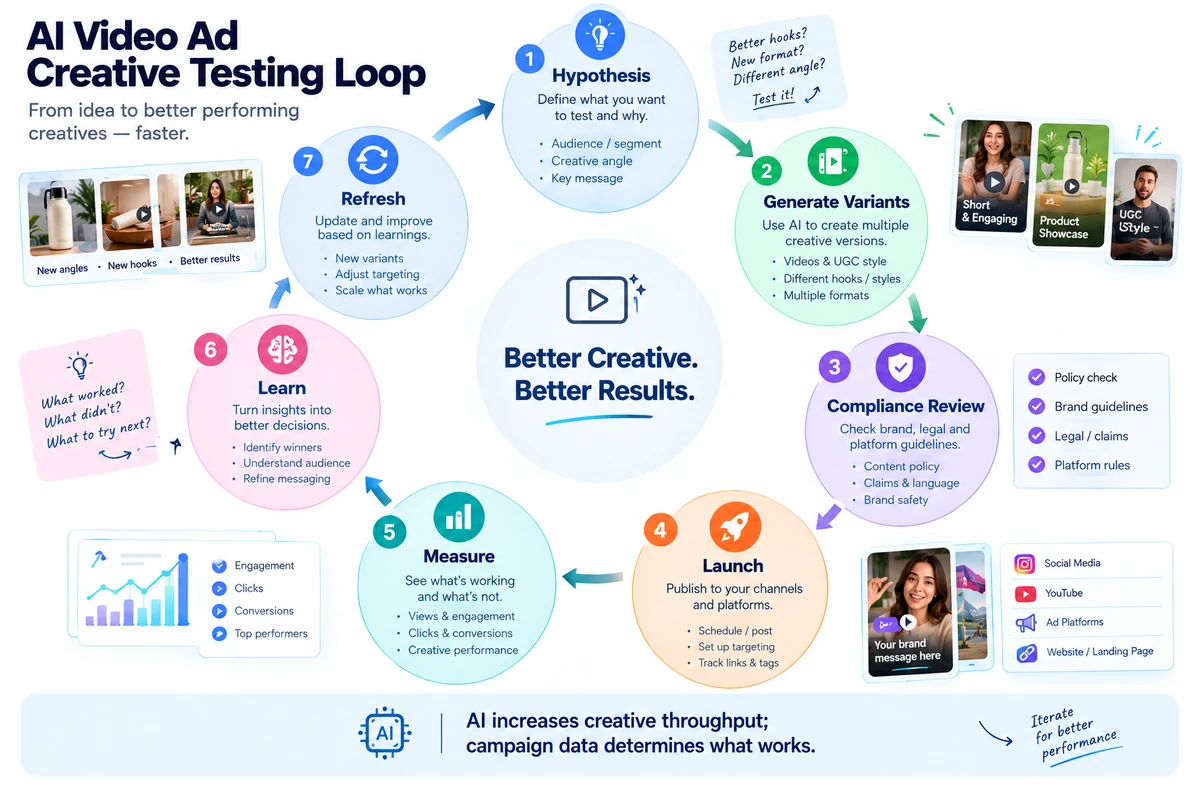
Use AI to increase the speed of controlled experiments: change one meaningful variable, launch enough volume to learn, then use real campaign data rather than the generator's marketing claims.
Build Variations Systematically
| Variable | Example Test |
|---|---|
| Hook | Question vs bold claim vs problem statement |
| Presenter | Founder-style vs creator-style vs no presenter |
| Opening visual | Product close-up vs problem scene vs lifestyle scene |
| Offer | Discount vs free trial vs benefit-led CTA |
| Length | 10–15 sec vs 20–30 sec |
| Format | 9:16 vs 1:1 vs 16:9 where placement supports it |
| Voice | Different tone/accent appropriate to target market |
| Language | Localized script and voice |
| CTA | Shop now vs learn more vs start free |
| B-roll | Real product footage vs generated concept footage |
Localization: Don't Just Translate the Words
HeyGen and Synthesia can dramatically accelerate multilingual video production, while other platforms provide voice and audio generation.
For advertising, localization should include offer, currency, terminology, captions, legal text, cultural context and landing-page consistency—not just translated narration.
Have a fluent reviewer check important campaigns before media spend is committed.
Commercial Rights and Paid-Ad Licensing Need Special Attention
Paid advertising is a stricter use case than posting an organic social video. A platform may allow general commercial use while placing restrictions on specific avatars, voices, partner models or paid promotion.
Synthesia is a good example: its July 2026 licensing guidance explicitly prohibits paid promotional use of stock and synthetic avatars, while custom-avatar use follows the rights agreement with the represented person.
Adobe states that outputs from its own Firefly Video Model are safe for commercial use, but partner models can have separate terms. Canva similarly tells users to ensure generated designs are suitable for commercial use and notes that outputs may not be exclusive.
Before launch, verify the exact model, avatar, plan and asset rights—not just the platform name.
Platform Advertising Policies Still Apply
An AI tool can generate a creative that an ad network will not approve. Meta, TikTok, Google, LinkedIn and other platforms have their own rules covering restricted industries, misleading claims, personal attributes, synthetic media and other content.
Treat AI generation as production assistance, not policy clearance. Human compliance review should happen before the creative enters Ads Manager.
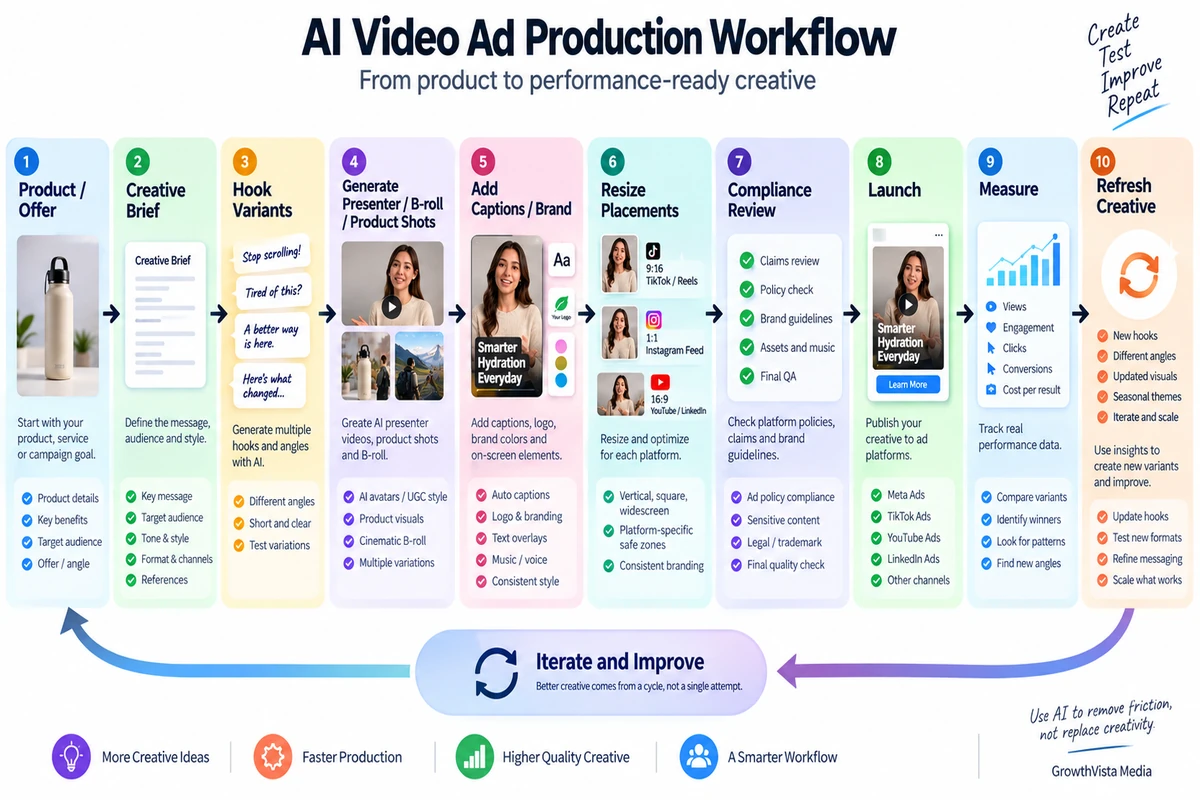
A Practical AI Ad Production Stack
| Stage | Possible Tool | What the Marketer Still Owns |
|---|---|---|
| Brief | Marketing team + writing assistant | Audience, offer, positioning and evidence |
| UGC/presenter | HeyGen / eligible custom-avatar workflow | Truthful claims, presenter rights and disclosure |
| Cinematic shots | Runway / Firefly / Luma / Kling / Google / Seedance | Art direction and asset rights |
| Design/variants | Canva / Adobe | Brand consistency and placement formatting |
| Localization | HeyGen / Synthesia / voice tools | Human language and legal review |
| Launch | Ad platform / Canva Grow where supported | Targeting, budget and policy compliance |
| Measurement | Ad platform analytics | Interpretation, incrementality and next test |
| Refresh | AI creative workflow | New hypothesis based on actual performance |
How to Choose Without Overbuying Software
Start with the type of ad you produce most often.
If you need presenter-led UGC-style creative, test an avatar/ad platform first.
If you need custom cinematic product visuals, test a generative-video platform.
If your bottleneck is resizing, branding, publishing and iteration, test an integrated design/ad workflow.
Run the same campaign brief through two shortlisted tools.
Count usable variants, production time and total credits—not just generation speed.
Verify paid-ad licensing before creating a full campaign library.
Keep the tool that improves your actual creative-testing workflow and remove redundant subscriptions.
Frequently Asked Questions
What is the best AI video generator for marketing?
The fit depends on the workflow. HeyGen is relevant for presenter/UGC-style ads, Canva Grow for integrated ad creation and publishing, and Runway or Adobe Firefly for custom generative visuals.
Can AI generate complete social media ads?
Yes. Some platforms can create scenes, presenter, voice, captions and formatting from a brief or product information. Human review is still needed for claims, brand quality and policy compliance.
Can I make AI UGC ads?
Yes, but synthetic presenter content should not be misrepresented as a genuine customer testimonial or real customer experience.
Which AI video tool is useful for product ads?
Adobe Firefly, Runway and other cinematic generators are relevant for product shots and B-roll, while HeyGen can turn product information into presenter-led ads.
Which tool can publish ads directly?
Canva Grow currently documents direct publishing workflows for Meta, TikTok and LinkedIn.
Can I use Synthesia avatars in paid ads?
Synthesia's July 2026 licensing documentation says stock and synthetic avatars cannot be used in paid promotion. Custom-avatar use is governed by the rights agreement with the represented person and platform policies.
Can Adobe Firefly video be used commercially?
Adobe states that videos generated with its own Firefly Video Model are safe for commercial use. Check separate terms when using partner models.
Does AI guarantee better ad performance?
No. AI can increase creative-production and testing speed, but performance depends on the offer, audience, creative concept, landing page, targeting and campaign execution.
Should I generate dozens of ad variants?
Only if the variations test meaningful hypotheses. Randomly generating large volumes of near-identical creative can waste credits and make analysis harder.
What should I check before launching an AI-generated ad?
Check factual claims, rights to faces/voices/assets, commercial-use terms, paid-ad licensing, localization, required disclosures and the advertising platform's current policies.
Final Thoughts on the Best Ai Video Generators For Marketing
When comparing the best AI video generators for marketing, the strongest fit is the one that improves your creative-testing system, not simply the one that generates the most cinematic demo.
HeyGen is especially relevant to UGC-style and spokesperson workflows. Canva Grow is moving toward an integrated create-publish-learn loop. Adobe Firefly and Runway give creative teams more control over custom product and cinematic visuals, while Synthesia can be valuable for structured global marketing when its licensing fits the intended distribution.
For paid media, licensing and policy review are part of the production process. A beautiful AI-generated ad is not useful if the avatar cannot legally be used in paid promotion or the creative violates the ad network's rules.
Shortlist tools based on your actual ad format, generate several controlled variants from the same brief, and judge the platform by usable creative, iteration speed, compliance and real campaign results.