Best AI Video Generators for YouTube Creators in 2026
The best AI video generators for YouTube in 2026 support different creator workflows, including faceless channels, AI presenters, cinematic B-roll, Shorts, voice, captions and editing. The right choice depends on where AI can remove repetitive production work without replacing editorial judgment.
Explore more in our AI Tools guides. Features, commercial-use terms and plans can change, so verify current details on each provider’s official website before publishing.
How We Compared the Best Ai Video Generators For Youtube
AI video tools can now help YouTube creators at almost every stage of production: generating B-roll, animating still images, creating presenter-led explainers, localizing videos, producing Shorts and building visual sequences that would otherwise require stock footage or a camera crew.
But YouTube creators do not all need the same generator. A faceless documentary channel needs different tools from a tutorial creator, a product-review channel, a Shorts publisher or a creator who wants an AI version of themselves on screen.
This guide organizes the market by creator workflow rather than treating every AI video platform as interchangeable. The aim is to help you shortlist tools for the type of YouTube videos you actually publish.
Editorial Disclosure: GrowthVista Media may receive compensation from qualifying SaaS referrals where an affiliate relationship is available. This does not change the comparison criteria used in this guide.
How We Evaluated Tools for YouTube Workflows
Long-form versus Shorts workflow
Text-to-video and image-to-video capability
AI presenter/avatar options
B-roll and cinematic scene generation
Audio, voice and captions
16:9 and 9:16 support
Localization and dubbing
Editing after generation
Cost and iteration efficiency
Fit with YouTube's AI disclosure requirements
Quick Shortlist
| Tool | Useful YouTube Workflow | Why It Stands Out |
|---|---|---|
| Runway | Cinematic B-roll and custom shots | Gen-4.5 text/image-to-video with camera and motion control |
| HeyGen | Presenter videos, faceless channels, localization | Video Agent, avatars, B-roll, voices and long-form exports |
| Canva AI | Shorts, explainers and design-heavy channels | AI clips inside a full design/video editor |
| Adobe Firefly | Creative teams and multi-model B-roll | Generation plus editing inside Adobe ecosystem |
| Luma AI | Cinematic B-roll and modifying existing footage | Generation and video modification workflows |
| Pika | Short-form effects and visual hooks | Social-first transformations and effects |
| Synthesia | Educational, training and business channels | Structured presenter-led multilingual video |
| Kling | Cinematic shots and multi-shot experimentation | Generative video with advanced motion workflows |
| Gemini / Google video | Native-audio cinematic generation | Google's evolving multimodal video workflow |
| Dreamina / Seedance | Reference-driven multi-shot creation | Multimodal video generation for stylized/cinematic scenes |
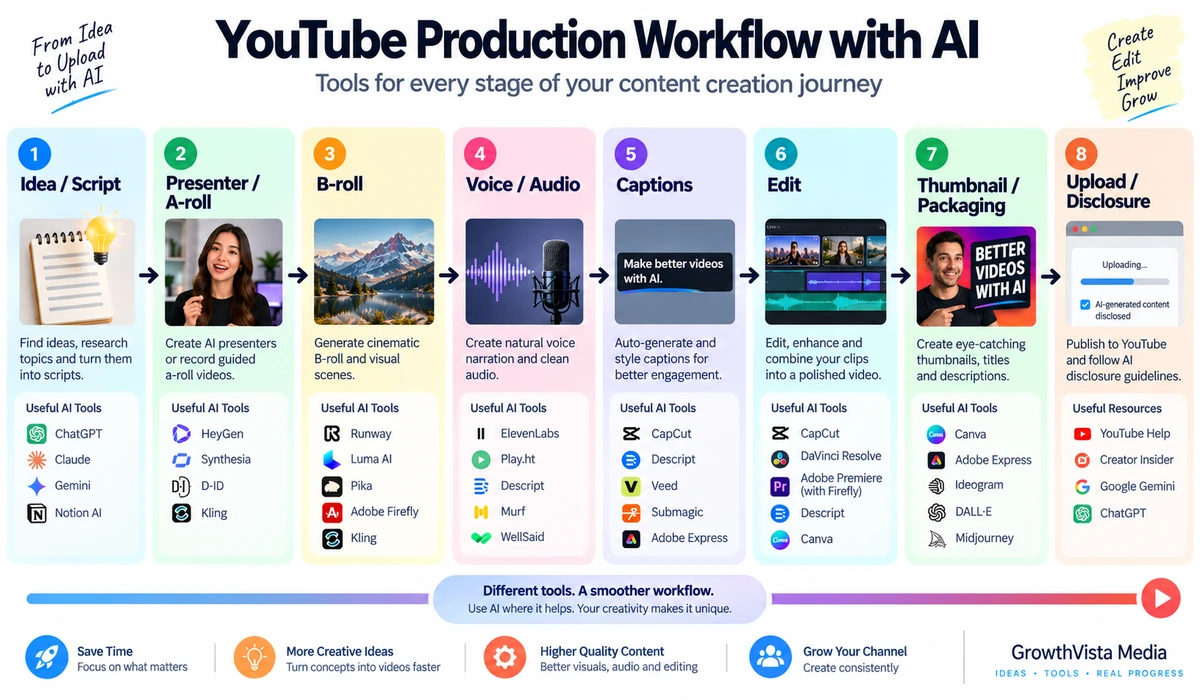
1. Runway — For Cinematic B-Roll and Custom Visual Sequences
Runway is a strong fit when a YouTube creator needs shots that are difficult, expensive or impossible to film. Its current Gen-4.5 model supports text-to-video and image-to-video, with 2–10 second generations and multiple aspect ratios including 16:9 and 9:16.
Runway's documentation emphasizes camera choreography, sequenced actions and motion prompting. That makes it useful for documentary B-roll, concept visualization, channel intros, storytelling sequences and transitions.
For YouTube, the practical workflow is usually shot-based: generate several short clips, choose the usable takes, then assemble them around narration or A-roll. Gen-4.5 currently costs 12 credits per generated second, so iteration volume should be part of the budget.
2. HeyGen — For AI Presenters, Faceless Channels and Localization
HeyGen is particularly relevant when the video needs a presenter but the creator does not want to record every episode. Its current Video Agent can turn a prompt, script, URL or document into a structured video with scenes, avatar, voice, B-roll and captions.
HeyGen's current Avatar V supports expressive digital presenters, while the platform advertises voice and video workflows across 177+ languages and dialects. Creator and Pro plans support videos up to 30 minutes, and current export options include 1080p on Creator and 4K on Pro and higher.
That combination can fit faceless educational channels, software explainers, multilingual channels and creators who want a reusable digital twin.
The important caveat is authenticity: using a synthetic presenter does not remove the need for original scripting, editorial judgment and meaningful value.
3. Canva AI — For Shorts, Explainers and Design-Heavy Channels
Canva's AI video generator is useful when generated clips are only one component of the finished YouTube asset. Canva can create video from prompts with synchronized audio and then place the result directly into a broader design and editing workflow.
This is practical for creators who already use Canva for thumbnails, channel graphics, Shorts, title cards and social repurposing. Instead of exporting a generated clip into another editor immediately, the creator can combine it with typography, templates, graphics and brand assets in the same environment.
For channels that depend on sophisticated cinematic shot control, a dedicated generator may offer deeper controls. For fast creator packaging, Canva's integration is the attraction.
4. Adobe Firefly — For Creators Already in the Adobe Ecosystem
Adobe Firefly is increasingly useful as a multi-model generative workspace. Creators can generate video and then continue into Adobe's wider editing environment rather than treating AI footage as an isolated asset.
Firefly also exposes multiple video-model choices in supported workflows, which can reduce the need to maintain separate interfaces for every generator.
For YouTubers already editing in Premiere Pro or using Adobe tools for graphics and audio, workflow integration can matter more than chasing a single model for every shot.
5. Luma AI — For Cinematic B-Roll and Footage Transformation
Luma's current video workflows are relevant to creators who want cinematic generation but also want to modify existing footage. Its Ray family supports generative video, while Modify workflows can transform environments, styling and other visual elements around an existing performance.
That can be useful when a YouTuber has real footage but wants to create a different setting, visual treatment or conceptual sequence without reshooting everything.
As with all fast-moving model families, verify the exact Ray version and controls available in your account before building a recurring production workflow.
6. Pika — For Short-Form Effects, Hooks and Visual Experiments
Pika's product family is particularly suited to creators who want visually surprising transformations. Its workflows include frame-based generation, scene and object transformations, additions and stylized effects.
For YouTube Shorts, these effects can help create an immediate visual hook. Pika has also expanded into AI audio, making it increasingly useful for self-contained short-form experiments.
A dramatic effect is not automatically a good video strategy. Use effects to support the idea rather than allowing the effect itself to become the entire channel.
7. Synthesia — For Educational and Business YouTube Channels
Synthesia is a natural fit for channels publishing structured explainers, training material, product education or professional communication. Its current platform combines 240+ pre-built avatars with localization and voiceover across 160+ languages.
Creators can start from a script, prompt, PowerPoint, PDF, URL or document and generate a multi-scene presenter video. That makes it useful when YouTube is one distribution channel for content that may also live in an LMS, knowledge base or customer-training library.
It is less focused on cinematic experimentation than dedicated generative-video tools, but that is not necessarily a disadvantage for structured educational production.
8. Kling — For Cinematic Motion and Multi-Shot Experimentation
Kling remains a notable option for creators exploring cinematic AI-generated sequences. Current multi-model creative platforms expose Kling alongside other leading video models, making it easier to compare its output on the same project.
It is particularly relevant for narrative B-roll, stylized scenes and motion-heavy shots where a stock library would feel generic.
Because model versions, duration and access can change quickly, verify the exact Kling model and plan before publishing hard specifications or budgeting a recurring series.
9. Google's Current Video Tools — For Native Audio and Multimodal Creation
Google's video-generation ecosystem is evolving quickly. Veo 3.1 remains documented by Google DeepMind, while Gemini's consumer video experience is moving toward Gemini Omni.
The important creator capability is native or integrated audio: generated scenes can include dialogue, ambience and sound effects rather than always requiring a separate audio pass.
For YouTube storytelling, that can be useful for conceptual sequences, short narrative scenes and B-roll where sound is part of the creative idea. Always verify which Google model is actually available in the product surface you use.
10. Dreamina / Seedance — For Reference-Driven Creative Sequences
Dreamina's Seedance workflows are relevant when creators want to combine text, image, video and audio references to direct a generated sequence.
That makes reference-driven generation useful for recurring visual styles, story sequences and concept-heavy B-roll. It can also reduce some of the randomness of pure text-to-video when a creator already knows the look of the scene.
As with other rapidly changing tools, confirm the exact model version, regional availability and commercial terms before committing a channel workflow.
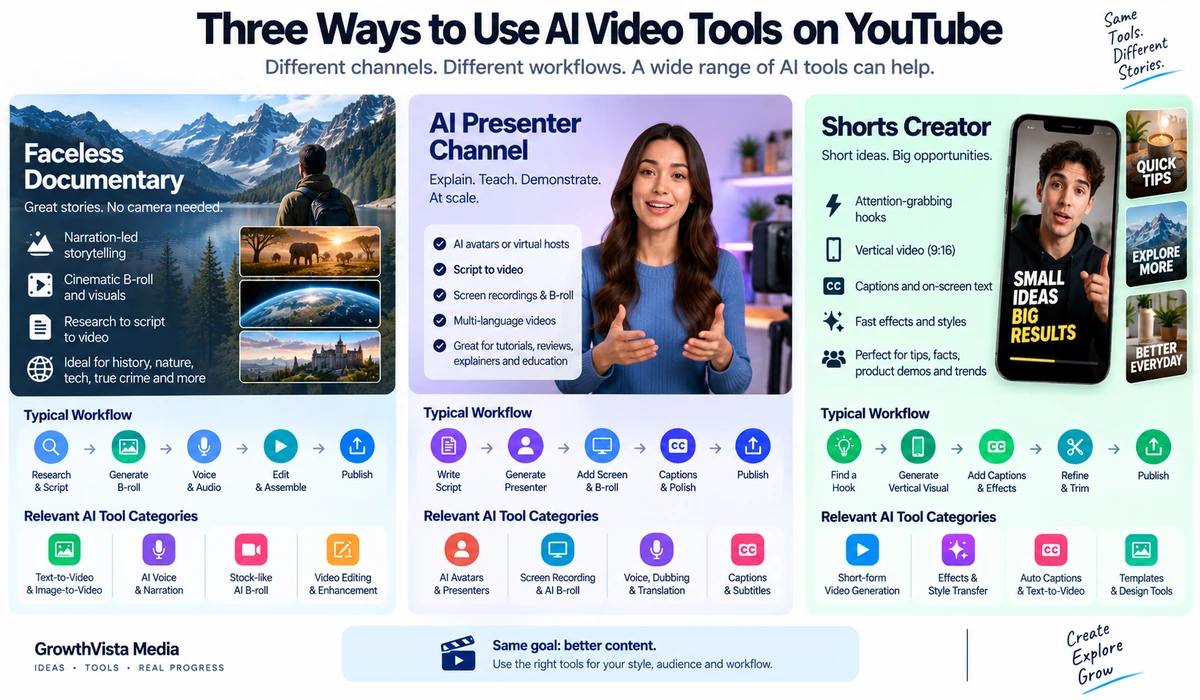
Which Tool Fits Different YouTube Channel Types?
| Channel Type | Tools to Investigate | Typical Workflow |
|---|---|---|
| Faceless documentary | Runway, Luma, Google video, Kling, Seedance | Narration + generated/stock B-roll + editor |
| AI presenter / explainer | HeyGen, Synthesia | Script + avatar + B-roll + captions |
| Software/tutorial | HeyGen, Canva, Synthesia | Presenter/voice + screen recording + graphics |
| YouTube Shorts | Pika, Canva, Runway, HeyGen | Hook + vertical clips + captions + fast edit |
| Storytelling / cinematic | Runway, Luma, Kling, Google video, Seedance | Storyboard + short generated shots + sound/edit |
| Business education | Synthesia, HeyGen, Canva | Structured script + presenter + branded scenes |
| Multilingual channel | HeyGen, Synthesia | Master video + translation/dubbing + review |
| Design/marketing channel | Canva, Adobe Firefly | Generated visuals inside broader creative workflow |
Long-Form YouTube: AI Should Usually Be a Production Layer, Not the Entire Strategy
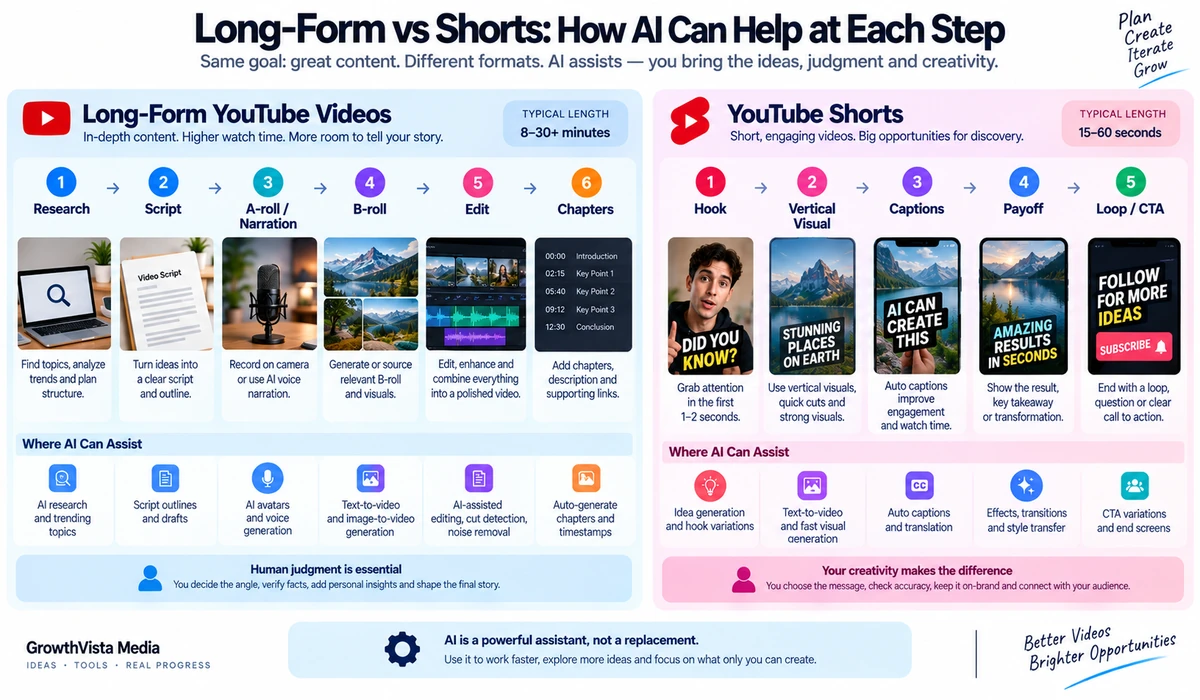
Most generative-video models still work best as short-shot generators rather than one-click replacements for a complete 8–20 minute YouTube production.
A more reliable workflow is to build the long-form video from layers: original research and script, narration or presenter, screen recordings or real footage where useful, generated B-roll for difficult scenes, licensed music and sound, then human editing.
Avatar platforms are an exception in the sense that they can render much longer presenter-led videos, but the editorial quality still depends heavily on the script and structure.
Shorts: Vertical Format and the First Seconds Matter
For Shorts, check native 9:16 support or an editing workflow that can reframe without losing the subject. Runway Gen-4.5 documents 9:16 generation, while HeyGen exports vertical formats and Canva is built around multi-format design.
AI effects can help with the visual hook, but the first seconds still need a clear idea. A visually impressive clip with no narrative payoff is unlikely to build a durable channel.
AI Avatars vs Faceless Narration
An AI avatar gives the viewer a consistent presenter and can make explainers easier to follow. Faceless narration gives the creator more freedom to use footage, graphics, screenshots and cinematic B-roll.
Choose based on channel identity. If trust depends on personal expertise, a real on-camera creator may still be the strongest option. If the content is process-driven or multilingual, a synthetic presenter can make scaling easier.
Localization Can Turn One Video Into Multiple Markets
HeyGen and Synthesia both support broad multilingual workflows, including translated voice and presenter video. For a creator with genuinely international subject matter, this can make localization much faster than re-recording every language manually.
Do not publish machine-translated versions without review. Product names, technical terms, jokes and regional phrasing can fail even when the general translation is fluent.
YouTube's AI Disclosure Rules Matter
YouTube requires creators to disclose content that meaningfully alters or generates realistic, photorealistic material in ways viewers could mistake for reality. Examples include making a real person appear to say or do something they did not, altering footage of a real event or place, or generating a realistic scene that did not occur.
YouTube provides an AI-use disclosure setting in Studio and can display a 'Made with AI' disclosure. In 2026, YouTube also updated its disclosure and labeling approach to improve transparency around AI-created media.
Not every use of AI requires the same disclosure. Creators should use YouTube's current help documentation for the exact scenario rather than assuming that all AI-assisted editing is treated identically.
AI Does Not Remove Copyright and Rights Questions
A creator still needs rights to uploaded footage, music, voices, faces, logos and reference images. Commercial-use terms can also vary by generator and subscription tier.
For client channels or monetized content, keep a record of the source assets and the plan/model terms under which the video was created.
Avoid the 'One-Click Faceless Channel' Trap
Tools that can generate scripts, avatars, B-roll and narration are powerful, but full automation can easily produce repetitive or generic videos.
A stronger channel still needs a distinct point of view, useful information, fact checking, original examples and editing choices. Use AI to reduce production friction, not to eliminate the creator's judgment.
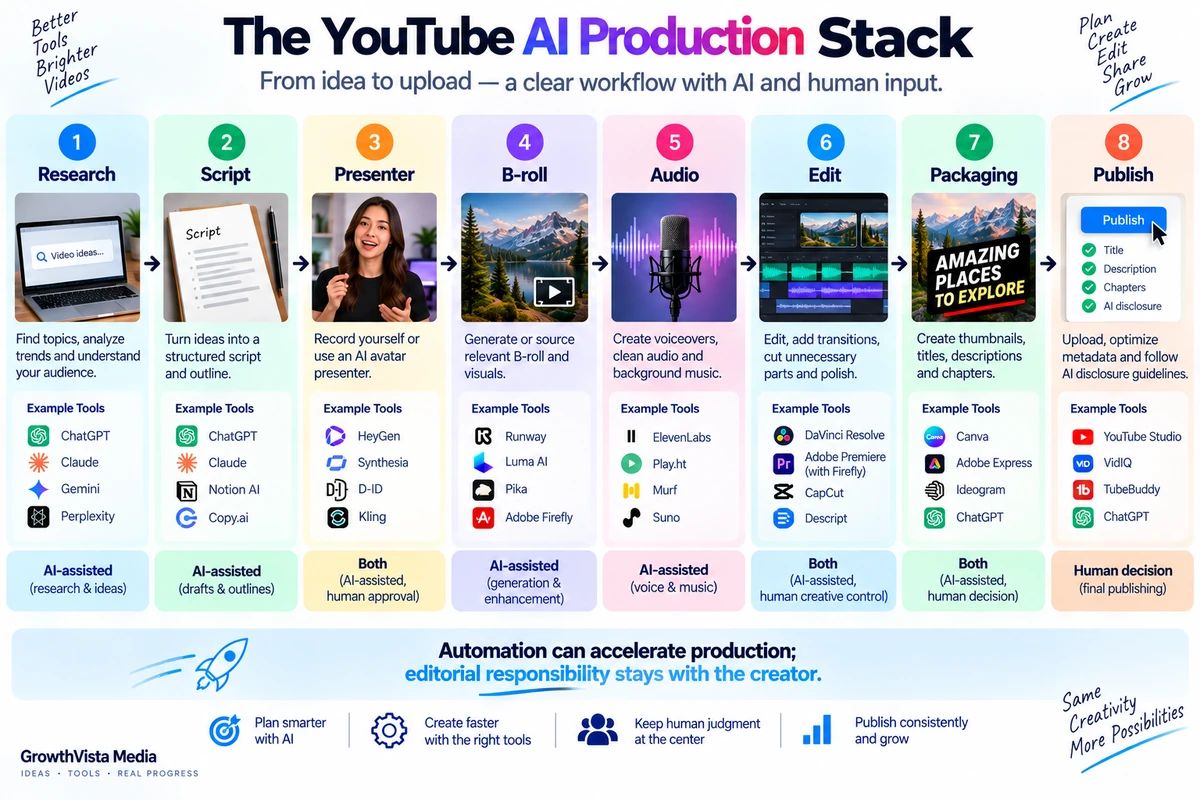
A Practical YouTube AI Video Stack
| Stage | Possible Tool Type | Creator Responsibility |
|---|---|---|
| Research / angle | Research and writing tools | Choose a useful, accurate idea |
| Script | Writing assistant + human edit | Add expertise, examples and fact checking |
| Presenter | Real camera, HeyGen or Synthesia | Choose appropriate identity and disclosure |
| B-roll | Runway, Luma, Kling, Google, Seedance | Direct shots and reject artifacts |
| Design | Canva / Adobe | Brand consistency and readable graphics |
| Audio | Voice, music and SFX tools | Check rights, levels and pronunciation |
| Edit | Traditional or AI-assisted editor | Pacing, continuity and final quality |
| Publish | YouTube Studio | Title, thumbnail, chapters and AI disclosure where required |
How to Choose Without Paying for Five Subscriptions
Pick your dominant video format: long-form, Shorts, presenter-led or cinematic.
Choose one primary production platform.
Add a specialist generator only if your primary tool cannot create the shots you need.
Test the same 3–5 real shots before subscribing annually.
Measure usable output, not generation count.
Estimate credits consumed per finished minute.
Check commercial rights and YouTube disclosure requirements.
Cancel tools that duplicate capabilities you already have.
Frequently Asked Questions
What is the best AI video generator for YouTube?
It depends on the channel. Runway and similar generators fit cinematic B-roll; HeyGen and Synthesia fit presenter-led content; Canva fits design-heavy creator workflows.
Can I make a faceless YouTube channel with AI?
Yes. AI can assist with narration, presenters, B-roll, graphics and editing, but successful channels still need original value, fact checking and editorial direction.
Which AI tool is useful for YouTube Shorts?
Pika and Canva are relevant for fast social workflows, while Runway supports vertical generation and HeyGen can create vertical presenter-led videos.
Can AI create a full 10-minute YouTube video?
Avatar platforms can render long presenter-led videos, while cinematic generators usually work better as short-shot tools assembled in an editor.
Does YouTube allow AI-generated videos?
Yes, subject to YouTube's policies. Creators must disclose certain realistic altered or synthetic content using YouTube's AI-use disclosure workflow.
Do I have to label every AI-assisted video?
Not necessarily. YouTube's disclosure requirement focuses on meaningfully altered or generated realistic content that viewers could mistake for reality. Check the current YouTube help guidance for your exact use.
Can I monetize AI-generated YouTube videos?
AI use itself does not automatically answer monetization eligibility. The channel and videos still need to comply with YouTube's current monetization, copyright and content policies.
Which AI video tool is useful for multilingual channels?
HeyGen and Synthesia both provide broad localization workflows. Human review remains important for pronunciation and translation accuracy.
Is Runway good for YouTube?
Yes for creators who need custom B-roll, visual sequences and cinematic shots. Its current Gen-4.5 supports text/image-to-video and multiple aspect ratios.
Should I use an AI avatar instead of appearing on camera?
Only if it fits your channel identity and workflow. Personal on-camera presence can build trust, while avatars can improve repeatability and localization.
Final Thoughts on the Best Ai Video Generators For Youtube
The best AI video tool for a YouTube creator is the one that removes the biggest bottleneck in that creator's workflow.
If the bottleneck is custom B-roll, start with a cinematic generator such as Runway and compare alternatives on your real shots. If the bottleneck is recording a presenter repeatedly, HeyGen or Synthesia may change the production process more dramatically. If the bottleneck is turning clips into branded Shorts and explainers, Canva or an integrated creative suite may be more useful.
Most serious channels will still benefit from a hybrid workflow: human editorial direction plus AI assistance for specific production tasks.
Before committing to a paid plan, create one complete representative video. Count the time, credits, rejected generations and editing effort. The platform that produces the most usable finished content—not the most impressive demo—is the one worth keeping.