Runway vs Google Veo: Which AI Video Generator Fits Your Workflow?

Runway vs Google Veo compares two different approaches to AI video: a broader creative production platform and a video-generation model connected to Google workflows. This guide looks at the surrounding workflow as well as generation capabilities.
Explore more in our AI Tools guides. Capabilities and plans change, so verify current details on the official Runway and Google Veo pages.
How We Compared Runway vs Google Veo
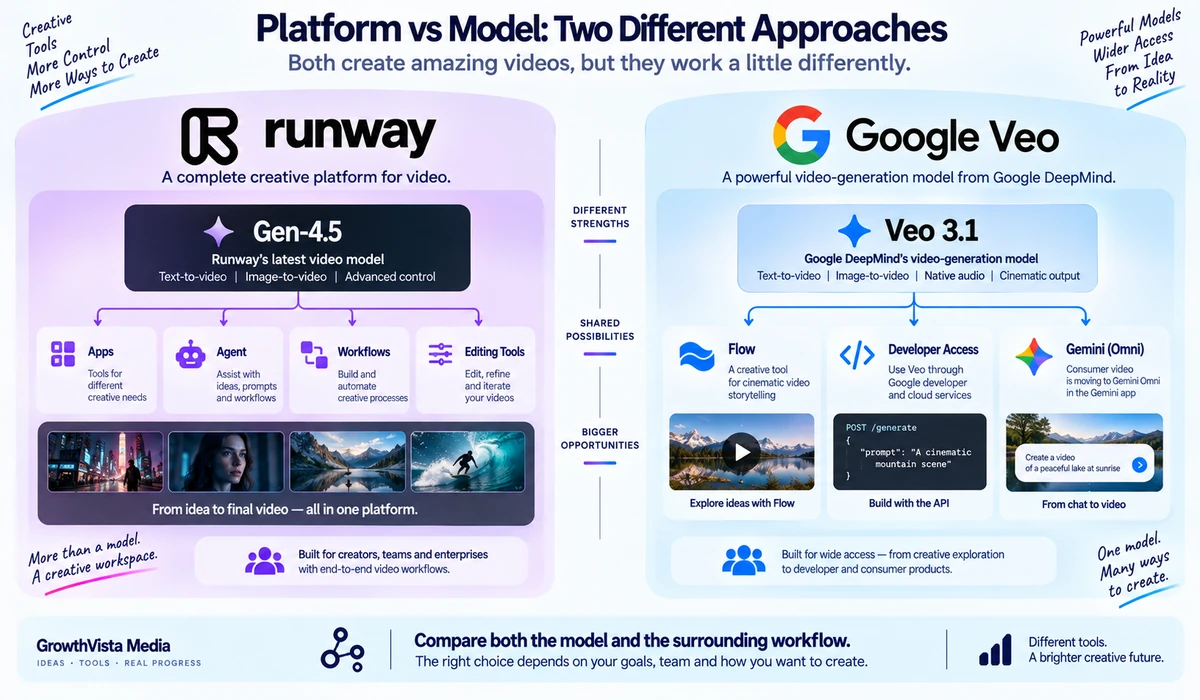
Runway and Google Veo are both major names in generative video, but comparing them in 2026 requires an important distinction: Runway is a creative platform with its own video models and workflow tools, while Veo 3.1 is Google's video-generation model available through products such as Flow and developer services.
Runway's current flagship Gen-4.5 supports text-to-video and image-to-video, detailed camera and motion prompting, multiple aspect ratios and a broader Runway workspace for iteration. Google Veo 3.1 emphasizes cinematic generation with native audio, reference images, scene extension, camera controls and high-resolution output.
Google has also introduced Gemini Omni, which is replacing Veo inside the Gemini app. That does not make Veo 3.1 irrelevant: Google DeepMind still presents Veo 3.1 as its leading video-generation model, while Google's product surfaces are evolving around Omni.
This comparison therefore focuses on Runway Gen-4.5 versus Veo 3.1 as video-generation technologies and workflows, while clearly separating the model from the apps through which you access it.
Editorial Disclosure: GrowthVista Media may receive compensation from qualifying SaaS referrals where an affiliate relationship is available. This does not change the comparison criteria used in this guide.
Current Product Status in 2026
Runway's current documentation identifies Gen-4.5 as its newest generative-video model for text-to-video and image-to-video. Google DeepMind continues to document Veo 3.1 as its leading video-generation model, while the Gemini consumer app is transitioning from Veo to Gemini Omni. Readers should therefore verify the exact model offered in the Google product they plan to use.
| Area | Runway Gen-4.5 | Google Veo 3.1 |
|---|---|---|
| What it is | Runway's flagship generative-video model inside a broader creative platform | Google DeepMind video-generation model |
| Text-to-video | Yes | Yes |
| Image-to-video | Yes | Yes |
| Native audio | Not a defining Gen-4.5 generation feature; Runway has separate audio/workflow tools | Yes: dialogue, ambience and sound effects |
| Documented clip length | 2–10 seconds in current Runway Gen-4.5 documentation | Veo examples and product surfaces vary; verify current access surface |
| Documented resolution | 720p base output for Gen-4.5 | Google documents 1080p and 4K capabilities |
| Aspect ratios | Multiple, including 16:9, 9:16, 1:1, 4:3, 3:4, 21:9 | Varies by access surface/workflow |
| Reference controls | Image-to-video plus Runway workflow tools | Reference images, style, characters, first/last frame |
| API availability | Runway API | Google developer/cloud access; availability depends on service |
| Consumer workflow | Runway web platform | Flow and evolving Google/Gemini surfaces |
1. Text-to-Video: Both Support Prompt-Driven Generation
Runway Gen-4.5 supports text-only video generation. Runway recommends prompts that describe both visual content and motion, and its documentation highlights complex sequenced instructions, camera choreography and scene composition.
Veo 3.1 also supports text-to-video and is positioned by Google around realism, prompt adherence and cinematic storytelling. Google documents native audio as part of the generation system, which changes how prompts can describe dialogue, ambience and sound.
For pure prompt-to-video work, both belong on a serious shortlist. The larger difference is how much of the production process you want to happen in the same generation.
2. Image-to-Video: Runway Uses the Image as the Visual Foundation
Runway's Gen-4.5 image-to-video workflow treats the uploaded image as the source of composition, subject, lighting and style. The text prompt is then used primarily to describe motion, camera behavior and temporal progression.
This is useful when you already have a designed keyframe, product concept, character image or storyboard frame and want controlled movement rather than asking the model to invent the entire shot.
Veo 3.1 also supports image-guided creation and goes further with documented reference-image workflows for scenes, characters, objects and style.
3. Native Audio Is a Major Veo 3.1 Difference
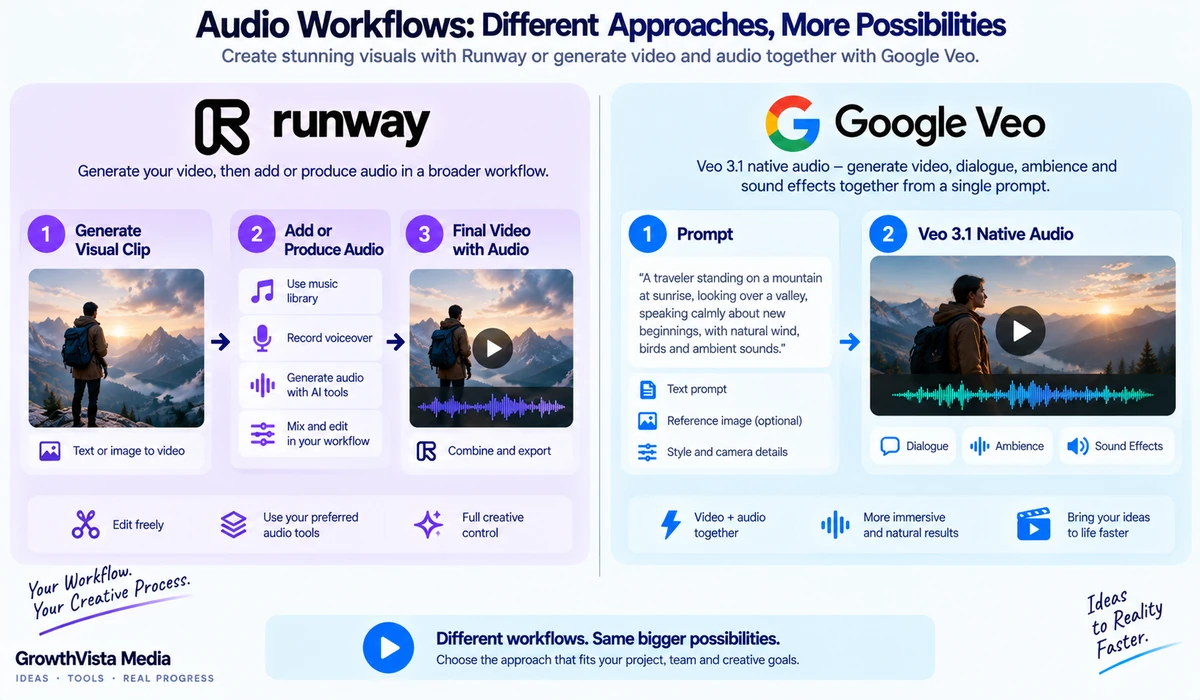
Google explicitly documents native audio generation in Veo 3.1, including sound effects, ambient noise and dialogue. That means audio can be conceived as part of the shot rather than always being assembled afterward.
Runway is a broader creative platform with audio capabilities and tools, but Gen-4.5's current core specification is centered on visual text-to-video and image-to-video generation rather than native synchronized audio as the defining generation feature.
If spoken dialogue and environmental sound need to emerge directly with the generated scene, Veo's native-audio design is a significant workflow consideration.
4. Resolution: Veo Documents Higher Native Output Options
Runway's current Gen-4.5 specification lists 720p base output. Runway provides additional export and post-generation workflow options, but the documented Gen-4.5 generation resolution is 720p.
Google DeepMind documents Veo 3.1 with 1080p and 4K output capabilities. For workflows where native high-resolution generation is a requirement, that specification difference deserves attention.
Resolution alone does not determine usable quality. Motion consistency, prompt adherence, artifacts and how well the footage survives editing are equally important.
5. Duration and Shot Design
Runway documents Gen-4.5 generations from 2 to 10 seconds. That encourages a shot-based workflow: generate individual clips, iterate, then assemble the finished sequence.
Google's Veo ecosystem also supports shot-based creation and scene extension. Google documents the ability to extend a scene while maintaining visual and audio consistency.
For longer finished videos, neither workflow should be thought of as simply typing one prompt and receiving a polished multi-minute production. Planning, shot selection, continuity and editing still matter.
6. Camera and Motion Control
Runway's prompting documentation places strong emphasis on camera choreography. Gen-4.5 can respond to detailed instructions describing camera movement, timing and multiple actions within a shot.
Veo 3.1 also documents camera controls, including precise framing and movement. Google additionally lists motion controls for defining object movement paths.
Creators who depend on repeatable camera language should test their own shot types in both systems rather than relying on demo reels.
7. Character and Reference Consistency
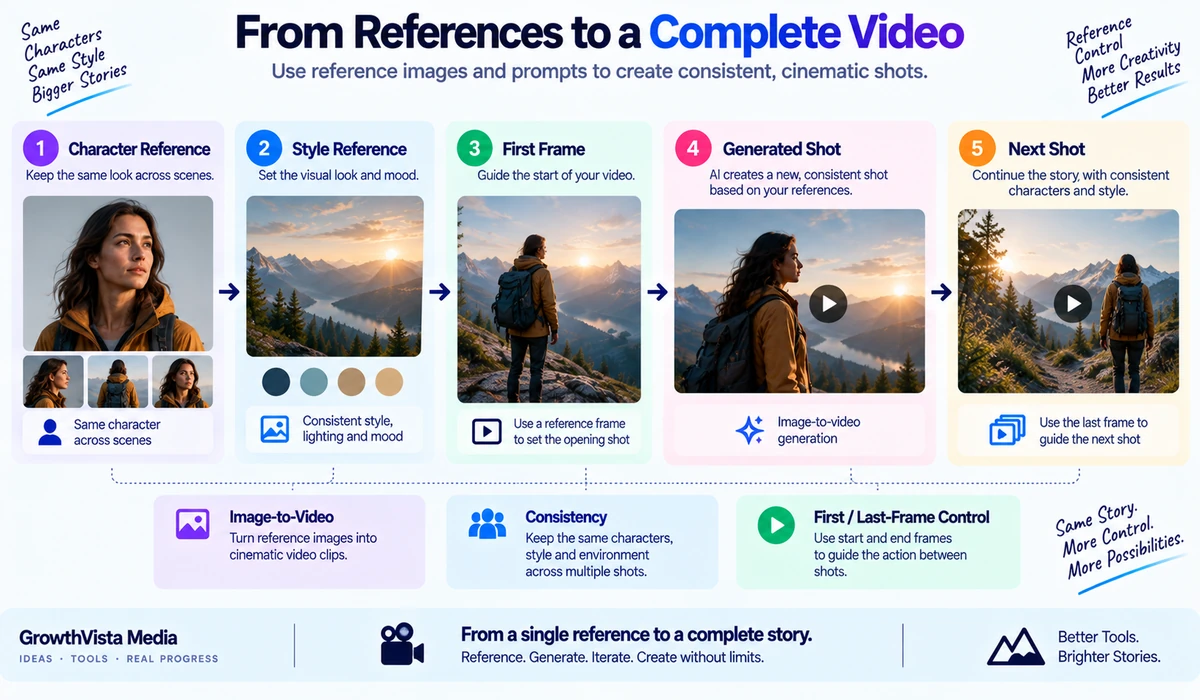
Google documents several Veo 3.1 reference controls: scene, character and object images; style references; first-and-last-frame workflows; scene extension; object addition/removal; and character controls.
Runway's broader platform offers image-driven generation and additional apps/workflows around character and creative consistency, but the exact technique can depend on which Runway tool or model you select.
If your project involves a recurring person, product or branded object across multiple shots, reference consistency should be tested before committing to a long production.
8. Editing and Iteration: Runway's Platform Breadth Matters
One of Runway's strongest structural advantages is that generation sits inside a broader creative platform. Current Runway documentation highlights Apps, an Agent that can help produce multi-shot videos through conversation, and node-based Workflows for repeatable creative pipelines.
After generating a Gen-4.5 clip, users can continue working with it inside Runway rather than treating the model as an isolated endpoint.
Google's Flow is also designed around cinematic clip, scene and story creation using Google's generative models. The practical difference depends on which surrounding tools your team prefers, not just which underlying model produces the first clip.
9. Automation and API Workflows
Runway provides developer APIs for generative media and currently exposes Gen-4.5 alongside several other video models through its developer platform. This can be attractive for teams building automated content pipelines or testing multiple models through one integration.
Google provides developer access to Veo through its AI/cloud ecosystem. For enterprise or application development, teams should compare quotas, regional availability, safety requirements, pricing and the exact model version exposed by the API they plan to use.
API availability can evolve faster than editorial articles, so production teams should verify current developer documentation before implementation.
10. Cost Structure: Credits vs Google Product/API Pricing
Runway documents Gen-4.5 at 12 credits per generated second. A 5-second generation therefore consumes 60 credits and a 10-second generation consumes 120 credits under the current credit table.
Google's cost depends on how Veo is accessed: consumer subscriptions, Flow allowances and developer/API pricing are separate purchasing contexts. Because these can change, a fixed cross-platform monthly-price table can become stale quickly.
For a real project, calculate the cost of usable footage rather than the cost of one generation. If a 10-second shot requires six attempts, the production cost is six generations plus any upscaling, audio or editing work.
11. Vertical and Multi-Format Content
Runway Gen-4.5 officially supports multiple aspect ratios, including 16:9, 9:16, 1:1, 4:3, 3:4 and 21:9 for image-to-video, making it flexible for social, cinematic and square formats.
Google's Veo output formats depend on the product surface and generation mode. Google also documents outpainting to expand footage for different screen sizes.
If you publish across Shorts, Reels, YouTube and widescreen ads, test whether reframing preserves the subject and motion—not just whether an aspect-ratio option exists.
12. Safety and AI Transparency
Both ecosystems apply safety controls to generated media. Google also uses SynthID watermarking across its generative media ecosystem, including video, to help identify AI-generated content.
For commercial work, teams should additionally review rights to prompts, uploaded reference material, faces, voices, trademarks and client assets. A technically successful generation can still create legal or brand-review problems if source materials were not cleared.
Runway Gen-4.5: Where Its Workflow Stands Out
Text-to-video and image-to-video in one flagship model.
Detailed camera and motion prompting.
Multiple documented aspect ratios.
Runway Apps, Agent and Workflows surrounding the generation model.
Developer platform that exposes multiple generative-media models.
Clear per-second credit accounting for Gen-4.5.
Runway Gen-4.5: Trade-Offs to Consider
Current documented Gen-4.5 base generation is 720p.
Gen-4.5 costs 12 credits per generated second, so repeated iteration can consume credits quickly.
Native synchronized dialogue/audio is not the central Gen-4.5 generation capability in the way it is for Veo 3.1.
The broader Runway toolset means users need to understand which app/model handles each production task.
Google Veo 3.1: Where Its Workflow Stands Out
Native audio including dialogue, ambience and sound effects.
Documented 1080p and 4K capabilities.
Reference images for scenes, characters, objects and style.
Scene extension, first/last-frame, object and motion controls.
Integration with Google's Flow and developer ecosystem.
Google Veo 3.1: Trade-Offs to Consider
Google's consumer product story is changing as Gemini Omni replaces Veo inside the Gemini app.
Features and pricing differ depending on whether Veo is accessed through Flow, developer services or another supported surface.
Exact limits such as duration, aspect ratio and availability should be verified in the access surface being used.
A sophisticated reference/audio workflow can still require substantial iteration to produce a finished multi-shot sequence.
Which One Should You Shortlist for Your Workflow?
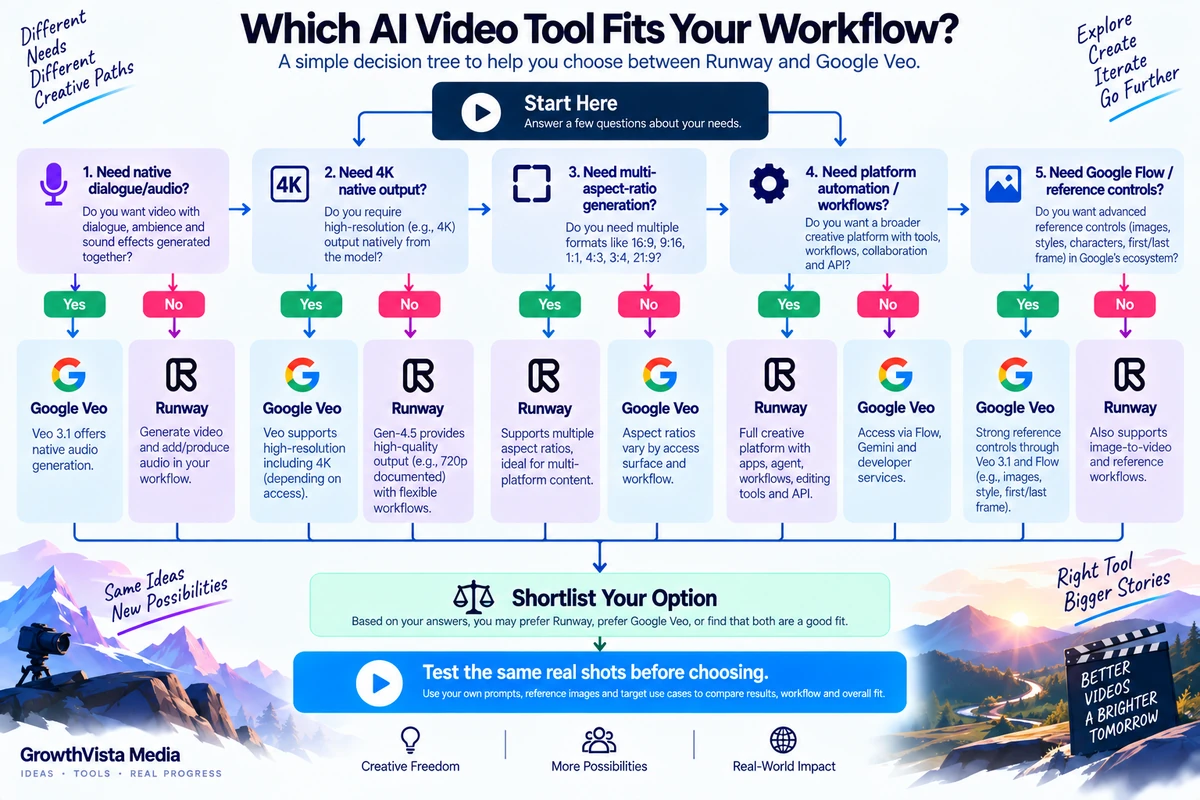
| Your Workflow | Runway Gen-4.5 Is Relevant When… | Veo 3.1 Is Relevant When… |
|---|---|---|
| Cinematic B-roll | You want strong prompt/camera iteration inside Runway | You want cinematic generation with native sound |
| Image-to-video | You want a clear motion-focused workflow from a keyframe | You want broader reference-image controls |
| Dialogue scene | You can assemble audio through the broader workflow | Native dialogue/audio is central to the generation |
| High-resolution master | 720p generation fits your pipeline or post workflow | Native 1080p/4K capability matters |
| Social formats | You want documented multi-aspect-ratio generation | Your chosen Google surface supports the needed format/reframing |
| Multi-shot production | You value Runway Agent/Apps/Workflows | You value Flow and Veo scene/reference controls |
| Automated pipeline | Runway's developer platform fits your stack | Google's API/cloud ecosystem fits your stack |
| Model experimentation | You want Runway plus access to multiple models in one developer environment | You want Google's own Veo/Flow ecosystem |
This table is a workflow map, not a scorecard. Test the same representative shots in both environments before committing to a production.
What About Gemini Omni?
Gemini Omni is important because Google states that Omni is replacing Veo inside the Gemini app. Omni 1.1 Flash supports multimodal video generation and editing from text, photos and video, native audio, 10-second video, multiple photo references and conversational multi-turn editing.
That means a reader choosing a Google consumer subscription in late 2026 may interact with Omni rather than a button labeled Veo. Veo 3.1 remains relevant as a Google DeepMind model and in supported production/developer workflows, but the consumer interface is evolving.
For an evergreen article, GrowthVista should keep this distinction visible so the comparison does not imply that every Google user sees the same Veo interface.
Prompting Differences to Keep in Mind
For Runway image-to-video, the starting image already defines the visual content, so Runway recommends focusing the prompt on motion and camera behavior. For text-to-video, the prompt needs to describe both the scene and motion.
Veo prompts can incorporate dialogue, sound effects and ambience because audio is generated natively. Reference images and camera controls can also carry part of the creative instruction.
In both systems, concise shot-level prompts are generally easier to iterate than trying to describe an entire film in one generation.
A Fair Test You Can Run Yourself
Create one 5–10 second cinematic text-to-video prompt.
Create one image-to-video shot from the same reference image.
Test a moving camera shot with two sequential actions.
Test a human subject with hands and object interaction.
Test a product or branded-object shot where geometry matters.
For Veo, test native dialogue/ambience; for Runway, evaluate the equivalent finished workflow with audio.
Record generation attempts, usable clips, total credits/cost and editing time.
Judge the final usable shot, not the best demo from either vendor.
Frequently Asked Questions
Is Runway better than Google Veo?
They emphasize different workflows. Runway combines Gen-4.5 with a broad creative platform, while Veo 3.1 emphasizes Google's cinematic generation, native audio and reference controls. Compare them against your actual production needs.
Does Runway Gen-4.5 generate audio?
Current Gen-4.5 documentation centers on text-to-video and image-to-video visual generation. Runway has broader audio and creative tools, but native synchronized audio is a defining Veo 3.1 capability.
Does Google Veo generate dialogue?
Yes. Google documents Veo 3.1 as generating dialogue, sound effects and ambient audio natively.
What resolution does Runway Gen-4.5 generate?
Runway's current Gen-4.5 specification lists 720p base output.
Can Veo generate 4K video?
Google DeepMind currently documents Veo 3.1 with 1080p and 4K output capabilities.
How long are Runway Gen-4.5 clips?
Runway currently documents durations from 2 to 10 seconds.
Is Veo still in Gemini?
Google states that Gemini Omni is replacing Veo in the Gemini app. Veo 3.1 remains documented by Google DeepMind and available through supported Google production/developer workflows.
Which is better for vertical social video?
Runway explicitly documents 9:16 support in Gen-4.5. For Veo, verify the format options in the Google surface you plan to use.
Which is better for API automation?
Both have developer pathways. The practical choice depends on model availability, pricing, quotas, cloud stack and whether you need access to multiple models.
Can I use both?
Yes. Some production teams use different models for different shots. Runway's developer platform itself currently exposes several video models, including Veo, alongside Runway models.
Final Thoughts on Runway vs Google Veo
Runway Gen-4.5 and Google Veo 3.1 are not simply two versions of the same product. Runway is strongest when viewed as a full creative platform around generation, iteration and automation, while Veo 3.1 is a Google video model with a particularly rich set of cinematic, reference and native-audio capabilities.
Runway documents a clear 2–10 second Gen-4.5 workflow, multiple aspect ratios and 12-credit-per-second pricing. Veo 3.1 adds native audio and Google-documented 1080p/4K capability, plus extensive reference and scene controls.
The Google side is also changing quickly: Gemini Omni is replacing Veo in the Gemini app, so readers should distinguish the underlying Veo model from the consumer interface through which Google video generation is accessed.
For a serious project, the best evaluation is practical: generate the same shots, count how many iterations become usable, include editing and audio time, and compare the total production workflow rather than a single showcase clip.