Best AI Image Generators for Marketing, Design & Content Creation in 2026
Editorial Disclosure: GrowthVista Media may receive compensation from qualifying SaaS referrals where an affiliate relationship is available. This does not change the comparison criteria used in this guide.
What Are the Best AI Image Generators in 2026?
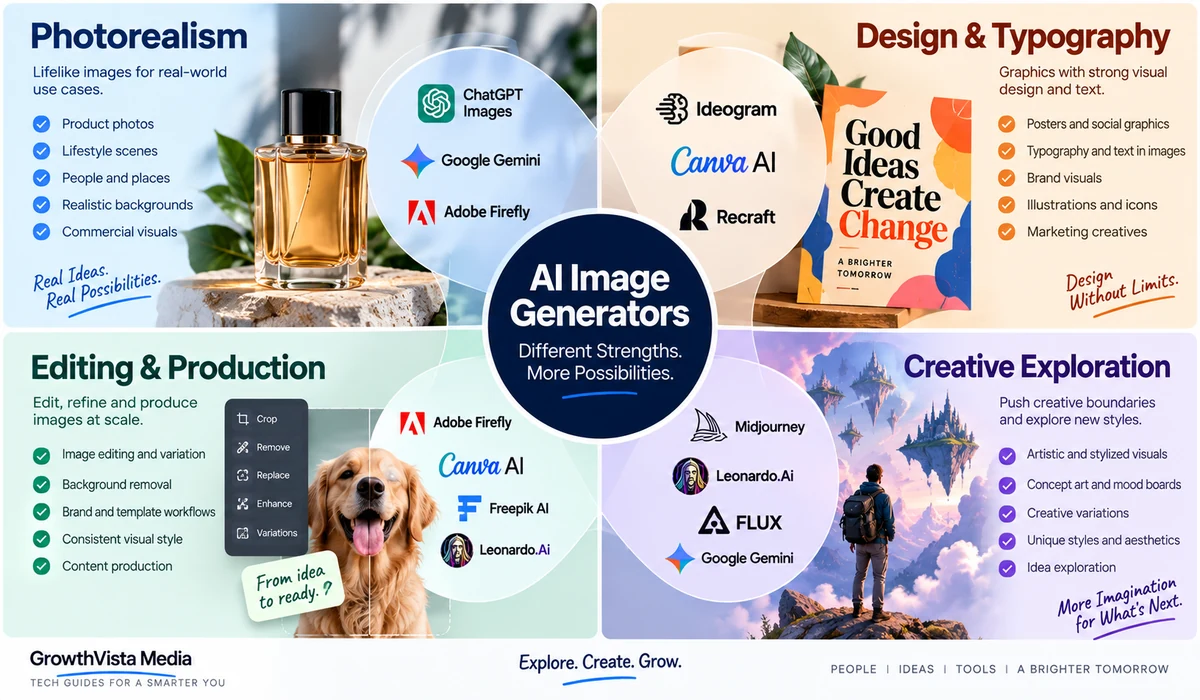
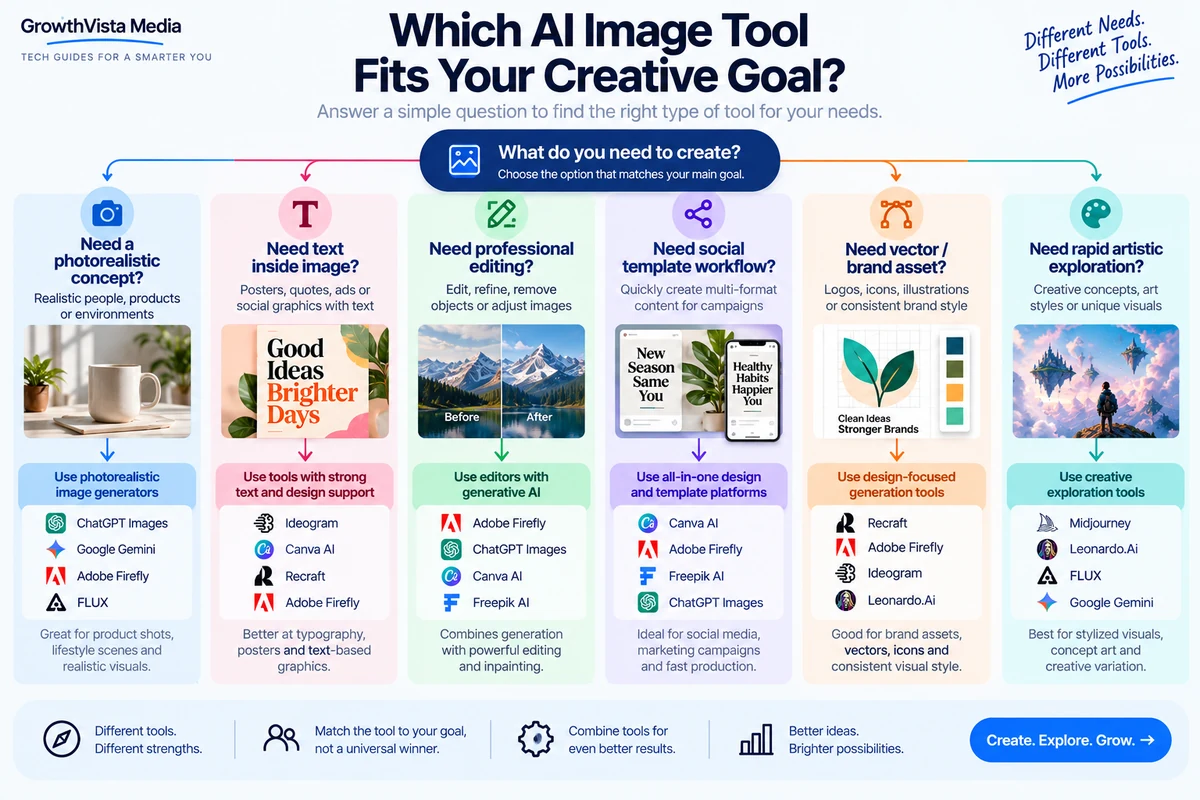
The best AI image generator depends on what you need to create. ChatGPT Images is useful for conversational creation and editing, Adobe Firefly for professional creative workflows, Midjourney for visual exploration, Ideogram for text-heavy images, and Canva AI for social and marketing design. For most users, the right choice depends on image quality, editing, text rendering, brand workflow, commercial-use requirements and ease of use.
The best AI image generators in 2026 support much more than simple prompt-to-image creation. This comparison looks at practical tools for marketing, design, editing, brand graphics and visual content workflows.
Explore more in our AI Tools guides. For primary product information, see the official OpenAI and Adobe Firefly websites.
How We Compared the Best AI Image Generators
AI image generation has moved beyond novelty prompts. Marketing teams now use it for campaign concepts, product backgrounds, social graphics and creative variations, while designers and content creators use it for illustrations, thumbnails, mood boards and visual storytelling.
The difficult part is choosing the right workflow. Some platforms prioritize photorealistic generation, some are better for typography and layout, some combine generation with professional editing, and others are built around rapid creative exploration.
This guide compares 10 major options by practical use case rather than assigning a universal winner.
Editorial Disclosure: GrowthVista Media may receive compensation from qualifying SaaS referrals where an affiliate relationship is available. This does not change the comparison criteria used in this guide.
How We Evaluated AI Image Tools
- Prompt-to-image capability
- Image editing and reference-image control
- Typography and text rendering
- Photorealistic versus illustrative range
- Brand/design workflow
- Product and marketing use cases
- Speed of iteration
- Integration with existing creative tools
- Commercial-use considerations
- Suitability for repeatable content production
Best AI Image Generators: Quick Comparison
| Platform | Strong Fit | Workflow Character | View Tool |
|---|---|---|---|
| ChatGPT Images | Conversational generation and editing | Create, revise and transform images through natural-language iteration | View Tool → |
| Adobe Firefly | Professional design and commercial creative workflows | Generation and editing connected to Adobe tools | View Tool → |
| Midjourney | Visual exploration and stylized concepts | Strong art direction through prompting and references | View Tool → |
| Ideogram | Typography-heavy graphics and posters | Image generation with emphasis on text inside images | View Tool → |
| Canva AI | Social, marketing and design production | Generation inside templates, brand tools and multi-format editor | View Tool → |
| Google Gemini Images | Conversational multimodal image creation | Generate and edit images within Google’s AI ecosystem | View Tool → |
| Leonardo.Ai | Creator assets and production controls | Image generation, editing and reusable creative workflows | View Tool → |
| Recraft | Brand graphics, vectors and design assets | Design-oriented generation and visual consistency | View Tool → |
| Freepik AI | Stock/design workflow with generative tools | Generate and edit assets inside a broad creative library | View Tool → |
| FLUX ecosystem | Model-driven image generation | Flexible high-quality generation across supported platforms | View Tool → |
1. ChatGPT Images — Best for Conversational Creation and Editing
ChatGPT’s image workflow is useful when the creator wants to develop an image through conversation rather than repeatedly rebuilding a technical prompt.
A user can describe the visual, request changes to composition, objects, text or style, and continue refining the result. This makes it practical for social graphics, editorial concepts, ad mockups, diagrams and visual ideation.
The broader advantage is context: image work can happen alongside research, copywriting, campaign planning or document analysis in the same workflow.
For brand production, creators should still verify text, logos, product details and any factual visual elements before publishing.
2. Adobe Firefly — Best for Professional Creative Workflows
Adobe Firefly is particularly relevant to designers and marketing teams already working in Adobe’s ecosystem. It combines generative image creation with editing capabilities and integration into professional creative workflows.
Firefly can help generate concepts, replace or extend image areas, create backgrounds and develop campaign assets that continue into Photoshop or other Adobe applications.
Adobe positions its own Firefly models for commercially safe creative use, which is an important consideration for agencies and brands. When partner models are available inside Adobe workflows, their separate terms should be reviewed.
3. Midjourney — Best for Visual Exploration and Art Direction
Midjourney remains a prominent option for creators who value visual exploration, mood, composition and stylized art direction.
It is useful for concept development, editorial imagery, mood boards, fantasy or cinematic visuals and early campaign exploration where the goal is to discover a compelling visual direction.
Reference-image and style workflows can help steer output, but brand-critical details should be checked carefully. Designers may also need another tool for final typography, layout and precise production edits.
4.Ideogram — Best for Text-Heavy Images
Ideogram is particularly relevant when readable text needs to be part of the generated image. This can matter for poster concepts, social graphics, signs, title treatments and advertising mockups.
AI image models have historically struggled with lettering, so typography remains a meaningful differentiator for marketing and design workflows.
Even when text renders correctly, final brand typography is often better rebuilt in a design application so spacing, fonts and accessibility can be controlled precisely.
5. Canva AI — Best for Social Media and Marketing Design
Canva’s advantage is that AI image generation sits inside a complete design workflow. A generated visual can immediately become part of an Instagram post, YouTube thumbnail, presentation, ad, flyer or other template.
Brand Kit and reusable templates can help teams keep generated assets aligned with established typography and colors instead of treating every AI image as a standalone piece.
For creators who prioritize speed from concept to publishable layout, that integration can matter more than the deepest possible image-model controls.
6. Google Gemini Images — Best for Multimodal Image Creation
Google’s image-generation workflow is increasingly integrated into Gemini’s broader multimodal environment. Users can generate images from natural-language instructions and refine visual ideas alongside text and other inputs.
This is useful for users already working inside Google’s AI ecosystem and for workflows where image generation is one part of a broader research or content task.
Because Google’s model and product naming can evolve quickly, verify the exact image model and available editing capabilities immediately before publication.
7. Leonardo.Ai — Best for Creator Assets and Production Control
Leonardo.Ai provides image generation and editing tools aimed at creators, designers and production workflows. It is relevant for concept art, marketing assets, game-style visuals, product concepts and reusable creative pipelines.
The platform’s value is in offering more production-oriented controls than a simple one-prompt generator, including image guidance and editing workflows.
For a team, evaluate whether those controls actually improve consistency across repeated assets rather than judging only isolated showcase images.
8. Recraft — Best for Brand Graphics and Vector Assets
Recraft is especially relevant to designers who need generated graphics rather than only photorealistic pictures. Its design-oriented workflow includes raster and vector creation, editing and style consistency features.
That can be useful for icons, illustrations, brand-supporting graphics and visual systems that need to remain coherent across multiple assets.
For production design, editable or vector-oriented output can be more valuable than a visually impressive flat image that is difficult to modify.
9. Freepik AI — Best for AI Generation and Stock Assets
Freepik combines generative tools with a large ecosystem of design and stock assets. That makes it useful for marketers who mix generated images with existing photos, vectors, templates and other creative resources.
Its AI workflow can reduce the number of separate services required for routine campaign production, particularly when the final design uses both generated and licensed library assets.
As always, check the license attached to each asset type and the current terms for AI-generated output.
10. FLUX — Best for Flexible, Model-Focused Image Generation
The FLUX model family has become an important part of the generative-image ecosystem and is available through multiple supported platforms and developer workflows.
It is relevant to creators and technical teams that want strong image generation while retaining flexibility over the interface or service through which the model is accessed.
Because the FLUX ecosystem includes different model versions and hosts, commercial terms, pricing and controls can vary by implementation. Verify the exact model and provider before production.
Which Tool Fits Which Creative Task?
| Creative Task | Tools to Investigate | Reason |
|---|---|---|
| Social graphics | Canva, ChatGPT Images, Ideogram | Fast concepts, text and layout workflow |
| Ad concepts | Firefly, ChatGPT Images, Midjourney, Canva | Creative variation plus production editing |
| Product backgrounds | Firefly, Leonardo, FLUX-based tools | Generation/editing around product imagery |
| Posters with text | Ideogram, Canva | Typography-oriented creation and final layout |
| Editorial illustration | Midjourney, ChatGPT Images, Recraft | Strong concept and illustration workflows |
| Brand/vector assets | Recraft, Adobe tools | Design-oriented editable assets |
| YouTube thumbnails | Canva, ChatGPT Images, Ideogram | Visual concept plus text/layout |
| Mood boards/concepts | Midjourney, Firefly, Leonardo | Rapid visual exploration |
| Stock + generated workflow | Freepik AI | Generated and library assets together |
How Should You Prompt an AI Image Generator?
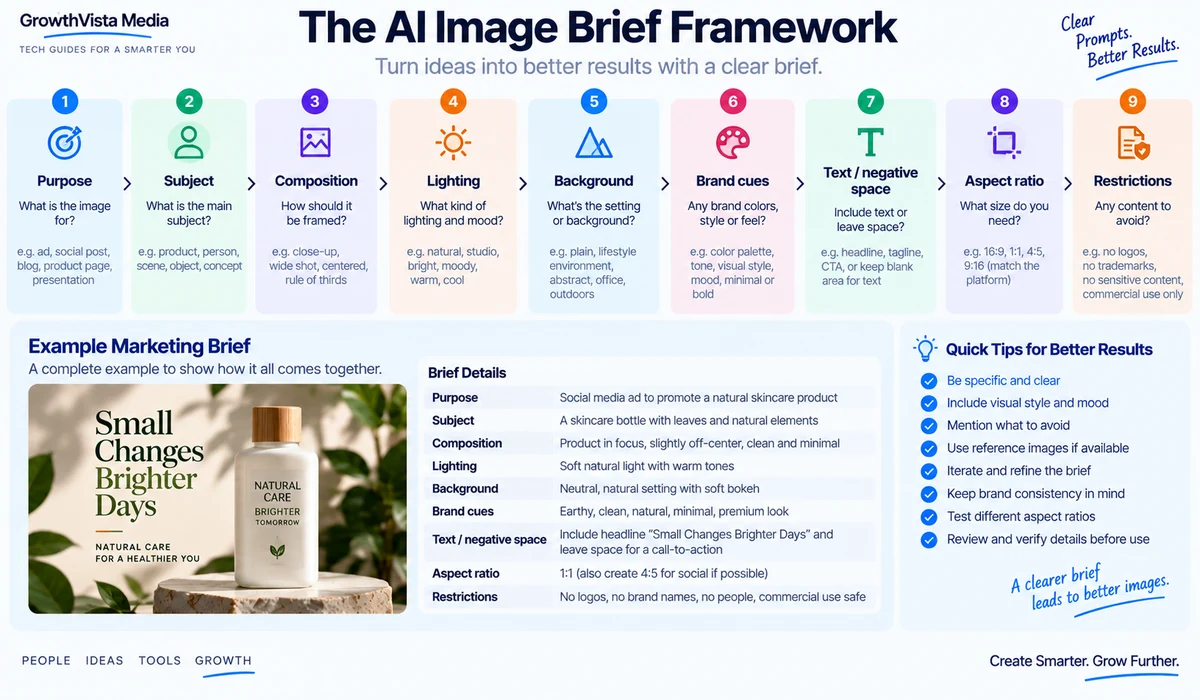
A prompt such as ‘a coffee cup on a table’ gives the model very little production context.
A marketing-oriented prompt is more useful when it specifies purpose, composition, camera angle, lighting, background, empty space for copy, aspect ratio and the visual emotion the asset should communicate.
For example, a hero image for a landing page needs different negative space and composition from a square social post even if the subject is identical.
Reference Images Can Matter More Than Longer Prompts
When consistency matters, a reference image can communicate product shape, composition, character appearance or style more efficiently than a long text description.
Use reference images only when you have the right to use them. Avoid instructing a generator to reproduce a living artist’s distinctive style or to copy protected campaign artwork.
 Can AI Image Generators Create Accurate Product Images?
AI is useful for backgrounds, concept scenes and lifestyle variations, but it can also alter the product itself.
For ecommerce or advertising, check logos, ports, buttons, packaging, colors, dimensions and included accessories against the real product. Do not publish a generated product representation that creates a false impression of what the customer will receive.
A safer workflow is often to preserve a verified product image and use generative editing around it rather than regenerating the product from scratch.
Which AI Image Generator Is Best for Text Inside Images?
Text rendering has improved significantly, but marketing graphics still benefit from a final design pass.
If the exact wording, font, legal line or CTA matters, use the generator to establish the visual concept and then typeset the final copy in Canva, Photoshop, Illustrator or another design tool.
This also improves accessibility and makes future copy changes easier.
Commercial Use and Intellectual Property
Commercial-use rules vary by provider, model and subscription. Some platforms provide explicit commercial-use guidance, while others require users to evaluate rights and local law themselves.
Brands should keep records of source assets, reference images, model/provider and relevant license terms for important campaign work.
AI generation also does not give permission to use third-party trademarks, copyrighted characters, celebrity likenesses or other protected material.
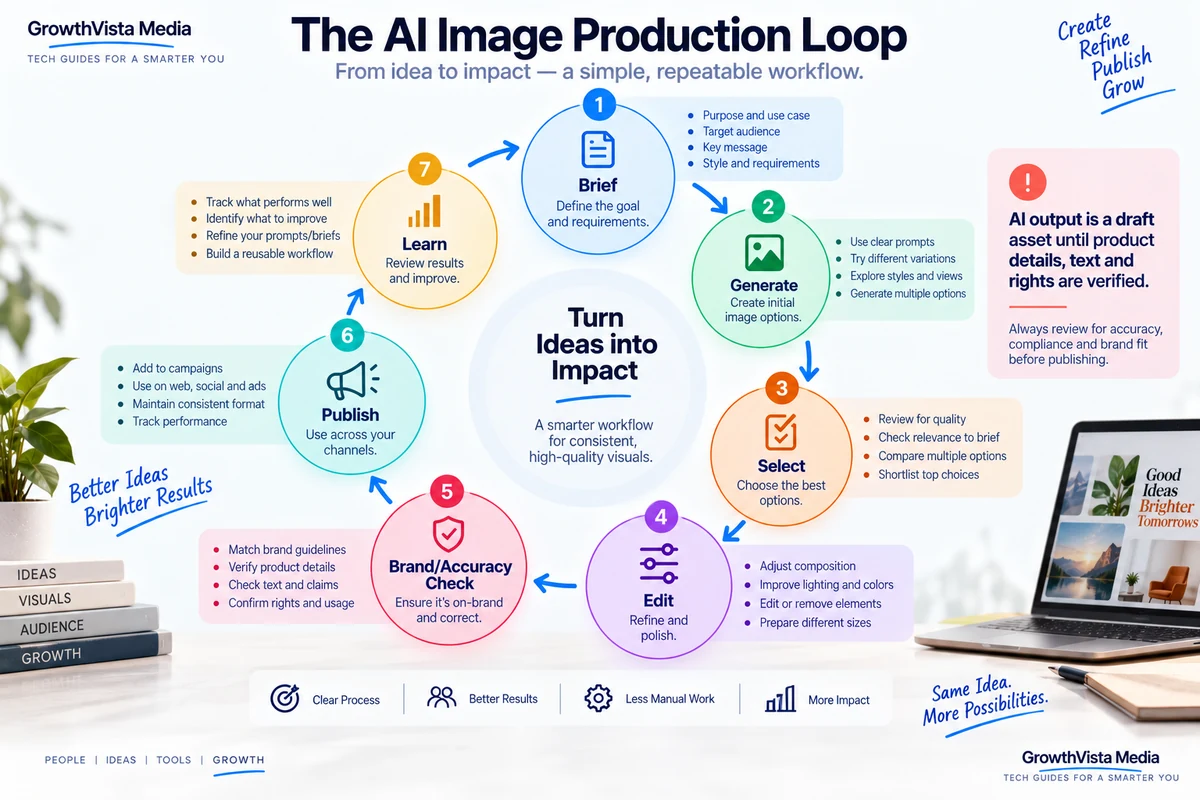
A Practical Marketing Image Workflow
| Stage | AI Role | Human/Design Role |
|---|---|---|
| Brief | Generate concepts and directions | Define audience, offer and brand |
| Reference assets | Analyze/use approved references | Confirm rights and product accuracy |
| Generation | Create multiple visual directions | Select strategically useful concepts |
| Editing | Replace/extend/refine areas | Protect brand/product details |
| Typography | Conceptual text treatment | Typeset final exact copy |
| Resize | Adapt compositions | Check crop and hierarchy per channel |
| Review | Spot obvious artifacts | Legal, brand and factual approval |
| Publish | Produce variants | Measure actual performance |
How to Test an AI Image Tool Before Subscribing
- Use three real briefs from your normal work.
- Include one image with people, one product/design asset and one text-heavy graphic.
- Test reference-image editing if consistency matters.
- Measure how many generations are needed before you get a usable concept.
- Check whether final corrections require another application.
- Verify export resolution and formats.
- Review commercial-use terms for your intended use.
- Compare total workflow time rather than the prettiest single output.
Frequently Asked Questions
What is the best AI image generator in 2026?
There is no universal choice. ChatGPT Images is useful for conversational iteration, Adobe Firefly for professional creative workflows, Midjourney for visual exploration, Ideogram for text-heavy concepts and Canva for integrated design.
Which AI image generator is useful for marketing?
Canva, Adobe Firefly and ChatGPT Images are relevant to marketing workflows, while specialist tools can add typography, illustration or photorealistic options.
Which AI image tool is useful for designers?
Adobe Firefly and Recraft are particularly relevant to design-oriented workflows, while Midjourney and Leonardo can help with concept exploration.
Which AI generator is good at text inside images?
Ideogram is known for text-oriented image generation. Exact campaign copy should still be checked and often typeset manually.
Can I use AI images commercially?
Often, but terms vary by provider, model and plan. Review current commercial-use terms and ensure you have rights to reference assets.
Can AI generate product photography?
AI can create product concepts and backgrounds, but generated product details may be inaccurate. Verify the product carefully or preserve a real product image during editing.
Can I create YouTube thumbnails with AI?
Yes. AI can generate thumbnail concepts and backgrounds, while a design tool can add precise typography and final layout.
Should I use AI-generated text directly in an image?
Check every word. For brand-critical or legal copy, use AI for the visual concept and add final text in a design editor.
Are AI-generated images copyrighted?
Copyright treatment varies by jurisdiction and circumstances. Commercial-use permission from a platform is not the same as a guarantee of copyright protection.
How many AI image tools do I need?
Usually one primary generator plus a design/editing environment is enough. Add another specialist only if it solves a repeated need such as vectors, typography or a specific visual style.
Final Thoughts
When comparing the best AI image generators, prioritize the workflow and specifications that match your actual use case rather than choosing on headline features alone.
The best AI image workflow starts with the output you need, not the model leaderboard.
ChatGPT Images is useful for conversational iteration, Adobe Firefly for professional creative production, Midjourney for exploration, Ideogram for typography-heavy concepts, Canva for multi-format design, and Recraft for design-oriented assets. Leonardo, Freepik, Gemini and FLUX-based workflows add further options depending on how much control and ecosystem integration you need.
For marketing and commercial content, accuracy matters as much as aesthetics. Check products, text, logos, people and rights before publication.
Test shortlisted tools with your real briefs. The platform that consistently gets from brief to approved asset with the least corrective work is the one that fits your production process.
Image Production Summary
Use original GrowthVista graphics and permitted vendor assets only. Do not copy vendor interfaces, copyrighted campaign art or distinctive living-artist styles. Do not fabricate image-quality benchmarks or imply hands-on testing that was not performed.
Explore more [AI tools for small businesses] in our related guides.
Source Verification Notes
- Verify every platform against its current official product, pricing and commercial-use documentation immediately before publication.
- OpenAI — official ChatGPT image-generation documentation.
- Adobe — official Firefly image-generation and commercial-use documentation.
- Midjourney — official product/documentation and current terms.
- Ideogram, Canva, Google Gemini, Leonardo.Ai, Recraft, Freepik and Black Forest Labs/FLUX — current official product and licensing pages.
- Recheck model names, plan limits, export options, reference-image features and commercial terms because generative-image products change frequently.