Best Laptop Stands for Home Office & Travel in 2026: 10 Options Compared

Amazon Disclosure: As an Amazon Associate I earn from qualifying purchases. GrowthVista Media may receive a commission from qualifying purchases made through our links, at no additional cost to you.
The best laptop stands in 2026 can improve screen positioning, desk organization and portability, but the right design depends on whether you work at a permanent desk, travel frequently or use an external keyboard.
Explore more in our Electronics guides. For primary product information, see the official Twelve South and UGREEN websites.
How We Compared the Best Laptop Stands
A laptop stand is a simple accessory, but the right design can make a desk easier to organize and a laptop screen easier to position. The wrong one can wobble while typing, block ports, take too much bag space or force you to carry an external keyboard when you did not plan to.
The most useful distinction is not brand versus brand. It is fixed versus adjustable, desk versus travel, open-laptop versus closed-laptop use, and whether you intend to type directly on the laptop.
- Stable support and sensible weight capacity
- Height and angle adjustment where relevant
- Portability and folded size
- Ventilation and open construction
- Laptop-size compatibility
- Grip/contact protection
- Space underneath the laptop
- Suitability for direct typing versus external keyboard use
10 Laptop Stands at a Glance
Rain Design mStand
Best fit: Permanent desk + external keyboard
Twelve South Curve
Best fit: Minimal home-office setup
Twelve South Curve Flex
Best fit: Hybrid desk and travel
Nulaxy C3
Best fit: Value-focused permanent desk
Nulaxy Adjustable
Best fit: Flexible home office
Roost Laptop Stand
Best fit: Frequent travel / remote work
Nexstand K2
Best fit: Portable value setup
MOFT Invisible
Best fit: Minimal mobile work
UGREEN Adjustable
Best fit: Flexible screen positioning
OMOTON Vertical
Best fit: Closed-laptop / space-saving desk
Rain Design mStand — Fixed Desk Simplicity
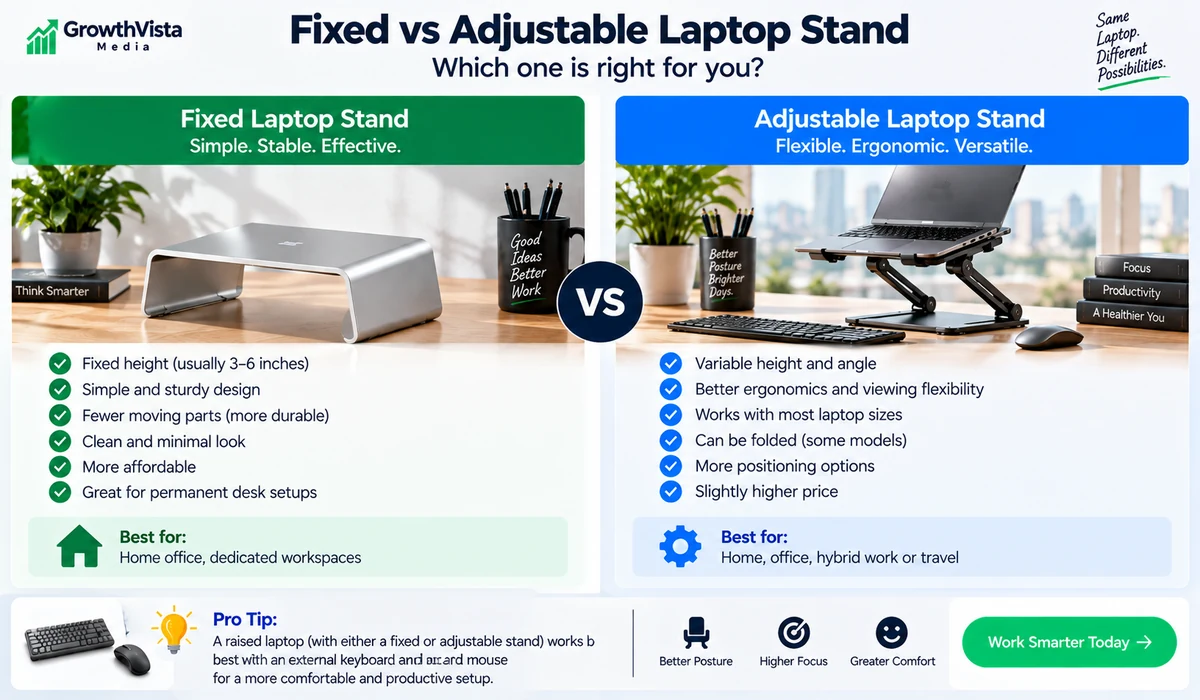
The Rain Design mStand is a well-known fixed aluminum riser built for a permanent workstation. A fixed stand has no height-adjustment mechanism, which keeps the setup simple and planted. It makes the most sense with an external keyboard and mouse, and the open space below can help keep a desk organized.
Twelve South Curve — Minimal Fixed Riser
Twelve South Curve follows the permanent-desk approach with an open-frame elevated design. It suits users who want a clean setup and do not need frequent height changes. Check the current laptop-size guidance and exact Curve variant before purchase.
Twelve South Curve Flex — Adjustable and Foldable
Curve Flex adds height and angle adjustment plus a foldable design. It is better suited to hybrid workers who move between locations or need to adapt the screen position to different desks. With any taller adjustable stand, an external keyboard is usually the more practical typing setup.
Nulaxy C3 — Straightforward Aluminum Desk Stand
The Nulaxy C3 represents the popular fixed aluminum stand category at a more accessible price point. It elevates the laptop, keeps the construction open and creates usable desk space underneath. Verify the exact C3 model and supported laptop range because Nulaxy sells several similar designs.
Nulaxy Adjustable/Foldable Stand — Flexible Home Office
Nulaxy also offers adjustable folding designs for users who want more control over height and viewing angle. When comparing models, check hinge resistance, base footprint and whether the front lip interferes with your wrists when typing directly on the laptop.
Roost Laptop Stand — Built Around Travel
Roost is designed for mobile professionals. Its lightweight folding structure raises the laptop substantially while collapsing into a narrow travel form. The elevated position works best when you also carry an external keyboard and pointing device.
Nexstand K2 — Portable Multi-Height Value
Nexstand K2 follows the portable adjustable-height approach and folds down for travel. Multiple height positions help adapt to temporary workspaces. Check laptop thickness and size compatibility if your notebook has a thick chassis or protective case.
MOFT Invisible Laptop Stand — Minimal Carry Weight
MOFT takes a different approach with an ultra-thin stand intended to stay with the laptop or fold nearly flat. It provides modest elevation without requiring a separate metal stand in the bag. Check attachment method and surface compatibility for the exact version.

UGREEN Adjustable Laptop Stand — Flexible Desk Positioning
UGREEN offers several adjustable stand designs that provide more positioning freedom than a fixed riser. This category suits video calls, secondary-screen use and shared desks. Verify the exact regional SKU, supported laptop size and folding dimensions.
OMOTON Vertical Laptop Stand — Closed-Laptop Storage
A vertical stand stores the computer upright instead of elevating an open screen. It is useful for a clamshell workstation with an external monitor, keyboard and mouse. Adjustable slot width and padded contact surfaces are important, and users should follow their laptop manufacturer’s guidance for closed-lid operation.
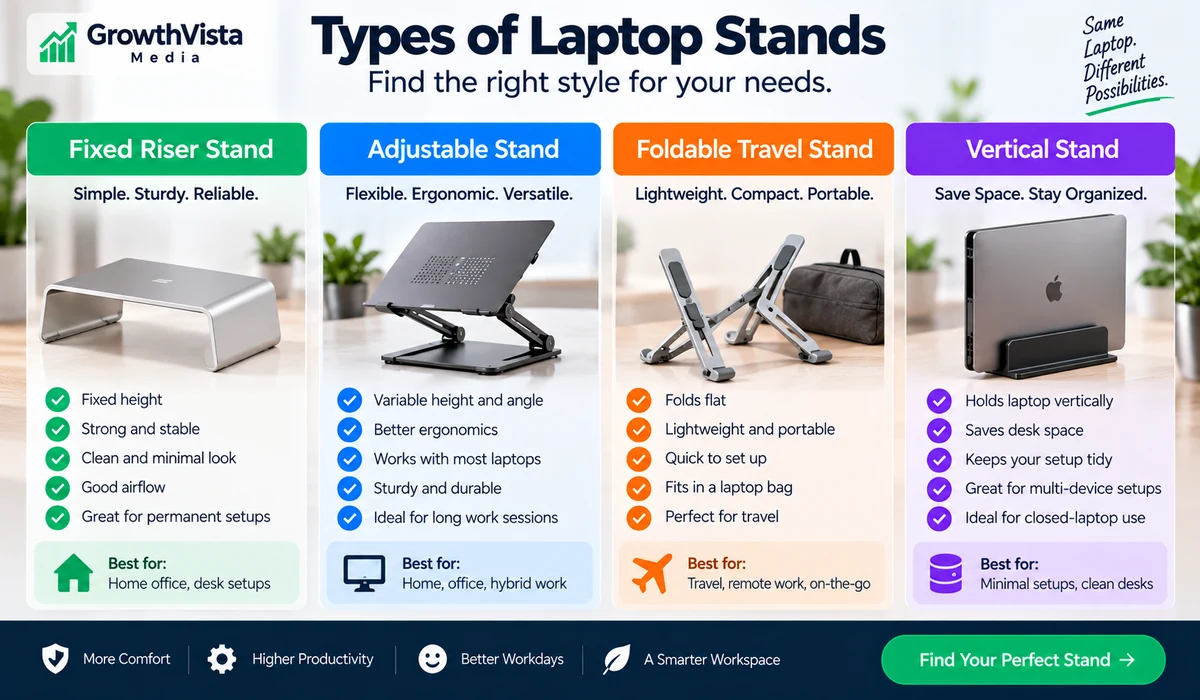
Which Stand Type Fits Your Setup?
Fixed Riser
Simple, stable and easy to leave in place. Best when you already use an external keyboard and mouse.
Adjustable Stand
Useful when screen height or angle changes between users, desks or working positions.
Foldable Stand
Prioritizes folded size and weight. Remember to include keyboard and mouse weight in the total travel kit.
Vertical Stand
Reclaims desk space when the laptop drives an external monitor in clamshell mode.
Laptop Stand Ergonomics: What a Stand Can and Cannot Do
A stand can change screen height and angle, but it cannot fix the entire workstation by itself. For a raised laptop used as a primary screen, an external keyboard and mouse allow the display to move upward without forcing your hands into an awkward typing position.
Comfort depends on chair height, desk height, screen distance, vision and individual posture. Treat stand adjustment as one part of the workstation rather than a medical solution.
Can You Type Directly on an Elevated Laptop?
You can, but the answer depends on how high and steep the stand is. A low-angle stand can remain usable for direct typing. A tall stand intended to bring the display higher is better paired with an external keyboard.
Ventilation: Open Designs Help, but a Stand Is Not a Cooling System
Many stands expose more of the laptop’s underside than a flat desk, which can help avoid blocking existing vents. A passive stand does not actively cool the computer, so check where your laptop takes in and exhausts air.
Laptop Size and Weight Compatibility
Check both supported size and weight. Large screens can make an adjustable stand more sensitive to movement, while vertical stands require particular attention to laptop thickness.
Travel Weight Is More Than the Stand
A high portable stand usually requires a separate keyboard and mouse. Compare the total mobile kit, not only the stand’s listed weight.
A 7-Step Buying Checklist
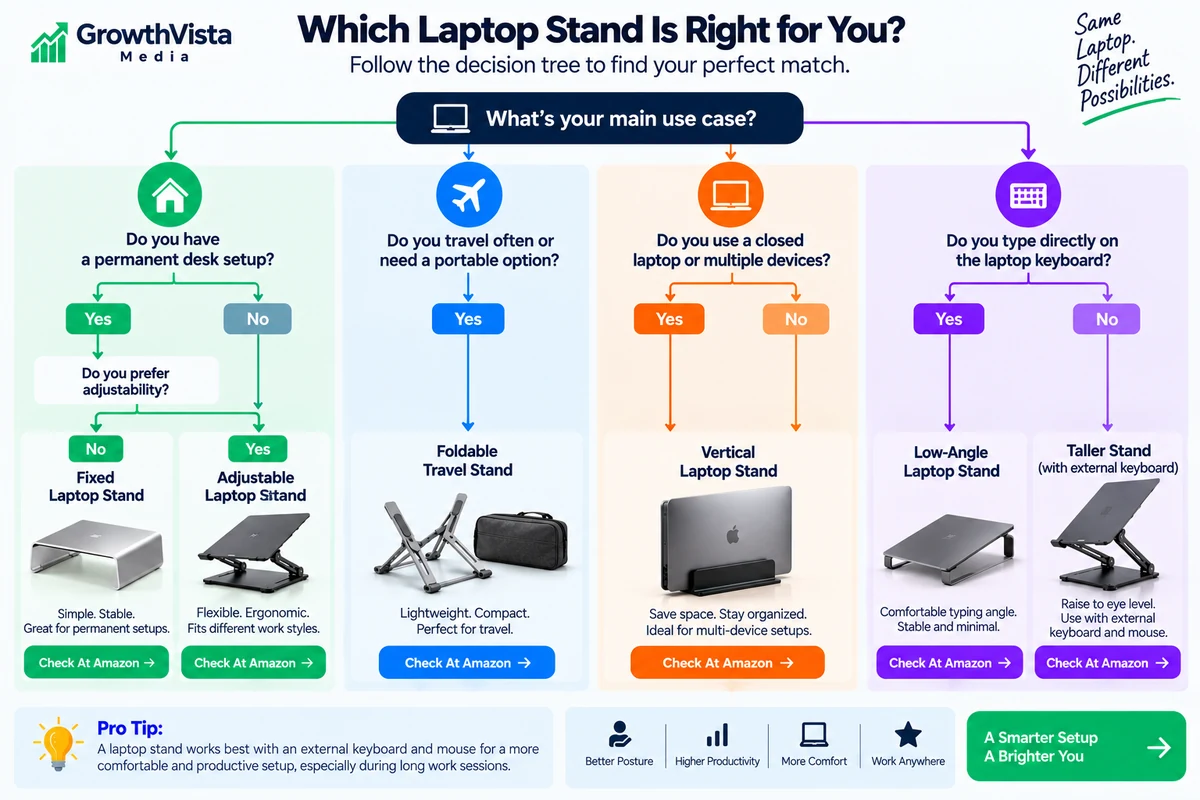
- Decide whether the laptop will be open, closed or used as a second screen.
- Decide whether you will type directly on the laptop.
- Measure laptop size, weight and thickness where relevant.
- Choose fixed, adjustable, travel or vertical form factor.
- Check height range and base footprint against your desk.
- Check pads, front lip and supports for port or vent interference.
- For travel, compare folded dimensions and total kit weight with keyboard and mouse.
Frequently Asked Questions
What type of laptop stand is best for a home office?
A fixed riser is simple for a permanent desk, while an adjustable stand is more flexible if multiple people use the desk or you change working positions.
What is the best laptop stand for travel?
Foldable designs prioritize portability and height adjustment. Ultra-thin fold-flat stands trade maximum elevation for minimal bulk.
Do I need an external keyboard with a laptop stand?
If the stand raises the laptop significantly, an external keyboard and mouse usually create a more practical setup.
Can a laptop stand improve cooling?
An open stand can avoid blocking vents and increase space around the laptop, but it is not an active cooling system.
Are adjustable laptop stands stable?
Stability varies by hinge design, height, laptop weight and typing force. Taller stands are generally better with external input devices.
What size laptop stand do I need?
Check the manufacturer’s supported laptop size and weight. For vertical stands, also measure laptop thickness including any case.
Is a vertical laptop stand safe?
It can be practical when sized correctly and padded. Follow the laptop manufacturer’s guidance for closed-lid operation and ventilation.
Are aluminum laptop stands better?
Aluminum can provide a rigid structure, but design, hinge quality, pads and base stability matter more than material alone.
Should I buy a fixed or foldable laptop stand?
Choose fixed for a permanent desk and foldable if you regularly move between locations.
Can I use a laptop stand with a 17-inch laptop?
Some stands support larger notebooks, but verify both size and weight capacity for the exact model.
Final Thoughts on the Best Laptop Stands
When comparing the best laptop stands, start with your workstation and travel needs, then compare stability, compatibility, adjustability and portability.
The right laptop stand depends more on your workstation than on the logo printed on the stand. Choose the form factor first, then compare stability, size compatibility, portability and current price.
For Amazon publishing, verify the exact model before replacing a search link with a direct product link. Do not hard-code prices, ratings or availability.