Best Mechanical Keyboards for Work in 2026: 10 Options Compared
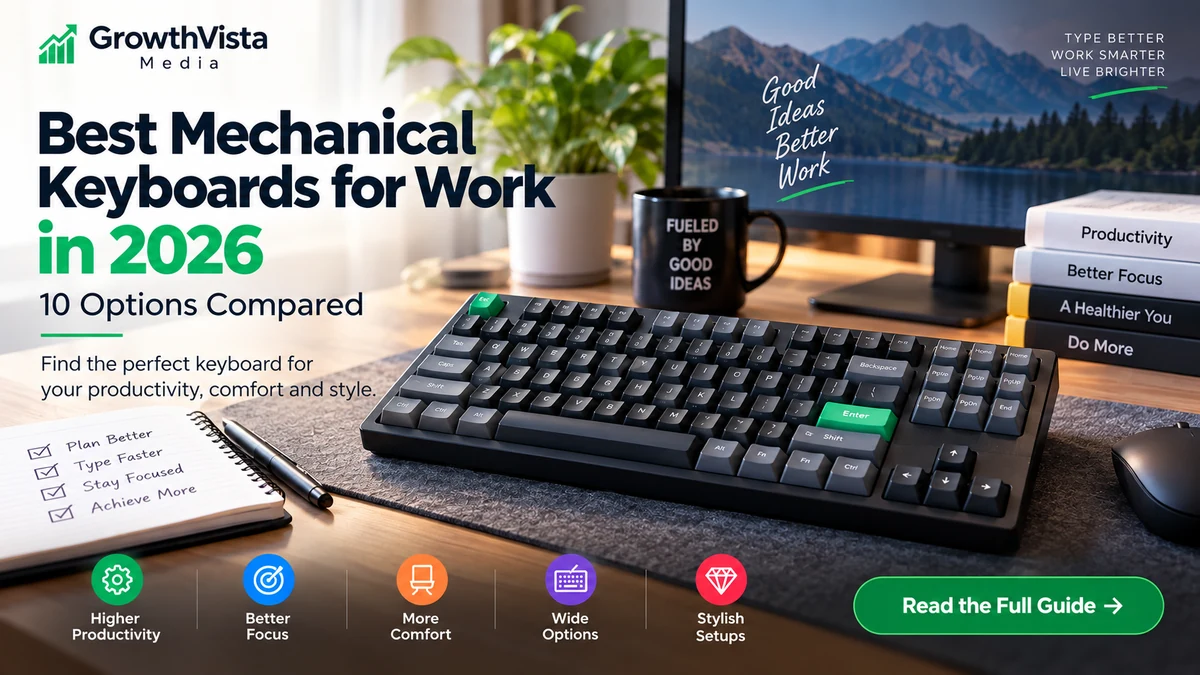
The best mechanical keyboards for work in 2026 balance typing feel, office-friendly noise, layout, connectivity and comfort rather than focusing only on gaming features.
Explore more in our Electronics guides. For primary product information, see the official Logitech and Keychron websites.
How We Compared the Best Mechanical Keyboards for Work
A mechanical keyboard can make a work desk feel more deliberate, but the best office keyboard is not necessarily the loudest, heaviest or most customizable model.
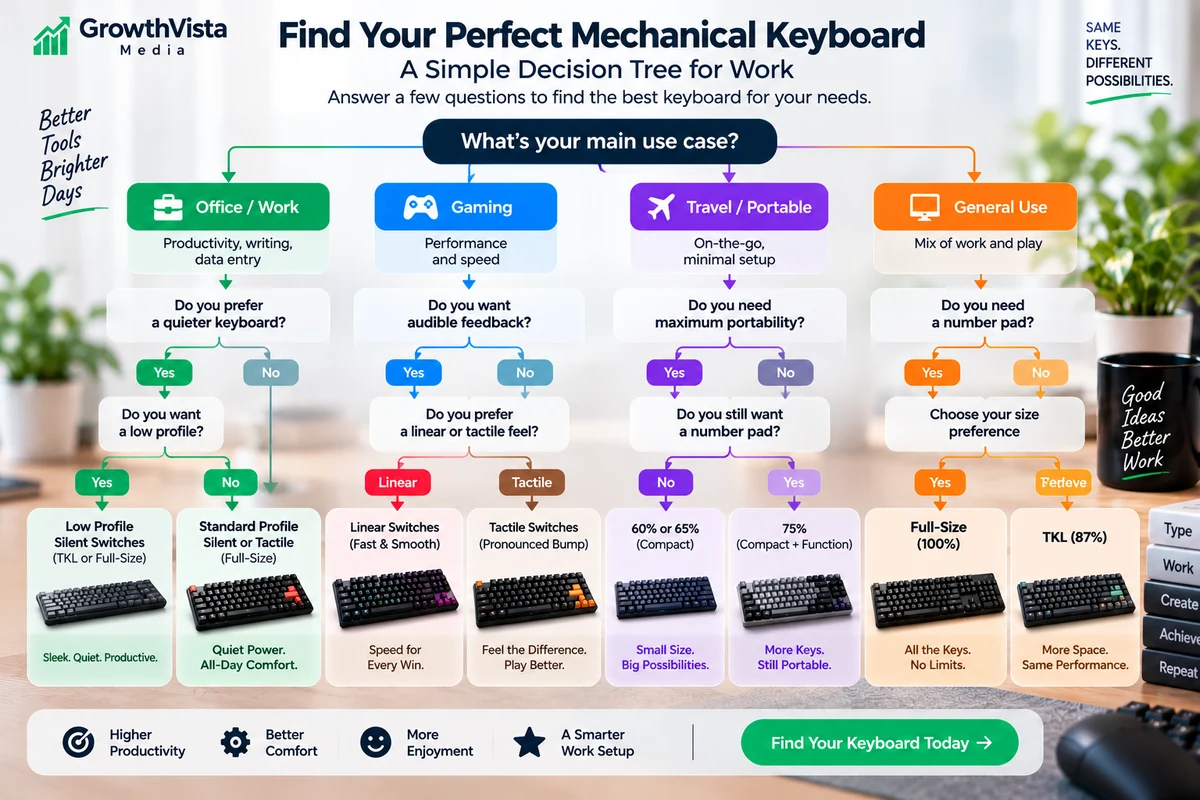
For work, layout, switch noise, wireless reliability, multi-device support, key height and software can matter more than gaming-oriented features. An accountant may want a full-size numpad. A programmer may prefer a compact 75% layout. A shared office may make quiet switches more important than maximum tactile feedback.
This guide compares 10 mechanical keyboards and keyboard families that fit different professional workflows. Exact switch choices, regional layouts and Amazon listings can vary, so verify the SKU before purchase.
- Typing-focused layout and key feel
- Quiet or office-appropriate switch options
- Wireless and multi-device support where useful
- Windows/macOS compatibility
- Full-size versus compact desk efficiency
- Low-profile versus standard-height ergonomics
- Customization and remapping
- Hot-swap support where relevant
- Build quality and long-term maintainability
Quick Comparison
| Keyboard | Layout / Style | Useful For |
|---|---|---|
| Logitech MX Mechanical | Full-size, low-profile wireless | Office users who need numpad + multi-device workflow |
| Logitech MX Mechanical Mini | Compact low-profile wireless | Writers/programmers with smaller desks |
| Logitech Alto Keys K98M | 98% wireless mechanical | Work users wanting numpad + customization |
| Keychron Q6 Max | 100% full-metal wireless custom | Premium full-size typing and deep customization |
| Keychron V6 Max | 100% wireless custom | Value-oriented full-size customization |
| Keychron K3-class low-profile wireless | 75% low-profile | Portable Mac/Windows workstations |
| Razer Pro Type Ultra | Full-size quiet wireless | Shared-office productivity with silent linear switches |
| CHERRY MX 10.0N RGB | Full-size ultra-low-profile wired | Low-profile mechanical feel at a fixed desk |
| Das Keyboard 6 Professional | Full-size wired mechanical | Traditional productivity / heavy desktop use |
| Keychron K8-class wireless | TKL standard-profile | Users who want function/navigation keys without numpad |
1. Logitech MX Mechanical — Full-Size Productivity
The MX Mechanical is designed around work rather than gaming. Logitech currently positions it for professionals, writers and everyday productivity, with a full-size layout, wireless connectivity and USB-C charging.
It is available with different mechanical switch styles, including tactile, linear and clicky options in supported markets. Logitech's Easy-Switch workflow allows connection to multiple devices, which is useful for desks that move between a work computer and another machine.
The low-profile construction is also important: users coming from laptop or scissor-switch keyboards may find it easier to adapt to than a tall traditional mechanical board.
Choose the full-size version when the numpad is part of your daily work.
2. Logitech MX Mechanical Mini — Compact Workstation Option
MX Mechanical Mini keeps the low-profile typing approach but removes the numpad to reclaim desk space.
Logitech specifically highlights it for programmers and writers, and the smaller footprint leaves more room for a mouse. It retains wireless multi-device functionality and USB-C charging.
The trade-off is obvious: users who enter large amounts of numeric data may miss the dedicated number pad. For writing, coding and general office work, the compact layout can be easier to position.
3. Logitech Alto Keys K98M — 98% Layout With Customization
The Alto Keys K98M is a newer Logitech mechanical option aimed at users who want nearly full-size functionality without the full width of a conventional 104-key board.
Logitech describes a 98% layout, a vibration-absorbing UniCushion gasket structure, hot-swappable linear Marble switches, customizable action keys and multi-device support through Easy-Switch.
A 98% layout is useful for spreadsheets and finance work because it preserves a numpad while compressing the gaps between key groups.
Before purchase, verify the exact switch and regional-layout options because availability can vary.
4. Keychron Q6 Max — Premium Full-Size Custom Keyboard
The Keychron Q6 Max is for users who want a work keyboard that can also be treated as a long-term customizable platform.
Keychron's current specifications list a full aluminum 100% chassis, 2.4GHz wireless, Bluetooth, USB-C wired operation, QMK-based remapping through Keychron Launcher, hot-swappable MX-style switches and multiple acoustic-foam layers.
The full-size layout is practical for finance, operations and anyone who uses a numpad. The trade-off is weight: Keychron lists the fully assembled board at more than 2kg, so this is a permanent-desk keyboard rather than a travel accessory.
Its hot-swap support is valuable if you want to replace switches later without soldering.
5. Keychron V6 Max — Full-Size Customization at a Lower Tier
The V6 Max provides many of Keychron's customization features without the heavy full-aluminum construction of the Q-series.
Keychron currently describes a 100% layout, gasket mount, sound-absorbing foam, double-shot PBT keycaps, 2.4GHz wireless, Bluetooth and QMK-style customization.
For work users, that means a full numpad plus the ability to remap shortcuts and change switches. It is a practical route into customizable mechanical keyboards when the Q6 Max is more keyboard than the desk requires.
6. Keychron K3-Class Low-Profile Wireless — Compact Mac/Windows Work
Keychron's K3 family represents the low-profile 75% category: compact enough for a small desk while retaining a function row and dedicated arrow keys.
This layout is particularly useful for writers and developers who do not need a numpad but do not want to hide basic navigation behind multiple function layers.
Keychron offers several generations and variants, so confirm whether the exact model provides the wireless mode, hot-swap support and switch type you want.
For users who alternate between macOS and Windows, Keychron's dual-platform approach is one of the family's practical strengths.
7. Razer Pro Type Ultra — Quiet Wireless Full-Size Work Keyboard
Razer's Pro Type Ultra is one of the clearer examples of a gaming-brand mechanical keyboard designed specifically for productivity.
Razer currently lists silent linear Yellow mechanical switches, a full-size layout, white backlighting, a wrist rest, Bluetooth, 2.4GHz HyperSpeed wireless and wired USB-C connectivity.
The keyboard can connect to multiple hosts, making it relevant to users with several work devices. Razer also rates the switches for up to 80 million clicks.
The fixed linear switch choice will not suit users who want a pronounced tactile bump, but the quieter design is more appropriate for shared workspaces than many clicky mechanical boards.
8. CHERRY MX 10.0N RGB — Very Low-Profile Wired Mechanical
CHERRY's MX 10.0N RGB is an unusually slim full-size mechanical keyboard built around CHERRY MX Low Profile RGB Speed switches.
CHERRY lists the keyboard at only 22mm overall height, with a metal housing, removable USB-C-to-USB-A cable, onboard memory and a key-switch durability claim exceeding 100 million presses.
It is a useful option for someone who wants mechanical switches but dislikes the height of a conventional enthusiast keyboard.
The important trade-off for modern office setups is that it is wired rather than a multi-device wireless board.
9. Das Keyboard 6 Professional — Traditional Full-Size Wired Workhorse
Das Keyboard's professional line is aimed at users who prefer a substantial wired desktop keyboard with a conventional full-size layout.
This category works well for a fixed office desk where wireless switching and portability are not priorities. The numpad, dedicated controls and standard mechanical switch feel suit long-form typing, administration and development.
Because Das Keyboard configurations can vary by switch and region, verify the current 6 Professional SKU and switch option before linking to Amazon.
10. Keychron K8-Class Wireless TKL — A Practical Middle Layout
A tenkeyless keyboard keeps the function row, arrows and navigation cluster but removes the numpad. For many work users, this is the easiest compact layout to adopt.
Keychron's K8 family is a long-running example of this category and is included in the company's current office-keyboard range. Wireless connectivity and Mac/Windows support make it useful for mixed-device workstations.
The family has multiple generations, including Pro and newer variants, so treat 'K8' as a model family and verify the exact current version before purchase.
Which Keyboard Fits Which Work Style?
| Work Style | Prioritize | Models to Investigate |
|---|---|---|
| Finance / spreadsheets | Numpad, stable full-size layout | MX Mechanical, Alto K98M, Q6 Max, V6 Max |
| Writing / editing | Comfortable switches, compact width | MX Mechanical Mini, K3-class, K8-class |
| Programming | 75%/TKL, remapping, arrows/function row | K3-class, K8-class, MX Mechanical Mini |
| Shared office | Quiet switches and restrained sound | Razer Pro Type Ultra, tactile/linear low-profile options |
| Multi-device desk | Bluetooth/2.4GHz switching | MX Mechanical family, Alto K98M, Keychron wireless models |
| Customization enthusiast | Hot-swap + remapping | Q6 Max, V6 Max, selected Keychron variants |
| Fixed wired workstation | No battery/wireless concerns | CHERRY MX 10.0N, Das Keyboard 6 Professional |
Switch Choice Matters More Than the Brand Name
Mechanical keyboards feel different primarily because of switch design, spring weight, keycap profile and the keyboard's internal construction.
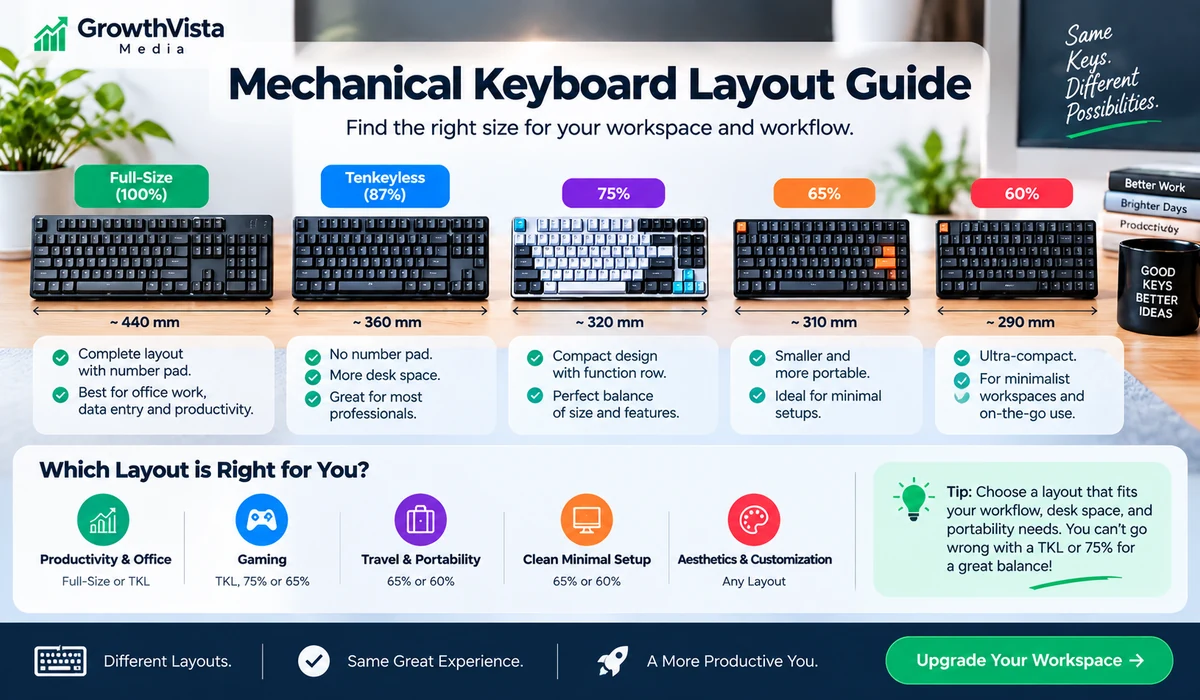
Linear switches move smoothly without a tactile bump. Tactile switches provide a noticeable bump around actuation. Clicky switches add an audible click and are usually the riskiest choice in a shared office.
For work, there is no universal best switch. If noise matters, prioritize quieter tactile or linear options and check independent sound demonstrations before buying.
Full Size, 98%, TKL or 75%?
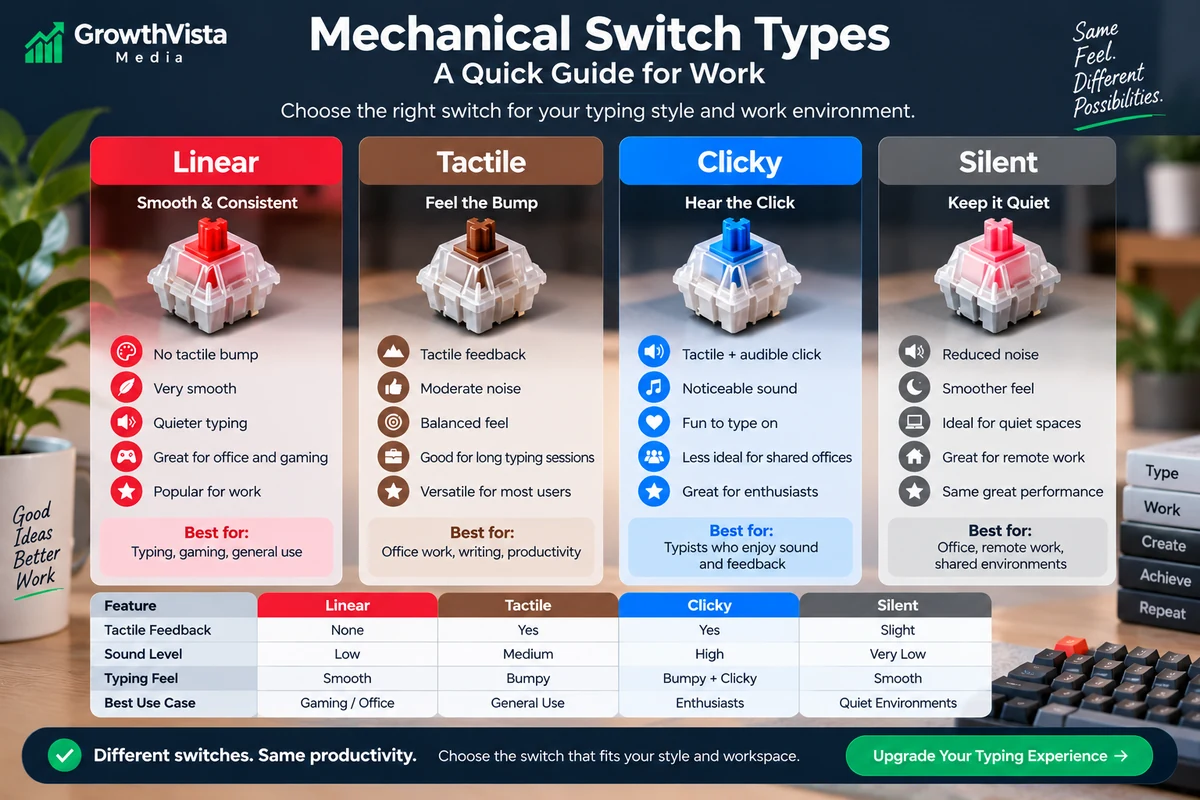
Layout changes how your hands and mouse fit on the desk.
Full-size boards provide a numpad but are widest. A 98% layout keeps most full-size keys while compressing spacing. TKL removes the numpad but preserves navigation keys. A 75% board compresses the navigation area further while usually keeping function keys and arrows.
For most office users who do not need a numpad, TKL or 75% is easier to adapt to than a 60% layout.
Low-Profile vs Standard-Profile Keyboards
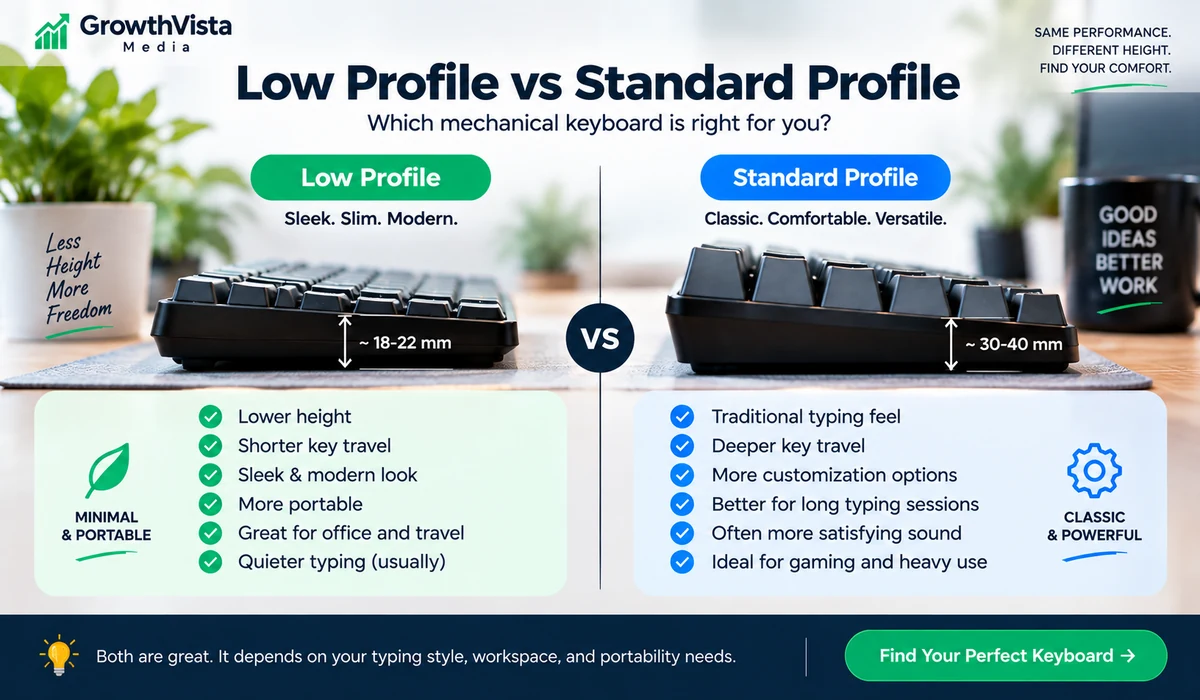
Low-profile mechanical keyboards reduce overall key height and can feel more familiar to laptop-keyboard users.
Standard-profile keyboards provide a wider ecosystem of switches and keycaps, especially in enthusiast models. They may also benefit from a wrist rest depending on the case height and your typing position.
Neither style is automatically more ergonomic. The correct choice depends on hand position, desk height and personal preference.
Wireless, Bluetooth and Multi-Device Workflows
For office use, wireless convenience is often more valuable than ultra-high polling rates.
Bluetooth is useful for switching among laptops, tablets and phones. A dedicated 2.4GHz receiver can provide a more responsive connection and can be preferable in busy wireless environments.
If your company has strict IT or security requirements, confirm whether Bluetooth or proprietary wireless receivers are permitted before purchasing for managed devices.
Hot-Swap and Remapping: Useful Even If You Are Not an Enthusiast
Hot-swappable sockets let you replace compatible switches without soldering. This can extend the life of a keyboard or let you change feel later.
Remapping can be even more valuable for work. Keychron's QMK/Launcher workflow, for example, can assign shortcuts and macros to keys. Logitech's Options+ ecosystem supports productivity customization on compatible keyboards.
For company-managed computers, verify whether configuration software can be installed before making software-dependent features a buying priority.
Noise in a Shared Office
Mechanical does not automatically mean loud, but keyboard construction and switch choice can make a major difference.
Avoid clicky switches when colleagues sit nearby unless the environment already tolerates keyboard noise. Quieter linear or tactile switches, internal dampening and low-profile designs can reduce sound.
Razer specifically positions the Pro Type Ultra around silent mechanical switches and sound dampening, while Logitech offers non-clicky switch choices on the MX Mechanical family.
A 7-Step Buying Checklist
- Choose a layout based on whether you need a numpad.
- Decide between low-profile and standard-height keys.
- Pick linear, tactile or clicky switches based on feel and noise tolerance.
- Choose wired, Bluetooth or 2.4GHz connectivity for your desk.
- Check macOS/Windows key legends and switching support.
- Decide whether hot-swap and remapping are worth paying for.
- Verify the exact switch, layout and regional SKU before buying.
Frequently Asked Questions
Are mechanical keyboards good for office work?
They can be. Mechanical keyboards offer distinct switch choices, durability and customization, but noise, layout and key height should fit the workplace.
What mechanical switch is best for work?
There is no universal choice. Quiet tactile switches provide feedback without a click, while linear switches feel smoother. Clicky switches are usually less suitable for shared offices.
Is a full-size keyboard better for work?
It is useful if you regularly use a numpad. Writers and programmers who do not need numeric entry may prefer TKL or 75% layouts for more mouse space.
Is Logitech MX Mechanical good for work?
Logitech designs the MX Mechanical line specifically around productivity, with low-profile switches, wireless connectivity and multi-device switching.
Is Keychron good for office use?
Keychron offers many office-suitable models with Mac/Windows support, wireless connectivity, hot-swap options and key remapping. Choose quiet switches for shared spaces.
What is the difference between 75% and TKL?
Both remove the numpad. TKL keeps a more separated navigation cluster, while 75% compresses those keys into a smaller footprint.
Should I buy a low-profile mechanical keyboard?
It can be a good transition from laptop keyboards and reduces overall keyboard height. Standard-profile boards offer more switch/keycap customization.
Are wireless mechanical keyboards reliable for work?
Modern Bluetooth and 2.4GHz models can be reliable for productivity. A wired mode remains useful for charging, troubleshooting and fixed workstations.
Do I need a hot-swappable keyboard?
No, but it lets you replace or change compatible switches without soldering, which can extend useful life and make future customization easier.
What keyboard is best for spreadsheets?
A full-size or 98% keyboard with a numpad is generally the most convenient layout for frequent numeric entry.
Final Thoughts on the Best Mechanical Keyboards for Work
When comparing the best mechanical keyboards for work, prioritize layout, switch noise, connectivity and the way the keyboard fits your daily workflow.
The best mechanical keyboard for work is the one whose layout, switch noise and connectivity disappear into your workflow rather than demanding attention.
Logitech's MX Mechanical family is designed around straightforward multi-device productivity. The Alto K98M adds a compact numpad-focused layout and customization. Keychron's Q6 Max and V6 Max suit users who want deeper remapping and switch flexibility, while its compact families cover TKL and 75% desks. Razer's Pro Type Ultra emphasizes quieter wireless productivity, and CHERRY and Das Keyboard remain relevant for wired desktop users.
Before ordering, choose the layout and switch type first. Then compare wireless features, customization, build and current price.
For Amazon publishing, verify the exact model and switch option before adding an affiliate link. Do not guess an ASIN or hard-code a price.