Best Monitor Arms for Home Office & Dual-Monitor Setups in 2026
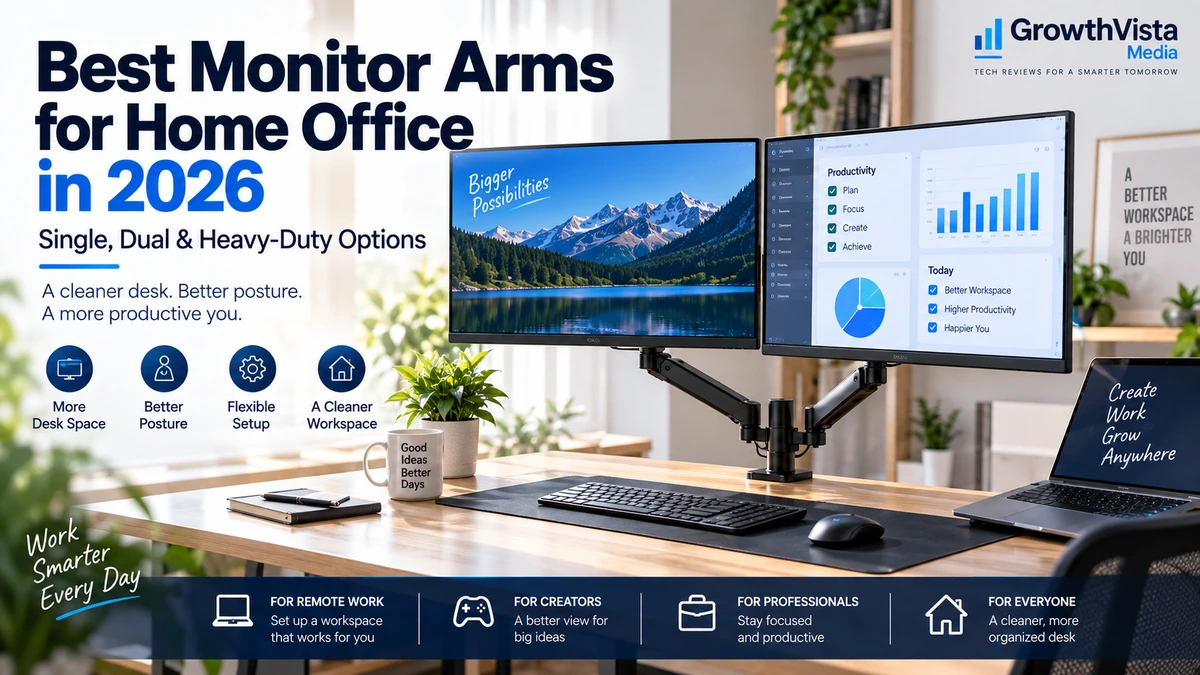
A good monitor arm can make a home-office desk feel larger, cleaner and easier to adjust. Instead of leaving a display fixed on a bulky factory stand, an arm lets you raise, tilt, swivel and reposition the screen around your workspace.
The best monitor arms for home office setups are not simply the models with the highest weight rating. The right choice depends on your monitor size and weight, VESA mounting pattern, desk thickness, preferred screen position and whether you use one monitor or two.
For dual-monitor users, independent positioning is especially useful. It can help align two displays at the same height, create side-by-side or stacked arrangements, and free the desk area that two separate monitor stands would otherwise occupy.
This guide compares 10 monitor arms and mounting systems worth considering in 2026, ranging from practical budget options to premium and heavy-duty designs. It also explains the compatibility checks you should make before ordering.
Quick Comparison: Best Monitor Arms for Home Office
| Monitor Arm | Setup | Best For | Mount Style | Key Advantage | CTA |
|---|---|---|---|---|---|
| Ergotron LX | Single | Most home offices | Clamp / grommet | Premium adjustability | Check Price → |
| HUANUO HNDS6 | Single | Budget setups | Clamp / grommet | Value-focused gas spring | Check Price → |
| Ergotron HX | Single | Heavy monitors | Clamp / grommet | Heavy-duty support | Check Price → |
| Humanscale M2.1 | Single | Premium offices | Desk mount | Clean professional design | Check Price → |
| Ergotron LX Dual | Dual | Premium dual setups | Desk mount | Independent positioning | Check Price → |
| Workstream by Monoprice Dual | Dual | Value dual setups | Desk mount | Lower-cost dual option | Check Price → |
| VIVO Dual Monitor Stand | Dual | Budget dual setups | Clamp / grommet | Simple practical mounting | Check Price → |
| HUANUO Dual Monitor Stand | Dual | Flexible home office | Clamp / grommet | Independent gas-spring arms | Check Price → |
| Mount-It! Vertical Dual Mount | Dual / stacked | Vertical layouts | Desk mount | Stacked-screen capability | Check Price → |
| Clearspace Uni-2 | Dual | Premium design | Desk mount | Fine alignment control | Check Price → |
Note: Exact supported monitor size, weight, desk thickness and VESA compatibility vary by model and revision. Verify the current manufacturer specification before purchasing.
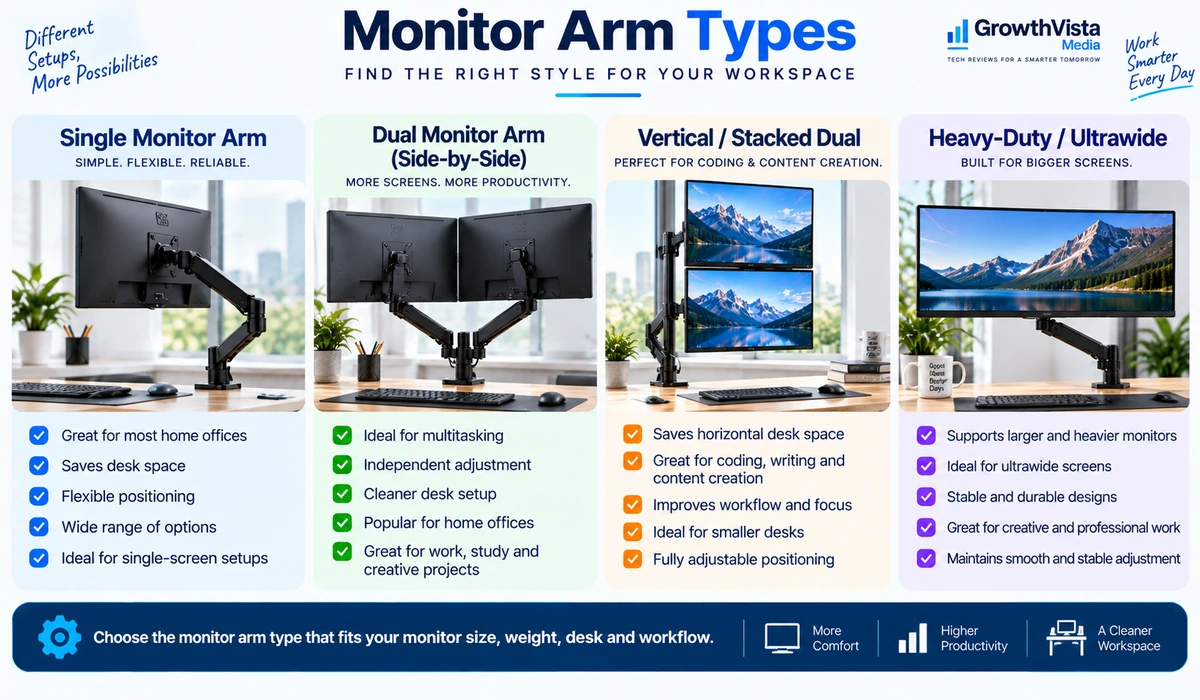
Ergotron LX — Best All-Round Monitor Arm
The Ergotron LX is a useful reference point for what a premium single-monitor arm should do well: hold a compatible display securely while allowing frequent repositioning without turning every adjustment into a project.
It is particularly attractive for a permanent home office where the monitor is moved throughout the day—for example, pushed back for focused work, pulled forward for detailed tasks, or rotated for portrait-oriented documents and coding.
Premium arms cost more than basic steel mounts, so the LX makes the most sense when smooth adjustment, long-term use and a polished desk setup matter more than minimizing the purchase price.
Best for: Professionals building a long-term single-monitor workstation.
GrowthVista take: A strong premium baseline for a conventional monitor setup.
HUANUO HNDS6 — Best Budget Single-Monitor Arm
A budget monitor arm can still deliver the two benefits most buyers want: reclaiming desk space and getting the screen off its stock stand.
The HUANUO HNDS6 is aimed at users who want an adjustable arm without moving into premium-office pricing. As with any spring-assisted arm, the important step is matching the display’s actual weight to the supported range and adjusting the tension correctly.
It is a better fit for a typical home-office monitor than for an unusually heavy ultrawide.
Best for: Budget-conscious users with a compatible mainstream monitor.
Ergotron HX — Best Heavy-Duty Monitor Arm
Large and heavy displays need a different class of mounting hardware. An arm that works perfectly with a 24-inch office monitor may sag or become difficult to position when paired with a much heavier ultrawide.
The Ergotron HX is designed for demanding single-display installations and is widely positioned as a heavy-duty option. That makes it relevant to users with large monitors who still want articulation instead of a fixed stand.
Do not buy a heavy-duty arm only because it sounds more robust. Counterbalance systems work best when the monitor falls inside the arm’s intended weight range.
Best for: Large or heavy compatible monitors and premium ultrawide workstations.
Humanscale M2.1 — Best Premium Office Design
Some monitor arms are chosen as much for the workspace as for the display. In a polished executive office or client-facing studio, industrial-looking hardware may not fit the rest of the desk.
The Humanscale M2.1 emphasizes a clean professional appearance while retaining the adjustability expected from a premium monitor arm.
It makes the most sense for buyers who care about materials, design and integration into a high-end workstation rather than simply finding the cheapest way to lift a monitor.
Best for: Premium offices and design-conscious workspaces.
Ergotron LX Dual — Best Premium Dual-Monitor Arm
A dual-monitor arm needs to do more than hold two screens. It should allow both displays to align cleanly while giving each monitor enough independent movement for a comfortable viewing position.
The Ergotron LX Dual is a premium choice for users who want two independently adjustable displays on one desk-mounted system.
This type of setup is useful for analysts, developers, editors and anyone who keeps multiple applications visible throughout the day.
Best for: Long-term dual-monitor workstations where adjustability and build quality matter.
Workstream by Monoprice Dual — Best Value Dual-Monitor Arm
Not every dual-monitor desk needs premium mounting hardware. A value-focused dual arm can be a sensible choice when the displays are conventional sizes and the user mainly wants to clear the desk and improve positioning.
The Workstream dual-monitor range is worth considering for buyers who want two-screen functionality at a lower cost than premium office systems.
Pay particular attention to the supported weight per arm and the amount of independent adjustment available, especially if your two monitors are different sizes.
Best for: Value-focused dual-monitor home offices.
VIVO Dual Monitor Stand — Best Simple Budget Dual Setup
VIVO’s dual-monitor mounts are common choices for practical desk setups because they focus on the basic job: mounting two VESA-compatible screens above the desktop.
A simpler mechanical design can be perfectly adequate when you set the screens once and rarely reposition them.
If you expect to move your monitors several times each day, a more sophisticated gas-spring or counterbalanced system may be worth the additional cost.
Best for: Fixed or occasionally adjusted dual-monitor setups.
HUANUO Dual Monitor Stand — Best for Flexible Dual-Screen Positioning
Independent gas-spring arms are useful when two monitors need to move separately. You may want one screen centered for primary work while the second is angled for communication, reference material or dashboards.
A HUANUO dual-arm system can suit that workflow, provided both displays fall within the supported size and weight limits.
Before ordering, check whether your desk has enough rear clearance for the arms to move without hitting a wall.
Best for: Home-office users who regularly reposition two compatible monitors.
Mount-It! Vertical Dual Mount — Best for Stacked Monitors
Side-by-side is not the only way to use two monitors. A vertical stack can be useful on narrow desks, for streaming setups, or when one screen is mainly used for monitoring dashboards, chat or reference information.
A vertical dual mount uses desk height rather than horizontal width, which can help when the available desk surface is limited.
Stacked arrangements require careful height planning. The upper display should not force you to spend long periods looking sharply upward.
Best for: Narrow desks and users who specifically want an upper-and-lower display arrangement.
Clearspace Uni-2 — Best Premium Dual-Monitor Design
The Clearspace Uni-2 takes a premium approach to two-screen mounting, with an emphasis on individual positioning and clean desk presentation.
It is most relevant to buyers who are willing to pay more for precise alignment and an office-furniture aesthetic.
For many home users, a less expensive dual arm will accomplish the same basic task. The value here is in refinement rather than necessity.
Best for: Premium dual-monitor workspaces where alignment and appearance are priorities.
What to Check Before Buying a Monitor Arm
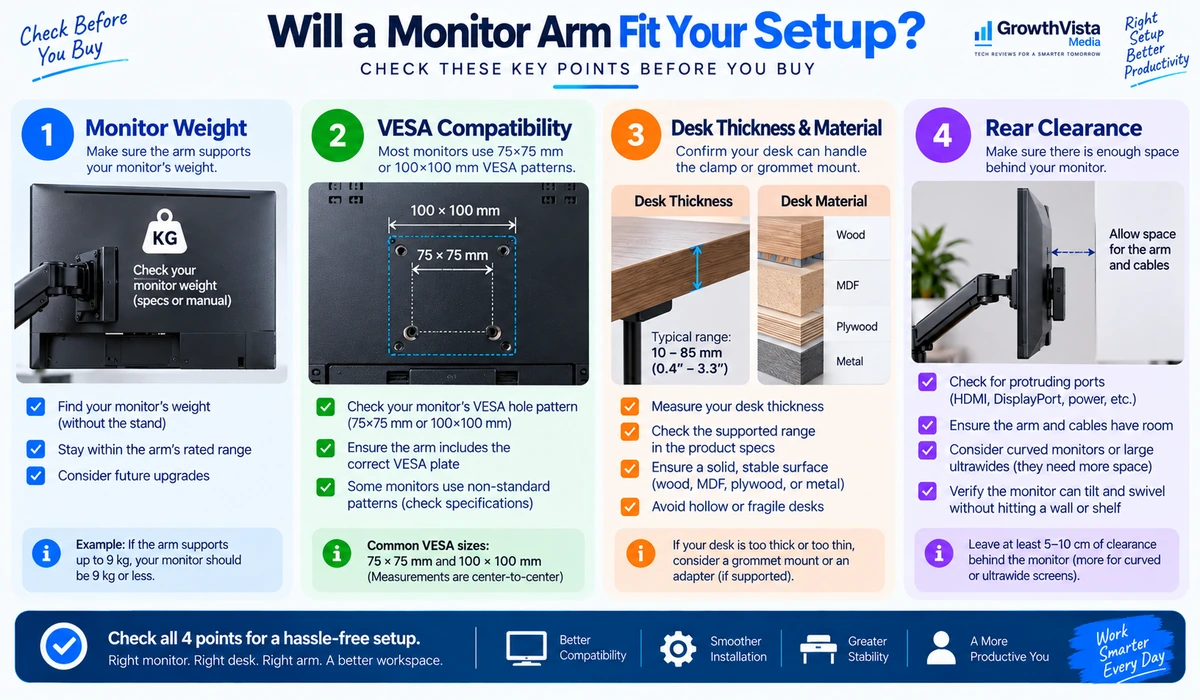
1. Monitor Weight
Check the monitor’s weight without its factory stand. The arm’s supported weight range matters more than screen size alone. A display that is too heavy may sag, while a display that is too light can also be difficult for some counterbalance systems to hold correctly.
2. VESA Compatibility
Most monitor arms use standard VESA mounting patterns such as 75 × 75 mm or 100 × 100 mm. Confirm the mounting holes on the back of your monitor. Some displays require an adapter.
3. Desk Thickness and Material
Clamp and grommet mounts place force on the desk. Check the manufacturer’s supported desk-thickness range and make sure the surface is structurally suitable. Thin, hollow or fragile desktops may require extra reinforcement.
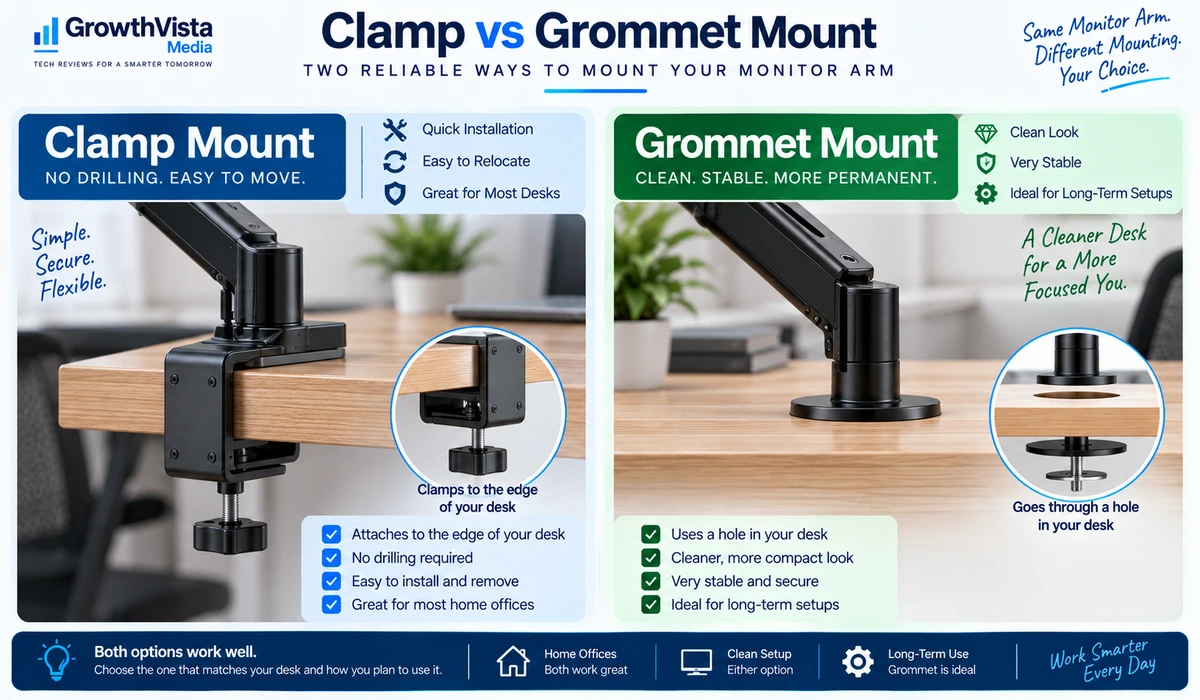
4. Clamp vs Grommet Mount
A clamp attaches to the desk edge and is convenient when you do not want to drill. A grommet mount uses an existing cable hole or a drilled opening and can create a cleaner, more permanent installation.
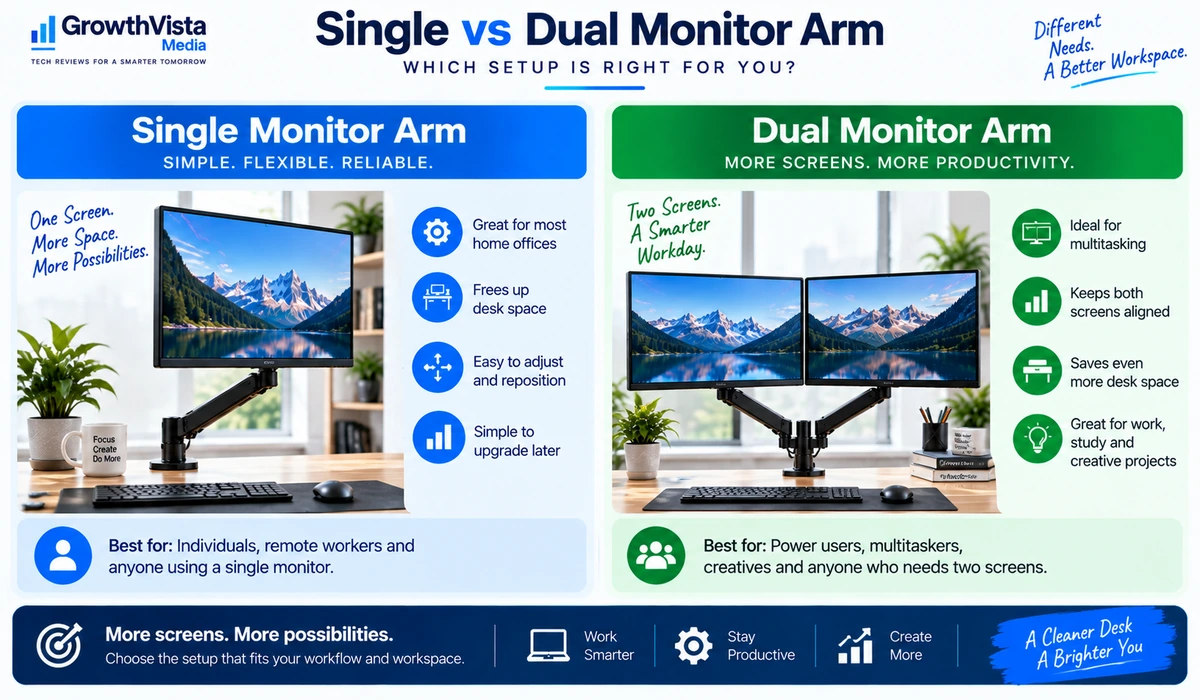
5. Single vs Dual Arm
A single arm gives each monitor its own mounting point. A dual system places two screens on one base. Dual arms can look cleaner, but monitor size, weight and alignment become more important.
6. Range of Motion
Consider height adjustment, extension, tilt, swivel and rotation. More movement is useful only if your desk has enough space behind and beside the monitors.
7. Cable Management
Integrated cable channels or clips can keep power and video cables from hanging across the desk. Leave enough slack for the monitor to move through its full range.
8. Wall Clearance
Many articulating arms extend backward when the monitor is pulled forward. A desk pushed tightly against a wall can restrict movement.
Single Monitor Arm vs Dual Monitor Arm
| Feature | Single Arm | Dual Arm |
|---|---|---|
| Best for | One display | Two-display workstation |
| Adjustment | Independent | Independent or linked, depending on design |
| Desk mounting | One mount per arm | Usually one shared base |
| Alignment complexity | Lower | Higher |
| Upgrade flexibility | Easy to add/change one arm | Depends on system |
| Desk appearance | Minimal | Clean two-screen setup |
| Main buying check | Monitor weight | Weight + alignment + combined setup |
Monitor Arm vs Monitor Stand
A monitor arm is not automatically better than a conventional stand. A good factory stand can provide stable height, tilt and swivel adjustment without putting stress on the desk edge.
A monitor arm becomes especially useful when you want to reclaim desk space, position the screen farther forward or backward, rotate it frequently, or align multiple displays. If your monitor already sits comfortably and never moves, replacing the stand may provide little practical benefit.
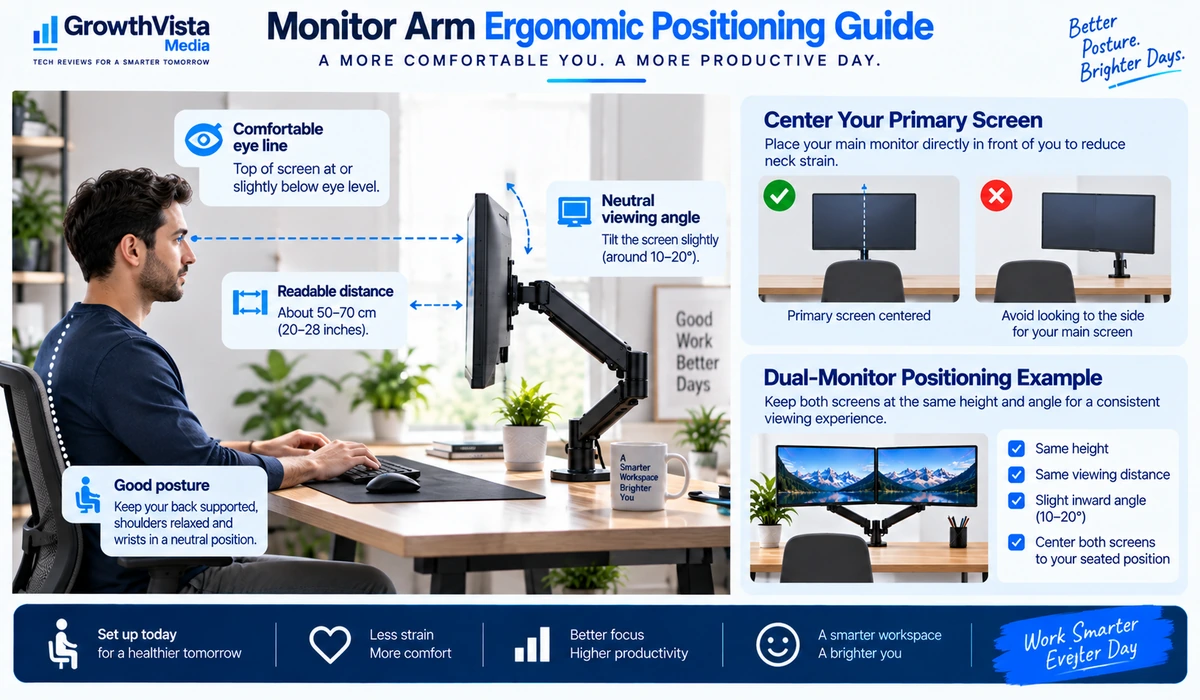
How to Position Your Monitor
- Start with the screen centered on your normal seated working position rather than centering it on the desk.
- Adjust height so you can view the screen comfortably without repeatedly tilting your head upward or downward.
- Keep the display far enough away that text is comfortable to read without leaning forward.
- For two monitors used equally, place them symmetrically. If one display is primary, center that screen and angle the secondary monitor toward you.
- After positioning the monitors, route cables with enough slack to allow movement without pulling on connectors.
Are Monitor Arms Safe for Standing Desks?
They can be a good match for standing desks because the screens move with the desktop as its height changes. The main concern is stability. A heavy monitor mounted far forward creates leverage, so the desk, arm and clamp all need to be suitable for the load.
If your standing desk wobbles at full height, a monitor arm will not necessarily fix that problem and may make screen movement more noticeable. Stable mounting and sensible arm extension matter.
Frequently Asked Questions
Are monitor arms worth it for a home office?
They can be when you want more desk space, better screen positioning or a cleaner multi-monitor setup. If your existing stand already provides the adjustment you need, an arm is optional.
How do I know if my monitor supports a monitor arm?
Check the rear of the monitor or its specifications for a VESA mounting pattern, commonly 75 × 75 mm or 100 × 100 mm, and confirm the monitor’s weight without its stand.
Can a monitor arm damage a desk?
A poorly matched or overtightened clamp can damage some desktops. Check desk material and thickness, follow the mounting instructions and consider reinforcement for thin or fragile surfaces.
Can I mount two different-size monitors on a dual arm?
Often yes, provided each display fits the arm’s size, weight and VESA requirements. Different dimensions can make perfect visual alignment more difficult.
Do monitor arms work with ultrawide monitors?
Some do, but ultrawides can be substantially heavier and place more leverage on the arm. Use a model explicitly rated for the monitor’s weight and form factor.
Is a gas-spring monitor arm better?
Gas-spring or counterbalanced arms are useful when you reposition the display frequently. A simpler mechanical arm can be sufficient for a screen that stays in one position.
Should I use a clamp or grommet mount?
A clamp is convenient and does not require drilling. A grommet mount can provide a clean, permanent installation when the desk has a suitable hole and structure.
Final Thoughts
The best monitor arms for home office setups are the ones that correctly match the monitor and desk—not necessarily the most expensive models.
For a conventional single-monitor workstation, a quality adjustable arm can free desk space and make screen positioning much easier. Dual-monitor users should pay extra attention to per-arm weight limits, alignment range and the amount of rear clearance required.
Heavy ultrawide displays need appropriately rated hardware, while budget users with standard monitors may be perfectly satisfied with a simpler mount.
Before buying, check four things first: monitor weight, VESA pattern, desk thickness and mounting clearance. Getting those basics right matters more than any feature list.