Best Portable Monitors for Laptops in 2026: 10 Models Compared
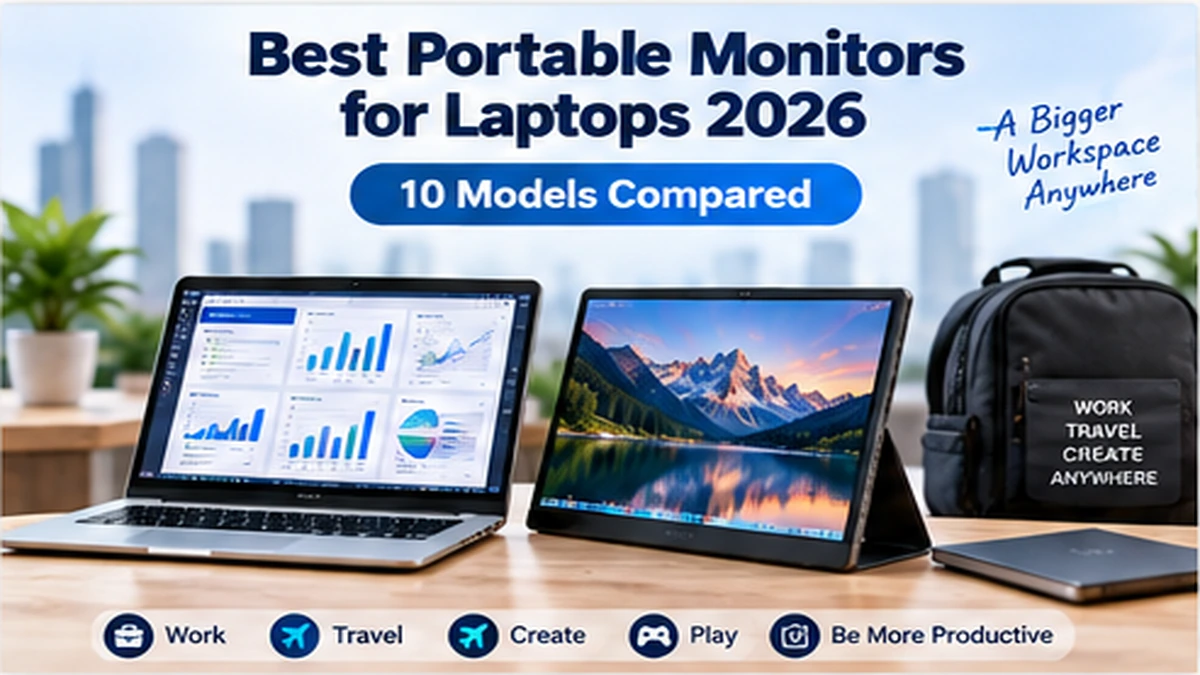
Working from a laptop gives you freedom, but the limited screen space can quickly become frustrating when you’re juggling spreadsheets, browser tabs, video calls, documents, or creative applications.
One of the easiest ways to expand your workspace without carrying a full-size desktop display is to add a portable monitor.
The best portable monitors for laptops are thin enough to fit inside a laptop bag, can often receive video and power through a single USB-C cable, and give you a second screen almost anywhere.
But portable monitors now vary considerably. You can choose from inexpensive 1080p IPS displays, high-resolution 16:10 screens, touchscreen models, OLED displays and high-refresh-rate gaming monitors.
This guide compares 10 portable monitors worth considering in 2026 and explains which features actually matter before you buy.
Quick Comparison: Best Portable Monitors for Laptops
| Portable Monitor | Display | Resolution | Best For | Key Advantage | CTA |
|---|---|---|---|---|---|
| ASUS ZenScreen MB16AHV | 15.6" IPS | Full HD | Most users | Versatile connectivity | Check Price → |
| Lenovo ThinkVision M14 | 14" IPS | Full HD | Business travel | Lightweight design | Check Price → |
| LG gram +view | 16" IPS | 2560 × 1600 | Productivity | 16:10 high-resolution screen | Check Price → |
| Lenovo ThinkVision M14t Gen 2 | 14" IPS | 2240 × 1400 | Touch productivity | Touch + stylus support | Check Price → |
| ASUS ZenScreen OLED MQ16AH | 15.6" OLED | Full HD | Media & creative work | OLED contrast | Check Price → |
| ViewSonic VX1655-4K-OLED | 15.6" OLED | 4K UHD | High-resolution work | 4K OLED display | Check Price → |
| ViewSonic VG1655 | 15.6" IPS | Full HD | Office use | Flexible USB-C connectivity | Check Price → |
| ASUS ROG Strix XG17AHPE | 17.3" IPS | Full HD | Gaming | High refresh rate | Check Price → |
| ASUS ProArt PA148CTV | 14" IPS | Full HD | Creators | Color-focused features | Check Price → |
| ASUS ZenScreen MB27ACF | 27" IPS | 2560 × 1440 | Large mobile workspace | Huge portable screen | Check Price → |
Note: Specifications can vary by region or revision. Verify current manufacturer specifications and Amazon availability before purchasing.
ASUS ZenScreen MB16AHV — Best All-Round Portable Monitor
The ASUS ZenScreen MB16AHV is a strong starting point for users who simply want more screen space without making their mobile setup complicated.
Its 15.6-inch Full HD display provides enough room for email, documents, spreadsheets, dashboards and browser windows while remaining substantially easier to transport than a conventional desktop monitor.
USB-C is particularly useful for modern laptops because compatible systems can send video and power through the same connection. The MB16AHV also provides additional connection flexibility compared with USB-C-only portable monitors.
Best for: Remote workers, business travelers, students and general laptop users looking for a practical second display.
Why consider it? Its appeal is the balance between portability, useful screen size and straightforward connectivity.
GrowthVista verdict: A sensible place to start if you’re buying your first portable monitor.
Lenovo ThinkVision M14 — Best for Business Travel
If your portable monitor will spend as much time inside your backpack as it does on your desk, weight matters.
The Lenovo ThinkVision M14 focuses heavily on portability. Its 14-inch format makes it particularly suitable for professionals who regularly move between offices, client locations, coworking spaces and hotels.
Rather than trying to replace a desktop monitor, the M14 works best as a lightweight companion screen.
You could keep Microsoft Teams or Slack on one display while working in Excel, Power BI, a browser or another business application on the laptop screen.
Best for: Frequent travelers and mobile professionals.
Main advantage: A compact 14-inch form factor that’s easier to carry than many 15.6- and 16-inch alternatives.
LG gram +view — Best for Productivity
The LG gram +view takes a different approach from basic 1080p portable monitors.
Its 16-inch 2560 × 1600 IPS display uses a productivity-friendly 16:10 aspect ratio, giving you additional vertical working space.
That can be particularly useful for spreadsheets, coding, long documents, analytics dashboards and web browsing.
One important compatibility consideration is USB-C video support. Buyers should confirm their laptop supports the required video output and power behavior before purchasing.
Best for: Professionals who value resolution and workspace more than the lowest possible purchase price.
Why 16:10 matters: A 16:10 screen provides more vertical space than a traditional 16:9 display at a comparable diagonal size.
Lenovo ThinkVision M14t Gen 2 — Best Touchscreen Portable Monitor
Touchscreens aren’t necessary for everyone, but they can transform how a portable display is used.
The ThinkVision M14t Gen 2 is aimed at users who want a portable second display that can also support more interactive workflows.
Touch can be useful for presentations, annotations, navigation and certain creative or educational applications.
If all you need is a second window for Outlook or Excel, paying extra for touch may not make sense. For people who will actually use touch input, however, it can justify the premium.
Best for: Presentations, annotation, touch-based productivity and users who want stylus functionality.
ASUS ZenScreen OLED MQ16AH — Best OLED Portable Monitor
OLED changes the portable-monitor experience primarily through contrast.
Because OLED pixels can individually control their light output, dark scenes and black backgrounds can appear dramatically deeper than on conventional IPS displays.
That makes an OLED portable monitor attractive for media consumption and visual work where image quality matters.
The trade-off is that you generally pay more than you would for a straightforward Full HD IPS portable monitor.
Best for: Creators, photographers, media consumption and users who prioritize display quality.
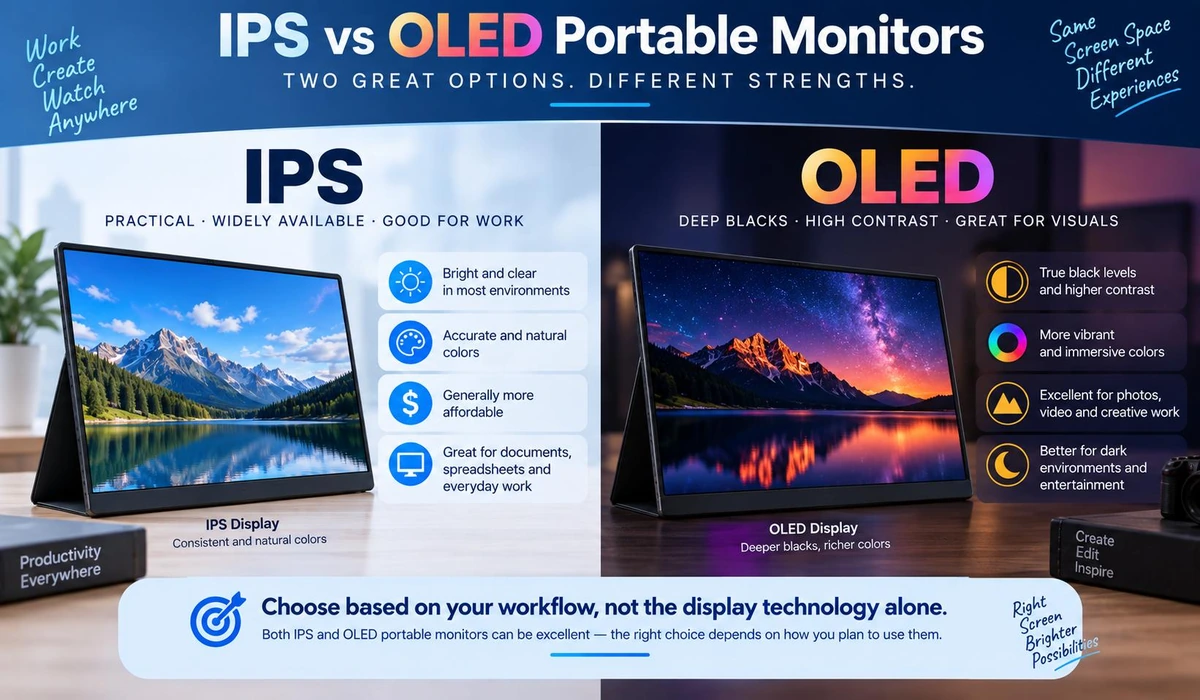
IPS or OLED? Choose IPS if affordability and general productivity matter most. Consider OLED when contrast, deep blacks and visual quality are higher priorities.
ViewSonic VX1655-4K-OLED — Best 4K Portable Monitor
A Full HD resolution is sufficient for many portable-monitor buyers, but some users want substantially more pixel density.
The ViewSonic VX1655-4K-OLED combines high resolution with OLED display technology, positioning it toward users who care much more about image detail than someone simply adding a second screen for email.
For ordinary office applications, 4K may be unnecessary. For detailed visual work, high-resolution media or users who value very sharp rendering, it becomes easier to justify.
Best for: Creative professionals and users seeking a premium high-resolution portable display.
ViewSonic VG1655 — Best for Flexible Office Setups
ViewSonic has several portable-monitor families, and the VG series is particularly relevant to business and productivity users.
A useful feature to look for in this category is USB-C power delivery or passthrough. Depending on the exact configuration, this can help simplify desk cabling by allowing compatible devices to exchange video and power through USB-C.
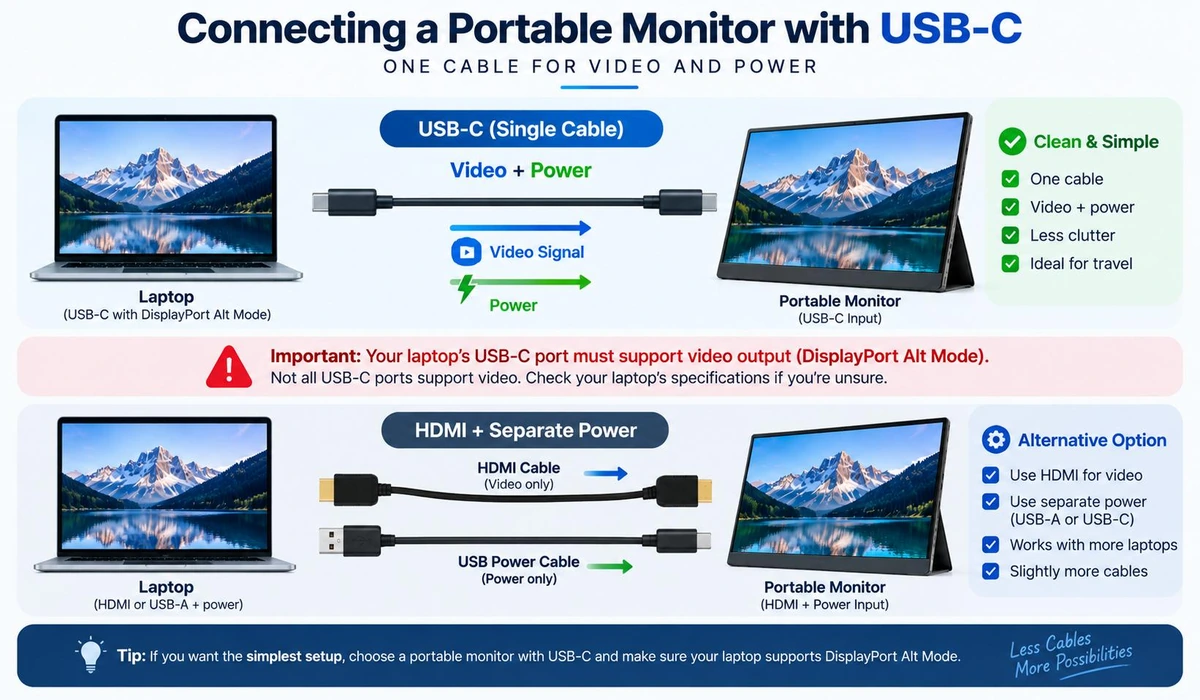
However, don’t assume every USB-C port does the same thing. Always check whether your laptop supports DisplayPort Alt Mode, whether the monitor requires separate power, and what level of USB Power Delivery is supported.
Best for: Office desks, hybrid work and users who prioritize connectivity.
ASUS ROG Strix XG17AHPE — Best Portable Monitor for Gaming
Gaming changes the buying criteria. For spreadsheets and documents, 60Hz is normally sufficient. For fast-paced games, a high refresh rate can provide noticeably smoother motion.
The ROG Strix XG17AHPE is built around that requirement, offering a much higher refresh rate than ordinary productivity-focused portable monitors.
Its larger 17.3-inch format also gives games more room to breathe. The downside is that gaming-oriented hardware is usually larger, more expensive and less focused on minimum travel weight.
Best for: Laptop gamers and portable console setups where high refresh rate matters.
ASUS ProArt PA148CTV — Best for Creative Work
Creative users have different priorities from general office workers.
Color reproduction, calibration capabilities and workflow-oriented features may matter more than simply getting the cheapest second screen.
The ASUS ProArt PA148CTV is designed with those users in mind.
It makes more sense for photographers, designers, editors and creators than for someone who only needs a portable screen for email.
Best for: Designers, photographers and creative workflows.
1ASUS ZenScreen MB27ACF — Best Large Portable Monitor
A 27-inch display might sound contradictory in an article about portable monitors, but portability doesn’t always mean fitting the display into the same backpack as your laptop.
Some users need a monitor that can be transported between rooms, temporary offices, events or work locations without becoming a permanent desktop installation.
The ASUS ZenScreen MB27ACF addresses that use case with a much larger 27-inch 1440p display.
Best for: Users who want a genuinely large secondary display that can still be moved relatively easily.
Not ideal for: Anyone looking for something to slip into a standard laptop backpack.
What to Look for When Buying a Portable Monitor
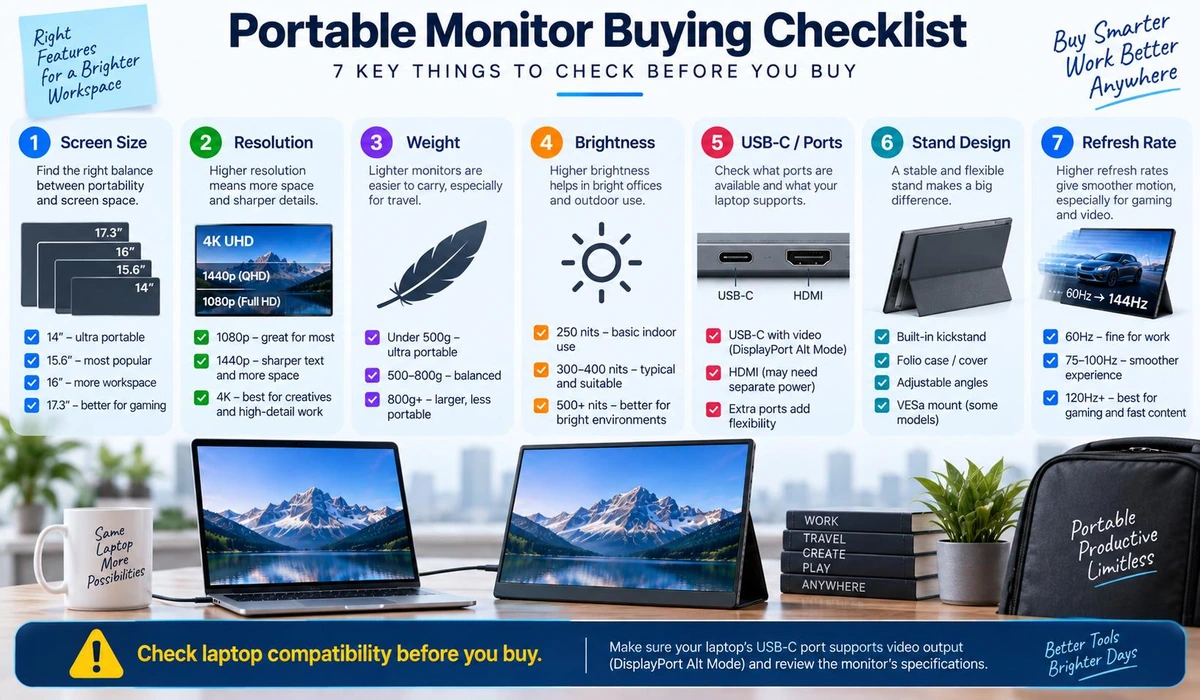
1. Screen Size
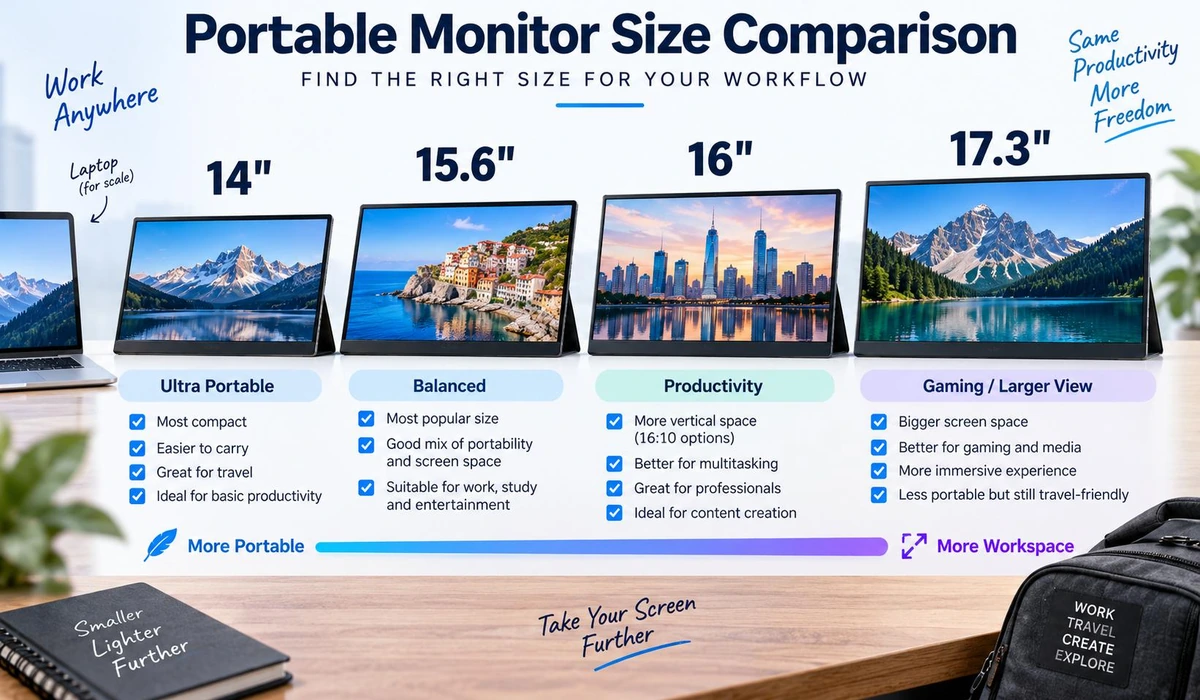
For most laptop users, 14 to 16 inches is the sweet spot. A 14-inch monitor prioritizes portability, while a 15.6- or 16-inch display generally provides a more comfortable workspace. Larger 17-inch and above displays make sense when screen space matters more than backpack portability.
2. Resolution
1920 × 1080 (Full HD) remains reasonable for general productivity on a 14- to 16-inch screen. Higher resolutions such as 2560 × 1600 provide sharper text and more working space, while 4K is primarily attractive for premium and creative applications.
3. USB-C Compatibility
A laptop having a USB-C connector does not automatically mean that USB-C port can output video. For a one-cable monitor setup, the laptop generally needs a compatible USB-C implementation supporting video output, commonly through DisplayPort Alt Mode.
4. Weight
A few hundred grams can make a noticeable difference when the monitor is carried every day alongside a laptop, charger, mouse and other accessories.
5. Stand Design
Some portable monitors use folding covers as stands, while others have integrated kickstands. A good stand can make positioning faster and more stable.
6. Brightness
If you mostly work indoors, moderate brightness may be sufficient. If you work near bright windows or in strongly lit environments, higher brightness becomes more valuable.
7. IPS vs OLED
IPS is generally the practical choice for productivity because it is widely available and typically more affordable. OLED is attractive when contrast and image quality matter more.
8. Refresh Rate
For normal work, 60Hz is usually enough. For gaming, consider a higher-refresh-rate option depending on your hardware and games.
Portable Monitor vs Regular Monitor
| Feature | Portable Monitor | Desktop Monitor |
|---|---|---|
| Portability | Excellent | Poor |
| Screen size | Usually smaller | Much wider selection |
| One-cable USB-C | Common | Increasingly common |
| Image quality | Good to excellent | Usually better at equivalent price |
| Ergonomics | Limited by stand | Usually better |
| Travel | Excellent | Impractical |
| Price per inch | Higher | Usually lower |
| Best use | Mobile second screen | Permanent workstation |
A portable monitor should not automatically replace your desktop monitor. For a permanent office, a conventional 24- or 27-inch monitor usually provides better ergonomics and value. The portable monitor wins when you need your second screen to move with you.
Who Should Buy a Portable Monitor?
- Remote and hybrid workers
- Frequent business travelers
- Students
- Programmers
- Data analysts
- Designers and content creators
- Gamers who travel
- People working from multiple locations
It is particularly useful when your workflow regularly requires two applications to remain visible simultaneously. For example, a data analyst could keep a Power BI report on one display and source data on another. A writer could keep research visible beside a document. A remote worker could keep a video meeting open without covering the application being discussed.
Do You Need a Portable Monitor With a Battery?
Not necessarily. Many portable monitors draw power directly from a connected laptop over USB-C. This keeps the monitor thin and light but increases demand on the laptop battery. A monitor with an integrated battery can reduce that dependency, but it also adds weight, cost and another battery that needs charging.
Frequently Asked Questions
What is the best portable monitor size for a laptop?
For most users, 14 to 16 inches provides the best balance between portability and usable screen space.
Can a portable monitor work with any laptop?
No. Compatibility depends on the available connections. USB-C monitors commonly require a laptop port capable of video output, while monitors with HDMI or mini-HDMI may work with a wider range of computers.
Can USB-C power a portable monitor?
Yes, many portable monitors can receive both video and power over one compatible USB-C connection. However, the laptop and monitor must support the required USB-C video and power standards.
Is a portable monitor worth it for working from home?
It can be if you move your workspace frequently or don’t have room for a permanent desktop monitor. If your workstation never moves, a conventional desktop monitor may offer better value and ergonomics.
Is 1080p enough for a portable monitor?
For most 14- to 16-inch productivity monitors, Full HD remains adequate. Higher resolutions provide sharper text and additional detail but generally increase the price.
Are portable monitors good for gaming?
They can be. Look specifically for high refresh rates, suitable response characteristics and appropriate HDMI or USB-C connectivity rather than choosing a standard productivity model.
Can I use a portable monitor vertically?
Many models can physically operate in portrait orientation, although stand design and automatic rotation support vary.
Final Thoughts
The best portable monitors for laptops aren’t necessarily the models with the highest resolution or longest specification list.
The right monitor depends on where and how you’ll actually use it.
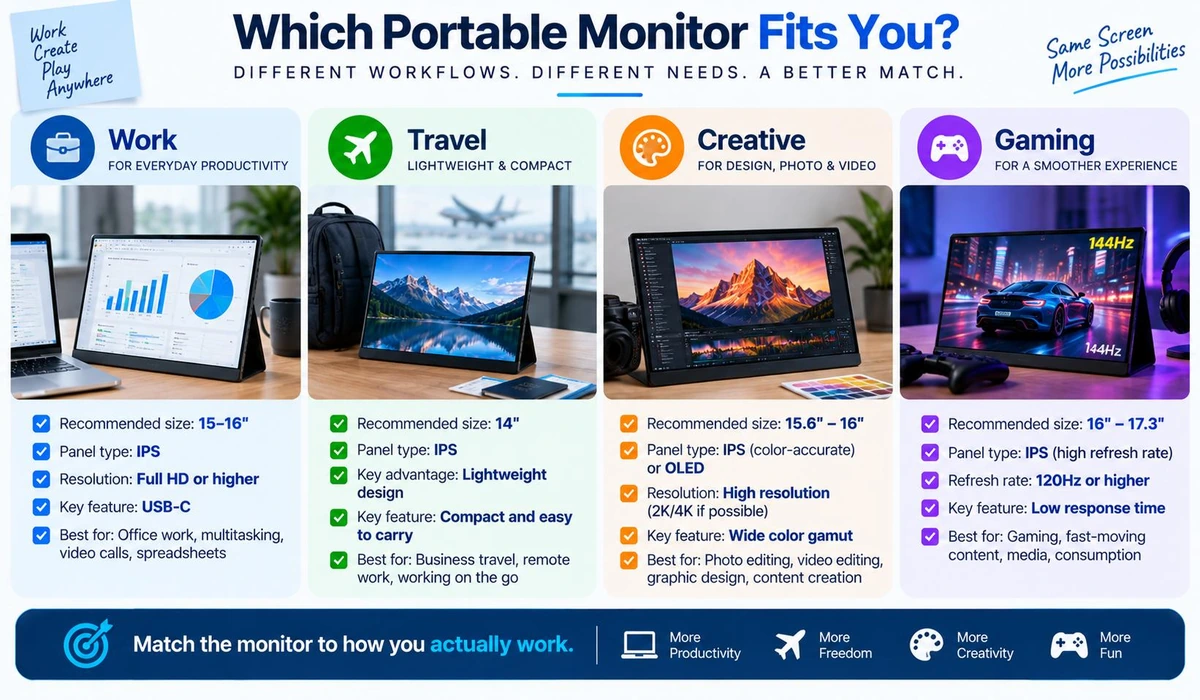
For everyday productivity, a lightweight 15- to 16-inch USB-C IPS monitor is usually the most practical choice. Frequent travelers may prefer a smaller 14-inch display, while creative professionals can benefit from OLED, higher resolution or better color capabilities.
Gamers should prioritize refresh rate, while anyone primarily working from a fixed desk should first consider whether a conventional desktop monitor would provide better value.
Most importantly, check your laptop’s USB-C video compatibility before buying. A portable monitor is at its best when it makes your workspace simpler—not when it requires a collection of unexpected adapters and cables.