Best Smart Locks for Keyless Home Security in 2026
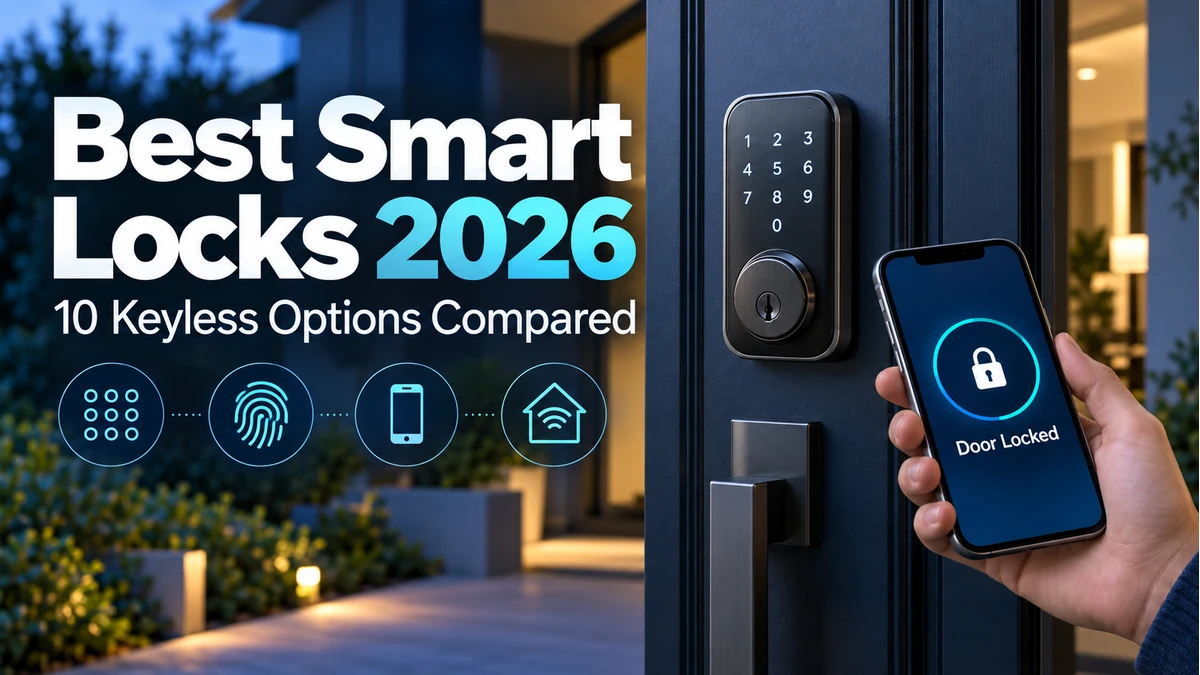
A smart lock replaces or augments a conventional door lock with electronic access such as a keypad, phone app, fingerprint reader or smart-home automation. The practical benefit is convenience: you can create temporary codes, check lock status and, on supported models, manage access remotely.
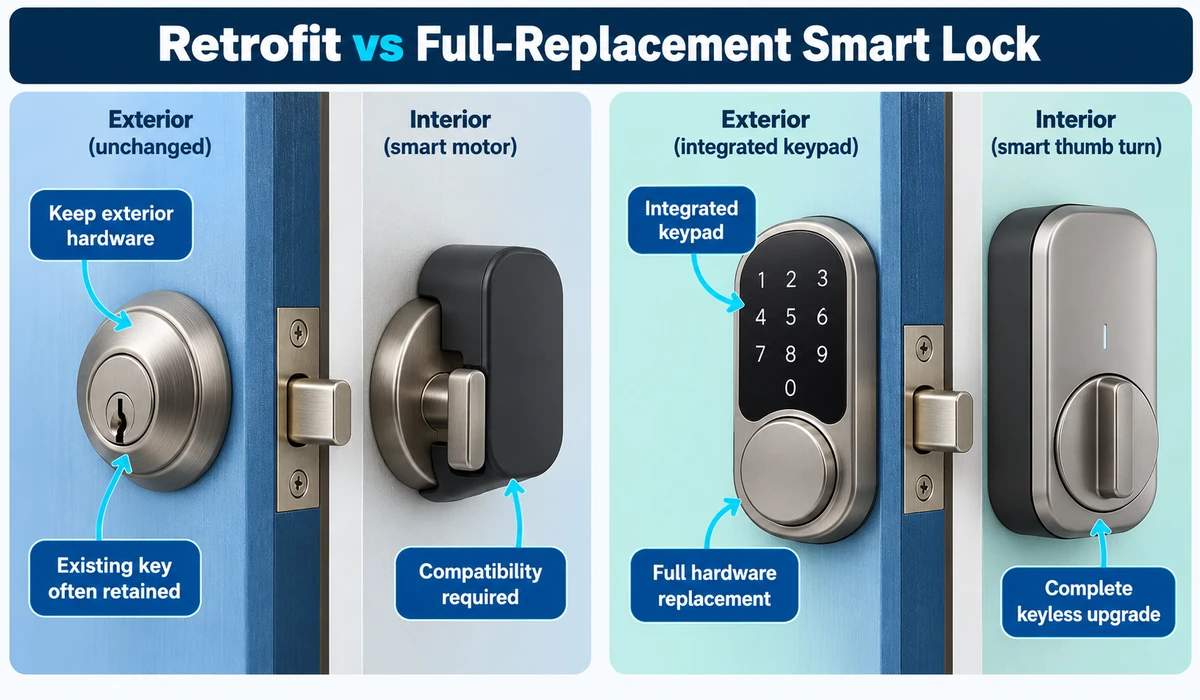
The best smart locks combine dependable physical hardware with straightforward access methods, sensible battery management and an ecosystem that fits the rest of the home. Some replace the full deadbolt, while retrofit models keep the existing exterior key hardware and motorize the inside thumb turn.
Connectivity is another major difference. Bluetooth can handle nearby phone control, Wi-Fi can enable remote access, and newer Matter-compatible products may integrate with multiple supported smart-home platforms. Some models use Thread, while others need a bridge or hub.
This guide compares 10 smart locks worth considering in 2026 and explains retrofit versus full replacement, keypads, fingerprints, Matter, remote access and installation considerations.
What are the best smart locks?
The best smart locks depend on your door, preferred entry method and smart-home ecosystem. The Schlage Encode Plus is a strong premium option, while the Yale Assure Lock 2 offers flexible configurations. The Aqara Smart Lock U100 is a good fit for Apple and Aqara homes, the August Wi-Fi Smart Lock is a retrofit option for compatible deadbolts, and the Eufy Smart Lock E30 is worth considering for Matter and Thread setups. Before buying, check door compatibility, entry methods, battery requirements, remote-access requirements and compatibility with your smart-home platform.
Quick Comparison: Best Smart Locks
| Smart Lock | Best For | Lock Style | Entry Options | Smart-Home Focus | CTA |
|---|---|---|---|---|---|
| Schlage Encode Plus | Overall premium | Full deadbolt | Keypad / key / app | Apple + major platforms | Check Price → |
| Yale Assure Lock 2 | Flexible ecosystem | Full deadbolt | Keypad / app / optional key | Modular connectivity | Check Price → |
| Aqara Smart Lock U100 | Apple / Aqara homes | Full deadbolt | Fingerprint / keypad / key / app | Apple + Aqara | Check Price → |
| Ultraloq U-Bolt Pro WiFi | Multiple entry methods | Full deadbolt | Fingerprint / keypad / key / app | Wi-Fi ecosystem | Check Price → |
| August Wi-Fi Smart Lock | Retrofit convenience | Interior retrofit | App / existing key | Broad integrations | Check Price → |
| SwitchBot Lock Pro | Retrofit versatility | Interior retrofit | App + optional accessories | Matter via supported hub | Check Price → |
| Level Lock+ | Discreet design | In-door deadbolt | Phone / key / supported wallet features | Apple-oriented | Check Price → |
| Eufy Smart Lock E30 | Matter / Thread value | Full deadbolt | Keypad / key / app | Matter / Thread | Check Price → |
| TP-Link Tapo DL110 | Tapo smart home | Full deadbolt | Keypad / fingerprint / app | Tapo ecosystem | Check Price → |
| Lockly Visage | Biometric premium | Full deadbolt | Biometric / keypad / key / app | Premium access features | Check Price → |
Note: Exact access methods, Matter/Thread support, bridges, remote-access requirements, door compatibility and platform integrations vary by model and revision. Verify current manufacturer specifications before publication.
1. Schlage Encode Plus — Best Overall Premium Smart Lock
The Schlage Encode Plus is a strong fit for homeowners who want a familiar full-deadbolt design with keypad access and broad smart-home convenience.
It is especially relevant to Apple households because supported Apple access features can make entry more convenient without abandoning conventional keypad and physical-key options.
Before purchase, verify door dimensions, platform compatibility and the exact remote-access setup you intend to use.
Best for: Homeowners wanting a premium full replacement with several practical entry methods.
2. Yale Assure Lock 2 — Best for Flexible Smart-Home Integration
The Yale Assure Lock 2 family is attractive because it offers several configurations rather than forcing every buyer into the same connectivity setup.
That flexibility can help when choosing between keypad styles, keyed or key-free designs and different smart-home integrations.
Because the Assure Lock 2 exists in multiple variants, verify the exact module and connectivity included in the listing rather than assuming every version supports the same features.
Best for: Buyers who want to tailor the lock to an existing smart-home ecosystem.
3. Aqara Smart Lock U100 — Best for Apple and Aqara Smart Homes
The Aqara U100 combines several access methods, including fingerprint and keypad entry, with integration into the broader Aqara ecosystem.
For Apple-oriented homes, its platform support can make it particularly appealing when combined with compatible home hubs and automations.
Some ecosystem features may depend on additional Aqara hardware, so compare the complete setup rather than only the lock price.
Best for: Apple and Aqara users who want multiple keyless entry options.
4. Ultraloq U-Bolt Pro WiFi — Best for Multiple Entry Methods
The Ultraloq U-Bolt Pro line emphasizes flexibility, giving households several ways to unlock the door rather than relying on a single keypad or phone.
That can be useful in a family where different people prefer fingerprints, codes, a phone or a physical backup key.
As with any biometric lock, fingerprint convenience should be evaluated alongside reliable backup access and battery management.
Best for: Families that want several independent entry methods.
5. August Wi-Fi Smart Lock — Best Retrofit Smart Lock
The August Wi-Fi Smart Lock is designed to replace the interior side of a compatible deadbolt while leaving the outside appearance and existing key in place.
That retrofit approach can be attractive to renters with permission, homeowners who want to preserve exterior hardware, or anyone who prefers a less visible smart-lock conversion.
Compatibility with the existing deadbolt is essential, so use the manufacturer’s compatibility guidance before ordering.
Best for: Users who want smart access while retaining the existing exterior lock and key.
6. SwitchBot Lock Pro — Best Retrofit Option for Unusual Existing Locks
The SwitchBot Lock Pro takes a retrofit approach that is intended to work with a range of existing lock mechanisms.
Its appeal is that the door may not need a complete deadbolt replacement, while optional accessories can add keypad or biometric entry depending on the setup.
Matter integration can depend on compatible SwitchBot hub hardware, so buyers should include any required bridge in the total cost.
Best for: Retrofit-focused users who want to keep existing lock hardware where compatible.
7. Level Lock+ — Best for a Discreet Smart-Lock Design
The Level Lock+ hides much of the smart-lock hardware inside the door, preserving a more traditional exterior appearance.
This makes it appealing to users who dislike bulky exterior keypads or obvious smart hardware.
The discreet design should still be evaluated for ecosystem compatibility, battery access and the entry methods required by every household member.
Best for: Design-conscious users who want smart access with minimal visible hardware.
8. Eufy Smart Lock E30 — Best Matter/Thread Value Option
The Eufy Smart Lock E30 is relevant to buyers looking for a newer smart-home architecture built around Matter and Thread.
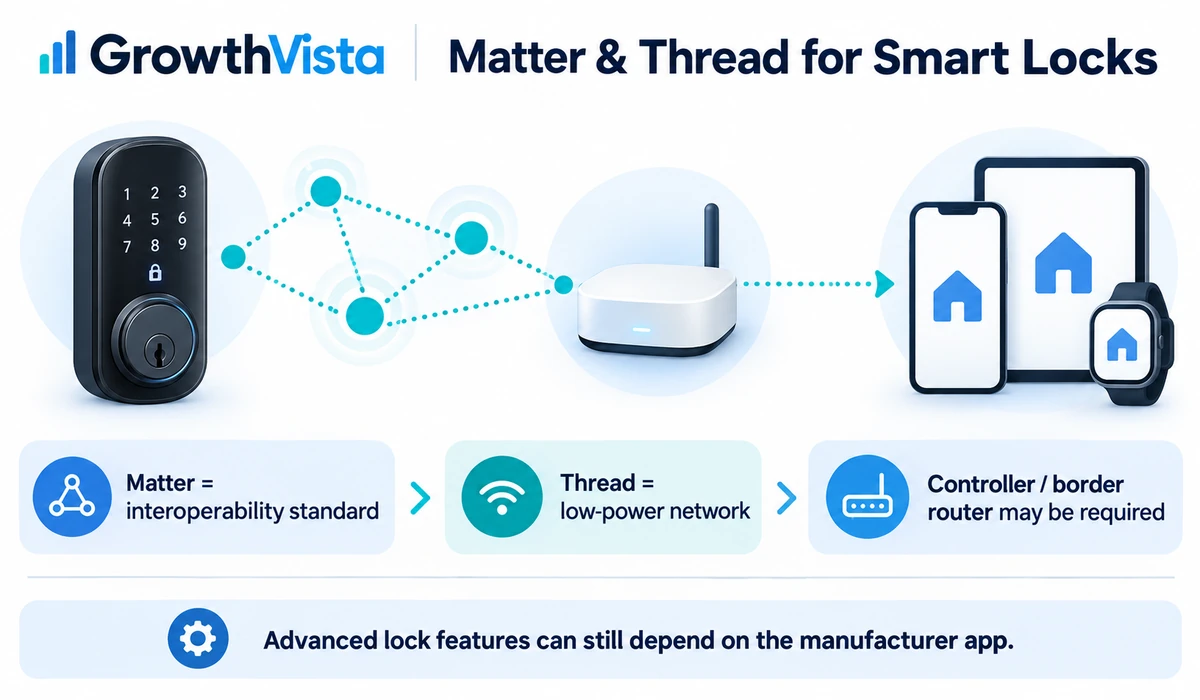
Thread can provide low-power mesh connectivity, while Matter is intended to improve interoperability across supported smart-home ecosystems.
A compatible Matter controller and Thread border router may be required for the intended setup, so verify what hardware you already own.
Best for: Users building a Matter/Thread smart home and wanting a modern keypad deadbolt.
9. TP-Link Tapo DL110 — Best for the Tapo Ecosystem
The Tapo DL110 extends TP-Link’s smart-home lineup into door access, making it particularly relevant to households already using Tapo cameras, plugs or other compatible devices.
Multiple entry options can make it useful for families, while keeping devices in one app can simplify day-to-day management.
Verify current regional availability and exact smart-home integrations because product variants can differ.
Best for: Existing Tapo users who want door access inside the same smart-home ecosystem.
10. Lockly Visage — Best Premium Biometric Smart Lock
The Lockly Visage targets buyers who want advanced biometric access in addition to more conventional keypad, app and backup entry methods.
Biometric features can be convenient, but they should be treated as one access method rather than the only way into the home. Battery status and physical backup access remain important.
Premium biometric hardware also carries a higher price, so it makes the most sense when the additional entry options will actually be used.
Best for: Buyers prioritizing premium biometric convenience with backup access methods.
Which Smart Lock Is Best for You?
- Best overall: Schlage Encode Plus — a strong premium full-deadbolt option with keypad and smart-home features.
- Best for flexible smart-home integration: Yale Assure Lock 2 — useful if you want different connectivity and lock configurations.
- Best for Apple and Aqara homes: Aqara Smart Lock U100 — combines fingerprint, keypad, key and app-based access.
- Best retrofit smart lock: August Wi-Fi Smart Lock — keeps the existing exterior hardware on compatible deadbolts.
- Best for multiple entry methods: Ultraloq U-Bolt Pro WiFi — offers several ways to unlock the door, including biometric access.
- Best discreet smart lock: Level Lock+ — designed to keep the exterior appearance closer to a traditional lock.
- Best Matter/Thread option: Eufy Smart Lock E30 — aimed at users building a compatible Matter and Thread smart home.
- Best premium biometric option: Lockly Visage — suited to buyers who prioritize fingerprint-based access and multiple backup methods.
Before choosing a model, verify your door and deadbolt dimensions, required hub or bridge, smart-home platform compatibility, battery setup and exact features of the model variant.
What are the best smart locks for a front door?
For a typical front door, a full-deadbolt smart lock such as the Schlage Encode Plus, Yale Assure Lock 2, Aqara Smart Lock U100 or Ultraloq U-Bolt Pro WiFi can be a good choice, provided the lock is compatible with the existing door and deadbolt. A retrofit model such as the August Wi-Fi Smart Lock can be preferable if you want to keep the exterior hardware unchanged. Compare the lock’s physical compatibility, entry methods, battery life, remote access and smart-home platform support before buying.
Retrofit vs Full-Replacement Smart Locks: What’s the Difference?
| Factor | Retrofit Smart Lock | Full-Replacement Smart Lock |
|---|---|---|
| What changes | Usually interior hardware | Deadbolt / exterior and interior hardware |
| Exterior appearance | Often unchanged | Usually visibly different |
| Existing physical key | Often retained | Depends on model |
| Installation | Can be simpler if compatible | More hardware to replace |
| Entry methods | Often app; keypad may be optional | Keypad/fingerprint often integrated |
| Best fit | Preserve existing hardware | Complete keyless upgrade |
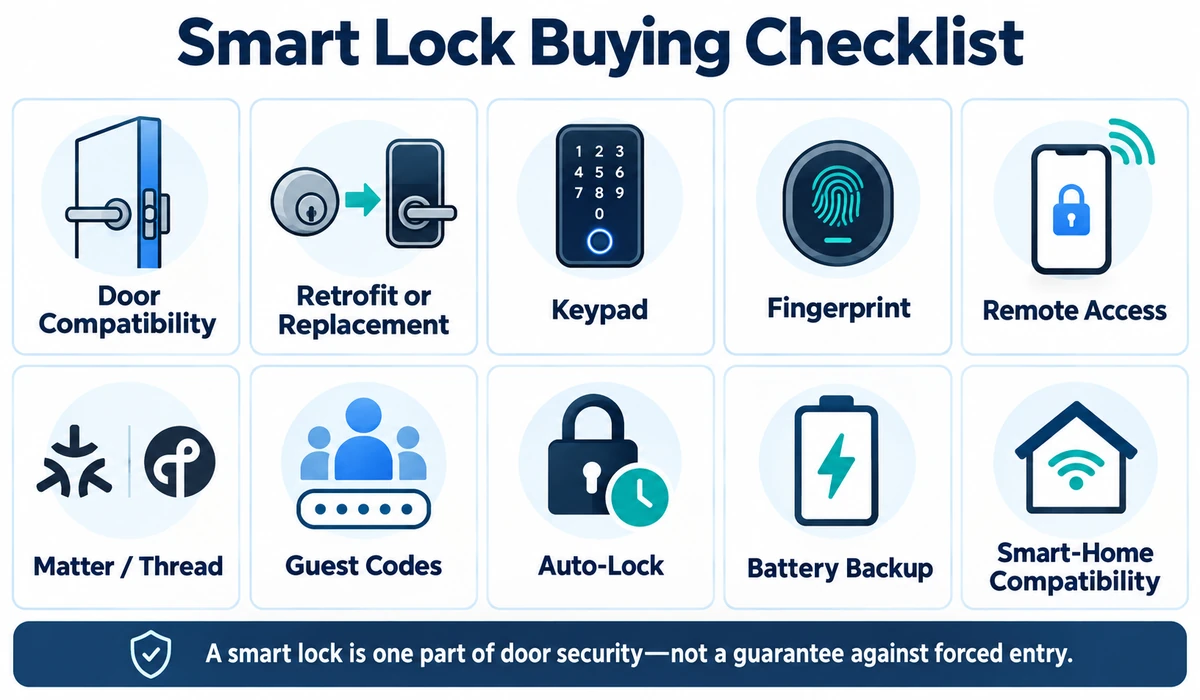
What to Look for When Buying a Smart Lock
1. Door and Deadbolt Compatibility
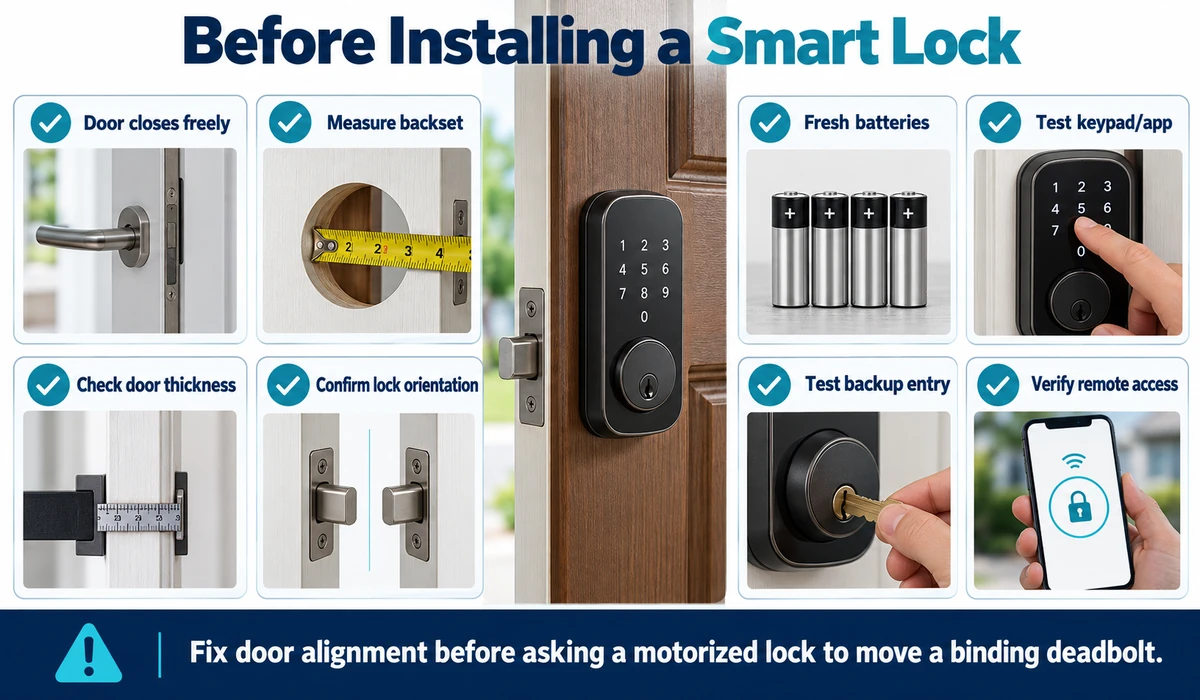
Measure the door thickness, backset, bore hole and existing deadbolt according to the manufacturer’s guide. A good smart lock is useless if it does not physically fit the door.
2. Entry Methods
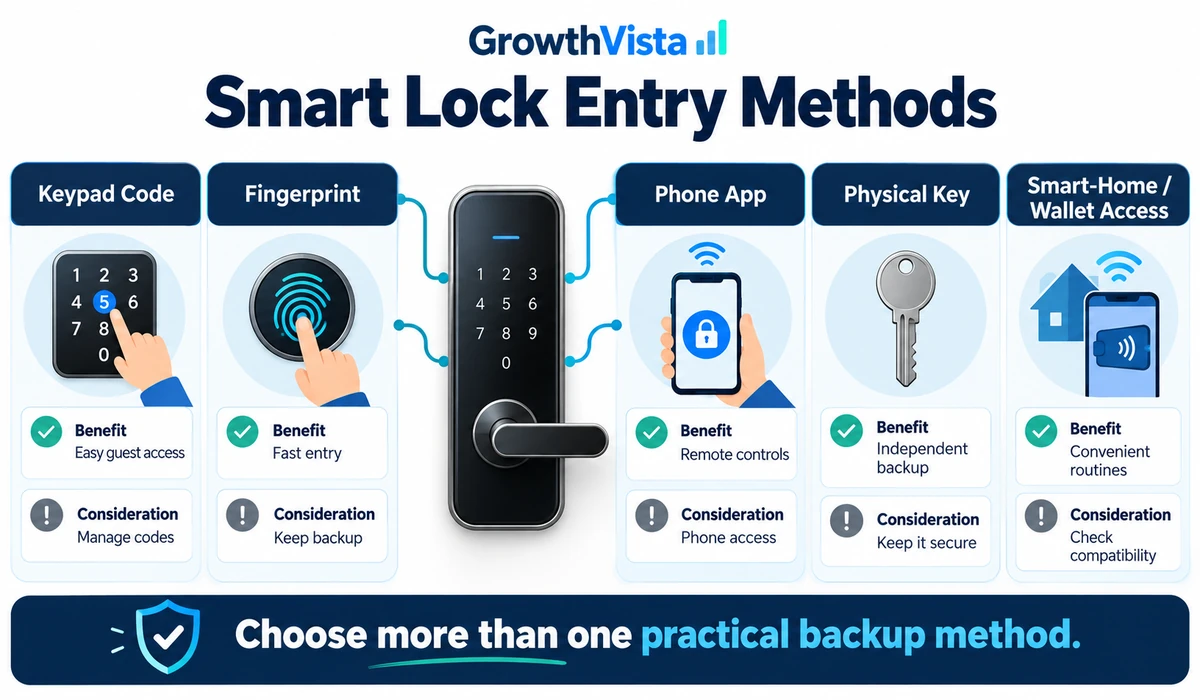
Keypads are convenient for families and guests. Fingerprints can be fast, while phone-based entry reduces the need to carry a key. A physical or alternative backup method is valuable.
3. Remote Access
Some locks include Wi-Fi; others use a bridge, hub or compatible smart-home controller. Check what is required to lock, unlock or manage codes when away from home.
4. Matter and Thread
Matter can broaden smart-home compatibility, while Thread can provide low-power mesh networking. Support does not mean every advanced lock feature is exposed in every platform.
5. Temporary and Guest Codes
Time-limited or scheduled codes are useful for cleaners, family members or short-term access. Review how easily codes can be created and revoked.
6. Auto-Lock and Door Sensing
Auto-lock can reduce the chance of leaving a door unlocked, while a door sensor can help distinguish between a locked door and an open door. Exact capabilities vary.
7. Battery Management
Check battery type, low-battery warnings and emergency-power options. Smart features depend on reliable power, so do not ignore battery alerts.
8. Physical Key Backup
Some buyers prefer a traditional key cylinder as a fallback; others prefer a key-free exterior. Decide which failure mode you are more comfortable managing.
9. Smart-Home Ecosystem
Alexa, Google Home, Apple Home, Samsung SmartThings and manufacturer ecosystems can offer different functions. Verify the exact integrations you need.
10. Security and Account Controls
Use strong unique passwords, enable multi-factor authentication where supported and keep lock/hub firmware updated. Digital security complements rather than replaces the lock’s physical security.
Keypad vs Fingerprint vs Phone: Which Smart Lock Entry Method Is Best?
| Entry Method | Advantages | Considerations |
|---|---|---|
| Keypad | Easy for family and guests; no phone needed | Codes should be unique and changed when access ends |
| Fingerprint | Fast and convenient | Recognition can vary; backup access still needed |
| Phone / App | Remote management and activity features | Depends on battery, connectivity and account access |
| Physical Key | Familiar independent backup | Key can be lost or copied |
| Smart-home / wallet feature | Convenient in supported ecosystems | Compatibility varies by platform and device |
Matter Smart Locks: What It Changes
Matter is designed to make supported smart-home devices interoperable across compatible platforms. For smart locks, that can simplify basic integration with more than one ecosystem.
Matter does not make every lock identical. Fingerprint management, access logs, advanced guest-code controls or firmware settings may still live in the manufacturer’s app. Thread-based locks also require appropriate Thread infrastructure, such as a compatible border router.
When buying for Matter, verify the exact lock version, the Matter controller you plan to use and whether a Thread border router is required.
Can a Smart Lock Make Your Home More Secure?
A smart lock can improve access management by reducing spare-key sharing, enabling temporary codes and providing status or activity information on supported models. Those are convenience and management benefits.
It does not make the entire door resistant to every form of forced entry. Door construction, strike plate, frame, hinges, windows and installation quality all contribute to physical security.
Choose a lock with appropriate certification for your market where relevant, install it correctly and treat digital account security as part of the overall system.
How Do You Install a Smart Lock?
-
- Confirm the door closes and the existing deadbolt moves freely before adding a motorized lock.
- Measure the door and deadbolt against the manufacturer’s compatibility guide.
- Check whether the lock is designed for your door orientation and regional lock standard.
- Install fresh recommended batteries and configure low-battery notifications.
- Create separate access codes for household members instead of sharing one code where supported.
- Test every backup entry method before relying on the smart lock.
- Confirm remote access and automations while you are still at home.
- Keep a practical backup plan for a dead phone, network outage or depleted lock battery.
Frequently Asked Questions
Are smart locks safe?
A reputable, correctly installed smart lock can provide convenient access management, but security depends on both physical hardware and digital account practices. No lock guarantees protection against forced entry.
What is the best smart lock for renters?
A retrofit smart lock can be a good option for renters because it may install on the interior side of an existing deadbolt while leaving the exterior hardware unchanged. The August Wi-Fi Smart Lock and SwitchBot Lock Pro are examples of retrofit-style options in this guide. However, renters should check their lease and obtain any required permission before modifying or replacing a lock.
Do smart locks work without Wi-Fi?
Many can still operate locally through keypad, fingerprint, Bluetooth or a physical key, depending on the model. Remote access may require Wi-Fi, a hub or another internet-connected controller.
What is the best smart lock with a fingerprint reader?
A fingerprint smart lock is useful for households that want quick keyless entry without relying on a phone or memorized code. The Aqara Smart Lock U100, Ultraloq U-Bolt Pro WiFi and Lockly Visage are examples in this guide with biometric access. Compare fingerprint reliability, backup entry methods, battery management and smart-home compatibility before choosing.
What happens if a smart lock battery dies?
The response varies. Some retain a physical key, while others provide external emergency power or another backup method. Check the exact model and replace batteries when warned.
Can I install a smart lock myself?
Many residential models are designed for DIY installation on compatible doors. If the door or deadbolt does not align correctly, or the installation requires unfamiliar work, professional installation can be appropriate.
Is a fingerprint smart lock better than a keypad?
Neither is universally better. Fingerprints are fast, while keypads make guest access easy. Locks offering several methods can be more flexible for families.
Do I need Matter in a smart lock?
No. Matter is useful if cross-platform smart-home integration is a priority, but a non-Matter lock can still be an excellent choice when it fits your preferred ecosystem.
Can landlords or renters use smart locks?
It depends on the lease, building rules and local requirements. Retrofit locks can preserve exterior hardware, but renters should obtain any required permission before modifying a door.
Final Thoughts
The best smart locks make everyday access easier without creating a complicated new routine.
A full-replacement keypad or biometric deadbolt makes sense when you want a complete keyless upgrade. Retrofit models are attractive when you prefer to keep the existing exterior lock or minimize visible changes.
Matter and Thread are useful developments for smart-home interoperability, but compatibility should still be checked at the exact model level. A familiar ecosystem can be more valuable than a feature you never use.
Before buying, measure the door, decide which backup entry method you want and identify how remote access will work. Good installation, battery maintenance and account security are just as important as the smart features.