Best Wi-Fi 7 Routers for Home & Office in 2026
Wi-Fi 7 is moving from an early-adopter technology into a realistic upgrade option for homes and offices with newer laptops, phones and high-speed internet connections.
The best Wi-Fi 7 routers are designed to handle more wireless traffic, newer frequency bands and faster local-network connections than older generations. Features associated with Wi-Fi 7 can include 320 MHz channels, Multi-Link Operation and improved use of available spectrum, although the benefit you see depends heavily on compatible client devices and local conditions.
A Wi-Fi 7 router will not automatically make a slow broadband plan faster. It also cannot eliminate dead zones created by distance, thick walls or poor router placement. The upgrade makes the most sense when your local network, devices or internet connection can actually take advantage of the newer hardware.
This guide compares 10 Wi-Fi 7 router families worth considering in 2026 and explains the features that matter before you buy.
Quick Comparison: Best Wi-Fi 7 Routers
| Wi-Fi 7 Router | Best For | Class | Wired Networking | Key Advantage | CTA |
|---|---|---|---|---|---|
| ASUS RT-BE96U | Overall premium | Tri-band Wi-Fi 7 | Multi-gig | Strong enthusiast feature set | Check Price → |
| TP-Link Archer BE800 | High-speed home | Tri-band Wi-Fi 7 | Multi-gig | Fast wired + wireless platform | Check Price → |
| TP-Link Archer BE550 | Value Wi-Fi 7 | Tri-band Wi-Fi 7 | Multi-gig | More accessible upgrade | Check Price → |
| NETGEAR Nighthawk RS700S | Premium home | Tri-band Wi-Fi 7 | Multi-gig | High-end performance focus | Check Price → |
| ASUS ROG Rapture GT-BE98 Pro | Gaming | Quad-band Wi-Fi 7 | Multi-gig | Gaming-oriented controls | Check Price → |
| TP-Link Archer GE800 | Gaming | Tri-band Wi-Fi 7 | Multi-gig | Gaming-focused networking | Check Price → |
| Amazon eero Max 7 | Simple premium networking | Wi-Fi 7 mesh-capable | Multi-gig | Easy ecosystem expansion | Check Price → |
| NETGEAR Nighthawk RS300 | Mainstream Wi-Fi 7 | Tri-band Wi-Fi 7 | Multi-gig | Balanced newer-generation option | Check Price → |
| ASUS TUF Gaming BE3600 | Budget / gaming | Dual-band Wi-Fi 7 | Multi-gig class | Lower-cost entry point | Check Price → |
| TP-Link Archer BE230 | Budget Wi-Fi 7 | Dual-band Wi-Fi 7 | Multi-gig class | Affordable Wi-Fi 7 access | Check Price → |
Note: Exact radio configuration, channel support, Ethernet port speeds, firmware features and regional availability vary by model. Verify the current manufacturer’s specification before publishing.
ASUS RT-BE96U — Best Overall Premium Wi-Fi 7 Router
The ASUS RT-BE96U is aimed at enthusiasts and demanding home-office users who want a feature-rich standalone router rather than a simplified plug-and-play system.
A premium Wi-Fi 7 router makes the most sense when the network includes newer client devices, fast wired equipment or a high-speed internet service. Multi-gig Ethernet can also matter when transferring large files to a NAS or workstation inside the home.
The large hardware footprint and premium pricing can be unnecessary for a modest apartment with a basic broadband plan.
Best for: Power users, fast home offices and enthusiasts who want extensive router controls.
TP-Link Archer BE800 — Best for High-Speed Home Networking
The Archer BE800 targets users building a faster home network around Wi-Fi 7 and multi-gig wired connections.
This type of router can be useful when several high-bandwidth devices operate at the same time or when the household moves large files locally in addition to using the internet.
Peak wireless specifications should not be interpreted as the speed one device will always receive. Distance, interference, client capability and protocol overhead all affect real-world results.
Best for: High-speed households with modern devices and multi-gig networking needs.
TP-Link Archer BE550 — Best Value Wi-Fi 7 Router
Not every Wi-Fi 7 upgrade needs to start with a flagship router. The Archer BE550 represents a more value-oriented path into the newer wireless generation.
It can make sense for users who want modern Wi-Fi features and multi-gig connectivity without paying for the most extreme radio configuration.
Value still depends on the equipment you already own. If almost every device in the home is Wi-Fi 5 or Wi-Fi 6 and the current router performs well, an immediate upgrade may offer limited practical improvement.
Best for: Users seeking a balanced Wi-Fi 7 upgrade without flagship pricing.
NETGEAR Nighthawk RS700S — Best Premium Nighthawk Option
The Nighthawk RS700S is positioned as a high-end standalone Wi-Fi 7 router for users who want strong performance and modern multi-gig networking in a premium package.
It is most relevant to larger or busier households with compatible devices, fast broadband and demanding local-network workloads.
Premium networking hardware can be expensive, so buyers should compare the cost with a mesh system if the real problem is coverage rather than peak router capability.
Best for: Premium home networks where a powerful central router can cover the intended space.
ASUS ROG Rapture GT-BE98 Pro — Best Premium Wi-Fi 7 Gaming Router
Gaming routers add traffic controls, gaming-oriented interfaces and hardware designed for users who want more visibility into network behavior.
The ROG Rapture GT-BE98 Pro sits at the enthusiast end of that market. It can appeal to households combining gaming PCs, consoles, streaming and other heavy network activity.
A router cannot remove latency that exists beyond your home network, and Wi-Fi is not automatically better than a wired Ethernet connection for a stationary gaming PC.
Best for: Enthusiast gamers who want extensive networking controls and high-end hardware.
TP-Link Archer GE800 — Best Alternative Gaming Router
The Archer GE800 is another gaming-focused Wi-Fi 7 option, combining newer wireless technology with features aimed at gaming-heavy households.
For a gaming setup, look beyond the styling. Multi-gig Ethernet, traffic management, port layout and firmware controls are more meaningful than decorative design.
If the gaming computer is close enough to the router, wired Ethernet remains worth considering for a consistent connection.
Best for: Gaming households wanting Wi-Fi 7 plus gaming-focused network management.
Amazon eero Max 7 — Best for Simple Wi-Fi 7 Expansion
The eero Max 7 takes a different approach from enthusiast routers covered in menus and advanced controls. Its appeal is a streamlined networking experience and the ability to build out coverage with compatible eero units.
That can be useful for users who value easy management more than manually tuning every wireless parameter.
Some advanced features or services in networking ecosystems may require subscriptions, so check the current feature model before buying.
Best for: Users who prioritize straightforward setup and future mesh expansion.
NETGEAR Nighthawk RS300 — Best Balanced Mainstream Option
The Nighthawk RS300 provides a route into Wi-Fi 7 without necessarily moving to the highest tier of the Nighthawk lineup.
A balanced router is often a better purchase than a flagship if the home has a moderate number of devices and does not need extreme wired or wireless capacity.
Check the exact port configuration and wireless bands against your requirements rather than assuming every Wi-Fi 7 router includes the same hardware.
Best for: Mainstream homes upgrading to newer Wi-Fi devices and faster broadband.
ASUS TUF Gaming BE3600 — Best Budget Gaming-Oriented Wi-Fi 7 Router
Lower-cost Wi-Fi 7 routers make the standard accessible to users who do not need the multiple high-end radios found in premium models.
The ASUS TUF Gaming BE3600 is relevant to budget-conscious users who still want gaming-oriented software and newer-generation wireless support.
Entry-level Wi-Fi 7 hardware may omit some capabilities found on premium tri-band or quad-band routers, so compare the actual bands, channels and ports rather than relying on the Wi-Fi 7 name alone.
Best for: Budget gaming and smaller networks where flagship hardware would be excessive.
TP-Link Archer BE230 — Best Budget Wi-Fi 7 Entry Point
The Archer BE230 represents the practical end of Wi-Fi 7 adoption: a router for users who want newer wireless support without paying premium-router prices.
It can be a sensible choice for smaller homes and straightforward networks where coverage is already manageable from one central router.
Budget models naturally involve compromises. Confirm whether the supported bands, channel widths, wired ports and software features match what you actually need.
Best for: Smaller homes and users looking for an affordable transition to Wi-Fi 7.
What Is Wi-Fi 7?
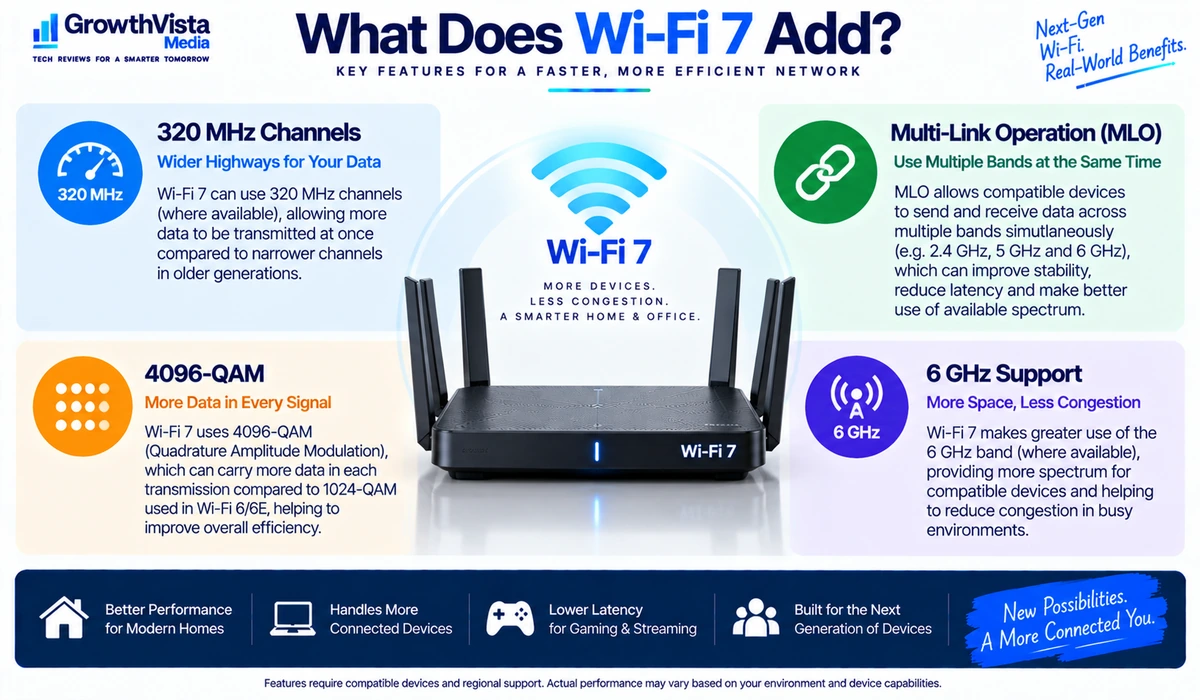
Wi-Fi 7 is the consumer name associated with IEEE 802.11be. It builds on previous Wi-Fi generations with technologies intended to increase capacity, throughput and flexibility in compatible environments.
- 320 MHz channels can provide wider channels where the band, region and hardware support them.
- Multi-Link Operation (MLO) is designed to let compatible devices make use of multiple wireless links in ways previous generations did not.
- 4096-QAM can carry more data per transmission under sufficiently strong signal conditions.
- Wi-Fi 7 continues to use modern spectrum options including the 6 GHz band on compatible tri-band and quad-band equipment, subject to regional regulations.
These capabilities do not guarantee a specific speed. Both the router and client device need compatible hardware, and local radio conditions remain important.
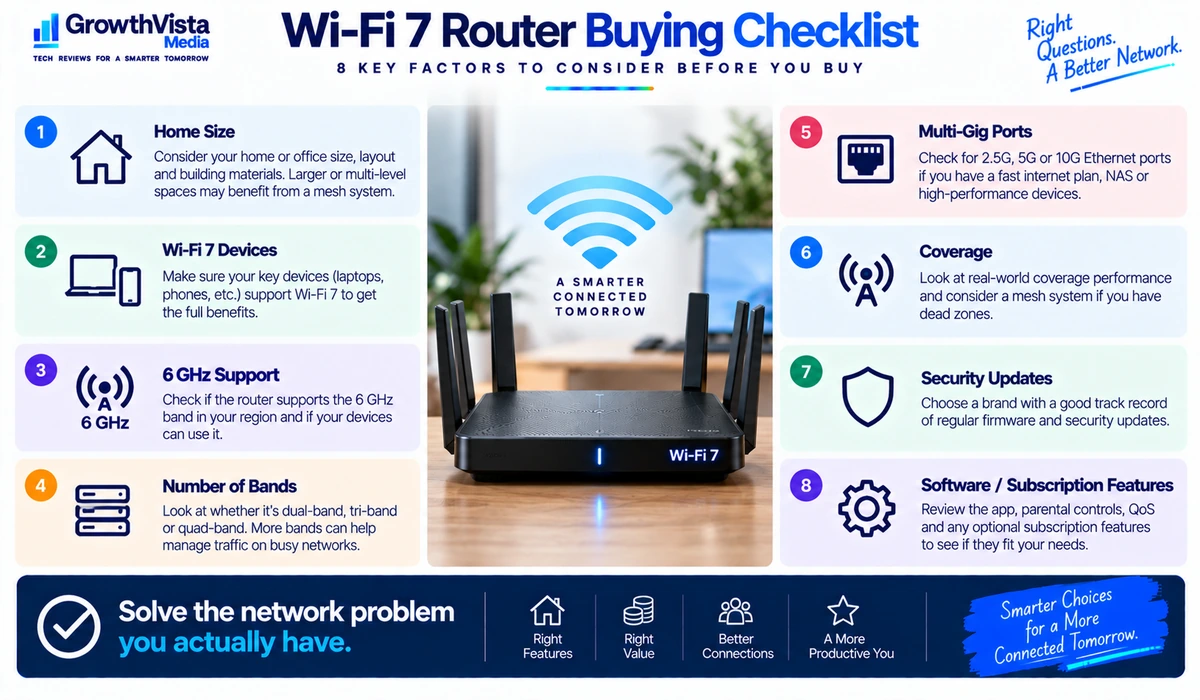
What to Look for When Buying a Wi-Fi 7 Router
1. Dual-Band vs Tri-Band vs Quad-Band
A dual-band router can be sufficient for smaller networks, while tri-band and quad-band designs provide additional radio capacity and may include 6 GHz operation. More bands are useful only when your devices and environment can benefit from them.
2. 6 GHz Support
The 6 GHz band can provide access to cleaner spectrum in supported regions and devices, but its higher-frequency signals generally have more difficulty penetrating obstacles than lower-frequency Wi-Fi bands. Coverage planning still matters.
3. Multi-Gig Ethernet
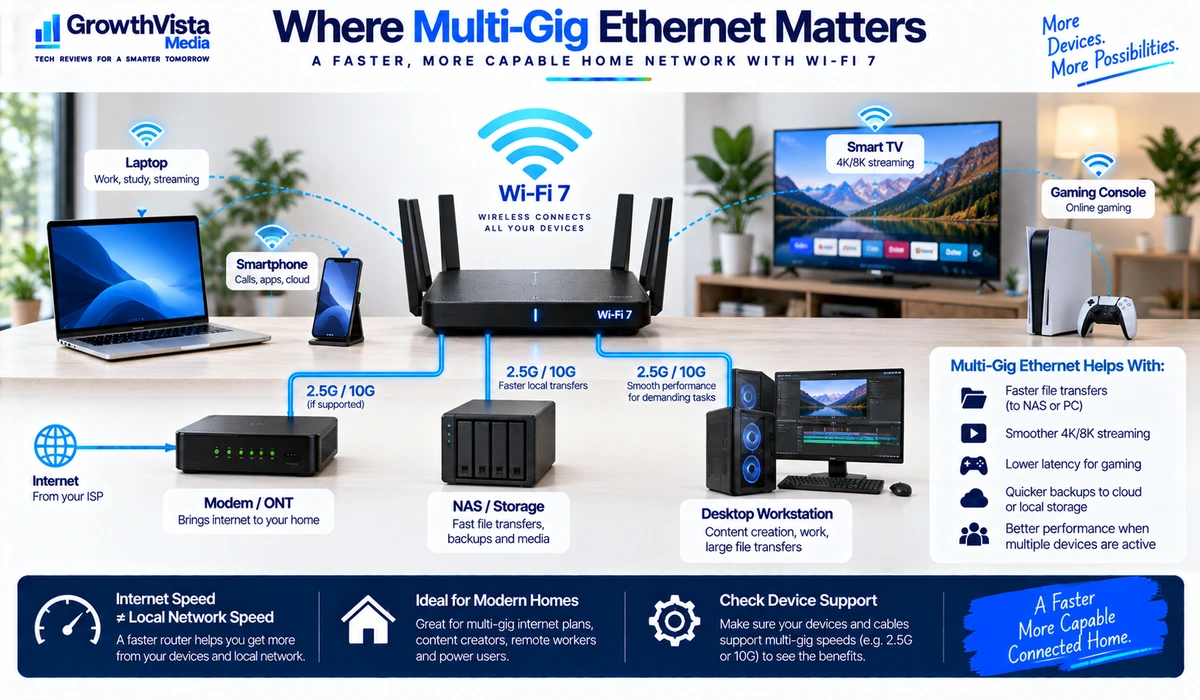
If your internet plan exceeds 1Gbps or you transfer files to fast local devices such as a NAS, 2.5GbE, 5GbE or 10GbE ports can become important. Check both WAN and LAN port capabilities.
4. Multi-Link Operation
MLO is one of Wi-Fi 7’s notable features, but benefits depend on client support, firmware and implementation. Do not assume every older device gains MLO simply because it connects to a Wi-Fi 7 router.
5. Coverage
A powerful router cannot overcome every building layout. Large homes, multiple floors, reinforced walls and distant rooms may be better served by a mesh system or carefully placed access points.
6. Security
Look for current wireless security support, regular firmware updates and a manufacturer with an ongoing update policy. Change default administrative credentials and keep firmware current.
7. Software and Parental Controls
Router apps can simplify setup, guest networking and device management. Some advanced security or parental-control functions may be subscription-based, so check what is included.
8. Number of Devices
The number and type of active devices matter more than the total number of gadgets listed in an app. Video streaming, cloud backup, gaming and large local transfers create different network demands than idle smart-home devices.
Wi-Fi 7 vs Wi-Fi 6E vs Wi-Fi 6
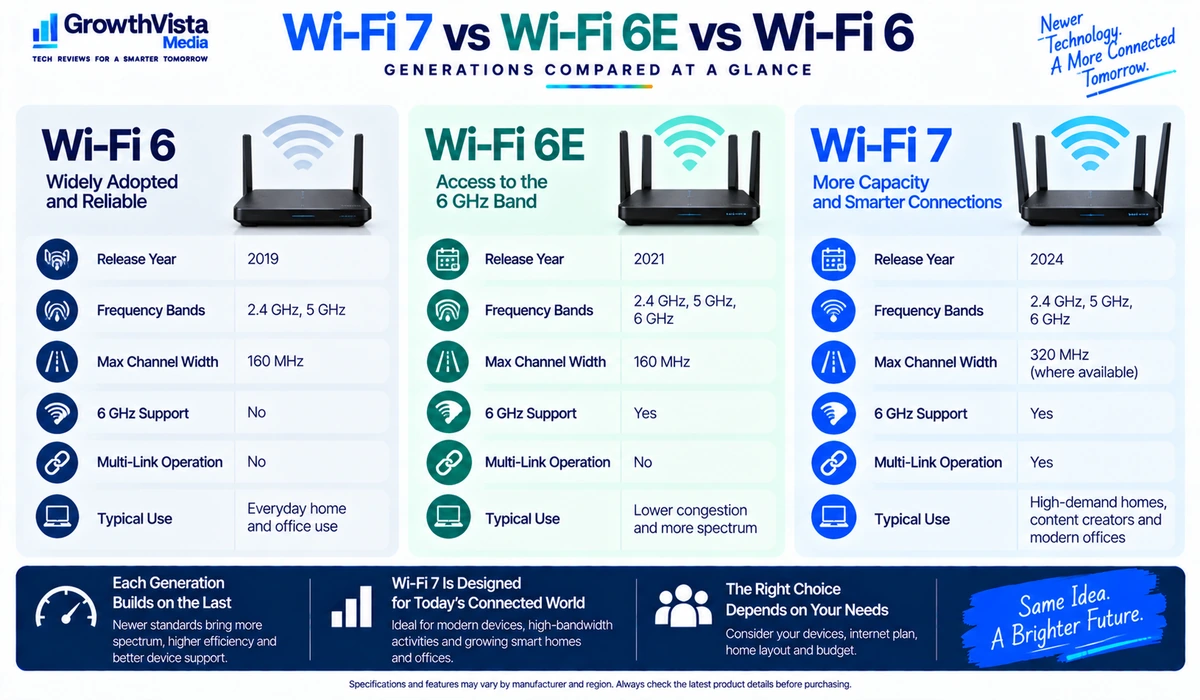
| Feature | Wi-Fi 6 | Wi-Fi 6E | Wi-Fi 7 |
|---|---|---|---|
| Generation | 802.11ax | 802.11ax extended to 6 GHz | 802.11be |
| 6 GHz support | No | Yes on compatible hardware | Yes on compatible hardware |
| Maximum channel width | Up to 160 MHz | Up to 160 MHz | Up to 320 MHz where supported |
| Multi-Link Operation | No | No | Yes on compatible devices |
| Best reason to choose | Mature and affordable | 6 GHz without needing Wi-Fi 7 | Newer high-capacity / high-speed ecosystem |
Do You Actually Need Wi-Fi 7 in 2026?
Wi-Fi 7 is most compelling when you are already replacing a router, buying new compatible devices, moving to multi-gig internet or building a fast local network.
If your current Wi-Fi 6 or Wi-Fi 6E router provides reliable coverage and your devices rarely saturate it, upgrading only for the Wi-Fi 7 label may not noticeably improve everyday browsing or streaming.
The decision should start with the problem you are trying to solve: speed, local transfers, device capacity, coverage, latency or aging hardware.
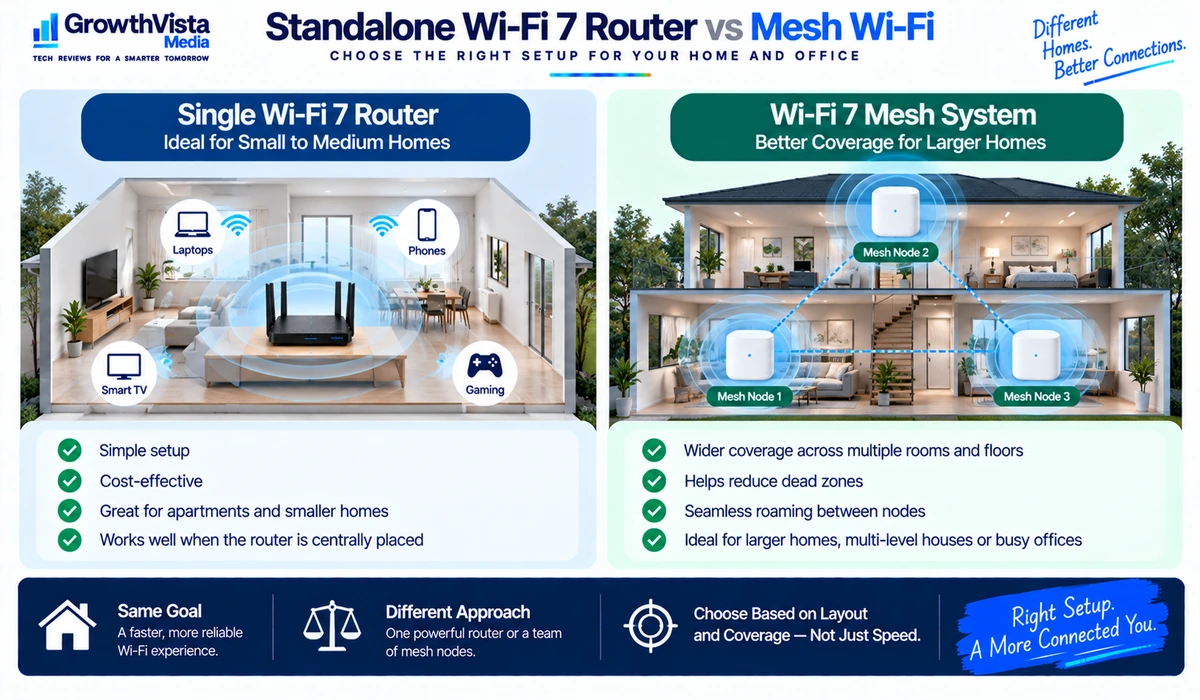
Standalone Router vs Mesh Wi-Fi
| Factor | Standalone Router | Mesh Wi-Fi System |
|---|---|---|
| Best fit | Small to medium spaces with central placement | Larger or difficult multi-room layouts |
| Hardware | One primary router | Multiple coordinated nodes |
| Setup cost | Often lower | Usually higher |
| Coverage expansion | May require extenders/access points | Designed for additional nodes |
| Advanced controls | Often strong on enthusiast models | Varies by ecosystem |
| Main advantage | Performance and control from one device | Broader distributed coverage |
How to Get Better Performance From a Wi-Fi Router
- Place the router in a reasonably central, open location rather than inside a cabinet or behind large objects.
- Keep firmware current and review manufacturer security updates.
- Use wired Ethernet for stationary devices when reliability and consistent latency are priorities.
- Confirm that high-speed client devices are connecting to the intended wireless band.
- Use appropriate channel settings and automatic optimization features where they work well in your environment.
- Do not assume a faster internet plan fixes weak in-home coverage; coverage and internet bandwidth are separate issues.
- For large or difficult layouts, consider mesh Wi-Fi or wired access points rather than trying to solve every dead zone with a single router.
Frequently Asked Questions
Is Wi-Fi 7 worth upgrading to in 2026?
It can be when you have compatible devices, fast internet or local-network workloads and are already due for a router upgrade. A well-functioning Wi-Fi 6 or 6E network may not need immediate replacement.
Will a Wi-Fi 7 router work with older devices?
Wi-Fi standards are generally designed with backward compatibility, but older devices connect using the capabilities they support rather than gaining Wi-Fi 7 features.
Do I need a Wi-Fi 7 device to use a Wi-Fi 7 router?
No, older compatible Wi-Fi devices can connect, but Wi-Fi 7-specific capabilities require compatible client hardware.
Does Wi-Fi 7 make my internet faster?
It can reduce a local wireless bottleneck, but it cannot make your internet service exceed the speed provided by your ISP.
Is 6 GHz better than 5 GHz?
It can offer cleaner spectrum and high performance under suitable conditions, but range and wall penetration can be less favorable. The best band depends on distance, interference and device support.
What is Multi-Link Operation?
MLO is a Wi-Fi 7 capability designed to allow compatible devices to use multiple links in new ways. Actual behavior and benefit depend on the router, client and implementation.
Should I buy a Wi-Fi 7 router or a mesh system?
Choose based primarily on coverage. A strong standalone router can work well in a smaller or centrally served space; a mesh system is often better suited to larger or difficult layouts.
Final Thoughts
The best Wi-Fi 7 routers are not automatically the models with the largest theoretical speed number.
For many homes, a balanced tri-band router with appropriate multi-gig Ethernet and reliable software will be more useful than an extreme flagship. Gamers and enthusiasts may value advanced controls, while smaller households can save money with a simpler Wi-Fi 7 model.
Coverage remains just as important as speed. If the current problem is dead zones across a large property, a mesh system may be a more appropriate investment than a more powerful standalone router.
Before buying, check your client devices, internet plan, wired-network requirements, home layout and the router’s exact bands and ports. That will tell you far more than the Wi-Fi 7 logo alone.