Best Wireless Mice for Work & Productivity in 2026
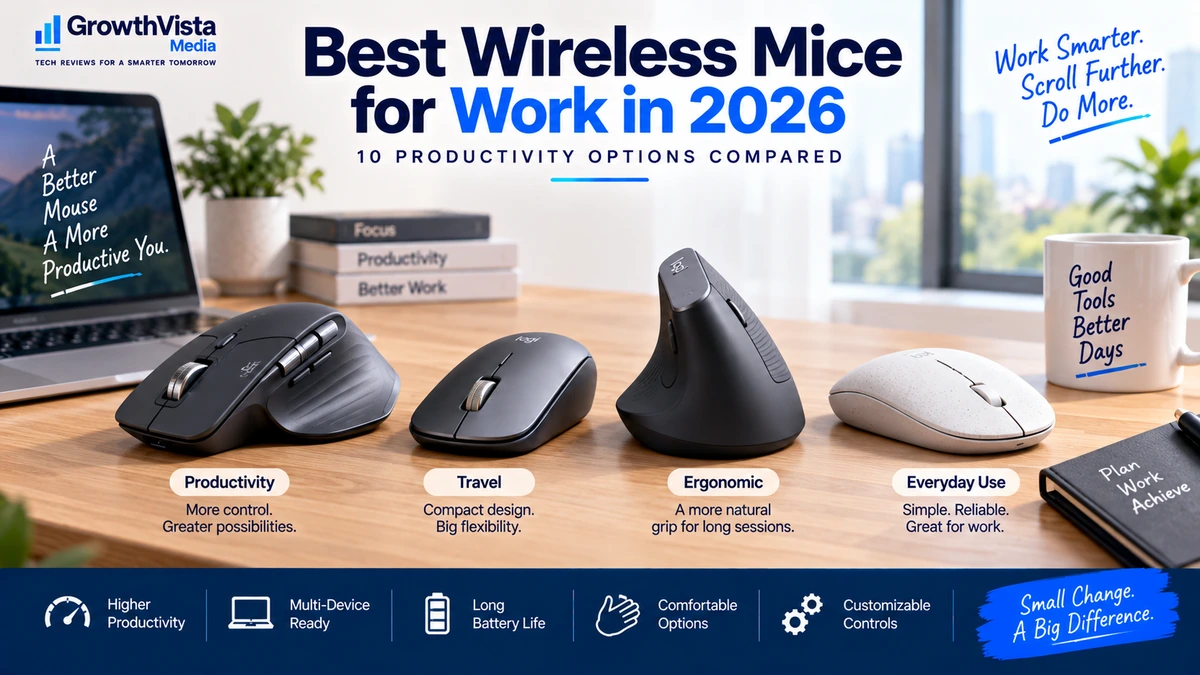
A mouse is one of the most frequently used tools on a work desk, yet it is easy to choose one based only on price or appearance. For anyone spending hours each day navigating spreadsheets, documents, browsers, dashboards or creative software, comfort and control can matter far more.
The best wireless mice for work combine reliable connectivity with a shape that suits your hand, useful scrolling, sensible button placement and enough battery life to avoid constant charging.
Some productivity mice focus on multi-device switching and customizable controls. Others prioritize portability, quiet clicks or ergonomic positioning. There is no single design that is ideal for every user.
This guide compares 10 wireless mice worth considering for work and productivity in 2026 and explains the features that matter before you buy.
Quick Comparison: Best Wireless Mice for Work
| Wireless Mouse | Best For | Connection | Design | Key Advantage | CTA |
|---|---|---|---|---|---|
| Logitech MX Master 3S | Overall productivity | Bluetooth / receiver | Right-handed ergonomic | Advanced scrolling & controls | Check Price → |
| Logitech MX Anywhere 3S | Travel | Bluetooth / receiver | Compact | Portable productivity | Check Price → |
| Logitech Lift | Ergonomic work | Bluetooth / receiver | Vertical | More upright hand position | Check Price → |
| Logitech Signature M650 | Everyday office | Bluetooth / receiver | Traditional | Simple comfortable workflow | Check Price → |
| Razer Pro Click Mini | Portable power users | Bluetooth / wireless | Compact | Travel + productivity controls | Check Price → |
| Keychron M6 | Productivity value | Multi-mode wireless | Ergonomic | Feature-rich scrolling | Check Price → |
| Microsoft Surface Precision Mouse | Windows productivity | Bluetooth / wired | Traditional ergonomic | Multi-device workflow | Check Price → |
| Dell Premier Multi-Device Mouse | Business | Bluetooth / wireless | Office-focused | Multi-device switching | Check Price → |
| HP 935 Creator Wireless Mouse | Creators | Bluetooth / wireless | Productivity | Customizable controls | Check Price → |
| Logitech Pebble Mouse 2 M350s | Budget / portability | Bluetooth | Slim compact | Quiet portable design | Check Price → |
Note: Connection methods, operating-system support, button customization and bundled receivers can vary by region or revision. Verify current specifications before publication.
Logitech MX Master 3S — Best Overall Wireless Mouse for Productivity
The MX Master line is built around office productivity rather than gaming speed or ultra-light weight. Its sculpted shape, multiple controls and fast scrolling make it especially relevant to users who spend long periods moving through documents, spreadsheets, timelines and web pages.
A productivity mouse becomes more useful when its extra controls match your workflow. Side scrolling can help in wide spreadsheets or editing timelines, while programmable buttons can reduce repetitive keyboard-and-mouse movements.
The larger right-handed shape will not suit everyone, particularly users who prefer a small mouse or frequently work away from a desk.
Best for: Professionals, analysts, developers and power users with a permanent workstation.
Logitech MX Anywhere 3S — Best Wireless Mouse for Travel
The MX Anywhere 3S takes many productivity-oriented ideas and puts them into a smaller body that is easier to carry with a laptop.
A compact mouse is useful for business travel, coworking spaces and hybrid work because it takes little room in a bag and can be used on smaller temporary desks.
The trade-off is ergonomics. A smaller mouse can be less comfortable for some users during full-day sessions, especially if they have larger hands.
Best for: Frequent travelers and hybrid workers who still want premium productivity features.
Logitech Lift — Best Vertical Mouse for Office Work
A vertical mouse changes the hand position by rotating the grip into a more upright orientation. Some users find this style more comfortable than a conventional flat mouse, while others need time to adapt.
The Logitech Lift is aimed at office users who want a vertical design without moving into a very large device.
Ergonomic products are highly personal. A vertical mouse should not be treated as a guaranteed solution to discomfort, and persistent pain should not be diagnosed through a product choice.
Best for: Users who prefer a more upright hand position and want an office-focused vertical mouse.
Logitech Signature M650 — Best Everyday Office Mouse
Not every office worker needs a premium mouse covered in programmable controls. For many people, dependable tracking, comfortable scrolling and straightforward wireless connectivity are more important.
The Logitech Signature M650 fits that simpler role. It is the type of mouse to consider for general office work, shared workspaces and users who want an upgrade from a basic bundled mouse without paying for features they may never use.
Best for: Everyday office work, general browsing and straightforward productivity.
Razer Pro Click Mini — Best Compact Mouse for Power Users
Razer is strongly associated with gaming peripherals, but the Pro Click Mini is positioned toward productivity in a compact format.
It can make sense for a user who travels frequently but still wants more controls and flexibility than an ultra-basic portable mouse.
Compact productivity mice are a compromise: they are easier to carry, but the smaller body may be less comfortable for long sessions than a full-size ergonomic design.
Best for: Mobile professionals who want a feature-rich compact mouse.
Keychron M6 — Best Productivity Value
The Keychron M6 is interesting for users who want productivity-oriented features without automatically moving to the highest-priced office mice.
Its appeal is the combination of a larger ergonomic shape, multiple connectivity options and scrolling controls designed for more than basic cursor movement.
Software support and operating-system compatibility should be checked carefully if button remapping is important to your workflow.
Best for: Value-conscious productivity users who want more controls than a basic office mouse.
Microsoft Surface Precision Mouse — Best for Windows-Focused Workflows
The Surface Precision Mouse is designed around a professional desktop workflow and can be a natural fit for users already working primarily within Windows.
Multi-device capability can be valuable when a desk includes a work laptop, personal computer or secondary machine. Instead of keeping separate mice on the desk, one device can potentially handle multiple systems.
Before buying, check current software support for any advanced customization features on your operating system.
Best for: Windows-focused professionals and multi-computer desks.
Dell Premier Multi-Device Mouse — Best for Business Multi-Device Setups
Business users increasingly move between multiple computers, docking stations and shared office environments. A multi-device mouse can reduce friction by allowing one familiar input device to switch between systems.
Dell’s Premier multi-device range is designed for that kind of professional setup rather than gaming or creator-specific use.
It is most valuable when you will actually use the switching capability. For a single computer, a simpler mouse may offer better value.
Best for: Corporate desks and professionals who regularly use more than one computer.
HP 935 Creator Wireless Mouse — Best for Creative Productivity
Creative applications often benefit from shortcuts and customizable controls. Repeated commands in editing, design or media software can be mapped to mouse buttons when the supporting software allows it.
The HP 935 Creator Wireless Mouse targets users who want that kind of customizable productivity workflow.
Creators should consider the mouse as part of the whole workstation. Keyboard shortcuts, application-specific controls and comfortable long-session use matter more than simply maximizing the number of buttons.
Best for: Designers, editors and creative professionals who value customizable controls.
Logitech Pebble Mouse 2 M350s — Best Budget Travel Mouse
A slim portable mouse is useful when the alternative is relying on a laptop trackpad all day.
The Pebble Mouse 2 M350s focuses on portability, quiet operation and a simple design rather than advanced ergonomic shaping or extensive controls.
Its low-profile shape makes it easy to carry, but users who spend eight hours a day at a fixed desk may prefer a larger mouse that fills the hand more naturally.
Best for: Students, travelers, occasional office use and users who prioritize portability.
What to Look for When Buying a Wireless Mouse for Work
1. Shape and Hand Size
A mouse can have excellent specifications and still be uncomfortable if its shape does not suit your hand. Consider whether you prefer a compact, full-size, sculpted or vertical design.
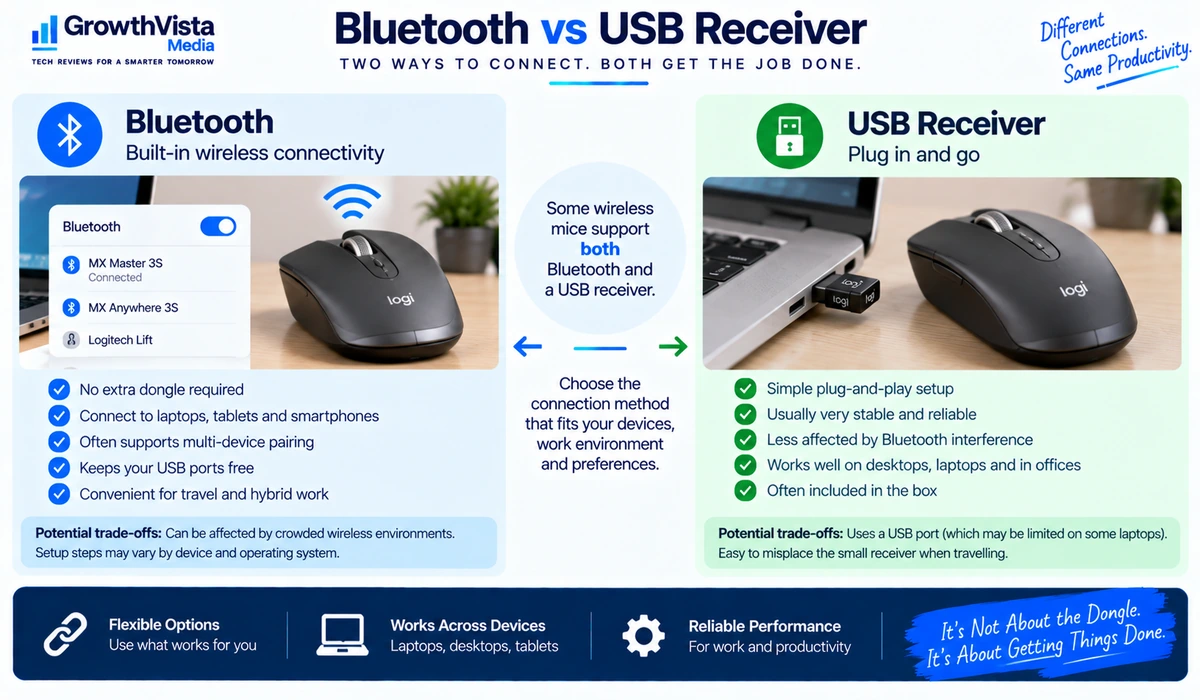
2. Bluetooth vs USB Receiver
Bluetooth avoids occupying a USB port and is convenient for modern laptops. A dedicated wireless receiver can offer simple pairing and dependable performance. Some mice support both, which is useful for multi-device work.
3. Multi-Device Switching
If you regularly use a laptop and desktop or switch between work and personal computers, a mouse that can pair with multiple devices can reduce desk clutter.
4. Scrolling
Standard scroll wheels are enough for basic work. Fast free-spinning or electromagnetic-style scrolling can be particularly useful for long documents, websites and spreadsheets. Horizontal scrolling can help with wide timelines and tables.
5. Programmable Buttons
Extra buttons can speed up repetitive actions such as back/forward navigation, copy/paste, application switching or software-specific commands. They are valuable only if you configure and use them.
6. Battery Type and Charging
Rechargeable mice reduce disposable battery use but need occasional charging. Replaceable-battery mice can run for long periods and are easy to revive immediately with a fresh battery. Neither approach is automatically better.
7. Quiet Clicks
Quiet switches can be useful in shared offices, libraries and late-night home workspaces. If click feel matters to you, remember that quieter buttons can feel different from conventional mechanical clicks.
8. Operating-System and Software Support
Basic pointing usually works across major operating systems, but advanced button customization, gestures or device switching may require companion software. Verify support for your computer before buying.

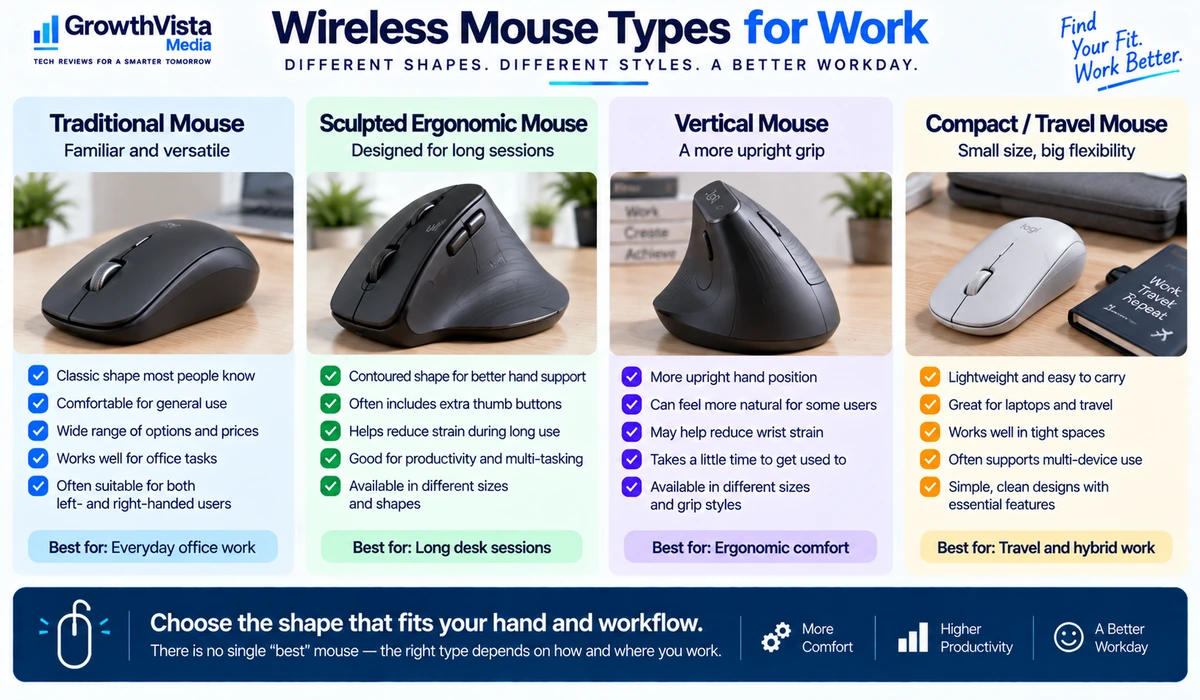
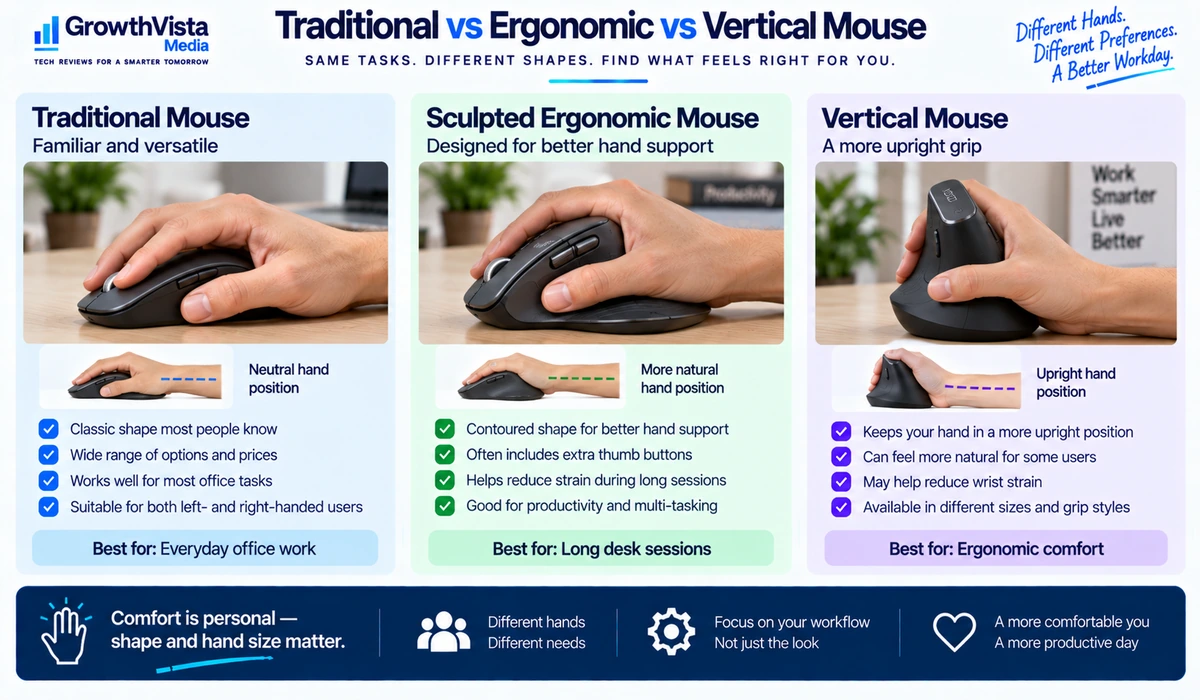
Ergonomic vs Traditional vs Vertical Mouse
| Design | Main Characteristic | Best Fit | Trade-Off |
|---|---|---|---|
| Traditional | Familiar flat/curved shape | Most users | Comfort varies by hand and grip |
| Sculpted ergonomic | Contoured for hand support | Long desk sessions | Usually larger and less portable |
| Vertical | More upright hand position | Users who prefer vertical grip | Adjustment period; not for everyone |
| Compact | Small and lightweight | Travel and mobile work | May be less comfortable for long sessions |
Wireless Mouse vs Trackpad for Productivity
A trackpad is excellent for portability and gestures, while a mouse generally provides more precise pointing and a wider choice of shapes and controls. Many laptop users benefit from using both rather than treating the choice as permanent.
For spreadsheets, design applications and long desktop sessions, a mouse can reduce the amount of repeated finger movement required on a small trackpad. For travel or casual browsing, the built-in trackpad may be all you need.
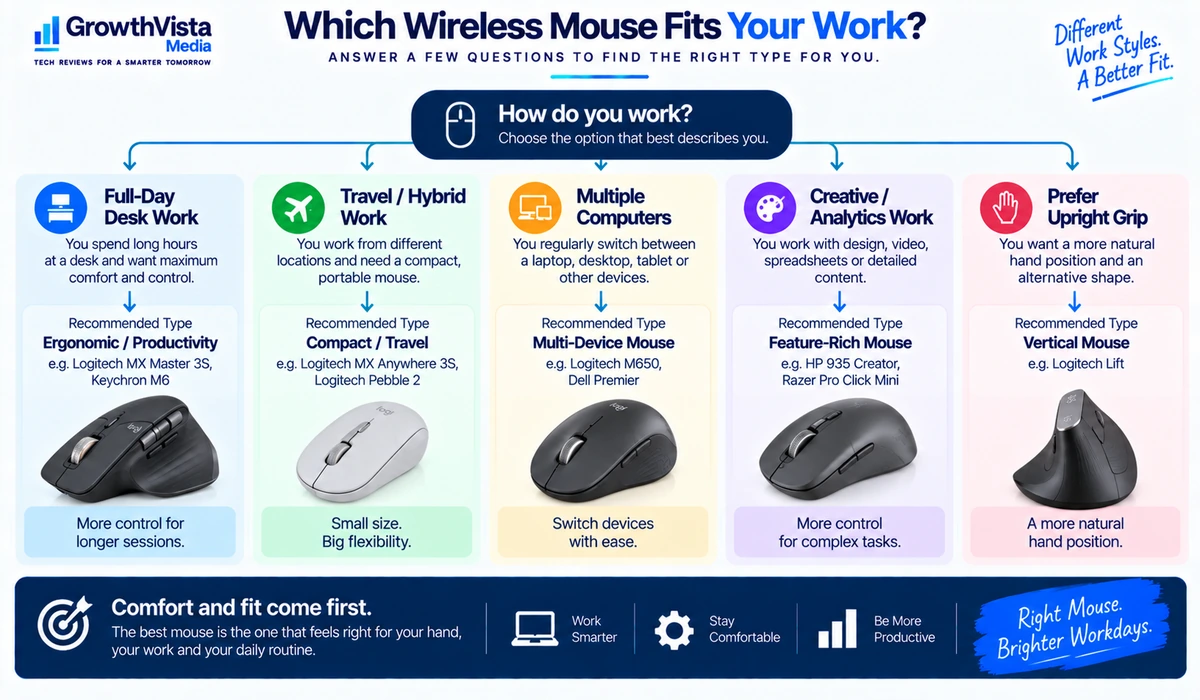
How to Choose a Mouse for Your Work Style
- Spreadsheet and analytics work: prioritize comfortable scrolling, horizontal navigation and programmable shortcuts.
- Writing and general office work: prioritize comfort, quiet clicks and reliable connectivity.
- Travel and hybrid work: prioritize compact size, Bluetooth and multi-device pairing.
- Creative work: look for customizable controls and comfortable precision over long sessions.
- Multi-computer desks: prioritize quick device switching and compatibility with each operating system.
- Users interested in a vertical mouse: choose based on fit and comfort rather than assuming a different shape will automatically solve discomfort.
Frequently Asked Questions
What is the best wireless mouse for office work?
The best choice depends on hand size and workflow. A full-size productivity mouse suits long desk sessions, while a compact model is more practical for travel.
Is Bluetooth or a USB receiver better for a work mouse?
Bluetooth saves a USB port and is convenient for laptops. A dedicated receiver can provide straightforward connectivity. A mouse supporting both offers the most flexibility.
Are vertical mice better for ergonomics?
Some users prefer the more upright grip, but comfort is individual. A vertical mouse is not automatically better for everyone and should not be treated as a medical solution.
Do I need a mouse with programmable buttons?
Not necessarily. They are useful for repetitive workflows, but a simpler mouse may be better if you rarely customize shortcuts.
Is a rechargeable mouse better than one with replaceable batteries?
Both can work well. Rechargeable models are convenient if you charge regularly, while replaceable-battery mice can offer very long runtime and instant battery replacement.
Can one wireless mouse work with multiple computers?
Many productivity mice support pairing with two or three devices, but switching methods and software features vary by model.
Is a gaming mouse good for office work?
It can be, but gaming mice often prioritize low weight, high polling rates and gaming controls. A productivity mouse may offer more useful scrolling, multi-device features and office-focused ergonomics.
Final Thoughts
The best wireless mice for work are the models that disappear into your workflow: comfortable enough for long sessions, reliable enough that you do not think about connectivity, and equipped with controls you actually use.
For a permanent desk, a full-size productivity mouse is usually the strongest choice. Travelers may prefer a compact model, while multi-device users should prioritize easy switching between computers.
Vertical and ergonomic designs can be worth exploring when you prefer a different hand position, but fit remains personal. No specification can replace trying to understand which size and shape suit your hand and work style.
Start with comfort and connectivity, then consider scrolling, buttons, battery design and software. That approach will usually produce a better purchase than choosing on brand or feature count alone.