Best Dash Cams for Cars in 2026: 10 Models Compared
What are the best dash cams?
A dash cam is primarily an evidence camera. It records the road while you drive and can preserve useful context after a collision, disputed incident or unexpected event.
The best dash cam depends on your priorities, such as video quality, front-and-rear coverage, parking surveillance, compact design or connected features. The VIOFO A329S 2CH is a strong premium overall option, while the VIOFO A229 Pro 2CH offers a balanced front-and-rear setup. The Garmin Dash Cam X310 suits drivers who want a compact 4K front camera, the Vantrue N4 Pro is useful for three-channel rideshare coverage, and the Thinkware U3000 2CH is worth considering for parking surveillance. Before buying, check the camera’s resolution, night performance, field of view, storage requirements, parking-mode power setup and compatibility with your vehicle.
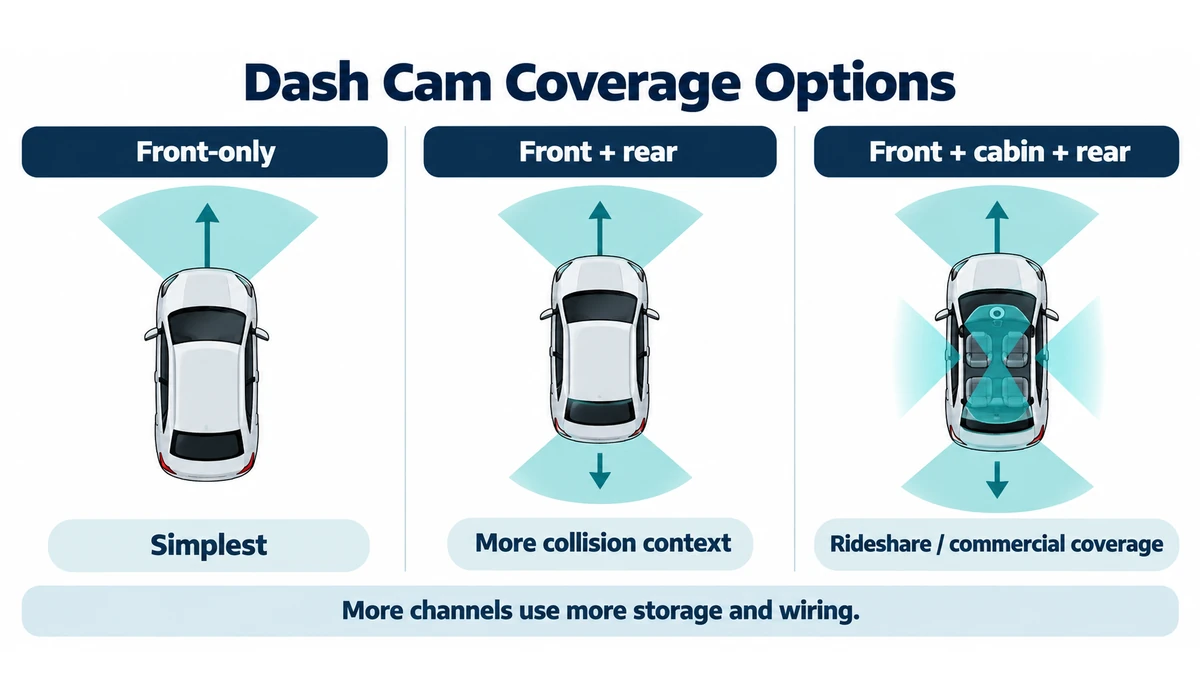
Front-only cameras are simple and discreet. Dual-channel systems add rear coverage, while three-channel models can also record the cabin for rideshare, taxi or commercial use. Parking recording introduces another decision because the camera normally needs a compatible constant-power or hardwire setup.
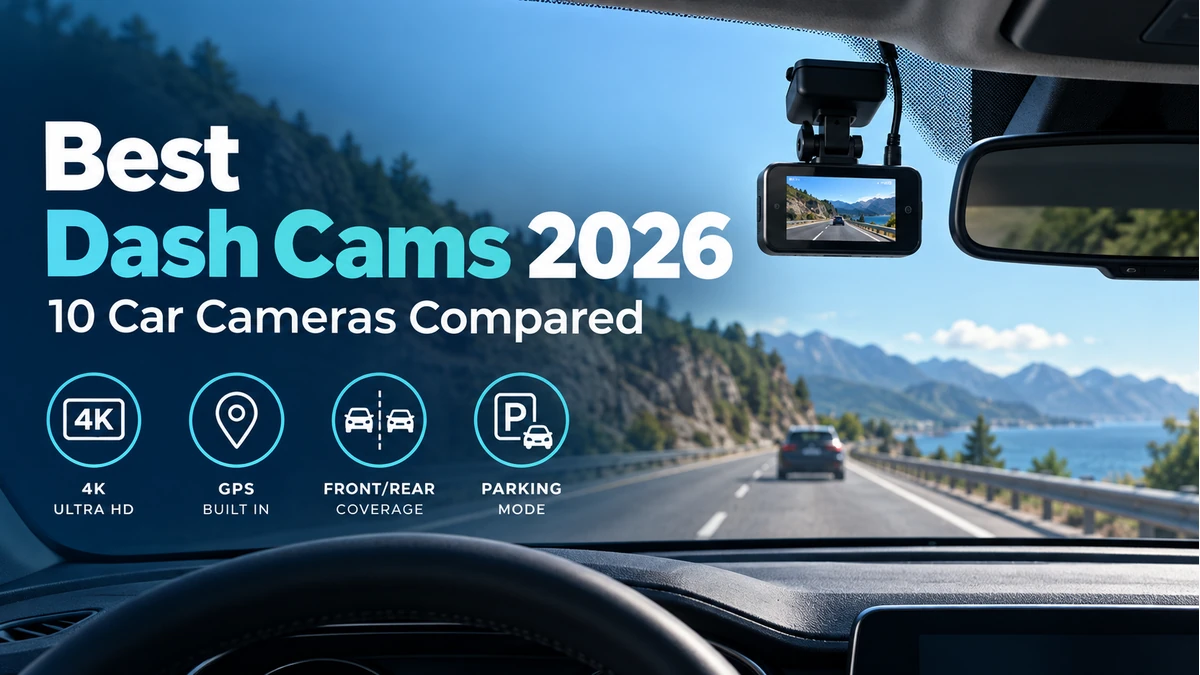
This guide compares 10 dash cams worth considering in 2026 and explains resolution, front-and-rear systems, parking mode, GPS, storage, night recording and installation.
Quick Comparison: Best Dash Cams
| Dash Cam | Best For | Coverage | Front Video | Key Advantage | CTA |
|---|---|---|---|---|---|
| VIOFO A329S 2CH | Overall premium | Front + rear | 4K up to 60 fps | Strong video + fast connectivity | Check Price → |
| VIOFO A229 Pro 2CH | Balanced dual-channel value | Front + rear | 4K | Proven front/rear setup | Check Price → |
| Garmin Dash Cam X310 | Compact premium front cam | Front | 4K | Small body + touchscreen | Check Price → |
| Garmin Dash Cam Mini 3 | Discreet installation | Front | 1080p | Ultra-compact design | Check Price → |
| Vantrue N4 Pro | Rideshare / cabin coverage | Front + cabin + rear | 4K front | Three-channel recording | Check Price → |
| Thinkware U3000 2CH | Parking surveillance | Front + rear | 4K front | Parking-focused features | Check Price → |
| BlackVue DR970X-2CH Plus | Cloud-oriented users | Front + rear | 4K front | Connected ecosystem | Check Price → |
| 70mai A810 | 4K value | Front / optional rear | 4K front | Feature-rich value option | Check Price → |
| Miofive S1 Ultra | Front + rear 4K value | Front + rear | 4K | High-resolution dual coverage | Check Price → |
| Nextbase Piqo | Simple compact setup | Front | Model dependent | Small connected design | Check Price → |
Model configurations can differ by region and bundle. Verify the exact rear/cabin camera, memory-card requirements, parking kit, GPS, cloud features and included accessories before publication or purchase.
1. VIOFO A329S 2CH — Best Overall Premium Dash Cam
The VIOFO A329S is a strong all-round choice for drivers who want high-quality front recording plus a rear camera without moving into a cloud-first ecosystem.
VIOFO lists the two-channel model with 4K front recording at up to 60 fps, a 2K rear camera, HDR, Wi-Fi 6 and support for high-capacity external SSD storage in addition to microSD. Those features make it particularly interesting for users who save or transfer large amounts of footage.
Parking features require the appropriate power arrangement, and external storage adds hardware and cable considerations, so the simplest installation will still be microSD-based.
Best for: Drivers prioritizing video quality, front/rear coverage and fast local footage handling.
2. VIOFO A229 Pro 2CH — Best Balanced Dual-Channel Value
The A229 Pro remains a useful alternative for drivers who want a mature 4K front-and-rear setup without paying for every newer A329S feature.
Its practical appeal is the combination of front/rear evidence coverage, strong night-oriented sensor technology and a conventional local-storage workflow.
If the price difference to a newer model is small, compare current bundles and storage features before deciding. If discounted, the A229 Pro can make more sense than buying the latest generation purely for specification gains.
Best for: Buyers wanting a capable dual-channel 4K setup at a potentially better price.
3. Garmin Dash Cam X310 — Best Compact Premium Front Dash Cam
The Garmin Dash Cam X310 is designed for drivers who want a small front camera with a built-in display rather than a large multi-camera system.
Garmin specifies 4K Ultra HD recording, a 140-degree field of view, built-in polarizer, GPS, HDR and a 2.4-inch touchscreen. Garmin also offers app and Vault-related connected features, with some functions requiring a subscription.
The X310 is a front-focused solution, so buyers who want rear evidence should compare a dual-camera system instead.
Best for: Drivers wanting a compact, polished 4K front camera with an integrated screen.
4. Garmin Dash Cam Mini 3 — Best Discreet Dash Cam
The Garmin Dash Cam Mini 3 is aimed at drivers who want the camera to disappear behind the mirror rather than add another screen to the windshield.
Its compact design is the main advantage. A discreet camera can reduce distraction and make a permanent installation look cleaner.
The trade-off is lower resolution than premium 4K models and greater reliance on the phone app for setup and footage review.
Best for: Minimalist installations and drivers who value small size over maximum resolution.
5. Vantrue N4 Pro — Best for Rideshare and Three-Channel Coverage
The Vantrue N4 Pro is designed for users who need more than front-and-rear evidence by adding an interior cabin camera.
That three-channel layout is particularly relevant to rideshare, taxi and other passenger-carrying use cases where events inside the vehicle can matter.
Cabin recording also creates additional privacy and audio-recording considerations. Drivers should understand local rules and inform passengers where required.
Best for: Rideshare and commercial drivers who need road, cabin and rear coverage.
6. Thinkware U3000 2CH — Best for Parking Surveillance
The Thinkware U3000 is positioned as a premium dual-channel system with a strong emphasis on parking surveillance and advanced monitoring features.
Parking recording can be valuable for vehicles left in public or shared parking areas, but it depends heavily on correct power management. A dash cam should not be allowed to drain the vehicle battery below safe limits.
Review the required hardwiring or power accessories and the exact parking modes before installation.
Best for: Drivers who prioritize parking monitoring and a premium front/rear system.
7. BlackVue DR970X-2CH Plus — Best for Cloud-Oriented Dash Cam Users
BlackVue’s premium dual-channel systems are aimed at users who value connected features and remote-access options alongside local recording.
Cloud functionality can add remote notifications, location and footage-access features when the camera has the necessary network connection and service setup.
That convenience also introduces subscription, connectivity and account-security considerations that do not exist with a purely local dash cam.
Best for: Users who want a premium front/rear camera inside a connected cloud ecosystem.
8. 70mai A810 — Best 4K Value Option
The 70mai A810 targets drivers who want 4K front recording and a broad feature set without entering the highest premium price tier.
It can be configured for additional rear coverage depending on the bundle, making it important to check exactly what is included before purchasing.
Value models should be compared on reliability, storage behavior, app quality and parking-kit requirements rather than resolution alone.
Best for: Buyers seeking a feature-rich 4K dash cam at a more accessible price.
9. Miofive S1 Ultra — Best Value for High-Resolution Front-and-Rear Coverage
The Miofive S1 Ultra is relevant to drivers who want high-resolution recording from both directions without moving directly to the most expensive premium systems.
Dual high-resolution recording can consume storage quickly, so memory-card endurance and capacity matter.
Before buying, compare real-world night footage and app behavior in addition to the headline resolution.
Best for: Value-focused drivers prioritizing detailed front-and-rear recording.
10. Nextbase Piqo — Best for a Simple Compact Connected Setup
The Nextbase Piqo takes a compact, screen-light approach aimed at users who want straightforward recording and phone-based management.
A smaller camera can be easier to position behind the mirror and less distracting than a large display-based model.
Connected and parking features vary by service and installation, so check current subscription and power requirements for the exact Piqo version.
Best for: Drivers wanting a small, app-oriented dash cam with a simple windshield footprint.
Which Dash Cam Should You Choose?
Choose the VIOFO A329S 2CH if you want premium front-and-rear video quality and fast local footage handling. Choose the VIOFO A229 Pro 2CH if you want a balanced dual-channel setup and potentially better value. Choose the Garmin Dash Cam X310 if you prefer a compact 4K front camera with a built-in display. Choose the Garmin Dash Cam Mini 3 if discreet installation is more important than maximum resolution. Choose the Vantrue N4 Pro if you need front, cabin and rear recording for rideshare or commercial use. Choose the Thinkware U3000 2CH if parking surveillance is a priority. Choose the BlackVue DR970X-2CH Plus if connected and cloud-oriented features are important. For a more accessible 4K option, consider the 70mai A810.
Before choosing any model, verify the exact configuration, included accessories, storage requirements, parking-mode power setup and vehicle compatibility.
Front-Only vs Dual vs Three-Channel Dash Cams
| Setup | What It Records | Advantages | Trade-Offs |
|---|---|---|---|
| Front-only | Road ahead | Simplest installation; lower cost; less storage | No rear/cabin evidence |
| Dual-channel | Front + rear | More complete collision context | More wiring and storage use |
| Three-channel | Front + cabin + rear | Useful for rideshare/commercial use | Most wiring/storage; added privacy considerations |
What to Look for When Buying a Dash Cam
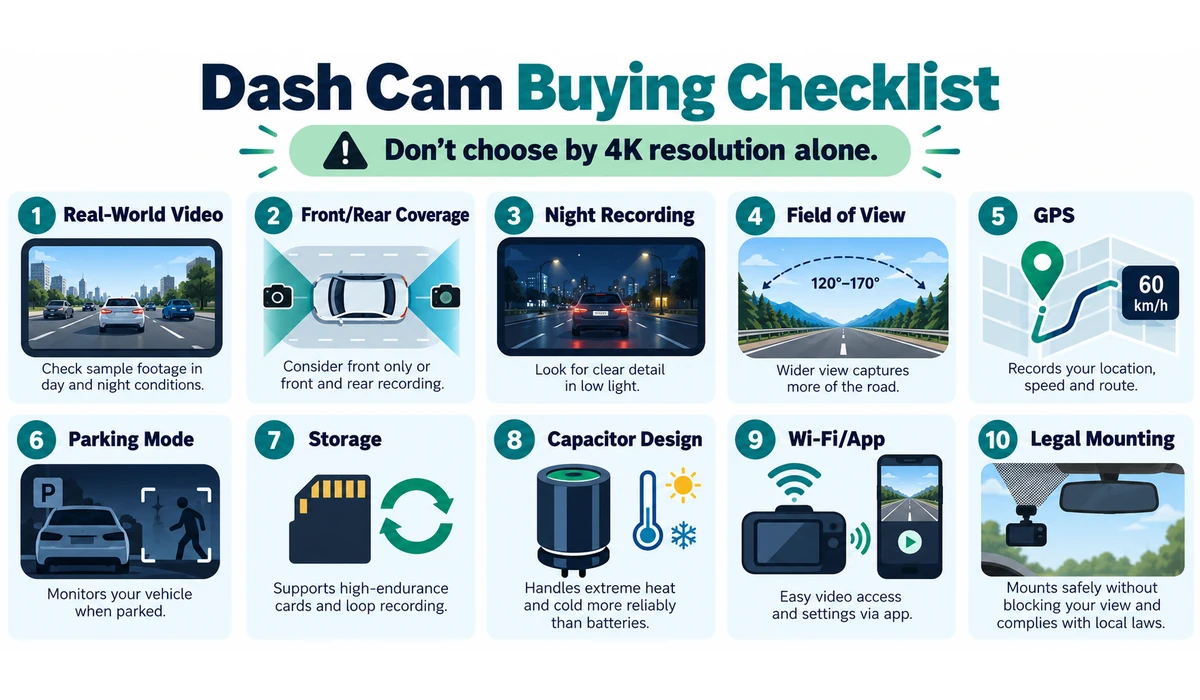
1. Real-World Image Quality
Resolution matters, but plate readability also depends on sensor quality, HDR, exposure, lens, motion and lighting. Look beyond the 4K badge.
2. Front and Rear Coverage
Rear footage can show impacts and events behind the vehicle. Decide whether the extra wiring and storage use are worthwhile for your driving.
3. Night Recording
Low-light footage is difficult because vehicles and plates move through bright headlights and dark backgrounds. HDR and modern sensors can help, but no camera captures every plate perfectly.
4. Field of View
Very wide lenses capture more scene context but can make distant objects appear smaller. A balanced view is generally more useful than chasing the widest number.
5. GPS
GPS can add location and speed metadata. Decide whether you want that information stored with footage and understand how the manufacturer handles it.
6. Parking Mode
Parking surveillance normally requires constant power from a hardwire kit, OBD accessory or compatible battery pack. Check low-voltage protection and installation requirements.
7. Storage
Use memory cards rated for sustained/high-endurance video where recommended. Higher resolution and more channels increase storage consumption.
8. Capacitor vs Battery
Many purpose-built dash cams use capacitors because they tolerate automotive temperature cycles better than large rechargeable batteries. Small batteries may still be used for brief shutdown functions.
9. Wi-Fi and App Transfers
Wi-Fi makes footage easier to review on a phone. Faster wireless standards can be useful when transferring large 4K files.
10. Mounting and Legal Placement
Install the camera where it has a clear view without obstructing the driver’s legally required field of vision. Mounting rules differ by jurisdiction.
If you’re concerned about vehicle battery power, see our guide to [car battery chargers and maintainers].
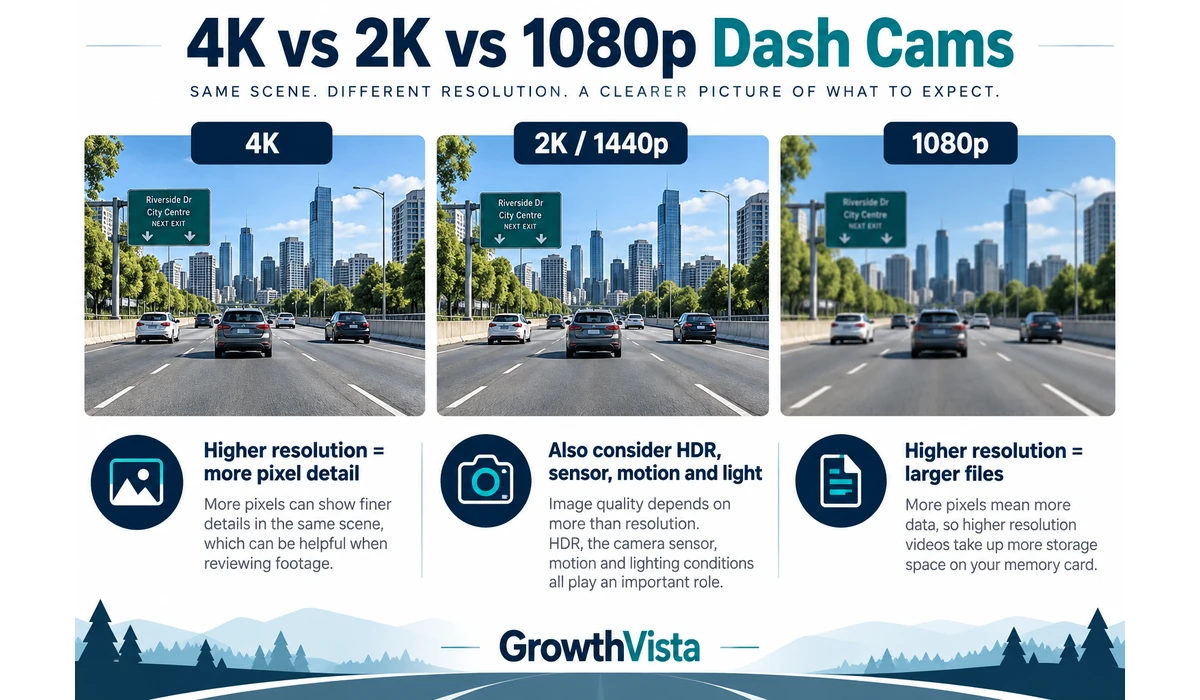
4K vs 2K vs 1080p Dash Cams: Which Resolution Is Best?
| Resolution | Strength | Consideration | Good Fit |
|---|---|---|---|
| 4K | More pixel detail in favorable conditions | Larger files; quality still depends on sensor/exposure | Drivers prioritizing front detail |
| 2K / 1440p | Good balance of detail and file size | Less cropping headroom than 4K | Everyday recording |
| 1080p | Lower storage use; adequate context | Less fine detail at distance | Budget or ultra-compact cameras |
Resolution alone should not be used as a quality ranking. A well-tuned lower-resolution camera can outperform a poorly implemented 4K model in difficult light.
Dash Cam Parking Mode Explained
-
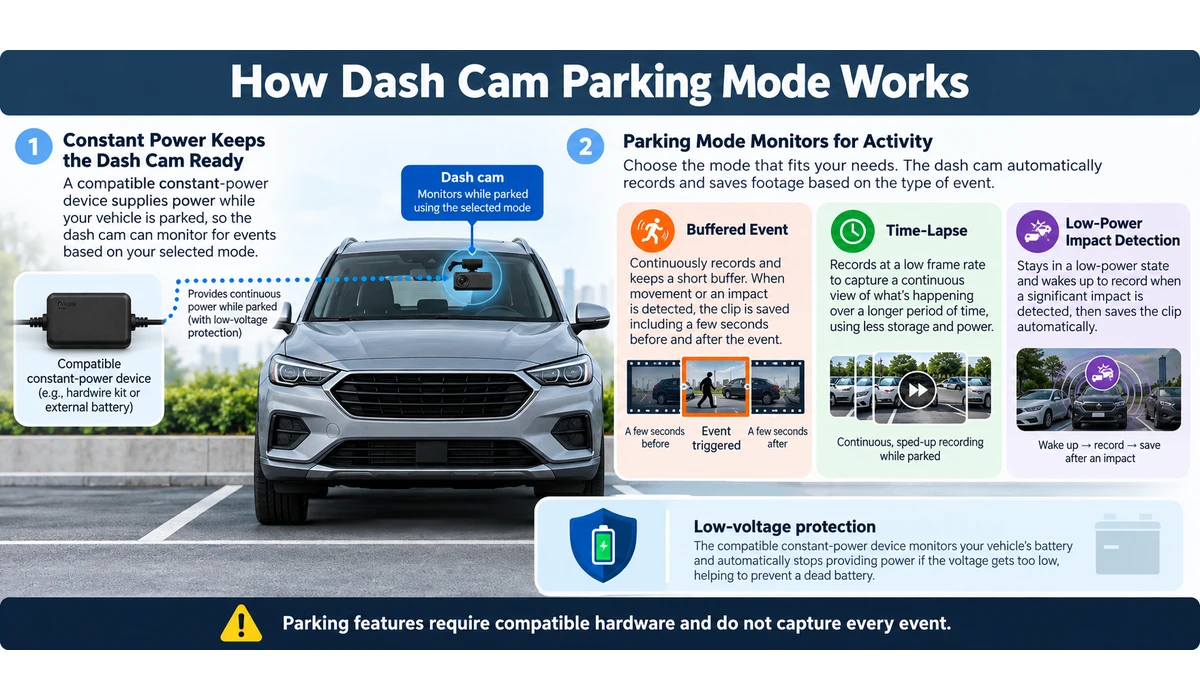
- Buffered event recording can preserve footage from before and after a detected incident on supported models.
- Time-lapse mode records at a reduced rate to lower storage and power use.
- Low-power impact detection keeps the system in a reduced-power state until an impact is detected on supported cameras.
- Parking recording usually needs a compatible hardwire kit, constant-power cable or dedicated dash-cam battery.
- Low-voltage protection is important so parking recording does not excessively discharge the vehicle battery.
- Parking mode is not a substitute for a full vehicle-security system and does not guarantee that every event will be captured.
Do You Need a Polarizing Filter?
A circular polarizing filter can reduce some windshield and dashboard reflections, which may improve apparent clarity in bright conditions. It also reduces the amount of light reaching the camera, so results can vary at night.
Some dash cams include a polarizer while others sell one separately. Correct orientation matters, and the benefit depends on the windshield, dashboard and lighting.
Dash Cam Storage: How Much Do You Need?
- Front-only 1080p recording uses substantially less storage than multi-channel 4K systems.
- Loop recording automatically overwrites older unlocked footage when the card fills.
- Incident files may be protected from normal loop overwrite, but protected folders can also fill if never reviewed.
- Use manufacturer-supported card capacities and high-endurance cards intended for repeated video writing.
- Regularly verify that the camera is actually recording and that the card has not failed.
- Important footage should be copied to another device promptly rather than left only on the dash cam.
How Do You Install a Dash Cam?
-
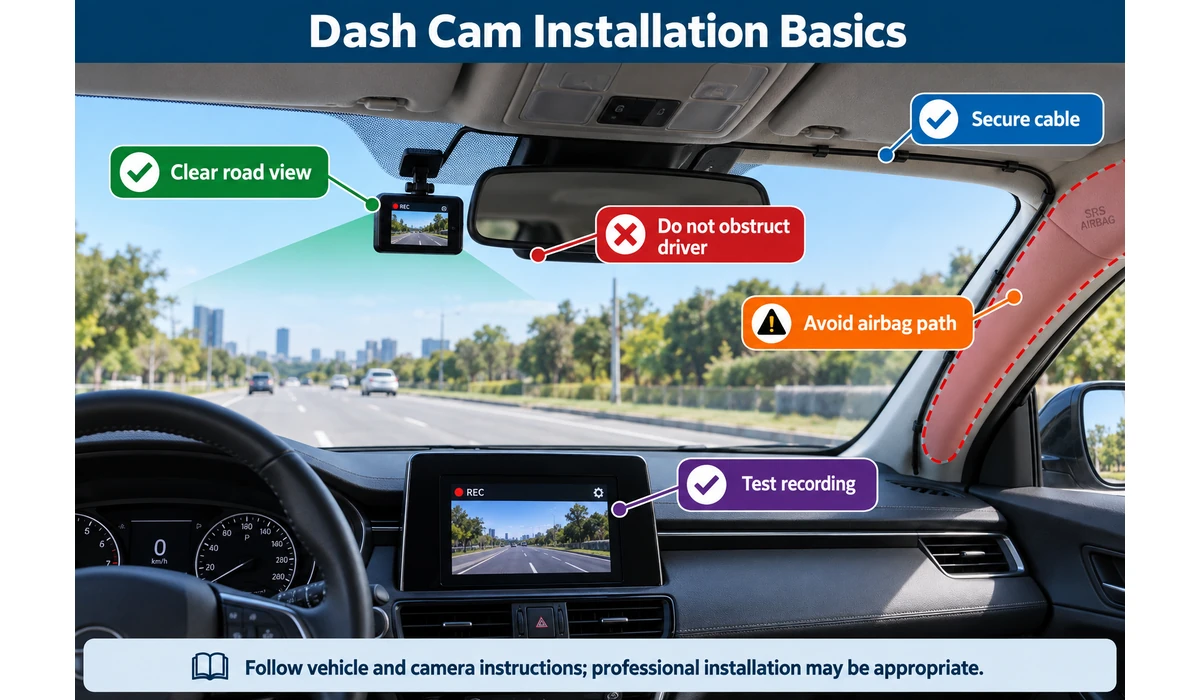
- Clean the windshield before attaching an adhesive mount.
- Position the camera high enough for a clear road view but outside restricted windshield zones.
- Route power cables so they do not obstruct the driver, pedals or controls.
- Keep cables away from airbag deployment paths, especially around A-pillars.
- Angle the camera so the road occupies most of the useful frame without excessive sky or dashboard.
- Format and test the memory card according to the manufacturer’s instructions.
- Confirm GPS, date/time and audio settings before relying on recordings.
- For parking mode or concealed wiring, use appropriate hardware and professional installation when needed.
Frequently Asked Questions
Is 4K necessary for a dash cam?
No. 4K can provide more detail, but sensor quality, HDR, motion and lighting are also important. A good 2K camera can be a better choice than a weak 4K model.
Should I buy a front-and-rear dash cam?
It is useful if you want evidence from both directions. The trade-offs are extra wiring, higher storage use and a higher purchase price.
Do dash cams record when the car is parked?
Only when the camera supports parking mode and has an appropriate power source. Many standard accessory sockets switch off with the ignition.
Can a dash cam drain the car battery?
Parking recording can consume battery power. Use manufacturer-supported low-voltage protection, a compatible power solution or professional installation.
How long does dash-cam footage stay on the memory card?
It depends on resolution, number of cameras, bitrate and card capacity. Loop recording normally overwrites the oldest unlocked files as storage fills.
Can dash cams record audio?
Many can, but audio-recording laws vary. Review local requirements and disable audio if necessary.
Where should a dash cam be mounted?
Typically high on the windshield with a clear forward view, but exact legal placement varies. It must not obstruct the driver’s view or interfere with vehicle safety systems.
What is the best 4K dash cam?
A 4K dash cam can provide more detail than 2K or 1080p models, but resolution should not be the only deciding factor. The VIOFO A329S 2CH, VIOFO A229 Pro 2CH, Garmin Dash Cam X310 and other 4K models in this guide offer different combinations of image quality, night performance, coverage, storage and features. Compare real-world image quality, HDR, sensor performance and field of view rather than choosing based only on the 4K label.
What is the best front-and-rear dash cam?
A front-and-rear dash cam is useful when you want evidence from both directions. The VIOFO A329S 2CH and VIOFO A229 Pro 2CH are strong options in this guide, while other dual-channel models such as the Thinkware U3000 2CH and BlackVue DR970X-2CH Plus offer different parking and connected features. Check the rear-camera resolution, cable routing and storage requirements before buying.
What is the best dash cam for parking mode?
The Thinkware U3000 2CH is a strong option for drivers who prioritize parking surveillance. Parking mode is not determined by the camera alone, however. The required hardwire kit or power solution, low-voltage protection and available parking modes should also be considered.
Do dash cams need a memory card?
Most dash cams that record locally require compatible storage, typically a microSD card. Higher-resolution and multi-channel cameras use storage more quickly, so check the manufacturer’s recommended card type and maximum capacity. Use a high-endurance card designed for repeated video recording when recommended.
Do dash cams work without Wi-Fi?
Yes. A dash cam can normally record video locally without an internet connection. Wi-Fi is mainly useful for connecting the camera to a phone for setup, settings or footage transfers. Cloud-connected models may require an internet connection for remote-access features.
Final Thoughts
The best dash cams are reliable evidence tools first and specification showcases second.
A front-only camera is enough for drivers who want the simplest setup. Dual-channel systems provide more complete context, while three-channel cameras are particularly useful for rideshare and commercial driving.
Parking mode, cloud access and high-resolution multi-camera recording can be valuable, but each adds power, storage, installation or subscription considerations.
Before buying, decide how many directions you need to record, whether parking surveillance matters and how much installation complexity you will accept. Then compare real-world image quality, storage reliability and current support rather than choosing from resolution alone.