Best Website Builders for Small Businesses in 2026
A small-business website has to do more than look polished. It may need to generate leads, accept bookings, sell products, publish useful content, rank in search and remain manageable by a team that does not have a full-time web developer.
The best website builders for small businesses in 2026 take different approaches. Wix combines AI-assisted creation with a flexible visual editor and integrated business tools. Squarespace emphasizes curated design and its Blueprint AI workflow. Shopify is built around commerce, while WordPress offers a broader publishing ecosystem with more responsibility for setup and maintenance.
AI has become a standard part of site creation. Wix’s current Harmony workflow can generate pages and components from prompts, Squarespace Blueprint AI generates a personalized site framework, and Shopify includes AI-powered storefront creation. AI can accelerate the first draft, but owners still need to review copy, legal pages, images, accessibility, SEO and conversion paths before launch.
This guide compares 10 website-building options and explains which types of small businesses each platform suits, along with the trade-offs around design, ecommerce, ownership, portability, apps and ongoing cost.
What is the best website builder for a small business?
The best website builder depends on what the business needs its website to do. Wix is a strong all-round option for many service businesses, Squarespace is well suited to design-focused businesses and portfolios, Shopify is designed for ecommerce, WordPress is useful for content-heavy businesses, and Webflow or Framer suit teams that need more visual design control. Small businesses should compare ease of editing, SEO controls, ecommerce or booking features, integrations, AI tools, portability and total ongoing cost before choosing a platform.
Quick Comparison: Best Website Builders for Small Businesses
| Website Builder | Best For | Ease of Use | Ecommerce | Key Strength | CTA |
|---|---|---|---|---|---|
| Wix | Most service-based small businesses | Easy–Moderate | Strong | Flexible editor + AI/business tools | Try Wix → |
| Squarespace | Design-led services / portfolios | Easy | Good | Polished design system | Try Squarespace → |
| Shopify | Product-focused ecommerce | Easy–Moderate | Excellent | Commerce operations + checkout ecosystem | Try Shopify → |
| WordPress.com | Content-heavy businesses | Moderate | Good with suitable plan/tools | Publishing flexibility | View Plans → |
| Hostinger Website Builder | Budget-conscious small sites | Easy | Basic–Good | Low-friction AI setup | Try Hostinger → |
| Webflow | Design/control-focused teams | Moderate–Advanced | Available | Visual design + CMS control | Try Webflow → |
| Framer | Modern marketing / landing sites | Easy–Moderate | Limited vs commerce platforms | Fast visual web design | Try Framer → |
| GoDaddy Website Builder | Fast local-business launch | Easy | Basic–Good | Simple all-in-one setup | Try GoDaddy → |
| Duda | Agencies / multi-client delivery | Moderate | Available | Client management + reusable systems | View Duda → |
| HubSpot Content Hub | Marketing + CRM-led businesses | Moderate | Not commerce-first | CRM/content integration | View HubSpot → |
1. Wix — Best All-Round Builder for Most Small Businesses
Wix is a strong fit for service businesses, consultants, restaurants, local companies and smaller online stores that want design flexibility without managing hosting separately.
In 2026, Wix’s Harmony Editor combines AI creation with hands-on editing. Its Aria AI agent can generate pages, sections and components from prompts, while users can still adjust the site manually. Wix also integrates tools for ecommerce, scheduling, blogging, contacts, marketing and analytics.
The trade-off is platform commitment: the more business processes you build inside one hosted ecosystem, the more planning a future migration can require.
Best for: Small businesses wanting an all-in-one platform with AI-assisted setup and flexible visual editing.
2. Squarespace — Best for Design-Led Service Businesses and Portfolios
Squarespace remains particularly attractive to businesses where visual presentation is central: consultants, architects, photographers, restaurants, wellness brands and professional portfolios.
Its Blueprint AI Builder creates a personalized website framework from business and brand inputs and can generate design, copy and image suggestions. Squarespace says Blueprint AI is free to use for building, while publishing requires a paid account.
Squarespace’s curated design approach can be easier to keep visually consistent than a highly flexible canvas, although businesses with unusual workflows may find a broader app ecosystem more useful.
Best for: Small businesses prioritizing polished design and straightforward content management.
3. Shopify — Best for Ecommerce-First Small Businesses
Shopify is fundamentally a commerce platform rather than a general website builder with a store added later.
Its website builder supports customizable themes and AI-powered storefront creation, while the broader platform handles products, payments, inventory, shipping, analytics and marketing integrations.
A service business that only needs five informational pages may not need this commerce depth. A retailer planning to manage a growing catalog, orders and multiple sales channels can benefit from choosing a commerce-first system early.
Best for: Small businesses where selling products online is the primary purpose of the website.
4. WordPress.com — Best for Content-Heavy Small Businesses
WordPress.com is worth considering when publishing, blogging and content structure are central to the business strategy.
The WordPress ecosystem is broad and can scale from a simple business site to more complex publishing and commerce setups, depending on the plan and tools selected.
Compared with tightly managed drag-and-drop builders, WordPress can require more decisions around themes, plugins, performance and maintenance. Businesses should distinguish hosted WordPress.com from self-hosted WordPress.org when comparing responsibilities and costs.
Best for: Businesses that expect content, editorial workflows and extensibility to matter long term.
5. Hostinger Website Builder — Best Budget-Friendly AI Builder
Hostinger’s builder targets owners who want to launch quickly with hosting and AI-assisted site creation bundled into a relatively simple workflow.
Recent 2026 comparisons continue to highlight Hostinger as a strong value option, particularly for small brochure sites and budget-conscious first websites.
The lower-complexity approach can become a limitation if the business later needs sophisticated commerce, integrations or content workflows.
Best for: New or small businesses prioritizing affordability and fast setup over maximum extensibility.
Try Hostinger Website Builder →
6. Webflow — Best for Design Control Without Traditional Coding
Webflow sits closer to professional web design tools than beginner-first site builders. It gives designers visual control over layouts, responsive behavior and CMS-driven content.
This makes it useful for businesses or agencies that care about custom presentation and structured content but do not want every change to require hand-coded templates.
The learning curve is steeper than Wix or Squarespace, and a small business with no design experience may pay for flexibility it does not use.
Best for: Design-conscious teams, agencies and businesses needing custom marketing sites with structured CMS content.
7. Framer — Best for Modern Marketing and Landing Pages
Framer has become popular for visually polished marketing sites and fast page creation, with a workflow familiar to product and interface designers.
It is especially appealing to startups, consultants and digital businesses that need modern landing pages and rapid iteration rather than a complex store.
For substantial ecommerce or highly operational business workflows, a commerce-first or broader business platform may be a better foundation.
Best for: Startups and service businesses focused on modern marketing pages and fast design iteration.
8. GoDaddy Website Builder — Best for a Fast Local-Business Launch
GoDaddy’s builder focuses on speed and simplicity, which can suit a local business that needs a professional web presence without a lengthy design project.
Domain, hosting and website tools can be managed within the same provider, reducing the number of systems a first-time owner needs to understand.
Businesses expecting complex design systems, content structures or ecommerce operations should compare the platform’s limits with more specialized alternatives before committing.
Best for: Local businesses that prioritize quick setup and simple ongoing management.
9. Duda — Best for Agencies Building Small-Business Sites
Duda is especially relevant to agencies, freelancers and web-service providers that build and manage websites for multiple clients.
Its value is not merely page editing; reusable sections, client collaboration and multi-site management can make delivery more efficient at scale.
A single owner building one simple site may not benefit from those agency-oriented capabilities.
Best for: Agencies and service providers managing multiple small-business websites.
10. HubSpot Content Hub — Best for CRM-Driven Marketing
HubSpot Content Hub is relevant when the website is part of a larger inbound-marketing and CRM workflow rather than a standalone brochure.
Businesses already using HubSpot for contacts, forms, campaigns and lead management can benefit from tighter alignment between site content and customer data.
It is not the obvious choice for a small product store or a simple five-page local-business site, and total HubSpot costs should be evaluated across the tools the business actually needs.
Best for: B2B and service businesses where website content, lead capture and CRM workflows are closely connected.
Which website builder is best for a small-business ecommerce store?
Shopify is a strong choice when selling products online is the main purpose of the website because it is built around products, checkout, inventory, payments and commerce operations. Wix and Squarespace can also work well for smaller stores with simpler catalogs. The right choice depends on product volume, inventory requirements, shipping, payment options, integrations and expected growth.
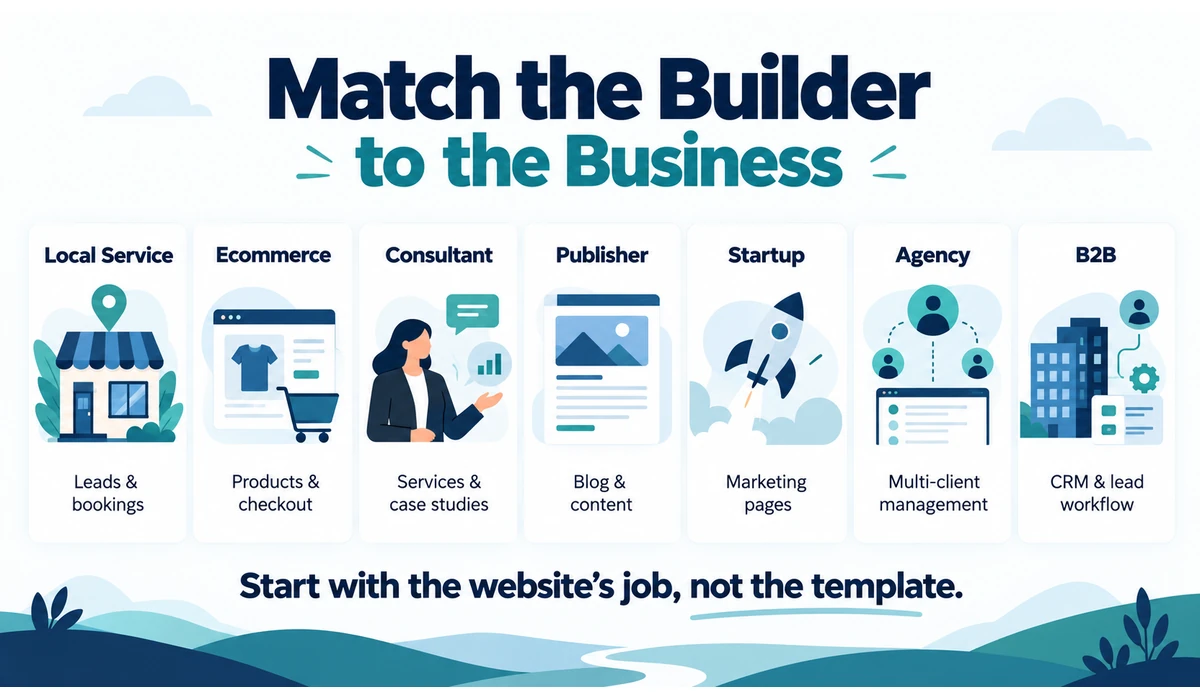
Which Website Builder Fits Your Business Type?
| Business Type | Priorities | Platforms to Evaluate |
|---|---|---|
| Local service business | Leads, forms, booking, maps, simple editing | Wix, Squarespace, GoDaddy, Hostinger |
| Online store | Products, checkout, inventory, shipping | Shopify, Wix, Squarespace |
| Consultant / professional | Trust, services, case studies, lead capture | Squarespace, Wix, Framer |
| Content / publishing business | Blog, categories, editorial growth, SEO | WordPress.com, Webflow, Wix |
| Design-led startup | Custom marketing pages, iteration | Webflow, Framer |
| Agency managing client sites | Reusable systems, permissions, multi-site workflow | Duda, Webflow |
| CRM-led B2B business | Forms, contacts, automation, content | HubSpot Content Hub |
What to Look for When Choosing a Website Builder
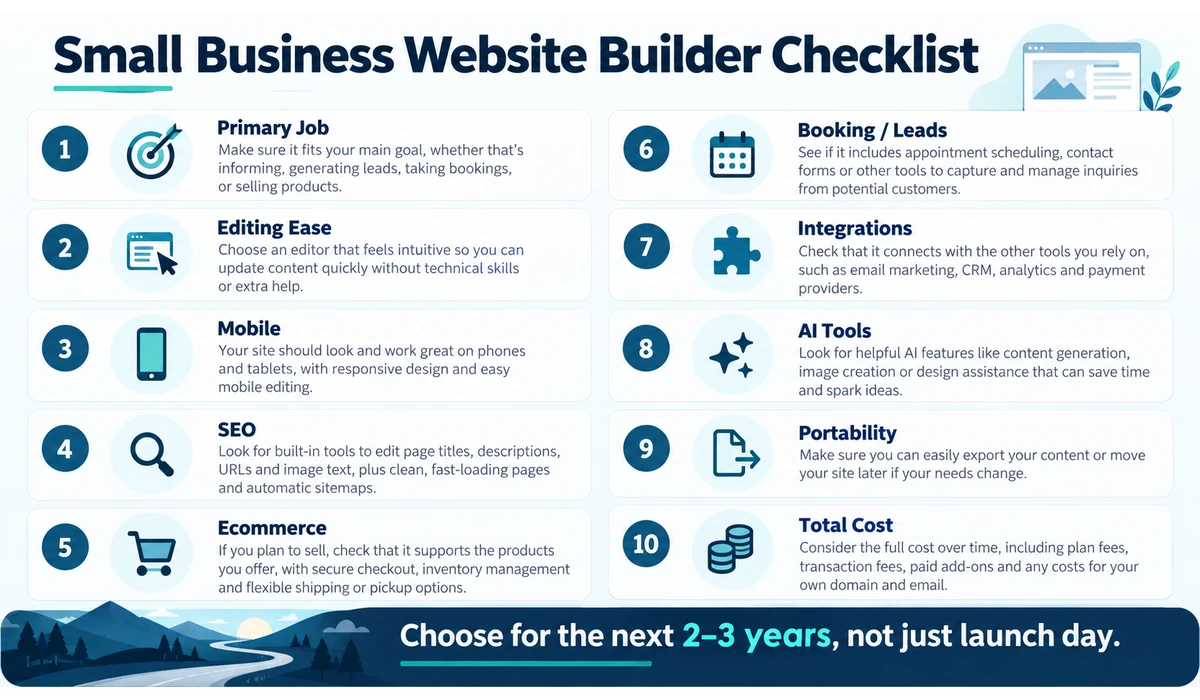
1. The Website’s Primary Job
Decide whether the site mainly generates leads, sells products, takes bookings, publishes content or supports an existing sales process. Start with the business workflow, not the template gallery.
2. Ease of Editing
The person maintaining the site after launch should be able to change text, images, services, hours and calls to action without breaking the layout.
3. Mobile Design
Most builders provide responsive tools, but owners should still inspect important pages on real phone sizes and check menus, forms, tables and buttons.
4. SEO Controls
Look for editable titles, meta descriptions, URLs, headings, image alt text, redirects, sitemap support and structured-data capabilities appropriate to the business.
5. Ecommerce Depth
A small catalog and a growing retail operation have different requirements. Evaluate payments, inventory, variants, shipping, tax tools, reporting and app costs.
6. Booking and Lead Capture
Service businesses may need forms, calendars, appointments, CRM connections and automated follow-up more than advanced ecommerce.
7. Integrations
List the systems the business already uses—email marketing, CRM, analytics, payments, accounting and automation—and check integrations before choosing the builder.
8. AI Features
AI can accelerate first drafts and repetitive tasks, but it should not be the sole reason to select a platform. Review generated copy, images and layouts before publishing.
9. Portability and Lock-In
Understand what can be exported if you leave. Content, design, ecommerce data and app functionality may have different migration paths.
10. Total Cost
Include the website plan, domain, email, premium apps, ecommerce fees, templates, plugins and agency/developer support rather than comparing only introductory prices.
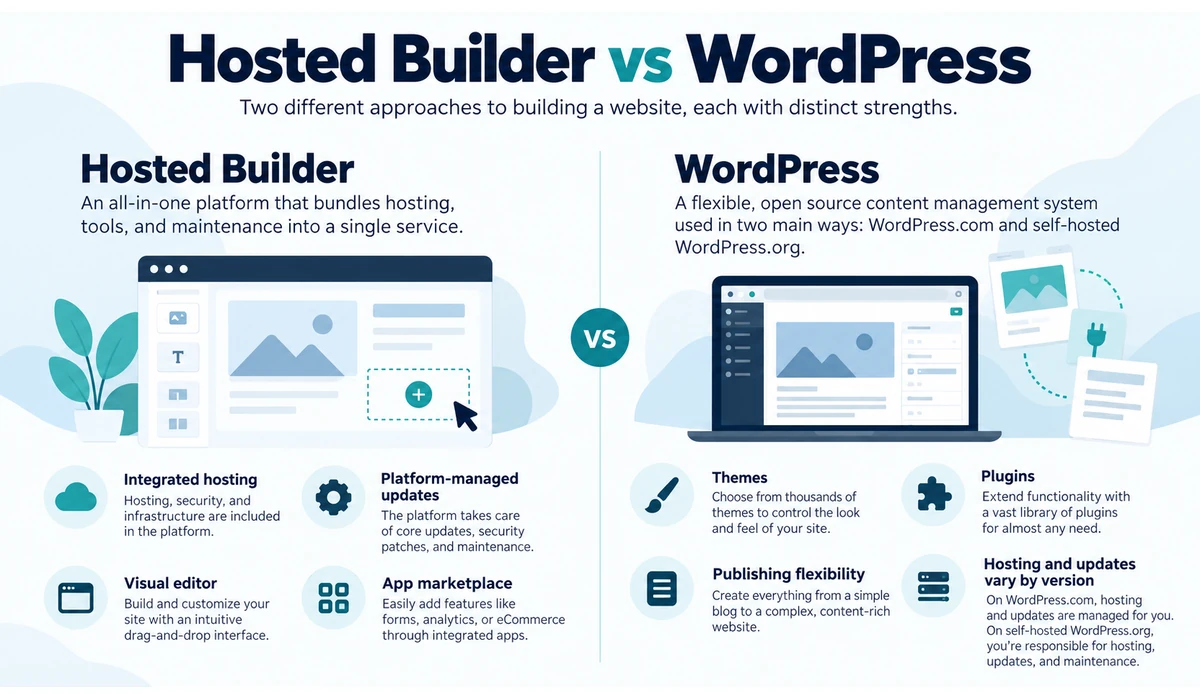
Hosted Website Builder vs WordPress
| Factor | Hosted Builder | WordPress Approach |
|---|---|---|
| Hosting | Included | Included on WordPress.com; self-managed on WordPress.org hosting |
| Updates/security | Mostly platform-managed | Varies by hosted/self-hosted setup |
| Design setup | Visual builder/templates | Themes, blocks and plugins |
| Extensions | Platform app ecosystem | Large plugin ecosystem |
| Maintenance burden | Generally lower | Can be higher with self-hosted setups |
| Portability | Platform-dependent | Content ecosystem is comparatively broad |
| Best fit | Owners prioritizing simplicity | Publishing/extensibility-focused businesses |
AI Website Builders: Useful Tool, Not Automatic Strategy
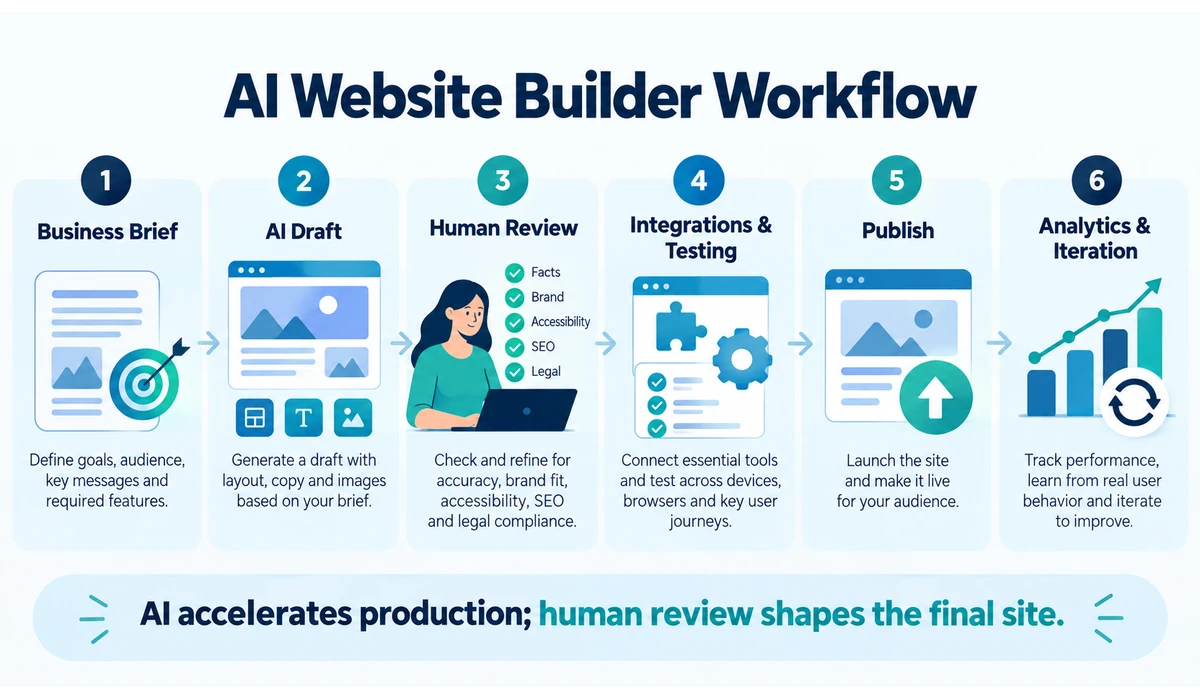
AI site builders can now generate layouts, copy, images and even custom components from a business description. Wix says its current AI workflow can create pages and components and connect business tools; Squarespace Blueprint AI builds a personalized site framework; Shopify includes AI-powered storefront generation.
That reduces blank-page work, but AI does not know whether a claim is legally safe, whether a service description accurately reflects the business, or whether a generated page converts real customers. Owners should review facts, brand voice, accessibility, privacy language, SEO intent and calls to action.
Use AI to accelerate production, then apply human review before publishing.
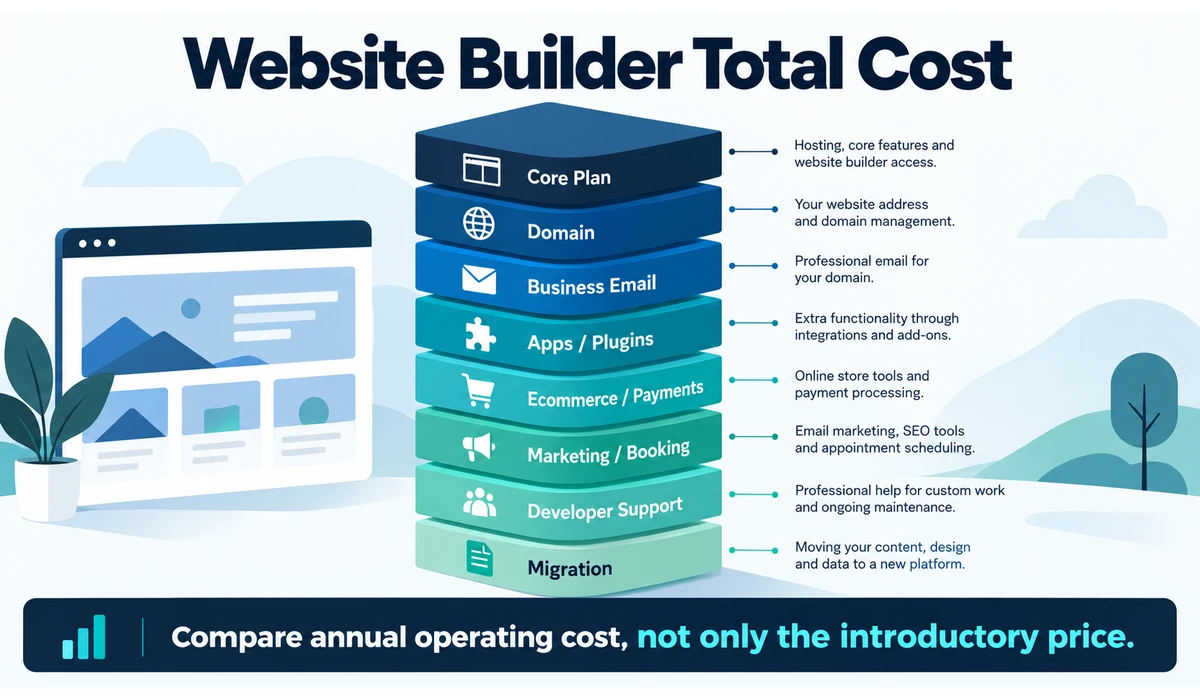
Website Builder Costs: What Small Businesses Often Miss
-
- Introductory pricing may renew at a different rate.
- Custom domains may be included only for the first year or on selected annual plans.
- Business email is often a separate product.
- Premium apps, plugins or extensions can add recurring costs.
- Ecommerce plans may have payment-processing or transaction considerations.
- Advanced booking, memberships, email marketing or automation may require higher tiers.
- Moving to another platform later can create redesign and migration costs.
- Agency or freelancer support should be included when the owner will not maintain the site personally.
A Simple Website Builder Decision Framework
-
- If ecommerce is the core business, evaluate Shopify first alongside the commerce capabilities of Wix or Squarespace.
- If visual presentation is the priority and requirements are straightforward, evaluate Squarespace.
- If you want an all-round hosted business platform with flexible editing, evaluate Wix.
- If publishing and long-term content extensibility dominate, evaluate WordPress.
- If budget and fast setup dominate, evaluate Hostinger or GoDaddy.
- If custom visual design and CMS structure matter, evaluate Webflow or Framer.
- If you build sites for multiple clients, evaluate Duda.
- If the website is tightly tied to CRM and inbound marketing, evaluate HubSpot Content Hub.
Frequently Asked Questions
What is the easiest website builder for a small business?
Wix, Squarespace, Hostinger and GoDaddy are among the simpler options for businesses that want to create and manage a website without coding. Wix offers more visual flexibility, Squarespace emphasizes guided design, while Hostinger and GoDaddy focus on fast setup. The easiest choice depends on whether the business also needs ecommerce, bookings, advanced content or custom design.
Which website builder is best for ecommerce?
Shopify is commerce-first and is designed around store operations. Wix and Squarespace can also suit smaller stores. Compare the exact catalog, payment, shipping and integration needs.
What is the best free website builder for a small business?
Free website-builder plans can be useful for testing a platform, but they often have limitations such as platform branding, limited storage, restricted features or no custom domain. For a professional business website, compare the paid plans of platforms such as Wix, Squarespace, Hostinger and WordPress.com based on the features and domain options you actually need rather than choosing only because a free tier is available.
Do I need WordPress for SEO?
No. Major hosted builders provide core SEO controls. WordPress offers broad flexibility, but rankings depend on content quality, technical implementation, authority and user experience—not the CMS name alone.
Can AI build my whole business website?
AI can generate a strong first draft of layouts, copy and visuals on several platforms, but business owners should review accuracy, branding, accessibility, legal content and conversion paths before publishing.
Can I switch website builders later?
Yes, but migration effort varies. Text and images may be transferable while themes, layouts, apps, forms and store functionality often require rebuilding.
Should I use a free website builder plan for my business?
Free tiers are useful for testing, but a professional business site usually benefits from a custom domain and the features included in paid plans.
How long does it take to build a small-business website?
AI and templates can generate a draft quickly, but launch time depends on content, approvals, product data, integrations, SEO, testing and legal requirements.
Is Wix or Squarespace better for a small business?
Wix is generally more flexible for businesses that want extensive visual editing and a broad set of business features, while Squarespace emphasizes curated design and visual consistency. The better choice depends on how much customization, ecommerce, booking and content functionality the business needs.
Is Shopify better than Wix for ecommerce?
Shopify is generally better suited to businesses where ecommerce is the primary operation because its platform is built around products, orders, payments, inventory and commerce workflows. Wix can be a better fit when ecommerce is only one part of a broader service-business website.
Which website builder is best for SEO?
There is no single website builder that guarantees better rankings. Wix, Squarespace, Shopify, WordPress and other major platforms provide important SEO controls. Rankings depend on content quality, technical SEO, site performance, search intent, authority and user experience as well as the platform itself.
Is WordPress better than a website builder?
WordPress can offer greater publishing flexibility and extensibility, but it may require more setup and maintenance depending on whether the business uses WordPress.com or self-hosted WordPress.org. Hosted website builders are often easier for owners who prioritize simplicity and low maintenance.
Final Thoughts
The best website builders for small businesses are the platforms that match the business model and remain manageable after launch.
Wix is a versatile all-round option for many service businesses; Squarespace is strong when design presentation matters; Shopify is built for commerce; WordPress is compelling for content-heavy businesses; and platforms such as Webflow, Framer, Duda and HubSpot serve more specialized workflows.
Do not choose from a homepage demo alone. Write down the site’s primary job, integrations, editing responsibilities and expected growth, then test the workflows that matter most.
AI can shorten the build process in 2026, but the durable advantage still comes from clear positioning, useful content, fast pages and an easy path for visitors to become customers.