Best Wireless CarPlay Adapters in 2026: 8 Options Compared
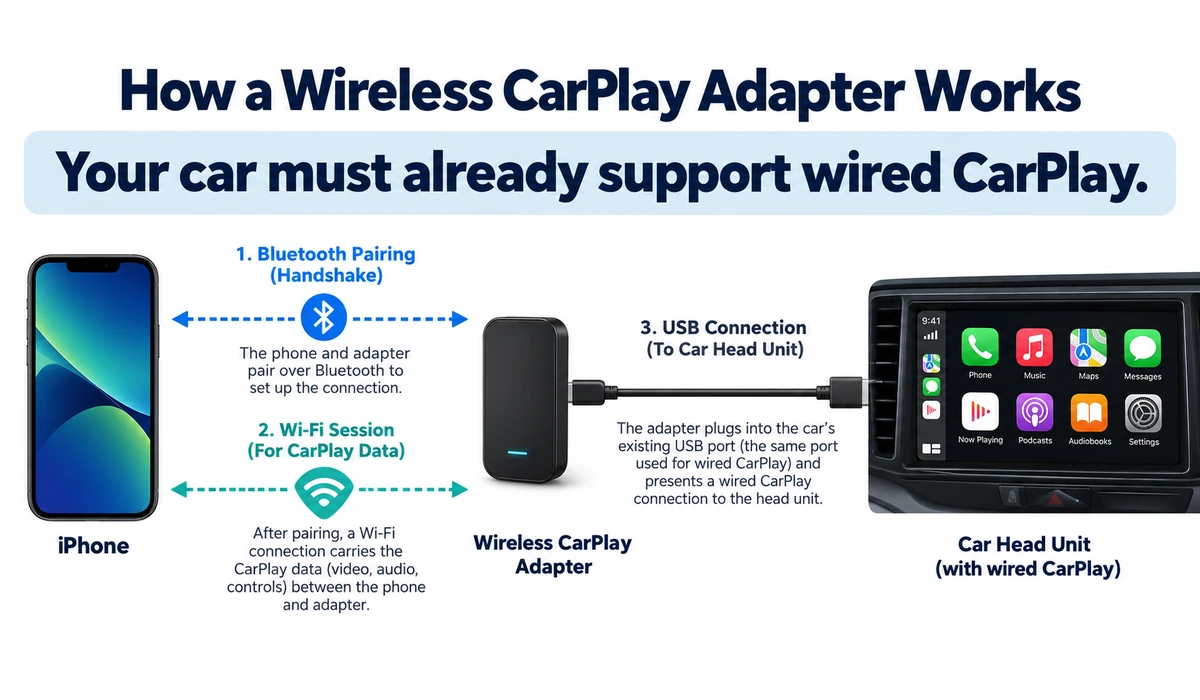
A wireless CarPlay adapter solves one narrow but useful problem: it removes the USB cable from a car that already supports wired Apple CarPlay. Plug the adapter into the vehicle’s CarPlay-capable USB data port, pair the phone, and compatible models reconnect wirelessly on later drives.
The best wireless CarPlay adapters are judged less by flashy specifications than by connection reliability, startup behavior, compatibility and how gracefully they handle multiple drivers. Bluetooth typically helps establish the connection, while Wi-Fi carries the CarPlay session.
These adapters do not add CarPlay to a vehicle that never had wired CarPlay. They are also unnecessary if the car already has reliable factory wireless CarPlay.
This guide compares eight current adapter options for 2026, including CarPlay-only dongles and dual-platform models that can also convert supported wired Android Auto to wireless.
What is the best wireless CarPlay adapter?
The best wireless CarPlay adapter depends on your vehicle, phone ecosystem and whether you also need Android Auto. Carlinkit 5.0/2air is a strong dual-platform option, AAWireless TWO+ is useful for shared iPhone and Android households, and Ottocast offers several compact CarPlay-focused and dual-platform models. Before buying, confirm that your car already supports wired CarPlay, check exact vehicle and head-unit compatibility, and compare reconnection reliability, startup time, firmware support and return policies.
Quick Comparison: Best Wireless CarPlay Adapters
| Adapter | Best For | CarPlay | Android Auto | Key Advantage | CTA |
|---|---|---|---|---|---|
| Carlinkit 5.0 / 2air | Overall dual-platform value | Wireless | Wireless | Configurable + broad platform support | Check Price → |
| AAWireless TWO+ | Mixed iPhone/Android households | Wireless | Wireless | Physical switching + strong controls | Check Price → |
| Ottocast Mini / Mini Core | Compact plug-and-play use | Wireless | Wireless | Small footprint | Check Price → |
| Ottocast U2AIR Pro | iPhone-only CarPlay users | Wireless | No / model-specific | Dedicated CarPlay focus | Check Price → |
| Carlinkit Mini Ultra | Compact dual-platform alternative | Wireless | Wireless | Small form factor | Check Price → |
| Ottocast U2-X / U2-X Pro | Dual-platform alternative | Wireless | Wireless | CarPlay + Android Auto | Check Price → |
| CRUX ACP-WLX | Aftermarket / installer-oriented option | Wireless | Wireless on supported systems | Automotive integration focus | Check Price → |
| Ottocast Mini Pico | Small mixed-platform adapter | Wireless | Wireless | Compact multi-platform design | Check Price → |
Important: exact model names and platform support can overlap within manufacturer lineups. Verify the current product page and your exact vehicle/head unit before publishing or purchasing.
1. Carlinkit 5.0 / 2air — Best Overall Dual-Platform Value
Carlinkit 5.0, also marketed as 2air, converts compatible wired CarPlay and wired Android Auto systems to wireless operation. Current 2026 guides continue to identify it as a strong dual-platform option.
Its main advantage is flexibility: one adapter can serve an iPhone driver and an Android driver when the underlying vehicle supports the respective wired system.
Carlinkit also exposes configuration options that can help with compatibility, but settings should not be changed unnecessarily when the default connection is stable.
Best for: Drivers wanting one configurable adapter for both CarPlay and Android Auto.
2. AAWireless TWO+ — Best for Mixed iPhone and Android Households
AAWireless TWO+ supports both wireless Apple CarPlay and wireless Android Auto, unlike the Android-focused AAWireless TWO.
A physical multifunction button is particularly useful in shared vehicles because it can assist with pairing, standby and switching between paired phones. The companion software also provides firmware and troubleshooting controls.
The adapter still requires a compatible wired CarPlay or Android Auto system, and current availability should be checked before publication.
Best for: Shared cars where drivers regularly alternate between iPhone and Android.
3. Ottocast Mini / Mini Core — Best Compact Plug-and-Play Option
Ottocast’s compact Mini family targets drivers who want a small adapter that can remain tucked near the vehicle’s USB port.
Current 2026 comparisons highlight the Mini family for dual-platform use and straightforward setup, but compatibility differs across exact Mini variants and head units.
Check the exact model name rather than treating every Ottocast Mini product as identical.
Best for: Drivers prioritizing a small physical footprint and simple everyday use.
4. Ottocast U2AIR Pro — Best Dedicated CarPlay Option
The U2AIR Pro is primarily aimed at iPhone users who want to convert factory wired CarPlay to wireless CarPlay without paying for unrelated AI-box features.
It is a better conceptual fit for an iPhone-only household than a more complex media box. Current product information emphasizes automatic reconnection and firmware support.
As always, vehicle compatibility matters more than the brand name; it does not create CarPlay in a car without wired CarPlay.
Best for: iPhone-only drivers wanting a dedicated wireless CarPlay bridge.
5. Carlinkit Mini Ultra — Best Compact Carlinkit Alternative
The Carlinkit Mini Ultra provides another compact route to wireless phone projection for compatible wired systems.
It is attractive when the larger 5.0/2air feature set is unnecessary and minimizing the dongle’s physical footprint matters more.
Compact size does not guarantee better connection stability, so buyers should still prioritize verified vehicle compatibility and return support.
Best for: Drivers wanting a small Carlinkit adapter for a tidy installation.
6. Ottocast U2-X / U2-X Pro — Best Alternative for Dual-Platform Cars
The U2-X family is designed for households that need both wireless CarPlay and wireless Android Auto from compatible wired systems.
This can simplify a shared vehicle where one driver uses an iPhone and another uses Android, although switching behavior should be checked for the exact model.
Firmware, phone and head-unit combinations can affect reconnect behavior, so keep the adapter updated according to the manufacturer.
Best for: Mixed-platform households wanting an Ottocast dual-system option.
7. CRUX ACP-WLX — Best Installer-Oriented Alternative
The CRUX ACP-WLX is an automotive-focused wireless integration option that appears in hands-on 2026 adapter comparisons.
It may appeal to buyers who prefer products distributed through car-audio and installation channels rather than only consumer gadget marketplaces.
Confirm whether the exact version supports both platforms on your head unit and whether any vehicle-specific limitation applies.
Best for: Buyers who value an automotive-accessory ecosystem and installer familiarity.
8. Ottocast Mini Pico — Best Small Mixed-Platform Alternative
The Mini Pico is another compact Ottocast option for converting compatible wired smartphone projection to wireless.
Its value is primarily size and dual-platform convenience rather than adding new infotainment functions.
Some head units can have model-specific limitations, so use Ottocast’s current compatibility information and verify the exact product revision.
Best for: Drivers wanting a very small adapter for CarPlay and Android Auto switching.
What a Wireless CarPlay Adapter Can—and Cannot—Do
| Capability | Wireless CarPlay Adapter |
|---|---|
| Convert existing wired CarPlay to wireless | Yes, on compatible systems |
| Add CarPlay to a car with no CarPlay support | No |
| Replace the vehicle head unit | No |
| Provide Android Auto | Only dual-platform models on compatible wired Android Auto systems |
| Guarantee factory-level startup speed | No; varies by car, phone and firmware |
| Stream arbitrary video while driving | Not the purpose of a standard CarPlay adapter |
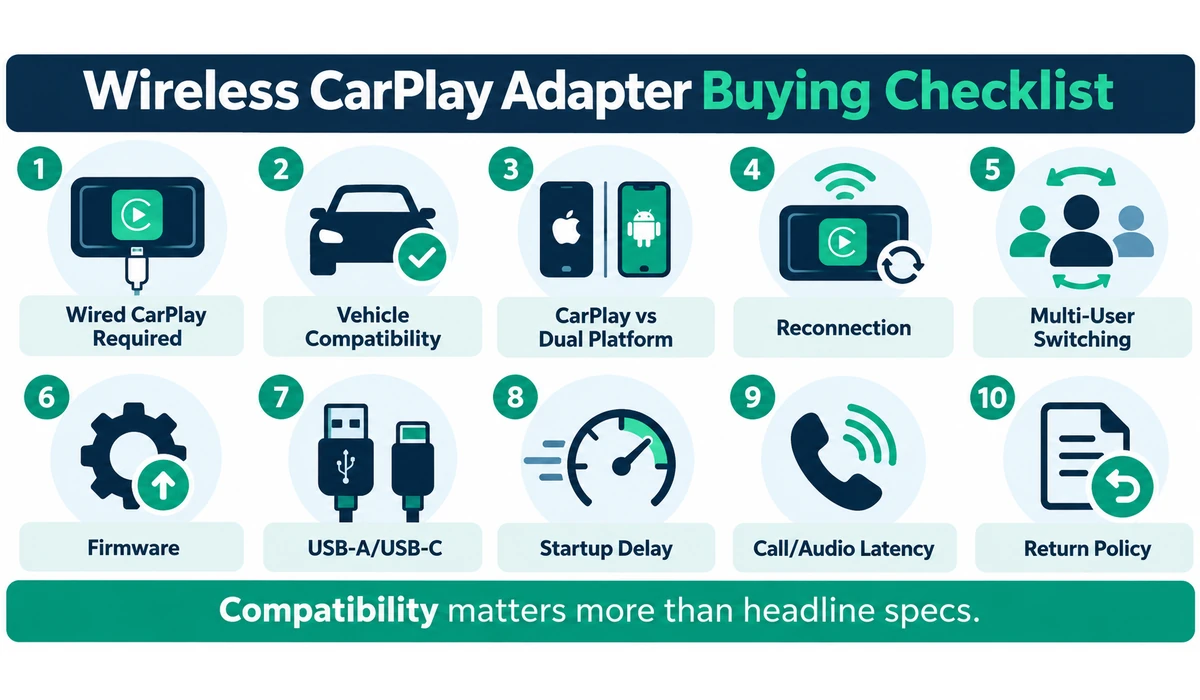
What to Look for When Buying a Wireless CarPlay Adapter
1. Existing Wired CarPlay
Confirm that your iPhone already launches CarPlay through the vehicle’s USB data port. If wired CarPlay does not work, a standard wireless adapter is not the solution.
2. Vehicle and Head-Unit Compatibility
Adapters can behave differently across factory and aftermarket systems. Check the manufacturer’s current compatibility notes and return policy.
3. CarPlay-Only vs Dual Platform
An iPhone-only household can use a CarPlay-focused adapter. Shared iPhone/Android households benefit from a model that explicitly supports both.
4. Reconnection Reliability
The most important everyday behavior is whether the adapter reconnects predictably after starting the vehicle. Firmware and vehicle USB behavior can affect this.
5. Multi-User Switching
In a shared car, check how the adapter chooses between previously paired phones and whether it provides a physical or software switching control.
6. Firmware Updates
A vendor that provides accessible firmware updates and troubleshooting tools can be valuable when phone or vehicle software changes.
7. USB Connector and Power
Check whether the car uses USB-A or USB-C and whether the package includes the correct cable/adapter. The port must support CarPlay data, not charging only.
8. Startup Delay
Wireless adapters add a handshake after the vehicle boots. Connection time varies; avoid treating one review’s seconds as a universal guarantee.
9. Call and Audio Latency
Wireless bridging can add some delay. Real-world performance depends on the phone, head unit, adapter and firmware.
10. Return and Support Policy
Compatibility is difficult to predict perfectly. A practical return policy is valuable even when a vehicle appears on a compatibility list.
If you regularly use additional car electronics, you may also want to compare car battery chargers and maintainers to help keep your vehicle battery in good condition.
Which wireless CarPlay adapter should you choose?
Choose Carlinkit 5.0/2air if you want a dual-platform adapter for both CarPlay and Android Auto. Choose AAWireless TWO+ if multiple iPhone and Android users share the same car. Choose an Ottocast CarPlay-focused model if everyone uses iPhones and you want a simpler setup. For a compact adapter, consider models such as the Ottocast Mini or Carlinkit Mini Ultra. In every case, verify compatibility with your exact vehicle and head unit before buying.
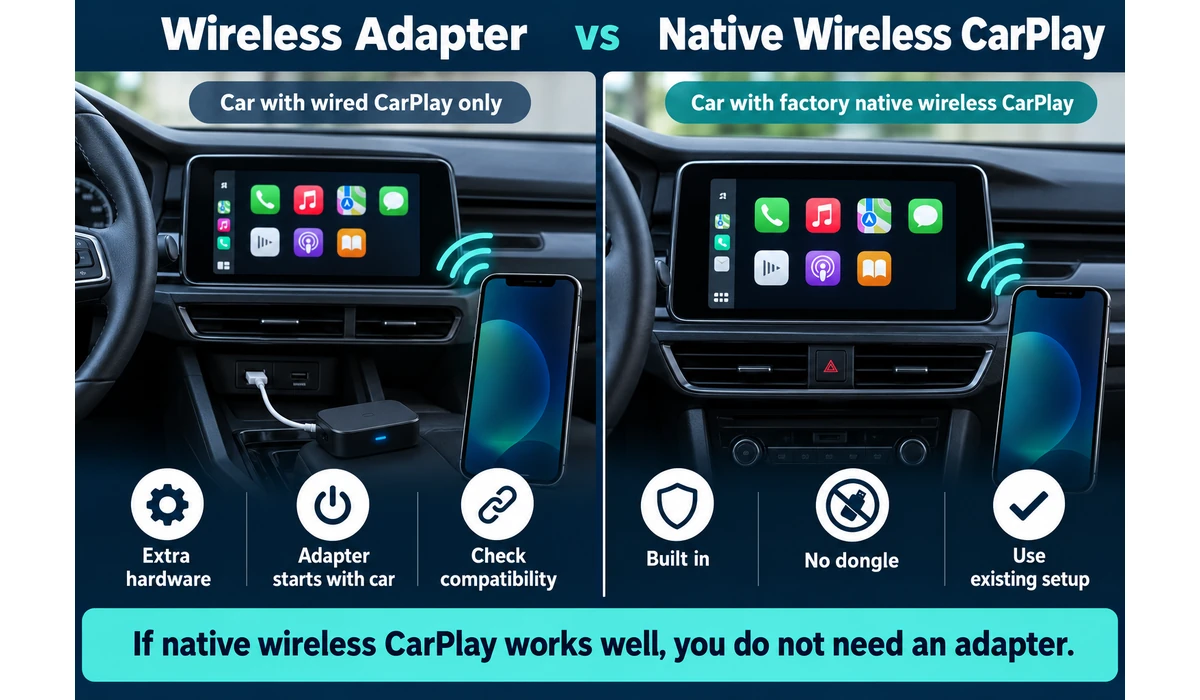
Wireless Adapter vs Native Wireless CarPlay
| Factor | Wireless Adapter | Factory Wireless CarPlay |
|---|---|---|
| Requires wired CarPlay first | Yes | No adapter needed |
| Extra hardware | USB dongle | Built into vehicle |
| Startup | Adapter + phone handshake | Integrated system handshake |
| Firmware source | Adapter vendor + phone + vehicle | Vehicle + phone |
| Compatibility risk | Higher | Generally lower |
| Best reason to use | Upgrade wired-only CarPlay | Already included—use native system |
CarPlay-Only vs CarPlay + Android Auto Adapters
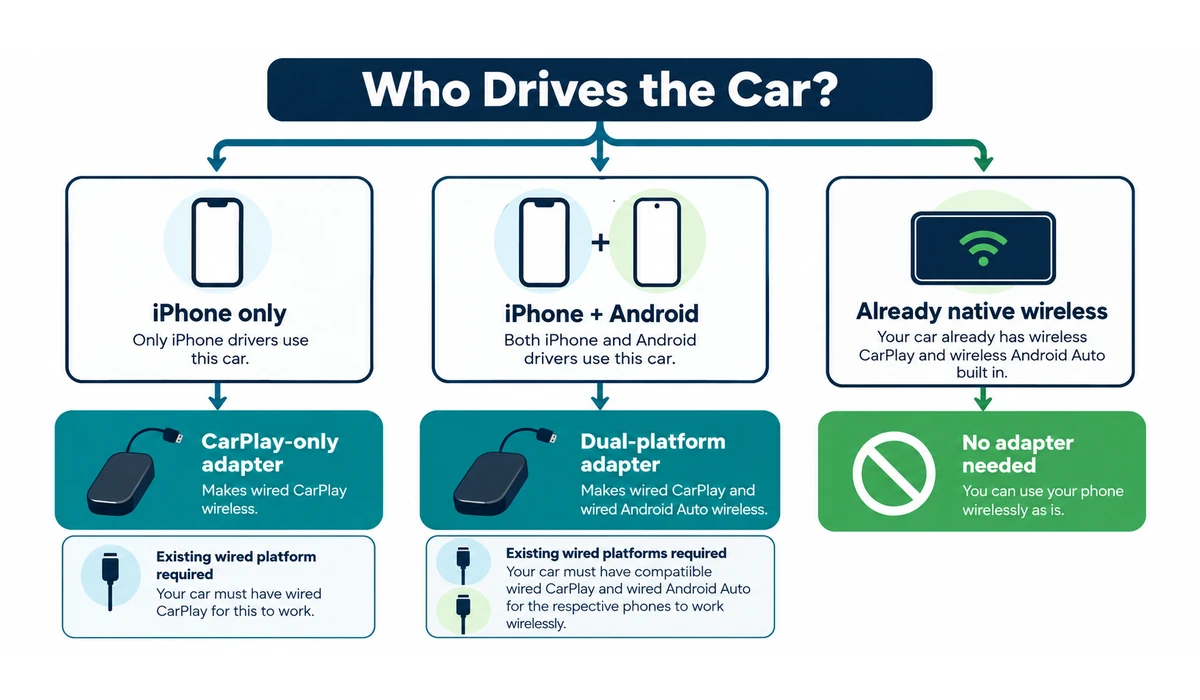
A CarPlay-only adapter is sufficient when every regular driver uses an iPhone. Dual-platform adapters make more sense when a vehicle is shared with Android users, provided the head unit already supports the relevant wired platform.
Do not assume a product called ‘wireless adapter’ supports both systems. For example, AAWireless TWO and TWO+ are different products: current 2026 information identifies TWO+ as the version supporting both wireless CarPlay and Android Auto.
How Does a Wireless CarPlay Adapter Work?
- Plug the adapter into the vehicle’s USB port that normally launches wired CarPlay.
- Pair the phone according to the adapter instructions, typically beginning through Bluetooth.
- The adapter establishes the higher-bandwidth wireless connection used for CarPlay.
- On later drives, the adapter boots with the vehicle and attempts to reconnect to a paired phone.
- Keep Wi-Fi and Bluetooth available as required by the adapter.
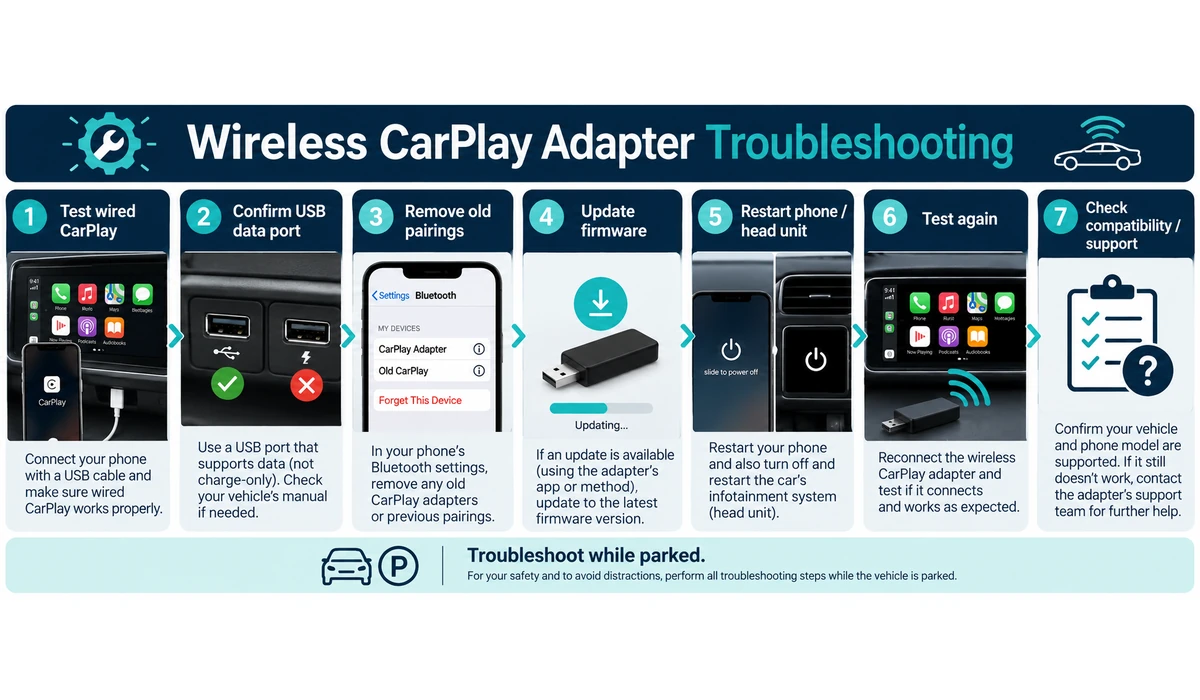
- Do not configure or troubleshoot the adapter while driving.
Common Wireless CarPlay Adapter Problems
Adapter never launches
Confirm the USB port supports wired CarPlay data and test wired CarPlay directly with a cable first.
Phone connects to the wrong driver
Review paired-device priority or use the adapter’s switching control if available.
Intermittent disconnects
Update adapter firmware, restart the phone/head unit, remove stale pairings and check the USB connection.
Audio or call delay
Some latency is inherent to wireless bridging; firmware or compatibility settings may help, but results vary.
Car already has wireless CarPlay
Remove the adapter and use the native implementation unless there is a specific compatibility reason not to.
Aftermarket head unit problems
Verify the exact head unit, USB data path and adapter support; factory compatibility does not guarantee aftermarket compatibility.
Frequently Asked Questions
Do wireless CarPlay adapters work in every car?
No. Most standard adapters require an existing compatible wired CarPlay system, and individual vehicles or aftermarket head units can still have compatibility issues.
Will an adapter add CarPlay to an older car?
Not if the car has no CarPlay system at all. In that case, you need a compatible aftermarket head unit or another dedicated CarPlay display solution.
Does wireless CarPlay use Bluetooth or Wi-Fi?
Bluetooth is commonly used during discovery/handshake, while Wi-Fi carries the higher-bandwidth CarPlay connection.
Is there a delay compared with wired CarPlay?
There can be additional startup and audio/call latency. The amount varies by adapter, phone, vehicle and firmware.
Can two phones use the same adapter?
Many adapters can remember multiple phones, but switching behavior differs. Shared-car users should prioritize models with clear device-selection controls.
Do I need an adapter if my car already has wireless CarPlay?
Usually no. Native wireless CarPlay eliminates the need for an extra dongle.
Can I watch Netflix or YouTube with a normal wireless CarPlay adapter?
A standard CarPlay adapter is intended to bridge wired CarPlay to wireless. AI/media boxes are a different product category, and video should never distract a driver.
What is the best wireless CarPlay adapter for iPhone?
For an iPhone-only household, a dedicated CarPlay adapter such as an Ottocast CarPlay-focused model can be a simpler choice. The right option still depends on the vehicle, head unit, connection reliability and desired features.
What is the best wireless CarPlay adapter for Android Auto?
If you need both wireless CarPlay and Android Auto, consider a dual-platform adapter such as Carlinkit 5.0/2air or AAWireless TWO+. Compatibility with the vehicle’s existing wired systems should be confirmed before purchase.
Do wireless CarPlay adapters work with older cars?
They can work with older cars if the vehicle already has compatible wired Apple CarPlay. An adapter generally cannot add CarPlay to a vehicle that has no CarPlay capability at all. Check the exact vehicle and head-unit compatibility before purchasing.
Final Thoughts
The best wireless CarPlay adapters are the ones that reliably disappear into the driving routine: start the car, let the phone connect and use CarPlay without touching a cable.
Carlinkit 5.0/2air and AAWireless TWO+ are especially relevant when a vehicle is shared between iPhone and Android users, while CarPlay-focused Ottocast models can be simpler for iPhone-only households.
Compatibility matters more than marketing claims. Test wired CarPlay first, verify the exact vehicle/head unit, and buy from a source with sensible return support.
Most importantly, remember what these products are: wireless bridges for an existing wired system. They are not replacements for a CarPlay-capable head unit.