VPN Speed Testing: Compare Your Actual Connection

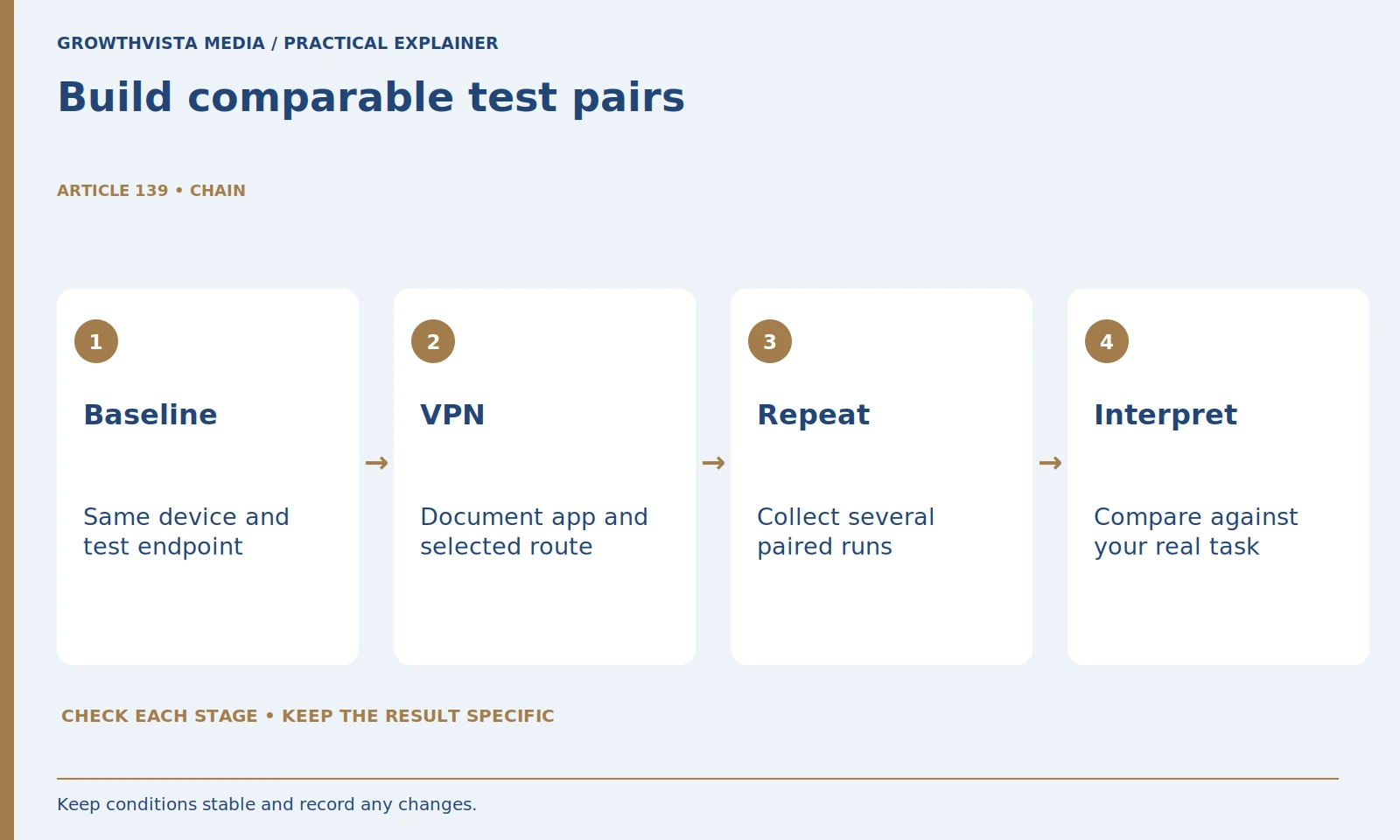
VPN speed testing should use paired baseline and VPN observations with the same device, connection, and test method. Repeat the pairs, record download, upload, and latency separately, and compare the results with the task you need to complete. A single best screenshot cannot establish which service is fastest worldwide.
The examples below are hypothetical and explain medians, differences, and recordkeeping. They are not GrowthVista measurements or named-provider benchmarks. Before using an external speed test, read its privacy and data-use information; Cloudflare explains that its test receives your connecting IP address and other measurement context. Cloudflare: speed test metrics and privacy information
Your decision checklist
- Define a local task and stable test conditions.
- Collect paired baseline and VPN runs.
- Keep throughput, latency, and variation separate.
- Report task outcomes and limits without global rankings.
What should VPN speed testing aim to answer?
Choose a specific local question, such as whether a supported route remains usable for uploads or a required call. Name the device, app, settings, connection, and test endpoint. The question determines what measurements and ordinary task checks are relevant.
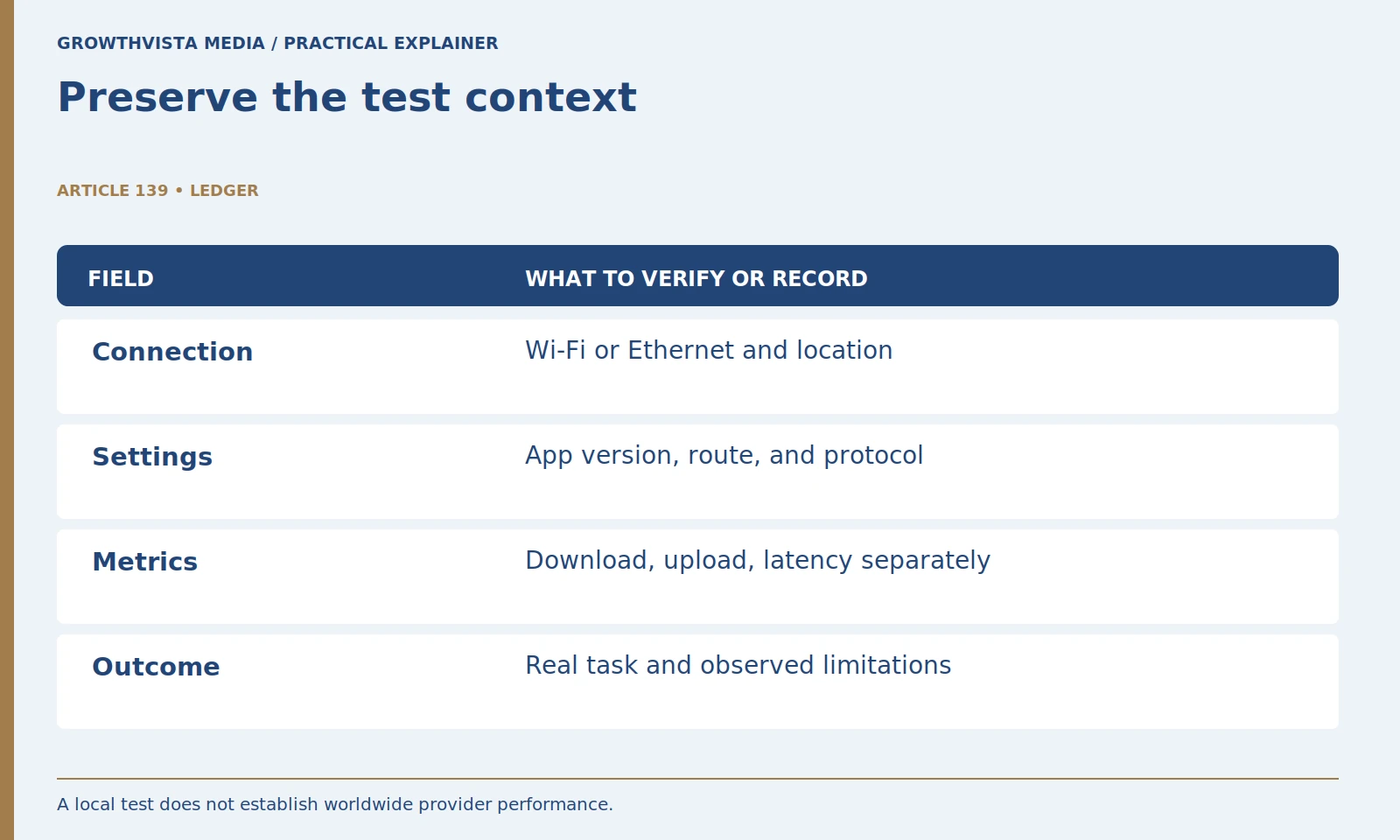
Identify the connection, device, VPN app, selected protocol if exposed, and test destination. Keep the device plugged in or under the same normal power conditions across runs. Note relevant background activity. The goal is not a perfect laboratory but a comparison whose major conditions are stable enough to explain. If the setup changes, record it rather than treating the observations as equivalent.

How do you make baseline and VPN runs comparable?
Use the same device, connection type, and supported test destination, with paired observations close together. Record avoidable background traffic and changes rather than attributing everything to the VPN. Alternating the order can help expose a steadily changing underlying connection.
Collect baseline and VPN observations close together, then repeat the pair. Where practical, alternate the order to reduce the chance that a steadily changing connection favors one condition. Record date and time. If the chosen speed-test destination changes automatically, note that limitation or use a supported way to keep it consistent. Comparable conditions matter more than collecting a large number of unrelated screenshots.
| Pair | Baseline Mbps | VPN Mbps |
|---|---|---|
| 1 | 100 | 80 |
| 2 | 90 | 85 |
| 3 | 95 | 75 |
| Median | 95 | 80 |
| Difference | 15 Mbps lower with VPN | 15.8% below baseline |
Why keep throughput and latency separate?
Download and upload concern transfer capacity, while latency concerns delay. Cloudflare reports these as distinct metrics alongside other network information. Keep each tool’s units and definitions attached to the values instead of averaging unlike quantities into an unexplained score. Cloudflare: speed test metrics and privacy information
Also note whether the application task worked: a file completed, a call stayed usable, or a required service failed. Task observations supplement synthetic results rather than replacing them. If the tool reports jitter, loss, or loaded latency, preserve the tool’s definitions and units. Avoid treating every measurement from different tools as directly interchangeable. A clear worksheet includes both the number and where it came from.
Should the highest speed result represent the trial?
No. Preserve valid runs and describe variation as well as a central value. For a small set, a median is a simple summary, but it does not remove the need to state sample size, time window, and interruptions. Mark changed conditions explicitly.
A median can provide a simple central value for a small set, but it does not remove the need to show variation. With three runs, sort the values and take the middle one. Report the minimum and maximum alongside it if useful. Label the sample size and time window. This prevents a tidy summary from implying certainty that the small local experiment cannot provide.
How do you calculate a baseline-relative throughput reduction?
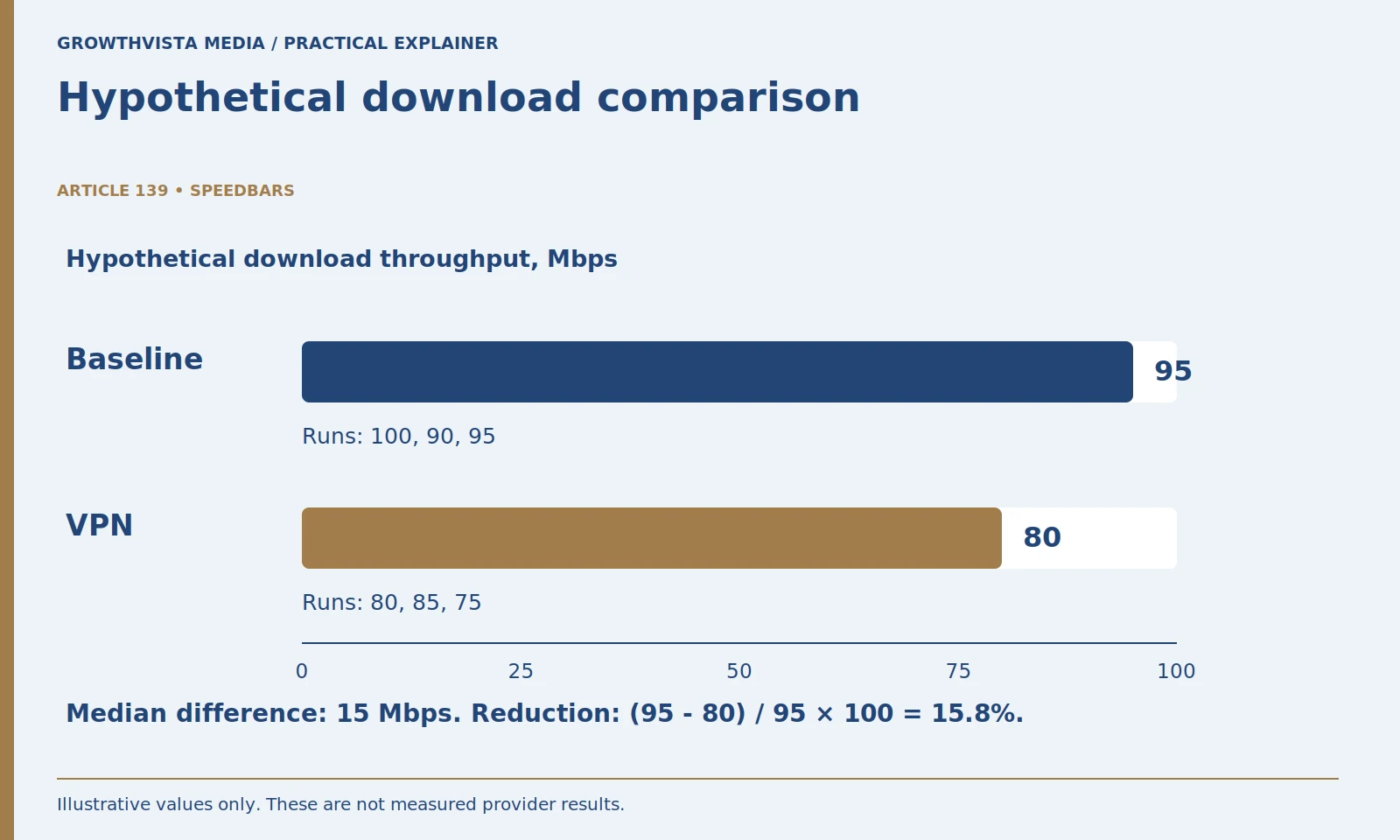
Subtract the VPN value from the baseline value, divide by the baseline, and multiply by 100. State the metric and reference condition. The worked example uses hypothetical medians of 95 and 80 Mbps and does not establish any provider’s measured performance.
In a hypothetical example, baseline download results of 100, 90, and 95 Mbps have a median of 95 Mbps. VPN results of 80, 85, and 75 Mbps have a median of 80 Mbps. The absolute difference is 15 Mbps. The reduction relative to the baseline is 15 divided by 95, multiplied by 100, or about 15.8 percent.
Keep the direction clear. A negative reduction would indicate the VPN median was higher in that sample, not prove the provider improves every connection. Do not reuse the throughput percentage to describe latency. State the metric, reference condition, sample size, and hypothetical status when presenting this example. Your actual decision should use your own observations and workload requirements.
How should a slow result be investigated?
First distinguish a slow underlying connection from a difference associated with the VPN configuration. Change one supported setting or route and repeat the method. Preserve earlier results, keep protection enabled, and use legitimate provider or network-support guidance.
Avoid disabling antivirus, firewall, or other protections to chase a faster number. Use the provider’s documented troubleshooting and your network administrator’s rules. Record any protocol or endpoint change because it creates a new condition. If the provider suggests a diagnostic procedure, understand its scope and any information it collects. A useful support request includes reproducible conditions without passwords, private account details, or unrelated browsing records.
Why test the actual application after the speed test?
A synthetic number does not by itself answer whether a call, upload, or required service works acceptably. Repeat a non-sensitive representative task and record the outcome. A task failure can involve more than raw throughput, so investigate the actual symptom rather than switching routes indefinitely.
The lowest-latency server is not automatically the best choice for every task, and the largest download number may not address an upload problem. Evaluate the metrics against the actual workflow. If an application fails despite adequate throughput, document the error and follow its supported troubleshooting. Do not assume every failure is caused by raw speed or fix it with repeated server switching.
What should a local speed-test conclusion say?
Name conditions, sample size, summary metrics, variation, task outcome, and limitations. State what worked in that sample rather than ranking the whole provider network. EFF’s VPN guidance clarifies the service’s routing scope; a local performance observation does not certify broader privacy or service behavior. EFF: VPN scope and limitations
Recheck after a material change rather than testing indefinitely. A new router, app version, location, or connection can justify another comparison. Otherwise, a usable task outcome and stable settings may be enough. This method gives you evidence for a personal decision while avoiding claims about a provider’s entire network or performance for readers in other locations.
Define a local task and stable test conditions. Collect paired baseline and VPN runs. Keep throughput, latency, and variation separate. Report task outcomes and limits without global rankings. Keep verified findings, illustrative examples, and unresolved requirements separate in the final decision.
Frequently asked questions
How many tests prove a provider is the fastest?
A small local test cannot prove global leadership. Several paired observations can support a limited decision about your own setup.
Should I report only the best speed?
Keep valid runs and describe a central value and variation, with sample size and conditions.
Can Mbps and milliseconds be averaged together?
They describe different properties and units. Keep them separate rather than creating an unexplained combined score.
What if the VPN median is higher than the baseline?
Report the observation and its conditions. It does not establish a universal promise that a VPN improves connections.
Are the example 95 and 80 Mbps results real measurements?
No. They are hypothetical medians used to explain a 15 Mbps difference and approximately 15.8 percent baseline-relative reduction.
Does using an external speed test have privacy implications?
Read the service’s disclosure. Cloudflare explains that its test receives the connecting IP address and measurement context.
Sources and further reading
Official documentation supports the technical guidance. Examples and worksheets are editorial methods, not hands-on product benchmarks. Reviewed October 2026.