Wi-Fi Extender vs Mesh Wi-Fi: Which Should You Choose?
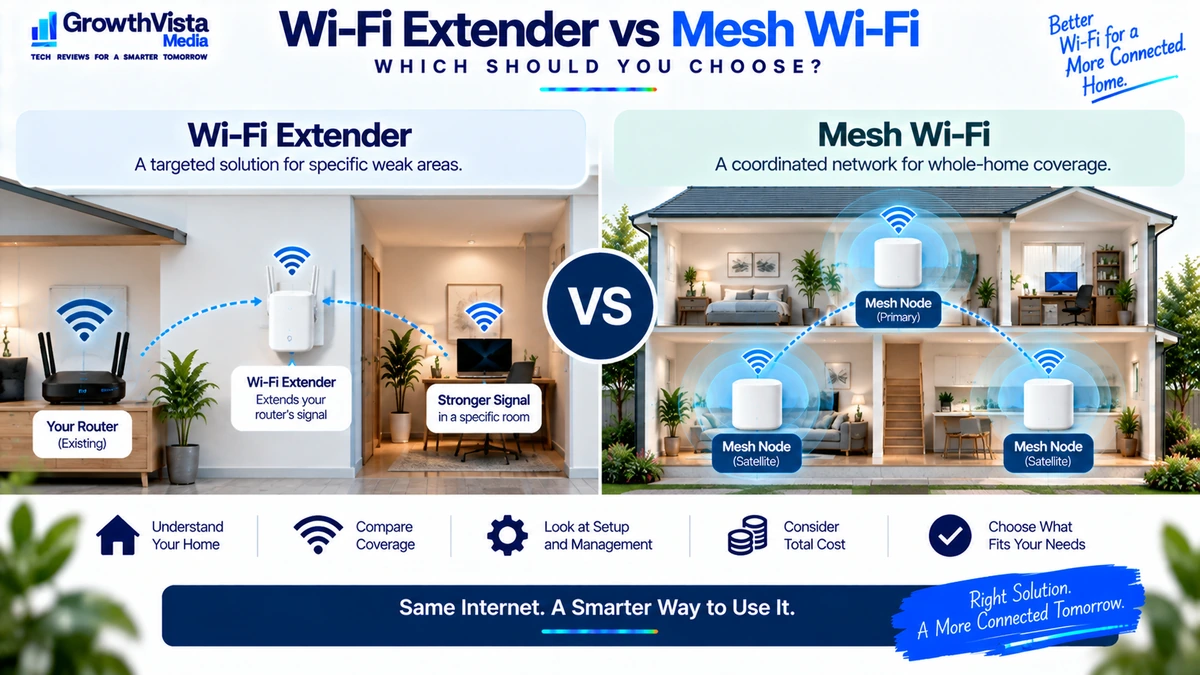
A weak Wi-Fi signal in one bedroom, upstairs office or distant corner of the house often leads to the same question: should you add a Wi-Fi extender or replace the setup with a mesh Wi-Fi system?
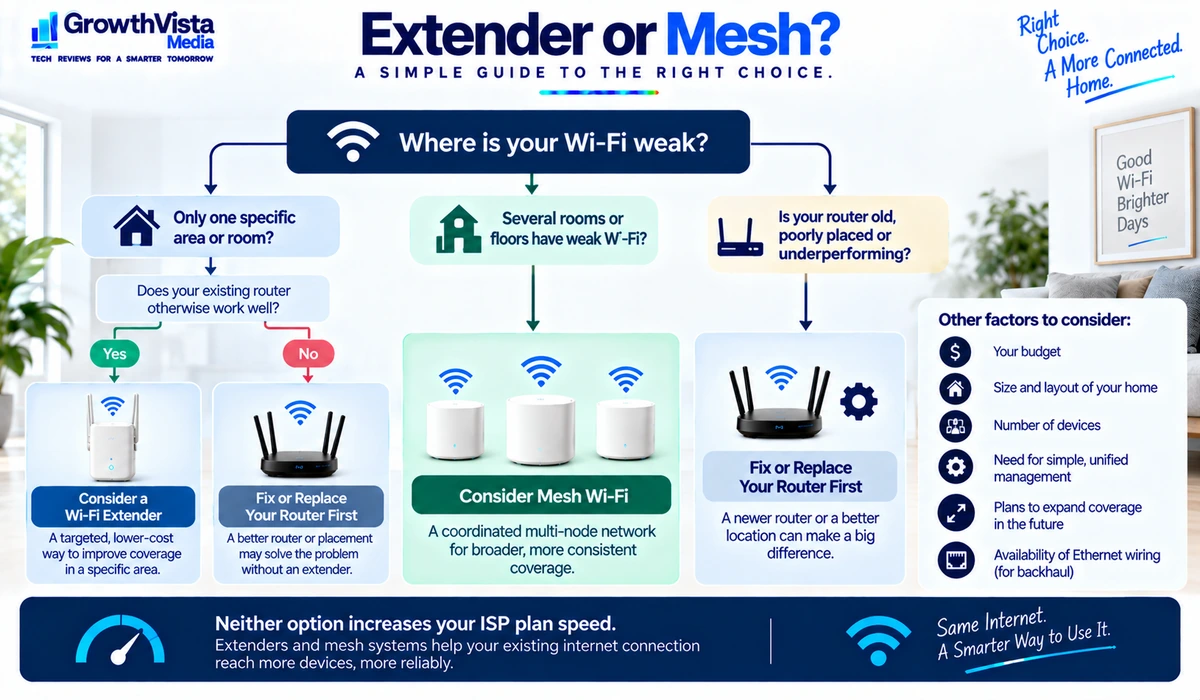
The Wi-Fi extender vs mesh Wi-Fi decision is primarily about the size and shape of the coverage problem. An extender is usually a targeted way to expand an existing router’s reach, while mesh Wi-Fi is designed as a coordinated multi-node network covering a broader area.
Neither option increases the speed supplied by your internet provider. Both are tools for improving how that connection reaches devices around your property.
This guide explains the practical differences between Wi-Fi extenders and mesh systems, including coverage, roaming, performance, setup, cost and the situations where each approach makes sense.
Wi-Fi Extender vs Mesh Wi-Fi: Quick Comparison
| Feature | Wi-Fi Extender | Mesh Wi-Fi |
|---|---|---|
| Primary purpose | Extend an existing router into a weak area | Create coordinated whole-home coverage |
| Hardware | Router + separate extender | Primary node + one or more mesh nodes |
| Management | Often separate or limited | Usually unified app / interface |
| Network experience | Can vary by product and setup | Designed for coordinated roaming |
| Best coverage problem | One or two targeted weak areas | Multiple rooms, floors or broad dead zones |
| Expansion | Add extenders individually | Add compatible mesh nodes |
| Cost | Usually lower initially | Usually higher |
| Setup complexity | Can be simple but separate | Usually guided as one system |
| Backhaul | Usually wireless; varies by model | Wireless and sometimes Ethernet |
| Best fit | Smaller targeted fix | Larger or difficult home layout |

What Is a Wi-Fi Extender?
A Wi-Fi extender is an additional device used with an existing router to provide wireless connectivity farther into an area where the router’s signal is weak.
Depending on the product, an extender may repeat an existing wireless connection, use a dedicated radio arrangement, support Ethernet, or integrate more closely with a compatible router ecosystem.
The main advantage is that you can keep your existing router and address a specific coverage gap without replacing the entire network.
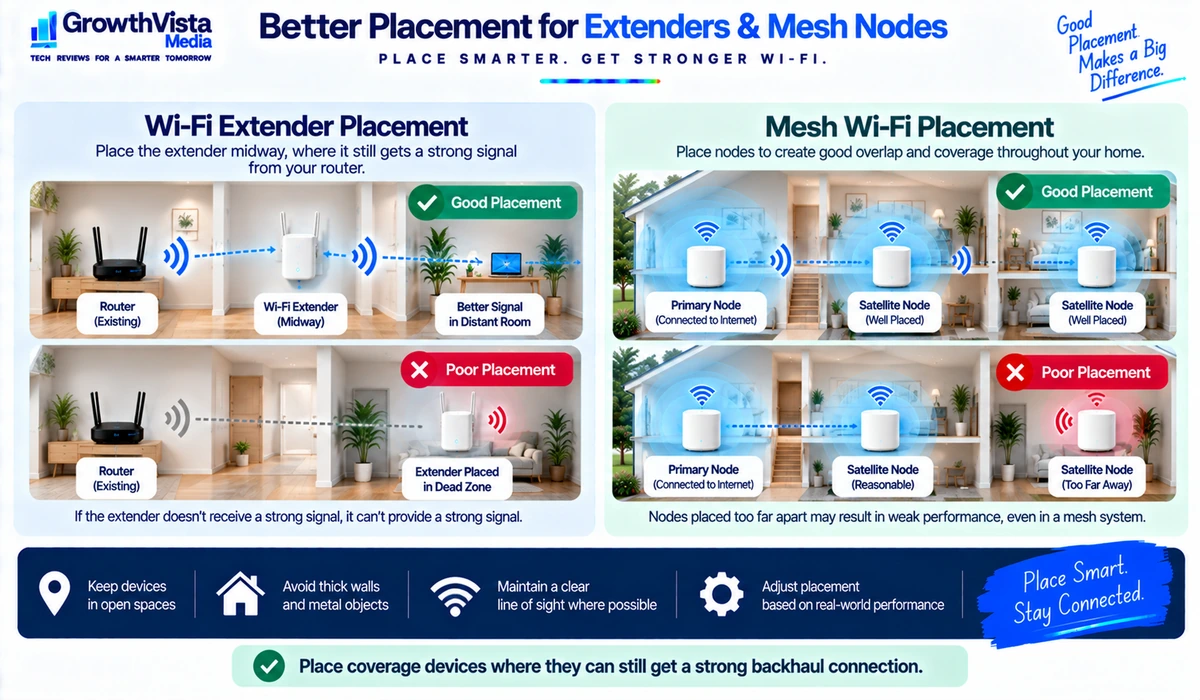
The main limitation is that the extender still needs a good connection back to the router. Placing it inside the dead zone gives it very little useful signal to extend.
When a Wi-Fi Extender Makes Sense
- You already have a good router and only one area has weak coverage.
- You want the lowest-cost way to improve a specific room.
- You live in a smaller home where whole-home mesh would be unnecessary.
- You do not need a sophisticated unified management system.
- You can place the extender where it still receives a strong connection from the router.
What Is Mesh Wi-Fi?
A mesh Wi-Fi system uses a primary node and one or more additional nodes that work together as a coordinated network.
Rather than treating each coverage device as a completely separate addition, the mesh platform manages the nodes as part of one system. Compatible client devices can move around the property while the network helps coordinate connectivity between access points.
Mesh systems are particularly useful in larger homes, multi-floor properties and layouts where one centrally located router cannot provide reliable coverage everywhere.
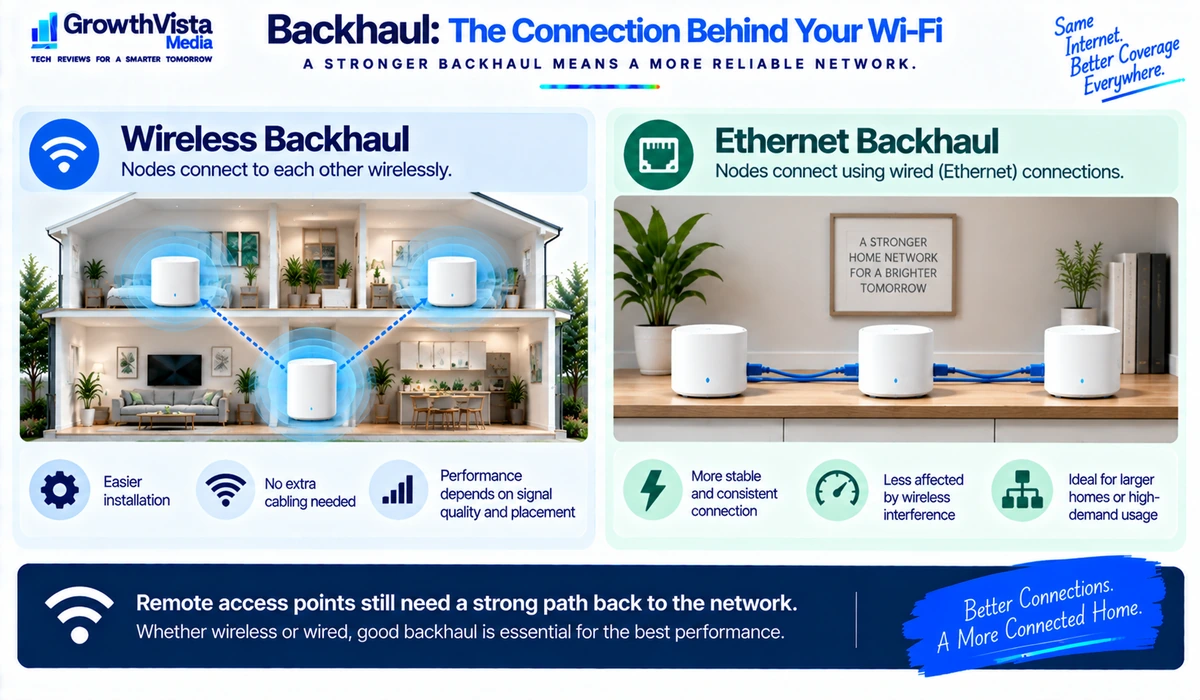
The connection between nodes—known as backhaul—is critical. Backhaul can be wireless, Ethernet or a combination of both depending on the system.
When Mesh Wi-Fi Makes Sense
- Several rooms or floors have weak Wi-Fi.
- You are replacing an older router anyway.
- You want one coordinated network and management interface.
- You expect to expand coverage later.
- Your home layout makes a single central router difficult to use effectively.
- You have Ethernet wiring available for wired backhaul or a mesh system designed for strong wireless backhaul.
Coverage: Targeted Fix vs Whole-Home Design
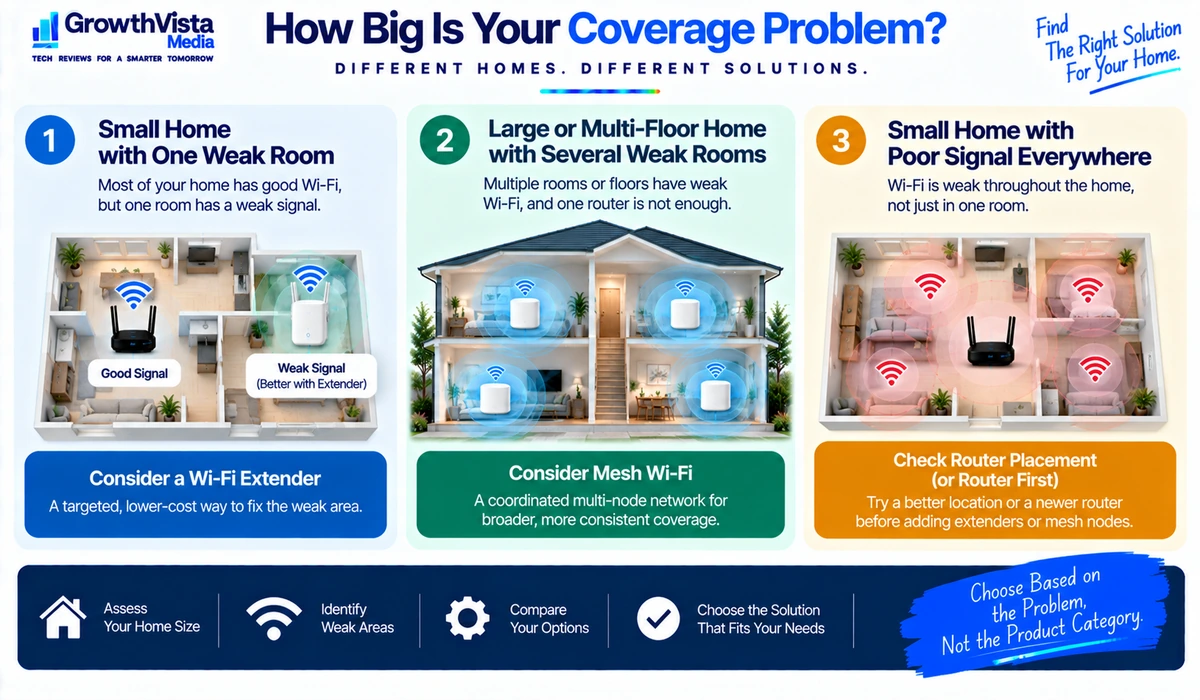
Coverage is the biggest distinction. An extender is usually best thought of as a targeted solution. If the router works well everywhere except one room, adding a strategically positioned extender can be reasonable.
Mesh is designed for broader distribution. Multiple nodes can be placed around a large property so devices have a nearby access point in the areas where people actually use the network.
Do not judge either product only by an advertised square-footage figure. Walls, floors, metal, concrete, neighboring networks and node placement can materially change real-world coverage.
Performance and Backhaul
Every remote access point needs a path back to the rest of the network. That path is the backhaul.
A basic wireless extender may have to use wireless capacity to communicate both with the router and with client devices. Actual behavior varies by design. Mesh systems can also use wireless backhaul, but higher-end systems may use additional radios or wired Ethernet to improve inter-node connectivity.
Ethernet backhaul is particularly useful when a home already has network cabling because it removes much of the uncertainty associated with a long wireless hop between nodes.
Roaming Around the Home
A mesh platform is designed to operate as a coordinated network. This generally makes it better suited to users who move through the home with phones, tablets and laptops.
Traditional extenders can provide a less unified experience depending on the model and configuration. Newer ecosystem-specific extenders may integrate more closely with compatible routers, so the distinction is not absolute.
Client devices also participate in roaming decisions, which means no network system can guarantee that every device will always switch access points at the ideal moment.
Setup and Management
A Wi-Fi extender is often inexpensive and quick to add, but it may have its own setup process, management page or network behavior.
Mesh systems are typically designed around a single setup flow. A mobile app or central interface can show nodes, connected devices, guest networking and system health in one place.
The trade-off is ecosystem dependence. Mesh nodes generally need to be compatible with the same platform, while an extender may be a simpler standalone purchase.
Cost
An extender usually has the lower upfront cost because you keep the router you already own and add one device.
Mesh costs more because you are buying a coordinated system, often with two or three units. Premium Wi-Fi 7 mesh packages can be significantly more expensive than a basic extender.
The lowest purchase price is not always the lowest long-term cost. If you keep adding extenders to solve several dead zones, replacing the network with an appropriately sized mesh system may become the cleaner solution.
Wi-Fi Generation
Both extenders and mesh systems exist across multiple Wi-Fi generations. Do not choose solely because a product says Wi-Fi 6, Wi-Fi 6E or Wi-Fi 7.
A newer standard can add useful capabilities, but the network still depends on client-device support, radio conditions and backhaul. A well-positioned Wi-Fi 6 mesh can outperform a badly positioned newer system in the rooms that matter.
If replacing a standalone router is part of the plan, see our Best Wi-Fi 7 Routers guide. For specific mesh product choices, see Best Mesh Wi-Fi Systems.
Wi-Fi Extender vs Mesh Wi-Fi by Home Type
| Situation | Usually Consider First | Why |
|---|---|---|
| Small apartment with one weak room | Wi-Fi extender | Low-cost targeted coverage |
| Medium home with good central router | Extender or additional compatible access point | May not require full network replacement |
| Large multi-floor home | Mesh Wi-Fi | Distributed coverage across floors |
| Several dead zones | Mesh Wi-Fi | Coordinated multi-node design |
| Existing Ethernet throughout home | Mesh / wired access points | Strong wired backhaul opportunity |
| Older router due for replacement | Mesh Wi-Fi or newer router | Good time to redesign the network |
| Rental / temporary setup | Extender | Lower commitment and easy relocation |
Where Should You Place a Wi-Fi Extender?
- Do not place the extender directly in the area where the router signal has already disappeared.
- Position it between the router and the weak-coverage room where it can still receive a usable connection.
- Keep it away from unnecessary obstruction by large metal objects, appliances and enclosed cabinets where possible.
- Test several locations because moving the extender even within the same hallway or room can change the quality of the backhaul.
- If the extender supports Ethernet and your home has suitable cabling, review whether a wired access-point mode is available.
Where Should You Place Mesh Nodes?
- Place the primary mesh node in an open location near the modem or gateway.
- Put satellite nodes between the primary node and the distant rooms rather than directly inside dead zones.
- Think vertically in a multi-floor home; node placement on adjacent floors can matter as much as horizontal distance.
- Use Ethernet backhaul where available and supported.
- Avoid adding unnecessary nodes. More access points do not automatically improve performance.
Can You Use an Extender With a Mesh System?
Technically, some combinations may work, but adding a generic extender to a mesh network can undermine the simplicity that made mesh attractive in the first place.
If the mesh system needs more coverage, the cleaner approach is generally to add a compatible mesh node from the same ecosystem when supported. Always check the manufacturer’s compatibility guidance before mixing networking products.
When Neither Option Is the Real Fix
Sometimes the problem is not coverage hardware. Before buying anything, check whether the existing router is poorly positioned, outdated, misconfigured or connected to an internet service that is itself slow.
- Move the router into a more central and open location if possible.
- Restart and update networking hardware when appropriate.
- Test internet speed with a wired connection to separate ISP problems from Wi-Fi problems.
- Check whether a crowded wireless channel or local interference is contributing to poor performance.
- Use Ethernet for stationary high-demand devices when practical.
Frequently Asked Questions
Is mesh Wi-Fi better than a Wi-Fi extender?
Mesh is generally better suited to broad multi-room coverage, while an extender can be a practical lower-cost fix for one weak area. The better choice depends on the size of the coverage problem.
Does a Wi-Fi extender reduce speed?
Wireless extension can introduce performance trade-offs depending on the design, signal quality and how backhaul is handled. Avoid assuming that the speed beside the main router will be reproduced in the extended area.
Does mesh Wi-Fi reduce speed?
Remote mesh nodes can also experience lower throughput when they rely on wireless backhaul. Strong node placement, dedicated backhaul designs or Ethernet backhaul can improve performance.
Can I keep my existing router with mesh Wi-Fi?
It depends on the system and network design. Some mesh systems replace the routing function, while others can operate in access-point or bridge configurations. Follow the manufacturer’s setup guidance.
Is mesh worth it for a small apartment?
Often not if one well-positioned router already provides good coverage. An extender may be sufficient for a single difficult corner, or the router may simply need better placement.
How far should an extender be from the router?
There is no universal distance because walls, interference and router power vary. Place the extender where it still receives a strong enough signal to create a useful backhaul connection.
Should I use Ethernet backhaul with mesh?
If your system supports it and cabling is available, Ethernet backhaul can provide a stable connection between nodes and free the mesh from relying entirely on wireless inter-node communication.
Final Thoughts
The Wi-Fi extender vs mesh Wi-Fi choice becomes much easier once you define the coverage problem.
If one otherwise well-served home has a single weak room, an extender can be the simplest and least expensive solution. If weak coverage affects multiple rooms, several floors or a large property, a coordinated mesh system is usually the more appropriate architecture.
Neither product can create internet bandwidth that your ISP does not provide, and both depend heavily on placement and backhaul quality.
Before spending money, test the current network, identify exactly where signal quality drops, and decide whether you are fixing one location or redesigning whole-home coverage.